מדריכים ומדריכים למשתמש של LTC
LTC allows for a diverse range of consumer electronics, specializing in gaming peripherals like mechanical keyboards and mice, alongside home audio and cooling appliances.
About LTC manuals on Manuals.plus
LTC is a versatile consumer electronics brand known for delivering affordable and functional technology solutions. The brand operates prominently in the gaming sector, offering enthusiast-grade peripherals such as the Nimbleback series of mechanical keyboards and precision wireless mice. These products often feature tri-mode connectivity (Bluetooth, 2.4G, Wired), hot-swappable switches, and customizable RGB lighting tailored for gamers.
In addition to gaming gear, LTC manufactures home electronics including floor fans, portable cooling devices, and audio equipment like public address amplifiers and waterproof speakers. Whether facilitating a high-performance gaming setup or improving home comfort, LTC products are designed for ease of use and reliability.
מדריכים לשירותי ביטוח לאומיים
מדריכים אחרונים מ manuals+ נבחר עבור המותג הזה.
LtC AUDIO MFA1200-USB-BT Ampמדריך למשתמש עם פונקציית Bluetooth
LTC AUDIO MEGA20W מגהפון נטען 20W עם פונקציית הקלטה מדריך למשתמש
Ltc אודיו סטריאו HiFi Amplifier 2 X 50w עם FM, Bluetooth & קריוקי מדריך למשתמש
LTC GM-031 Wired Gaming Mouse Quick Guide
מדריך התחלה מהירה לעכבר אלחוטי LTC OM021
LTC Sound Slave SS-502 Gaming Headset User Manual
מדריך למשתמש של עכבר גיימינג אלחוטי LTC Mosh Pit WHM-01
מדריך התחלה מהירה לנורות LED LTC 1909, 2209, 2409
מדריך מהיר ל-LTC Nimbleback NB-981: מולטימדיה ובקרות בסיסיות
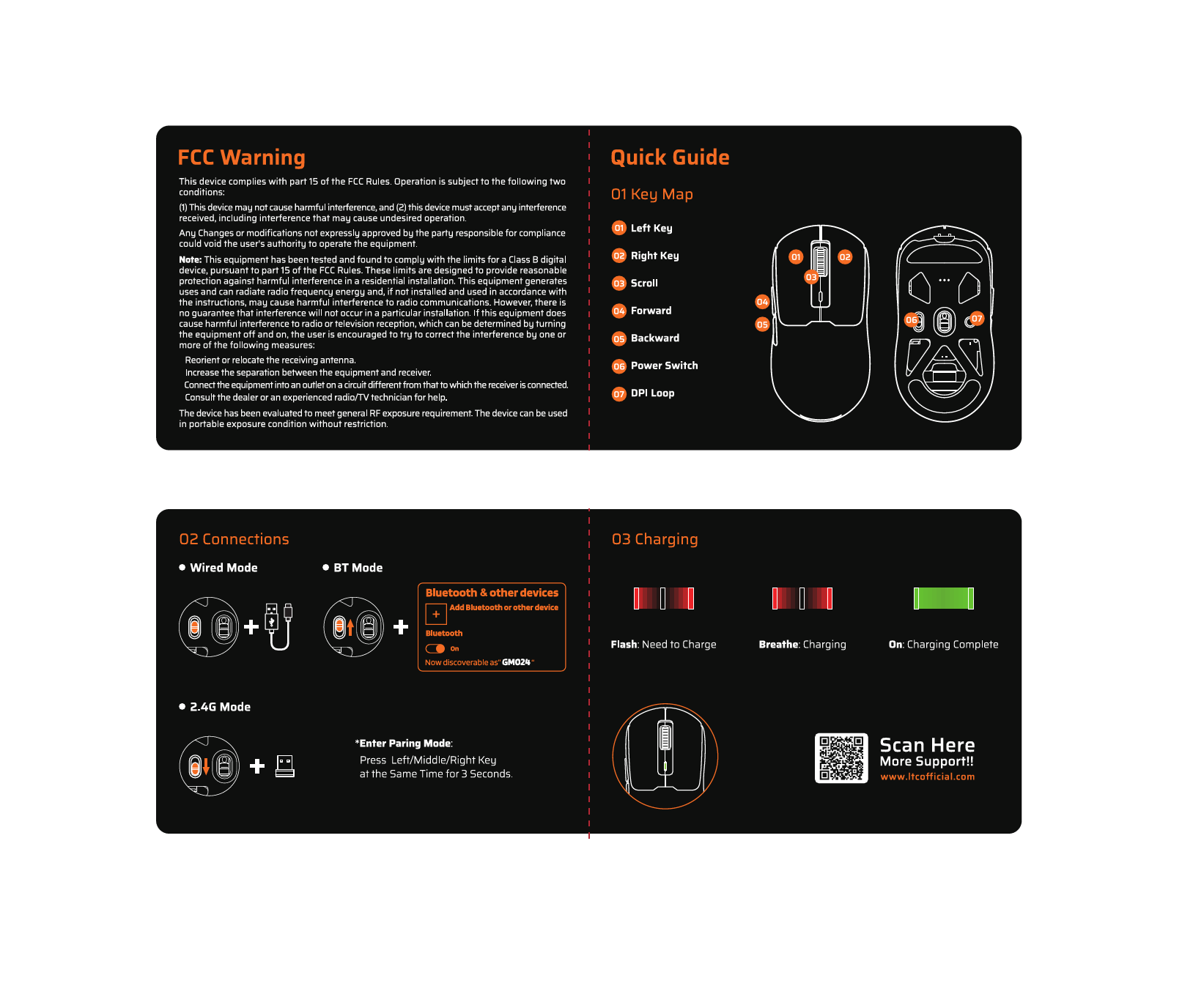
מדריך התחלה מהירה לעכבר אלחוטי LTC GM024 ואזהרת FCC
מדריך למשתמש למקרר נייד נטען LTC Smart Living COOL 30/50
LTC 4G Wireless Router Quick Installation Guide
מקלדת אלחוטית LTC MK-791: תכונות, קישוריות ותאימות FCC
מדריך למשתמש של מקלדת LTC NB-1041 Nimbleback - תכונות, הגדרה ותמיכה
מדריך מהיר ומידע על המוצר של עכבר גיימינג LTC MKM-051
מדריכים לרכב סיעודי מקמעונאים מקוונים
LTC Nimbleback LK-301 Low Profile מדריך למשתמש של מקלדת מכנית
LTC GM023 Tri-Mode Wireless Gaming Mouse Instruction Manual
LTC GM051 Wireless Ergonomic Vertical Mouse Instruction Manual
LTC Nimbleback NB831 Wireless 75% 3-Mode Mechanical Keyboard User Manual
מדריך למשתמש למקלדת מכנית אלחוטית LTC Nimbleback NB841 PRO 75%
Mecanica Dos Solidos V.1 מדריך הוראות מאת טימושנקו וגיר
LTC ATM8000BT Hybrid Amplifier Karaoke Hi-Fi with FM User Manual
מדריך למשתמש למקלדת מכנית חוטית LTC NB981 Nimbleback עם 98 מקשים
מדריך למשתמש עכבר גיימינג אלחוטי אולטרה-קל בעל 3 מצבים LTC GM022
LTC AUDIO BD-SWR5004 Waterproof Portable Speaker User Manual
LTC 3-Channel 60W Public Address Amplifier USB/SD-MP3 User Manual
מדריך למשתמש למקלדת מכנית אלחוטית LTC Nimbleback NB1041 PRO
LTC video guides
צפו בסרטוני התקנה, התקנה ופתרון בעיות עבור מותג זה.
LTC support FAQ
שאלות נפוצות בנוגע למדריכים, רישום ותמיכה עבור מותג זה.
-
How do I pair my LTC wireless mouse?
To enter pairing mode on many LTC mice, press and hold the designated mode button, or hold the Left, Middle, and Right buttons simultaneously for about 3 seconds until the LED flashes rapidly.
-
Where can I download software for my LTC keyboard?
Drivers and configuration software for LTC gaming keyboards and mice can typically be found on the official website at ltcofficial.com.
-
How do I assemble my LTC standing fan?
Attach the base to the vertical riser using the included screws. Place the motor on the arm, secure the rear grille cover with the locking nut, attach the propeller blade, and finally snap the front grille frame onto the rear frame.
-
Does my LTC fan have a timer?
Yes, digital display models like the LXWT114 typically feature a programmable timer (e.g., up to 12 hours) accessible via the control panel or remote.