1. הקדמה
Thank you for choosing the LTC 3-Channel 60W Public Address Amplifier with USB/SD-MP3. This manual provides essential information for the safe and efficient operation of your new amplifier. Please read it thoroughly before use and keep it for future reference. This amplifier is designed for public address applications, offering versatile input options including microphones, auxiliary devices, and integrated USB/SD card playback.
2. הוראות בטיחות
כדי להבטיח פעולה בטוחה ולמנוע נזק, אנא הקפידו על אמצעי הזהירות הבאים:
- מקור כוח: חבר את amplifier only to the specified power sources (12V DC or 220V AC) as indicated on the unit. Ensure the voltage תואם לספק הכוח המקומי שלך.
- אוורור: אין לחסום פתחי אוורור. יש לוודא זרימת אוויר מספקת סביב היחידה כדי למנוע התחממות יתר.
- לַחוּת: אל תחשוף את amplifier to rain, moisture, or excessive humidity. Keep it away from liquids.
- ניקוי: נתק את החשמל לפני הניקוי. השתמש במטלית יבשה ורכה. אין להשתמש בחומרי ניקוי נוזליים או בתרסיסים.
- שֵׁרוּת: אל תנסה לטפל במוצר זה בעצמך. פנה לכל טיפול וטיפול באנשי שירות מוסמכים. פתיחת היחידה עלולה לחשוף אותך לנפחים מסוכנים.tages או סכנות אחרות.
- מיקום: מניחים את amplifier on a stable, flat surface. Avoid placing it near heat sources or in direct sunlight.
- לְהַעֲמִיס יוֹתֵר מִדַי: אל תעמיס יתר על המידה את amplifier. Ensure connected speakers match the amplifier's impedance and power ratings.
3. המוצר נגמרview
The LTC 3-Channel 60W Public Address Amplifier is a versatile audio solution designed for various PA applications. It features multiple input options and an integrated MP3 player for convenience.
3.1 בקרות וחיבורים בלוח הקדמי
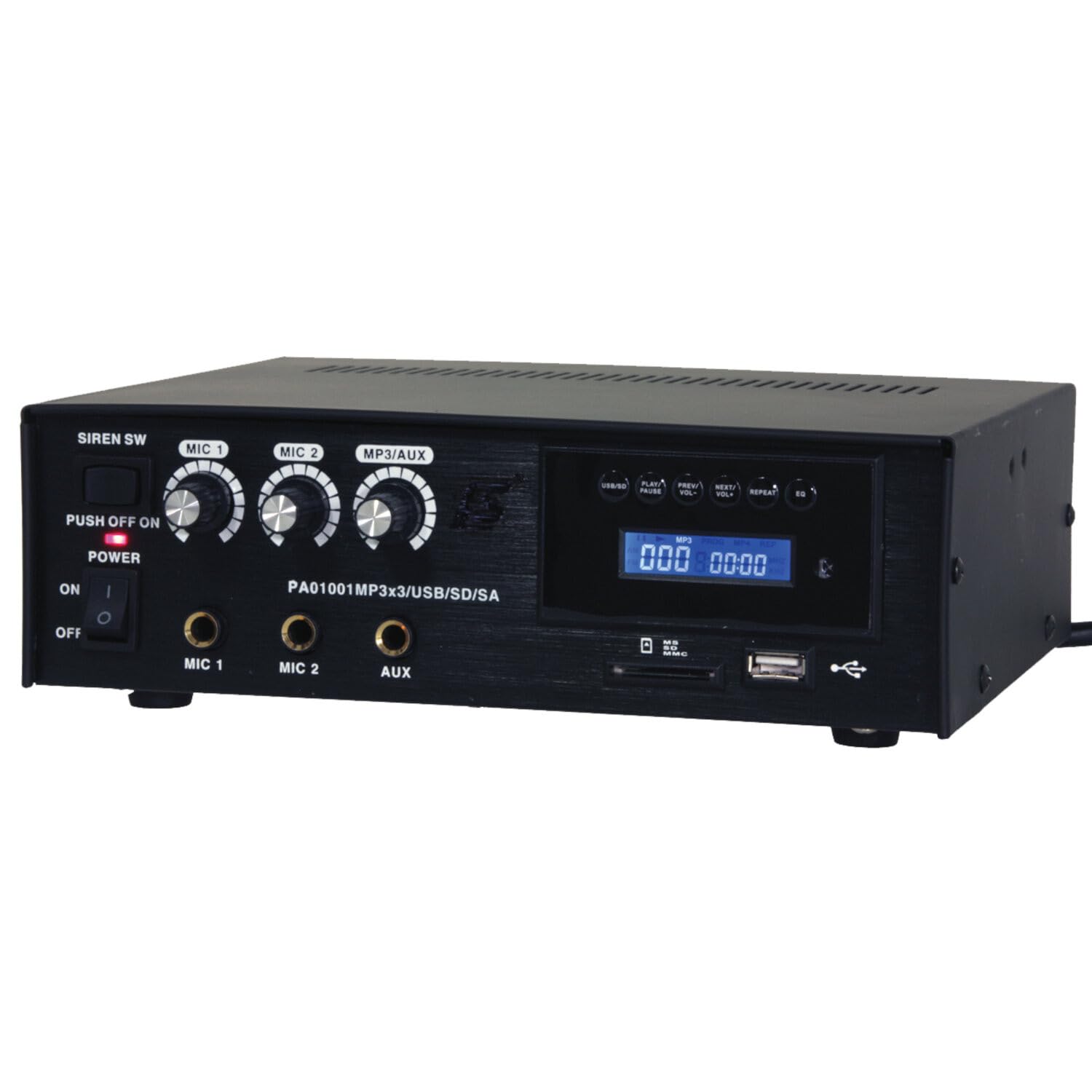
Image: Front panel of the LTC 3-Channel 60W Public Address Amplifier. Visible controls include volume knobs for MIC1, MIC2, and MP3/AUX, a Master volume knob, a Power switch, a Siren switch, and input jacks for MIC1, MIC2, and AUX. The MP3 player section features a display, USB port, and SD card slot.
- SIREN SW: Switch to activate the built-in siren sound.
- PUSH OFF / ON / OF Power Switch: Main power switch for the ampחיים יותר.
- MIC 1 Volume: Rotary knob to adjust the volume level for Microphone Input 1.
- MIC 2 Volume: Rotary knob to adjust the volume level for Microphone Input 2.
- MP3/AUX Volume: Rotary knob to adjust the volume level for the MP3 player and Auxiliary input.
- נפח מאסטר: Rotary knob to control the overall output volume of the ampחיים יותר.
- כניסת MIC 1: 6.3mm jack for connecting Microphone 1.
- כניסת MIC 2: 6.3mm jack for connecting Microphone 2.
- כניסת AUX: 6.3mm jack for connecting external audio sources (e.g., CD player, smartphone).
- USB/SD MP3 Player: Integrated player with USB port and SD card slot for direct playback of audio files. Includes control buttons (Play/Pause, Prev/Vol-, Next/Vol+, Repeat, EQ) and an LCD display.
3.2 תכונות עיקריות
- Mobile or fixed amplifier with 12V battery (car, boat) or 220V mains power supply.
- Integrated MP3 player with USB and SD ports for music playback.
- Includes a siren for powerful sound and an MP3 control screen with a blue LCD display.
4. התקנה
בצע את השלבים הבאים כדי להגדיר את ampחיים יותר:
4.1 חיבור מתח
- For 220V AC Operation: Connect the supplied power cord to the AC input on the rear panel of the amplifier and then to a standard 220V AC wall outlet.
- עבור הפעלה 12V DC: Connect a 12V DC power source (e.g., car battery) to the 12V DC input terminals on the rear panel. Ensure correct polarity (+ to + and - to -).
- להבטיח את ampיש לוודא שמתג ההפעלה של המפיץ במצב 'כבוי' לפני חיבורו לחשמל.
4.2 חיבור רמקולים
- Locate the speaker output terminals on the rear panel of the ampחיים יותר.
- Connect your speakers to these terminals, ensuring correct polarity (positive to positive, negative to negative).
- Verify that the total impedance of the connected speakers is compatible with the amplifier's output specifications to prevent damage.
4.3 חיבור קלט שמע
- מיקרופונים: Insert your microphones into the MIC 1 and/or MIC 2 input jacks on the front panel.
- התקני עזר: Connect external audio sources (e.g., smartphone, laptop, CD player) to the AUX input jack on the front panel using an appropriate 6.3mm audio cable.
- USB/SD Media: Insert a USB flash drive into the USB port or an SD card into the SD card slot on the front panel for MP3 playback.
5. הוראות הפעלה
פעם אחת ה ampלאחר שה-lifier מוגדר, בצע את השלבים הבאים להפעלה:
5.1 הפעלה/כיבוי
- ודא שכל החיבורים מאובטחים.
- Turn the MASTER volume knob to its minimum position.
- Flip the POWER switch to the 'ON' position. The power indicator light will illuminate.
- To power off, turn the MASTER volume to minimum and then flip the POWER switch to 'OFF'.
5.2 שימוש במיקרופון
- Connect your microphone(s) to the MIC 1 and/or MIC 2 inputs.
- Slowly increase the MIC 1 and/or MIC 2 volume knob(s) to the desired level.
- Adjust the MASTER volume for overall output.
- Avoid pointing microphones directly at speakers to prevent feedback (howling).
5.3 שימוש בכניסת AUX
- Connect your external audio device to the AUX input.
- Ensure the volume on your external device is set to a moderate level.
- Slowly increase the MP3/AUX volume knob to the desired level.
- Adjust the MASTER volume for overall output.
5.4 MP3/USB/SD Playback
- Insert a USB flash drive into the USB port or an SD card into the SD card slot. The amplifier will automatically detect the media and begin playback.
- Use the 'PLAY/PAUSE' button to start or pause playback.
- Use the 'PREV/VOL-' button to go to the previous track or press and hold to decrease volume.
- Use the 'NEXT/VOL+' button to go to the next track or press and hold to increase volume.
- Use the 'REPEAT' button to cycle through repeat modes (e.g., repeat one, repeat all).
- Use the 'EQ' button to cycle through equalizer presets.
- Adjust the MP3/AUX volume knob and MASTER volume for desired output.
5.5 Siren Function
- To activate the siren, flip the SIREN SW to the 'ON' position.
- To deactivate, flip the SIREN SW back to the 'OFF' position.
- Use the MASTER volume to control the siren's output level.
6. תחזוקה
תחזוקה נכונה מבטיחה את אורך חייו של ampחיים יותר:
- ניקוי: נגבו את היחידה באופן קבוע עם מטלית רכה ויבשה. אין להשתמש בחומרי ניקוי שוחקים, שעווה או ממסים.
- אוורור: Ensure that the ventilation grilles are free from dust and debris. Use a soft brush or vacuum cleaner to clear them if necessary.
- אִחסוּן: אם מאחסנים את ampאם לא תפעילו את המכשיר למשך תקופה ממושכת, יש לנתק אותו מהחשמל ולאחסן אותו במקום קריר ויבש, הרחק מאור שמש ישיר וטמפרטורות קיצוניות.
- חיבורים: Periodically check all cable connections for tightness and signs of wear.
7. פתרון תקלות
אם אתם נתקלים בבעיות עם שלכם amplifier, refer to the table below for common problems and solutions:
| בְּעָיָה | סיבה אפשרית | פִּתָרוֹן |
|---|---|---|
| אין כוח | Power cable not connected; Power outlet faulty; Power switch off; 12V DC battery depleted or incorrectly connected. | Check power cable connection; Try a different outlet; Ensure power switch is ON; Check 12V DC battery charge and polarity. |
| אין פלט קול | Master volume too low; Input volume too low; Speakers not connected or faulty; Incorrect input selected (for MP3/AUX); Mute activated. | Increase Master and input volumes; Check speaker connections and functionality; Ensure correct input source is active; Check if any mute function is engaged. |
| צליל מעוות | Volume too high (clipping); Speaker impedance mismatch; Faulty cables or connections. | Reduce volume; Verify speaker impedance compatibility; Check and replace faulty cables. |
| MP3/USB/SD not playing | לֹא נָכוֹן file format; USB drive/SD card faulty or not inserted correctly; MP3/AUX volume too low. | לְהַבטִיחַ files are MP3 format; Reinsert USB/SD card; Try a different USB/SD card; Increase MP3/AUX volume. |
| Feedback (howling) from microphones | Microphone too close to speakers; Microphone volume too high. | Reposition microphones away from speakers; Reduce microphone volume. |
אם הבעיה נמשכת לאחר ניסיון פתרונות אלה, אנא צור קשר עם תמיכת הלקוחות.
8. מפרטים
Technical specifications for the LTC 3-Channel 60W Public Address Ampחיים יותר:
| תכונה | מִפרָט |
|---|---|
| מספר דגם | LTCAUDIO95-1000 |
| הספק פלט (12V) | RMS 35W, Max. 45W |
| הספק פלט (220V) | RMS 45W, Max. 60W |
| מספר ערוצים | 3 (MIC1, MIC2, AUX/MP3) |
| כרך ידtage | 220 וולט (AC), 12 וולט (DC) |
| אספקה מקסימלית כרךtage | 240 וולט |
| אספקה מינימלית כרךtage | 220 וולט (AC) |
| מידות המוצר (L x W x H) | 48 x 9 x 35 ס"מ (18.9 x 3.5 x 13.8 אינץ ') |
| משקל המוצר | 3.26 קילוגרם (7.19 פאונד) |
| סוג הרכבה | הר שולחן |
| תכונות משולבות | USB/SD MP3 Player, Siren |
9. אחריות ותמיכה
This product is manufactured by Ibiza and sold under the LTC brand. Spare parts availability is indicated for 2 years from the date of purchase. For technical support, troubleshooting assistance beyond what is provided in this manual, or warranty claims, please contact your retailer or the authorized service center. Keep your proof of purchase for warranty validation.


