מָבוֹא
This manual provides detailed instructions for the AGPTEK A55PL USB C MP3 Player. It covers setup, operation, maintenance, and troubleshooting to ensure optimal use of your device. The A55PL is a versatile music player featuring USB-C connectivity, 64GB storage, FM radio, and voice recording capabilities, powered by a replaceable AAA battery.
תוכן החבילה
ודא שכל הפריטים המפורטים להלן כלולים בחבילה שלך:
- נגן MP3 AGPTEK A55PL
- כרטיס TF 64GB (מותקן מראש)
- כבל טעינה מסוג C ל-USB
- מדריך למשתמש

Image: Contents of the AGPTEK A55PL MP3 Player package, showing the player, USB-C cable, 64GB TF card, and user manual.
המוצר נגמרview ותכונות
The AGPTEK A55PL MP3 Player is designed for portability and ease of use, offering multiple functionalities in a compact form factor.
תכונות עיקריות:
- Direct Type-C & Universal USB Connectivity: Connects directly to Type-C phones for file transfer or to laptops/PCs using the included adapter/cable.
- Swappable AAA Batteries: Operates on a single AAA battery (not included), allowing for instant power replacement without needing charging outlets.
- אחסון עצום של 64 ג'יגה-בייט: Comes with a pre-loaded 64GB TF card, supporting over 13,000 songs and high-fidelity formats like FLAC, APE, and WAV. Functions as a U disk for data transfer.
- Crisp LED Display: Features an energy-efficient LED screen for clear navigation and song title display.
- Voice Recorder & FM Radio: Built-in voice recorder for capturing audio and an FM radio (requires wired headset as antenna) for broadcasts.

תמונה: מעלview of the AGPTEK A55PL MP3 Player's capabilities, including its Type-C port, music playback, recording, FM radio, and 64GB TF card storage.
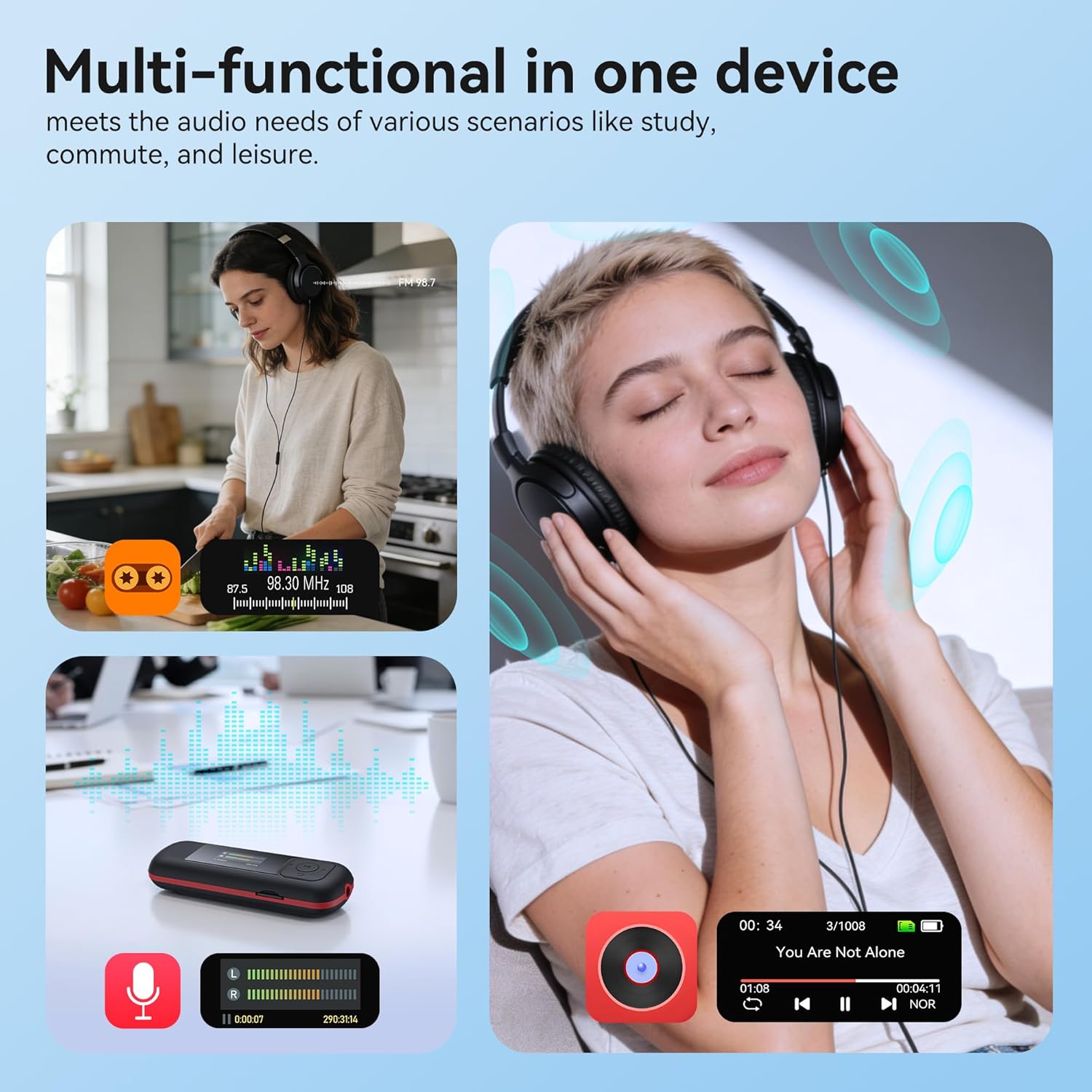
Image: The AGPTEK A55PL MP3 Player showcasing its multi-functional capabilities, including FM radio, voice recording, and music playback, suitable for various scenarios.
הגדרה
1. התקנת סוללה
The AGPTEK A55PL uses one AAA battery (not included). Ensure correct polarity when inserting the battery.
- אתר את מכסה תא הסוללה בגב המכשיר.
- Press the center of the cover and slide it forward to unlock and remove.
- הכנס סוללת AAA אחת, תוך התאמת הקוטבים החיוביים (+) והשליליים (-) למחוונים שבתוך התא.
- החלק את המכסה בחזרה למקומו עד שיינעל היטב.

Image: Step-by-step guide for removing the USB cap and installing the AAA battery into the AGPTEK A55PL MP3 Player.
פֶּתֶק: USB charging is not supported. The device relies solely on AAA battery power. The battery display on the screen is based on voltage changes at the battery terminal.
2. Initial Connection and File לְהַעֲבִיר
You can transfer music and other files to your MP3 player from a computer or a Type-C smartphone.
- עבור מחשבים: Use the included Type-C to USB cable. Connect the Type-C end to the player and the USB-A end to your computer's USB port. The player will appear as a removable disk.
- For Type-C Phones: Plug the player's Type-C connector directly into your phone's Type-C port. The player will be recognized as external storage. (For iPhones, a Lightning-to-Type-C OTG adapter is needed, not included).

Image: Demonstrates connecting the AGPTEK A55PL MP3 Player to a computer via USB cable and directly to a Type-C smartphone for file לְהַעֲבִיר.
הוראות הפעלה
בקרות בסיסיות
The player features a simple interface with dedicated buttons for easy navigation.
- לחצן הפעלה: לחץ והחזק להפעלה/כיבוי.
- לחצן הפעלה/השהה: לחץ כדי להפעיל או להשהות מוזיקה.
- כפתורי ניווט (למעלה/למטה/שמאלה/ימינה): משמש לניווט בתפריטים ולכוונון הגדרות.
- כפתורי עוצמת קול (+/-): Dedicated buttons on the side to adjust playback volume.
- כפתור תפריט (M): גישה לתפריטים תלויי-הקשר.
- כפתור חזור/חזור: חוזר למסך או לתפריט הקודם.
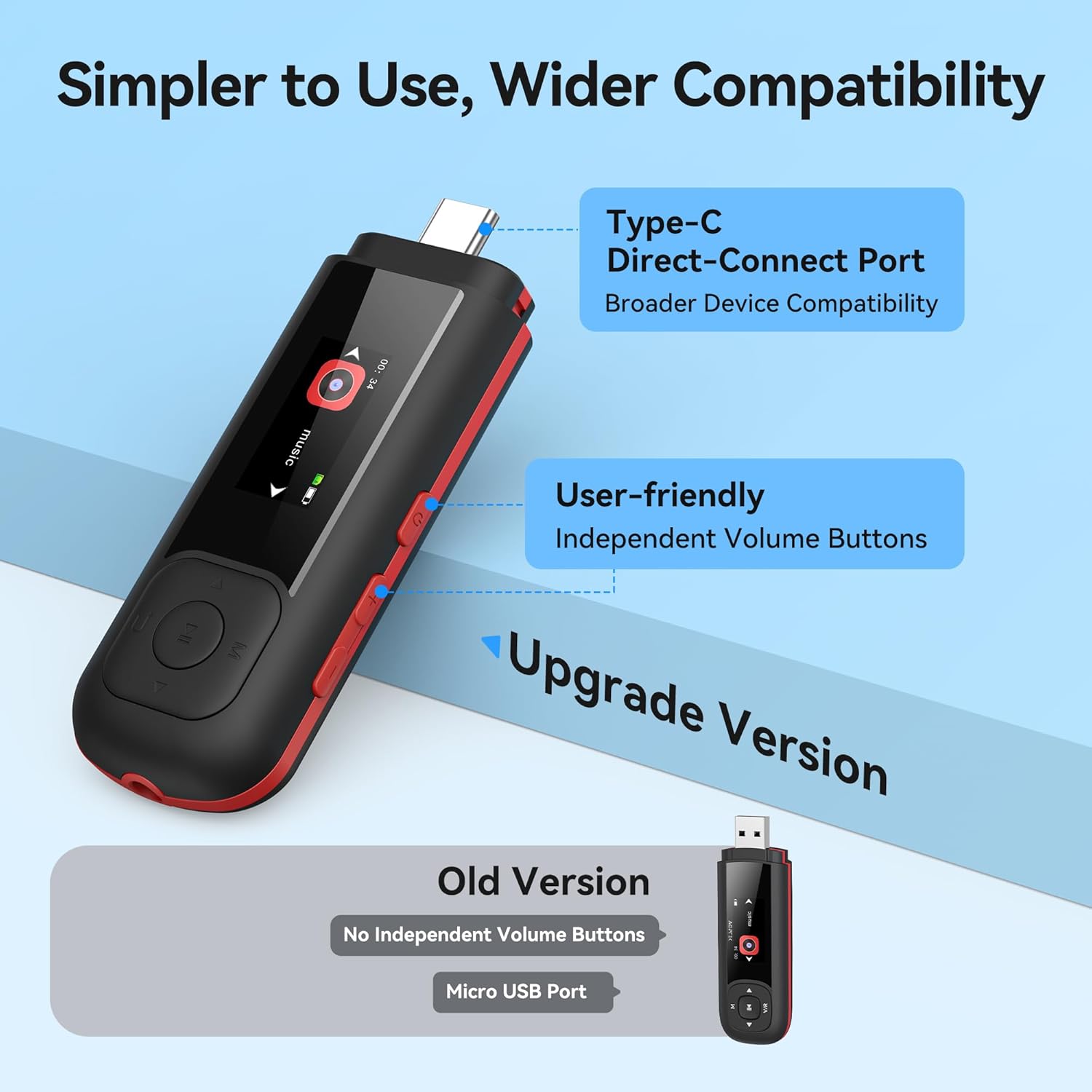
Image: Close-up of the AGPTEK A55PL MP3 Player, showing the Type-C direct-connect port and the independent volume buttons for user-friendly operation.
השמעת מוסיקה
The player supports various audio formats including MP3, WMA, APE, FLAC, and WAV.
- Connect wired headphones to the 3.5mm audio jack.
- נווטו אל האפשרות "מוזיקה" בתפריט הראשי.
- Browse through your music library by artist, album, or folder.
- בחר שיר כדי להתחיל את ההפעלה.
- Use the Play/Pause button to control playback and the volume buttons to adjust sound levels.

Image: A person enjoying music through headphones, highlighting the AGPTEK A55PL MP3 Player's support for multi-format lossless audio quality.

Image: Illustrates the different playback modes available on the AGPTEK A55PL MP3 Player, including Folder Mode and Music Mode with options like repeat, shuffle, and play in order.
רדיו FM
כדי להשתמש בפונקציית רדיו FM, יש לחבר אוזניות חוטיות שכן הן משמשות כאנטנה.
- חבר את האוזניות החוטיות שלך.
- Navigate to the "FM Radio" option from the main menu.
- השתמשו בלחצני הניווט כדי לסרוק תחנות או לכוון תדר באופן ידני.

Image: A user enjoying FM radio on the AGPTEK A55PL MP3 Player, emphasizing that wired headphones are required to function as an antenna.
מקליט קול
The built-in voice recorder allows you to capture audio on the go.
- Navigate to the "Recorder" option from the main menu.
- בחר "התחל הקלטה" כדי להתחיל.
- Press the Play/Pause button to stop and save the recording.
- Recordings can be accessed and played back from the "Recordings" list.

Image: The AGPTEK A55PL MP3 Player showing its portable recorder function, ready for effortless on-the-go audio capture.
Custom Playlists
You can create and manage custom playlists by connecting the player to a computer.
- Connect the MP3 player to your computer using the Type-C to USB cable.
- Access the player's storage as a removable disk.
- ארגן את המוזיקה שלך files into folders or create M3U playlist fileישירות על המכשיר.
- The player supports up to 3 built-in customizable playlists.

Image: Demonstrates how to create and edit custom playlists by connecting the AGPTEK A55PL MP3 Player to a computer via USB.
תַחזוּקָה
- ניקוי: השתמשו במטלית רכה ויבשה לניקוי המכשיר. הימנעו מנוזלי ניקוי או ממסים.
- אִחסוּן: יש לאחסן את הנגן במקום קריר ויבש, הרחק מאור שמש ישיר וטמפרטורות קיצוניות.
- טיפול בסוללה: Remove the AAA battery if the device will not be used for an extended period to prevent leakage.
- גיבוי נתונים: חשוב לגבות באופן קבוע fileמהנגן למחשב כדי למנוע אובדן נתונים.
פתרון בעיות
המכשיר לא נדלק
- Ensure the AAA battery is inserted correctly with the correct polarity.
- החלף את סוללת AAA בסוללת חדשה.
- לחץ והחזק את לחצן ההפעלה למשך מספר שניות.
לא ניתן להעביר Files
- Verify the Type-C to USB cable is securely connected to both the player and the computer/phone.
- נסה יציאת USB אחרת במחשב שלך.
- Ensure your computer's operating system recognizes external storage devices.
- For phones, ensure the phone supports OTG (On-The-Go) functionality for external storage.
אין צליל במהלך השמעה
- Check if wired headphones are properly plugged into the 3.5mm audio jack.
- ודא שהעוצמה אינה מוגדרת למינימום או מושתקת.
- בדוק עם זוג אוזניות אחר כדי לשלול בעיות באוזניות.
- אימות האודיו files are not corrupted and are in a supported format (MP3, WMA, APE, FLAC, WAV).
רדיו FM לא עובד
- Confirm that wired headphones are connected, as they serve as the antenna.
- Try scanning for stations again in an open area.
מפרטים
| תכונה | פְּרָט |
|---|---|
| שם הדגם | A55PL |
| מותג | AGPTEK |
| קיבולת אחסון זיכרון | 64 GB (via TF Card) |
| טכנולוגיית קישוריות | USB Type-C, Aux (3.5mm) |
| תכונות מיוחדות | FM Radio, Voice Recorder, Replaceable AAA Battery |
| צֶבַע | שָׁחוֹר |
| גודל מסך | 0.96 Inches (LED) |
| מכשירים תואמים | Headphones, Computers, Type-C Smartphones |
| סוג מדיה | מיקרו SD |
| משקל פריט | 3.87 אונקיות |
| מידות חבילה | 6.57 x 5.12 x 0.94 אינץ' |
אחריות ותמיכה
For warranty information and technical support, please refer to the official AGPTEK webאתר או צרו קשר עם שירות הלקוחות שלהם. שמרו את קבלת הרכישה כהוכחת קנייה עבור כל תביעת אחריות.
תמיכה מקוונת: בקר ב AGPTEK Store on Amazon לקבלת מידע על המוצר ומשאבי תמיכה.


