1. הקדמה
The Havit MS966SE is a high-performance tri-mode gaming mouse designed for versatility, precision, and comfort. It features a PixArt PMW3325 optical sensor, offering exceptional tracking accuracy and adjustable DPI settings up to 10,000. With its tri-mode connectivity, you can seamlessly switch between 2.4GHz wireless, Bluetooth 5.3, and USB-C wired modes to suit your gaming or work environment. The lightweight and ergonomic design ensures comfortable use during extended sessions, complemented by dynamic RGB lighting for a personalized aesthetic.

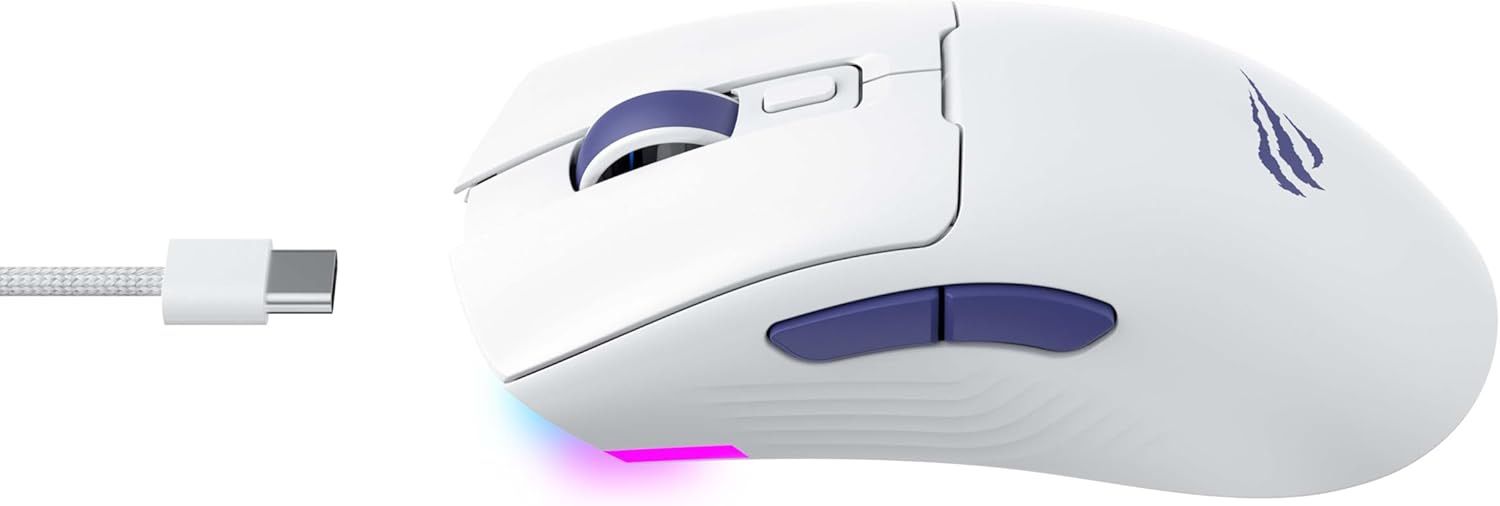
Figure 1: Havit MS966SE Gaming Mouse with USB-C cable.
2. התקנה
2.1 פירוק
Carefully remove the mouse and all accessories from the packaging. Ensure all components are present:
- Havit MS966SE Gaming Mouse
- כבל USB-C ל-USB-A
- מקלט USB 2.4 GHz
- מדריך למשתמש (מסמך זה)
2.2 חיבור העכבר
The MS966SE offers three connectivity options:
2.2.1 מצב אלחוטי 2.4GHz
- Insert the 2.4GHz USB receiver into an available USB-A port on your computer.
- Locate the mode switch on the bottom of the mouse and slide it to the 2.4G מַצָב.
- העכבר יתחבר אוטומטית למחשב שלך.
2.2.2 מצב בלוטות' 5.3
- Locate the mode switch on the bottom of the mouse and slide it to the BT מַצָב.
- במחשב או במכשיר הנייד שלך, פתח את הגדרות ה-Bluetooth וחפש מכשירים חדשים.
- Select "Havit MS966SE" from the list of available devices to pair.
2.2.3 מצב חוטי USB-C
- Connect one end of the provided USB-C cable to the mouse and the other end to an available USB-A port on your computer.
- העכבר יעבור אוטומטית למצב קווי ויתחיל להיטען.
איור 2: צד view of the mouse, highlighting the USB-C port.
2.3 טעינת העכבר
To charge the mouse, connect it to your computer using the USB-C cable. The mouse can be used in wired mode while charging. An indicator light on the mouse will show the charging status (refer to the manufacturer's website or product packaging for specific light behaviors).
3. הוראות הפעלה
3.1 פונקציות כפתורים
The Havit MS966SE features several programmable buttons for enhanced control:
- כפתור לחיצה שמאלי: פונקציית לחיצה ראשית סטנדרטית.
- כפתור לחיצה ימנית: פונקציית לחיצה משנית סטנדרטית.
- גלגל גלילה: גלילה למעלה/למטה, ופועל ככפתור לחיצה אמצעי.
- כפתור מחזור DPI: Located behind the scroll wheel, this button cycles through preset DPI sensitivity levels.
- כפתורי צד (קדימה/אחורה): משמש בדרך כלל לניווט ב web דפדפנים או שניתן לתכנת אותם לפעולות בתוך המשחק.

Figure 3: Side buttons and ergonomic design.
התאמת 3.2 DPI
The PixArt PMW3325 sensor allows for adjustable DPI settings up to 10,000. Press the DPI cycle button (located behind the scroll wheel) to switch between different sensitivity levels. Each press will cycle to the next preset DPI, allowing you to quickly adapt to various tasks or game scenarios.
3.3 Connectivity Mode Switching
To switch between 2.4GHz wireless, Bluetooth, and wired modes, use the physical switch located on the bottom of the mouse. Ensure the correct mode is selected based on your connection preference.
תאורת RGB 3.4
The mouse features dynamic RGB lighting. Specific controls for RGB lighting effects, colors, and brightness may be available through dedicated software provided by Havit. Please visit the official Havit website for software downloads and further customization options.
4. תחזוקה
4.1 ניקוי
- נתק את העכבר מהמחשב לפני ניקויו.
- השתמש במטלית רכה, יבשה ונטולת סיבים כדי לנגב את פני השטח של העכבר.
- עבור לכלוך עיקש, מעט דחוףampשטפו את המטלית במים או בתמיסת ניקוי עדינה. הימנעו מכימיקלים חזקים.
- השתמשו במקלון צמר גפן או באוויר דחוס כדי לנקות את סביב הכפתורים וגלגלת הגלילה.
- Do not immerse the mouse in water or any liquid.
4.2 אחסון
When not in use for extended periods, store the mouse in a cool, dry place away from direct sunlight and extreme temperatures. If storing for a long time, ensure the mouse is fully charged to maintain battery health.
5. פתרון תקלות
5.1 עכבר לא מגיב
- בדוק כוח: ודא שהעכבר דולק ושיש לו סוללה טעונה מספיק.
- בדוק קישוריות:
- מצב קווי: ודא שכבל ה-USB-C מחובר היטב גם לעכבר וגם למחשב. נסה יציאת USB אחרת.
- אלחוטי 2.4GHz: Ensure the USB receiver is properly inserted and the mouse is set to 2.4G mode. Try a different USB port for the receiver.
- מצב Bluetooth: Ensure Bluetooth is enabled on your device and the mouse is paired. Try unpairing and re-pairing the mouse.
- הפעל מחדש: הפעל מחדש את המחשב ואת העכבר.
5.2 DPI לא משתנה
- ודא שאתה לוחץ על כפתור מחזור ה-DPI הנכון.
- If using custom software, check the DPI settings within the software.
5.3 השהיה או ניתוקים במצב אלחוטי
- הַפרָעָה: Move the mouse closer to the receiver/device. Avoid obstacles between the mouse and receiver.
- רמת סוללה: סוללה חלשה עלולה להשפיע על ביצועי האלחוט. טען את העכבר.
- יציאת USB: Try connecting the 2.4GHz receiver to a different USB port, preferably a USB 2.0 port if available, as some USB 3.0 ports can cause interference.
6. מפרטים
| מותג | Havit |
| דֶגֶם | MS966SE |
| טכנולוגיית קישוריות | Tri-Mode: 2.4GHz Wireless, Bluetooth 5.3, USB-C Wired |
| טכנולוגיית חיישנים | אופטי (PixArt PMW3325) |
| רמות DPI | Up to 10,000 adjustable DPI |
| תכונות מיוחדות | Ergonomic Design, Dynamic RGB Lighting |
| מערכות הפעלה תואמות | חלונות, macOS, לינוקס |
| מכשירים תואמים | Notebook, Personal Computer, Tablet, Smartphone |
| משקל עכבר | בערך 68 גרם |
| סוג סוללה | ליתיום-יון |
7. אחריות ותמיכה
7.1 מידע אחריות
This Havit MS966SE Gaming Mouse comes with a אחריות יצרן לשנהאנא שמור את הוכחת הרכישה שלך לצורך תביעות אחריות. האחריות מכסה פגמים בחומרים ובביצוע בשימוש רגיל.
7.2 תמיכת לקוחות
For technical assistance, troubleshooting beyond this manual, or warranty inquiries, please contact Havit customer service directly. You can find the most up-to-date contact information and support resources on the official Havit webאתר (www.havit.com).


