1. הקדמה
The Maycall MC-26 Global Walkie Talkies provide reliable and extensive communication capabilities. Utilizing advanced 2G/3G/4G LTE and dual-mode technology, these two-way radios offer an ultra-long transmission range, ensuring connectivity in diverse environments. Designed for clarity and privacy, they feature secure encrypted calls, crystal-clear audio with noise reduction, and support for both individual and group communication. The devices are powered by a long-lasting 3000mAh battery and come with a lifetime service SIM card, eliminating recurring fees.
2. תכולת החבילה
ודא שכל הפריטים המפורטים להלן כלולים בחבילה שלך:
- 2 x Maycall MC-26 Walkie Talkies
- 2 x 3000mAh סוללות
- 2 x Back Clips
- 2 x Adapters (Wall Chargers)
- 2 כבלי טעינה מסוג USB מסוג C
- 2 x שרוכים
- 1 x מדריך הוראות
- 2 x Lifetime Service SIM Cards (pre-installed)
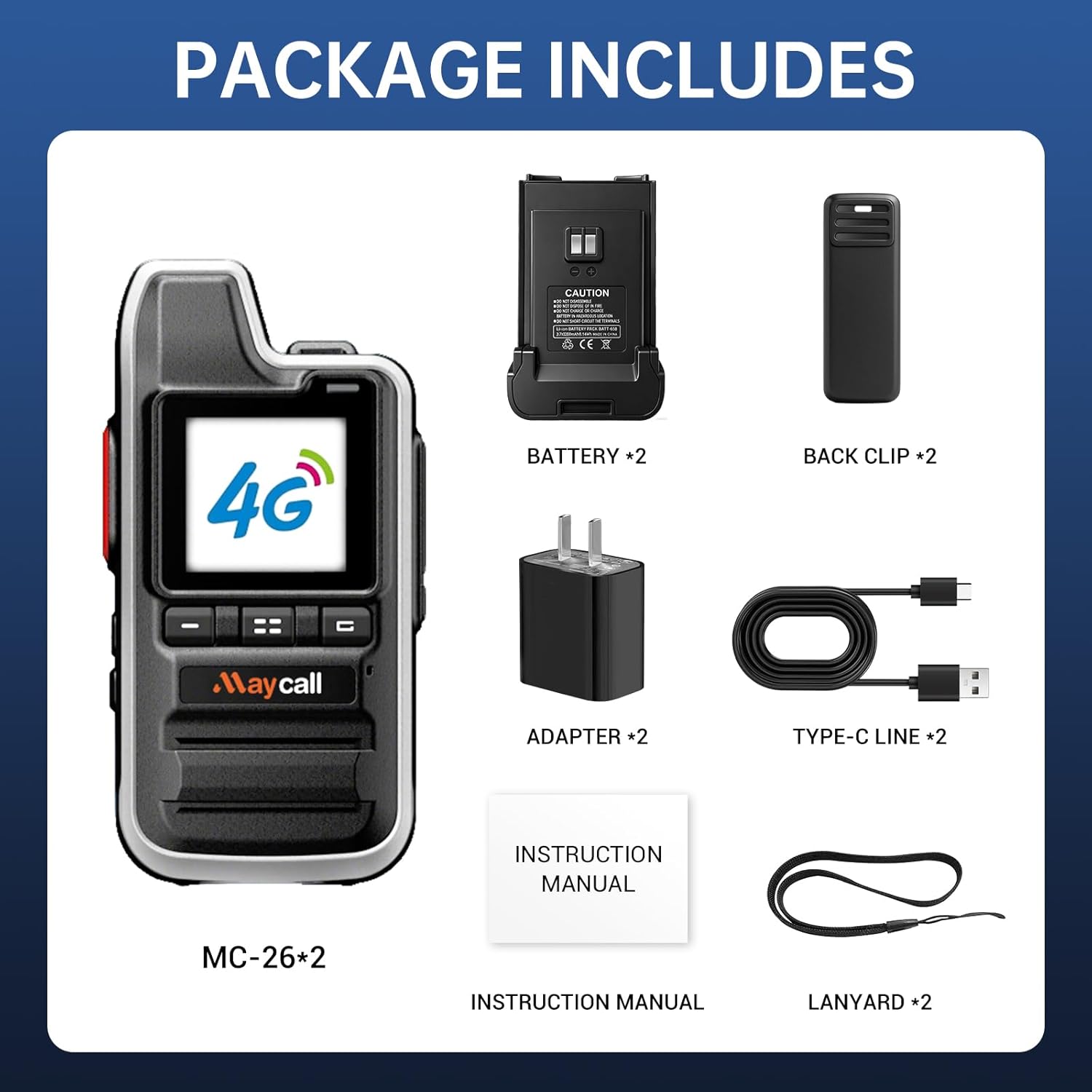
Figure 2.1: Contents of the Maycall MC-26 Walkie Talkie package.
3. תכונות מוצר
- Lifetime Service SIM Card: No subscription fees or hidden costs. Enjoy seamless communication without worrying about SIM card expiration or additional charges.
- Ultra-Long Range Communication: Up to 5000 km transmission range powered by 2G/3G/4G LTE and dual-mode technology. Reliable communication in remote or urban areas.
- Secure Encrypted Calls & Crystal-Clear Audio: Advanced encryption for privacy. Noise-canceling microphones and high-fidelity speakers for clear audio in noisy environments.
- Multiple Call Modes: Supports individual calls for one-on-one communication and group calls for team coordination.
- סוללה ארוכת טווח של 3000mAh: Provides up to 3 days of continuous use or 8 days on standby. Features smart power-saving mode and USB-C charging.
- פנס משולב: A convenient built-in flashlight for use in low-light conditions.
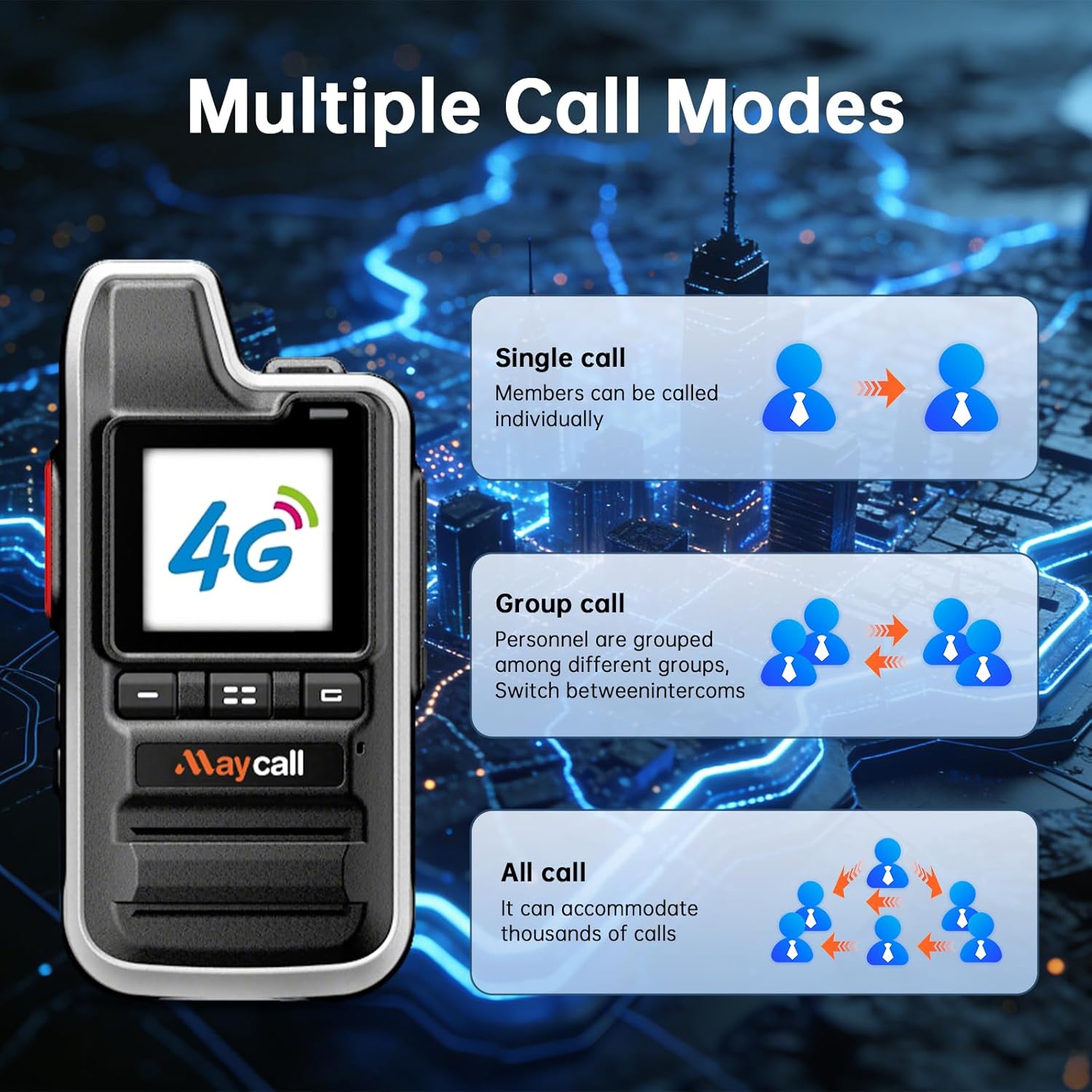
Figure 3.1: Multiple call modes available on the walkie talkie.

Figure 3.2: Illustration of the extensive communication range.
4. התקנה
4.1 התקנת סוללה וכרטיס SIM
The Maycall MC-26 walkie talkies come with pre-installed SIM cards. To access the SIM card slots or install the battery:
- Press down on the designated button/latch on the back of the walkie talkie to slide off the battery cover.
- הסר בזהירות את הסוללה.
- The SIM card slots are located beneath the battery. Ensure the SIM cards are properly seated.
- Insert the battery back into its compartment, ensuring proper alignment.
- החלק את מכסה הסוללה בחזרה למקומו עד שיינעל היטב.

איור 4.1: אחורי view of the walkie talkie with battery removed, showing SIM card slots.
4.2 טעינת המכשיר
The walkie talkies are equipped with a 3000mAh battery and support USB-C charging.
- Connect the provided Type-C USB charging cable to the charging port located at the bottom of the walkie talkie.
- Connect the other end of the USB cable to the provided wall adapter or a compatible USB power source (e.g., computer, power bank).
- Allow the device to charge fully before first use. The battery offers up to 3 days of continuous use or 8 days on standby.

Figure 4.2: Charging options for the walkie talkie.
4.3 הפעלה/כיבוי
To power on the device, press and hold the power button (typically an orange button on the side) for approximately 3 seconds. The screen will light up, displaying the 'POC Global' logo. To power off, press and hold the power button again until the device prompts you to shut down or restart.
5. הוראות הפעלה
5.1 Basic Communication (Push-to-Talk)
The Maycall MC-26 uses a Push-to-Talk (PTT) system for communication.
- To transmit, press and hold the large PTT button on the left side of the walkie talkie.
- דבר ברור לתוך המיקרופון.
- שחררו את כפתור ה-PTT כדי להפסיק את השידור ולהאזין לתגובה.
5.2 Call Modes (Individual & Group)
The walkie talkie supports various call modes for flexible communication:
- שיחה אישית: Allows direct, private communication with a specific user.
- שיחה קבוצתית: Enables communication with multiple users simultaneously within a pre-defined group.
- כל שיחות: Accommodates communication with a large number of users, suitable for broad announcements.
To manage call modes, navigate through the menu using the up/down arrow buttons and the menu/confirm button (orange square button). You can select specific users or groups from the contact list.
5.3 פונקציית הפנס
The walkie talkie includes a built-in flashlight for convenience. To activate the flashlight, press the dedicated flashlight button (usually one of the orange buttons on the side). Press it again to turn it off.
5.4 הגדרות מכשיר
The device offers various settings to customize your experience. Access the settings menu using the navigation buttons. Available settings include:
- הגדרות תצוגה: Adjust screen brightness, backlight, and wallpaper.
- הגדרת עוצמת קול: Control the speaker volume.
- Wakeup Screen: Configure how the screen wakes up.
- Call in Wakeup: Set screen behavior during incoming calls.
- Group Pop-up Window: Manage notifications for group calls.
- חסכון באנרגיה: אופטימיזציה של ניצול הסוללה.
- Signal Value: View עוצמת האות הנוכחית.
- Double Card Setting: Manage dual SIM card functionality.
- מידע על סוללות: בדוק את מצב הסוללה.
- מידע מערכת: View פרטי המכשיר.
5.5 Pairing Guide
For detailed instructions on pairing your Maycall MC-26 walkie talkies, please refer to the official pairing guide videos provided by Maycall. These videos demonstrate how to quickly form a team and bind groups using QR codes.
Video 5.1: Official Maycall Global Walkie-Talkie Pairing Guide.
Video 5.2: Maycall Global Walkie Talkies Pairing Guide.
6. תחזוקה
6.1 טיפול בסוללה
כדי למקסם את חיי הסוללה ולהבטיח פעולה בטוחה:
- הימנע מטעינת יתר של הסוללה.
- השתמשו רק באביזרי הטעינה המצורפים.
- Store the walkie talkie and battery in a cool, dry place when not in use.
6.2 עמידות במים
The Maycall MC-26 walkie talkies are designed with a waterproof rating. While they can withstand exposure to water, avoid prolonged submersion or exposure to high-pressure water jets to prevent damage.
7. פתרון תקלות
If you encounter issues with your Maycall MC-26 walkie talkies, consider the following:
- המכשיר לא נדלק: Ensure the battery is fully charged and correctly installed. Press and hold the power button for a longer duration.
- "No SIM card inserted" message: Remove the battery and verify that the SIM card is properly seated in its slot. Ensure the SIM panel is securely closed.
- Difficulty connecting to network: Ensure you are in an area with 2G/3G/4G LTE cellular signal coverage. The device automatically switches to the strongest available signal.
- איכות שמע ירודה: Check the volume settings. Ensure the microphone is not obstructed and that you are speaking clearly. The intelligent noise reduction function should minimize background noise.
- Setup complications: Refer to the detailed instructions in the included manual or watch the official pairing guide videos for visual assistance.
8. מפרטים
| תכונה | פְּרָט |
|---|---|
| משקל פריט | 1.15 פאונד |
| מידות המוצר | 4.45 x 1.4 x 2.36 אינץ' |
| מספר דגם של פריט | MC-26 |
| סוללות | נדרשת 2 סוללות LR44 (כלולות) |
| מותג | מייקל |
| צֶבַע | MC-26 |
| מספר ערוצים | 10000 |
| תכונה מיוחדת | Lightweight, Long Range |
| טווח דיבור מקסימלי | 3000 מייל |
| רמת עמידות במים | אֲטִימוּת |
| חיי סוללה | 30 שעות (שימוש רציף) |
9. אחריות ותמיכה
The Maycall MC-26 Global Walkie Talkies come with a 1 שנות אחריות יצרן. For any issues, technical support, or warranty claims, please contact Maycall directly through Amazon Buyer Messages. Our support team is dedicated to resolving your concerns promptly.


