1. המוצר נגמרview
The OnePlus 15 is an advanced Android smartphone designed for high performance and extended usage. It features a powerful Snapdragon 8 Elite Gen 5 processor, a large 7,300mAh battery, and a vibrant 6.78-inch 165 Hz AMOLED display. The device is equipped with a triple 50 MP camera system for detailed photography and offers robust durability with IP66/IP68/IP69 and IP19K ratings for dust and water resistance.
תכונות עיקריות:
- Massive 7,300 mAh Battery: Provides extended power for all-day use and beyond.
- Tri-Chip System: Integrates the Snapdragon 8 Elite Gen 5, a dedicated Wi-Fi chip, and a CPU scheduler for optimized performance, connectivity, and efficiency.
- Triple 50 MP Camera System: Captures high-quality images with wide, ultra-wide, and telephoto capabilities.
- עיצוב עמיד: Built to resist dust and water, with IP66/IP68/IP69 and IP19K ratings for enhanced protection.
- 6.78-inch 165 Hz AMOLED Display: Delivers vivid colors, smooth motion, and exceptional clarity.
2. מה בקופסה
ודא שכל הפריטים נמצאים באריזת המוצר שלך:
- OnePlus 15 Smartphone x1
- מטען x1
- כבל נתונים USB x1
- SIM Ejector Tool x1
- מדריך מהיר x1
- Safety Guide x1

Image: Contents of the OnePlus 15 retail box, showing the smartphone, charger, USB data cable, SIM ejector tool, quick guide, and safety guide.
3. התקנה
3.1 התקנת כרטיס SIM
- Locate the SIM card tray on the side of your OnePlus 15.
- Insert the provided SIM ejector tool into the small hole on the SIM tray. Press firmly until the tray pops out.
- Place your Nano-SIM card(s) into the tray with the gold contacts facing down. Ensure they are correctly oriented according to the tray's outline.
- Carefully push the SIM tray back into the phone until it is flush with the device.
3.2 הפעלה ראשונית ותצורה
- Press and hold the Power button (located on the right side of the device) until the OnePlus logo appears.
- פעל לפי ההנחיות שעל המסך כדי לבחור את השפה שלך, להתחבר לרשת Wi-Fi ולהגדיר את חשבון Google שלך.
- You may be prompted to transfer data from an old device. Follow the instructions or skip this step to set up as a new device.
- הגדר הגדרות אבטחה כגון פתיחת נעילת טביעת אצבע, פתיחת נעילת פנים או קוד סודי/תבנית.

תמונה: חזית view of the OnePlus 15 smartphone, showcasinהתצוגה והמצלמה הקדמית שלה.
4. הפעלת המכשיר שלך
4.1 מסך וניווט
The OnePlus 15 features a 6.78-inch 165 Hz AMOLED display. Navigate the interface using touch gestures:
- בֶּרֶז: בחר פריט או הפעל פונקציה.
- לִגנוֹב: גלילה בין מסכים או רשימות.
- קַמצוּץ: הגדלה או הקטנה של תמונות ו web דפים.
- לחיצה ארוכה: גישה לתפריטי הקשר או הזזת סמלים.
4.2 כפתורים ויציאות
Familiarize yourself with the physical controls and connections:
- לחצן הפעלה: Located on the right side. Press to wake/sleep the screen, long press to power off or restart.
- לחצני עוצמת הקול: Located on the left side. Adjust media volume, ringtone volume, and alarm volume.
- יציאת USB Type-C: Located at the bottom. Used for charging, data transfer, and connecting Type-C headphones.
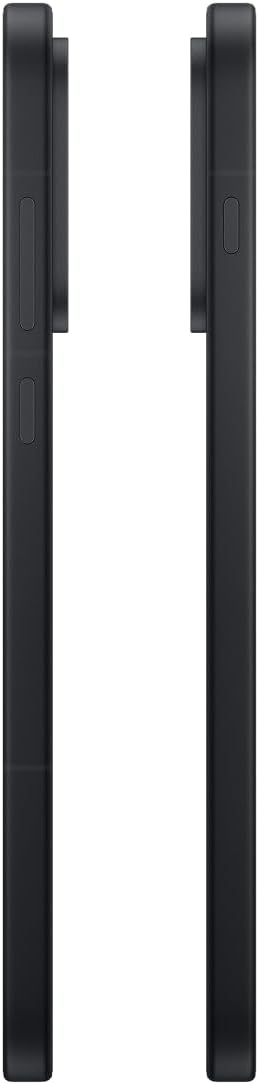
תמונה: צד view of the OnePlus 15, showing the placement of the power and volume buttons.
4.3 שימוש במצלמה
The OnePlus 15 features a versatile triple 50 MP camera system. To open the camera app, tap the camera icon on your home screen or lock screen.
- החלפת מצבים: החלק שמאלה או ימינה על המסך כדי לעבור בין תמונה, וידאו, פורטרט ומצבים אחרים.
- זום: Pinch in or out on the viewfinder, or tap the zoom icons (e.g., 0.6x, 1x, 2x) to adjust magnification.
- לִלְכּוֹד: הקש על כפתור הצילום כדי לצלם תמונה או להתחיל/להפסיק הקלטת וידאו.
- הגדרות: Access camera settings for features like flash, timer, aspect ratio, and more.

תמונה: גב view of the OnePlus 15, highlighting the triple 50 MP camera system.
4.4 ניהול סוללה
Your OnePlus 15 is equipped with a 7,300 mAh battery. To optimize battery life:
- כוונן את בהירות המסך והגדר זמן קצוב קצר יותר של המסך.
- השבת את ה-Wi-Fi, בלוטות' ו-GPS כאשר אינם בשימוש.
- Close background apps that are consuming power.
- Utilize Battery Saver mode when your battery is low.
- Use the provided charger and USB cable for optimal fast charging.
5. תחזוקה
5.1 ניקוי המכשיר שלך
To clean your OnePlus 15:
- השתמש במטלית רכה ונטולת סיבים כדי לנגב את המסך ואת הפאנל האחורי.
- עבור כתמים עקשניים, מעט דמוי עורampשטפו את המטלית במים או בחומר ניקוי למסכים.
- הימנעו משימוש בכימיקלים חזקים, חומרים שוחקים או אוויר דחוס.
5.2 עדכוני תוכנה
עדכוני תוכנה שוטפים מספקים תכונות חדשות, שיפורי אבטחה ותיקוני באגים. כדי לבדוק אם קיימים עדכונים:
- עבור אל הגדרות > על המכשיר > גרסת OxygenOS.
- בֶּרֶז בדוק אם יש עדכונים.
- If an update is available, follow the on-screen instructions to download and install it. Ensure your device has sufficient battery and is connected to Wi-Fi before updating.
6. פתרון תקלות
If you encounter issues with your OnePlus 15, try the following common troubleshooting steps:
- המכשיר לא מגיב: לחץ והחזק את לחצן ההפעלה למשך כ-10 שניות כדי לאלץ הפעלה מחדש.
- אפליקציות קורסות: נקה את המטמון והנתונים עבור האפליקציה הבעייתית ב הגדרות > אפליקציות > [שם האפליקציה] > אחסון ומטמון.
- הסוללה מתרוקנת במהירות: Review צריכת סוללה ב הגדרות > סוֹלְלָה to identify power-hungry apps. Adjust settings as described in Section 4.4.
- בעיות קישוריות לרשת: Toggle Airplane Mode on and off, restart your device, or reset network settings in הגדרות > הגדרות מערכת > גיבוי ואיפוס > אפס את הטלפון > אפס Wi-Fi, נייד ובלוטות'.
- Screen protector installation: For assistance with screen protector installation, refer to the following video guide:
Video: Installation guide for a screen protector on the OnePlus 15 5G. This video demonstrates the steps to correctly apply a screen protector to your device.
7. מפרטים
| שם הדגם | OnePlus 15 |
| מספר דגם של פריט | CPH2749 |
| מידות המוצר | 6.36 x 3.02 x 0.33 אינץ' |
| משקל פריט | 1.29 פאונד |
| מַעֲרֶכֶת הַפעָלָה | אנדרואיד 16 |
| דגם מעבד | סנאפדרגון 8 אליט דור 5 |
| מהירות מעבד | 4.61 גיגה-הרץ |
| גודל זיכרון RAM מותקן | 12 ג'יגה-בייט |
| קיבולת אחסון זיכרון | 256 ג'יגה-בייט |
| גודל מסך | 6.78 אינץ' |
| הַחְלָטָה | 2772*1272 |
| קצב רענון | 165 הרץ |
| קיבולת סוללה | 7300 מיליamp שעות |
| זמן שיחה בטלפון | 68.7 שעות |
| טכנולוגיות קישוריות | בלוטות', אינפרא אדום, NFC, USB, Wi-Fi |
| תכונות מיוחדות | Dual SIM, Wireless Charging |
| יַצרָן | OnePlus |
8. מידע בטיחות חשוב
Please read all safety information before using your device to ensure safe and proper use. Improper use may cause damage to the device or personal injury.
- אין לחשוף את המכשיר לטמפרטורות קיצוניות או לאור שמש ישיר למשך תקופות ממושכות.
- השתמשו רק במטענים, סוללות ואביזרים שאושרו.
- הימנעו מהפלת המכשיר או מחשיפתו לפגיעות חזקות.
- Keep the device away from water and liquids, despite its water resistance ratings, to prevent potential damage.
- אל תנסה לפרק או לשנות את המכשיר.
9. אחריות ותמיכה
Your OnePlus 15 is covered by a manufacturer's warranty. For detailed warranty information, technical support, or service inquiries, please visit the official OnePlus webאתר או צור קשר עם שירות הלקוחות.
ניתן למצוא תמיכה נוספת ומידע על המוצר באתר OnePlus Store.


