1. המוצר נגמרview
The Maycall MC-368 is a global 4G LTE Push-to-Talk (POC) walkie talkie designed for extended range communication. It features dual SIM card support, a 3000mAh battery, and an integrated flashlight. This device operates on 2G/3G/4G LTE networks, providing communication capabilities over vast distances.

תמונה: חזית view of the Maycall MC-368 Walkie Talkie, showcasing its display and controls.
תכונות עיקריות:
- תקשורת בטווח בלתי מוגבל: Utilizes 2G/3G/4G LTE technology for communication exceeding 3,000 miles.
- Versatile Calling Modes: Supports one-on-one calls and group chats with a responsive Push-to-Talk (PTT) button.
- אודיו באיכות גבוהה: Advanced noise-canceling technology ensures clear conversations.
- סוללה עמידה לאורך זמן: Equipped with a 3000mAh battery, offering up to 3 days of continuous use or 7 days standby.
- Built-in High-Brightness Flashlight: A 300-lumen LED flashlight for emergency or low-light situations.
- תמיכה בסים כפול: Seamlessly switches between major U.S. carriers (Verizon, AT&T, T-Mobile) based on signal strength.
2. מדריך התקנה
2.1 פתיחת הקופסה ובדיקה ראשונית
Carefully unpack your Maycall MC-368 walkie talkie and verify all components are present. The standard package includes:
- Maycall MC-368 Walkie Talkie Unit
- סוללה (3000mAh)
- קליפ אחורי
- מדריך הוראות
- כבל USB מסוג C
- ראש טעינה
- SIM Card(s)

Image: Visual representation of the Maycall MC-368 packing list, showing the radio, battery, back clip, manual, cables, charger, and SIM cards.
Video: An unboxing short film for the Maycall MC-368 Global Walkie Talkies, demonstrating the contents of the package.
2.2 התקנה והפעלה של כרטיס SIM
The MC-368 requires SIM card activation for network communication. Follow these steps:
- הכנת כרטיס SIM: Ensure your SIM card is the smallest possible unit (nano-SIM size) if it's a multi-size card.
- חריץ SIM פתוח: Locate the SIM card compartment on the back of the walkie talkie. Gently slide up the metal plate to unlock it.
- הכנס כרטיס SIM: Insert the SIM card(s) with the notch in the lower right-hand corner, ensuring the metal contacts face downwards. The device supports dual SIM cards.
- Secure SIM Card: Slide the metal plate back down to firmly secure the SIM card(s).
- הפעלה: Turn on the walkie talkie by rotating the power knob.
- סרוק קוד QR: Locate the QR code on the product packaging or the device itself. Use a smartphone to scan this QR code.
- הזן מידע: Follow the on-screen prompts on your smartphone to enter the recipient's phone number (used when receiving the goods) and a desired username or group owner name.
- Scan Device QR Code: Scan the QR code displayed on your walkie talkie's screen or located on the device itself to link it to your account.
- אשר הפעלה: If setting up multiple devices, use the 'add' button. Otherwise, press 'confirm' to complete the activation process. Activation typically takes approximately one minute after submission.
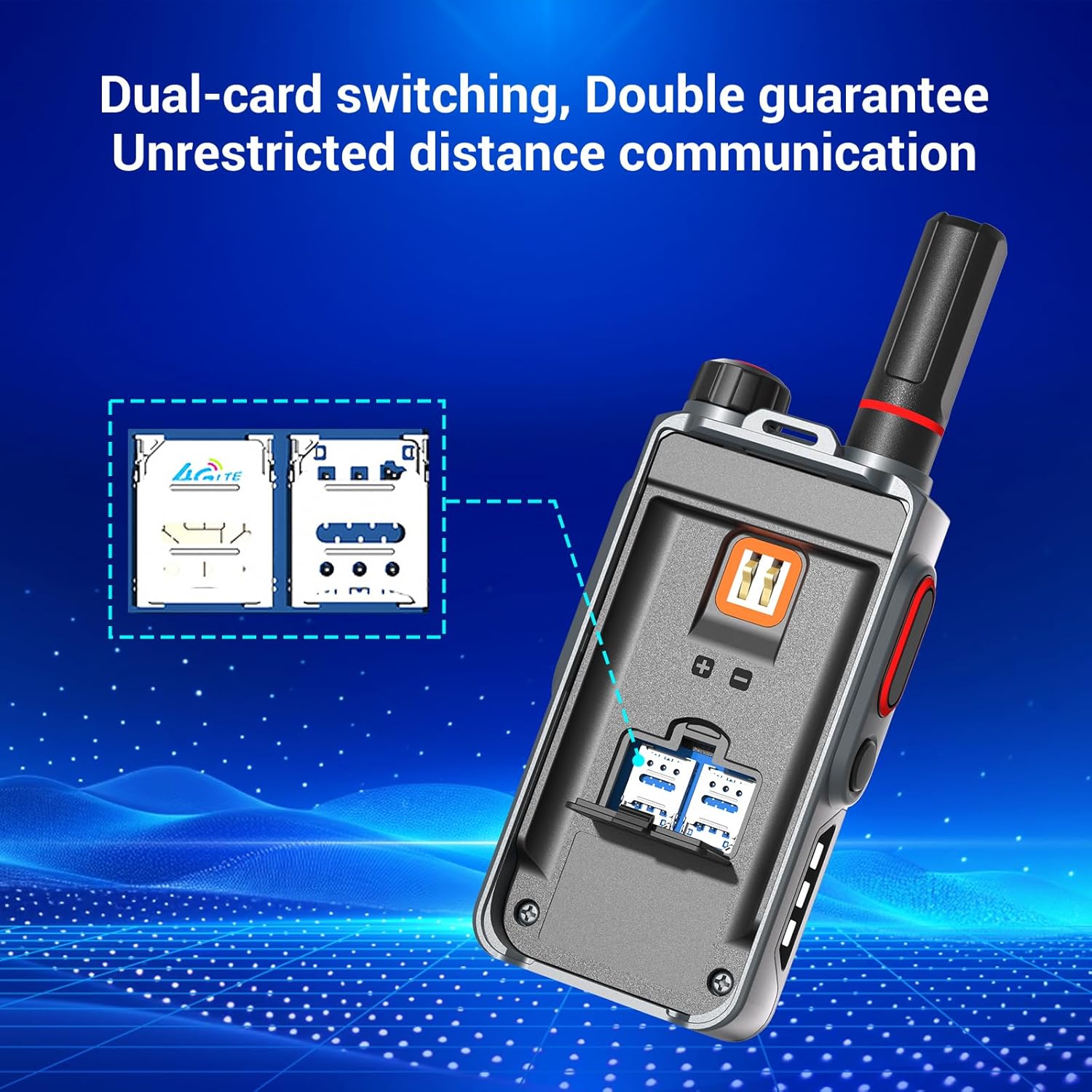
תמונה: תקריב view of the Maycall MC-368's dual SIM card slots, illustrating how to insert the SIM cards.
Video: A guide demonstrating the pairing process for the Global Walkie-Talkie, including SIM card setup and activation.
3. הוראות הפעלה
3.1 הפעלה/כיבוי
To power on the device, rotate the power knob located at the top of the walkie talkie clockwise until the screen illuminates. To power off, rotate the knob counter-clockwise until the device shuts down.
3.2 תקשורת בסיסית (PTT)
The MC-368 uses a Push-to-Talk (PTT) button for instant communication. Locate the large button on the side of the device:
- לשדר: Press and hold the PTT button. Speak clearly into the microphone. Release the button when you finish speaking.
- לקבל: Ensure the PTT button is not pressed. The device will automatically receive incoming transmissions.
3.3 Calling Modes
The device supports both individual and group call modes. Specific mode selection and switching are typically managed through the device's on-screen menu or pre-configured settings during activation.
3.4 הפעלת הפנס
The MC-368 includes a built-in high-brightness LED flashlight:
- הפעלת פנס: Press the dedicated red button on the side of the device to cycle through flashlight modes (e.g., steady on, flashing).
- Deactivate Flashlight: Continue pressing the flashlight button until the light turns off.

Image: The Maycall MC-368 walkie talkie demonstrating its integrated high-brightness LED flashlight function.
Video: An introduction video showcasing the features and general operation of the Maycall Walkie Talkies.
Video: A sound test video for the MC-368, demonstrating its audio clarity during communication.
4. ניהול סוללה
4.1 טעינת הסוללה
The MC-368 is powered by a 3000mAh high-capacity battery and is compatible with standard USB-C chargers.
- חבר את כבל ה-USB מסוג C המצורף לשקע הטעינה במכשיר.
- Connect the other end of the cable to the charging head and plug it into a power outlet.
- The charging indicator on the device will show the charging status.
4.2 חיי סוללה
A fully charged 3000mAh battery provides:
- Up to 3 days of continuous use.
- Up to 7 days on standby.
The device features a smart power-saving mode to optimize energy usage and extend runtime.

Image: Illustration of the Maycall MC-368's 3000mAh battery, highlighting its 24-hour working time and 8-day standby time.
5. תחזוקה
5.1 ניקוי
כדי לשמור על ביצועים ומראה אופטימליים:
- נגב את המכשיר עם רך, דamp בַּד.
- אין להשתמש בכימיקלים קשים, חומרי ניקוי או חומרי ניקוי חזקים.
- Ensure the charging port and other openings are free from dust and debris.
5.2 אחסון
כאשר אינו בשימוש למשך תקופות ממושכות:
- אחסן את המכשיר במקום קריר ויבש הרחק מאור שמש ישיר.
- Ensure the battery is partially charged (around 50%) before long-term storage to preserve battery health.
6. פתרון תקלות
If you encounter issues with your Maycall MC-368, refer to the following common problems and solutions:
| בְּעָיָה | סיבה אפשרית | פִּתָרוֹן |
|---|---|---|
| המכשיר לא נדלק | סוללה חלשה; התקנה שגויה של הסוללה | טען את הסוללה; התקן את הסוללה מחדש בצורה נכונה. |
| Cannot communicate / No signal | SIM card not activated; Poor network coverage; Incorrect group settings | Ensure SIM card is properly installed and activated (refer to Section 2.2); Move to an area with better 4G LTE coverage; Verify group settings are correct. |
| איכות שמע ירודה / רעש | Environmental noise; Microphone/speaker obstruction | Utilize the noise-canceling feature; Ensure microphone and speaker are clear of obstructions. |
| הסוללה מתרוקנת במהירות | High usage; Background applications | Activate smart power-saving mode; Close unnecessary applications if applicable. |
| פנס לא עובד | סוללה חלשה; תקלה | Charge the battery; If issue persists, contact customer support. |
7. מפרטים
| תכונה | פְּרָט |
|---|---|
| מספר דגם | MC-368 |
| משקל פריט | 1.46 פאונד |
| מידות המוצר | 4.45 x 1.4 x 2.36 אינץ' |
| קיבולת סוללה | 3000mAh (2 LR44 batteries included) |
| מספר ערוצים | 10000 |
| טווח דיבור מקסימלי | 3000 מייל |
| רמת עמידות במים | אֲטִימוּת |
| תכונות מיוחדות | Integrated Flashlight, Long-distance, Power Saving Mode, Rechargeable |
| רמת רעש | 30 דציבלים |
8. אחריות ותמיכה
8.1 מידע אחריות
The Maycall MC-368 comes with a 1-Year Manufacturer Warranty. Please retain your proof of purchase for warranty claims.
8.2 תמיכת לקוחות
For technical assistance, troubleshooting beyond this manual, or warranty inquiries, please contact Maycall customer support through the retailer where the product was purchased or refer to the contact information provided on the product packaging.


