1. הקדמה
This manual provides essential information for setting up, operating, maintaining, and troubleshooting your HP EliteDesk 800 G9 Mini Desktop. Please read these instructions carefully before using your device to ensure optimal performance and longevity.
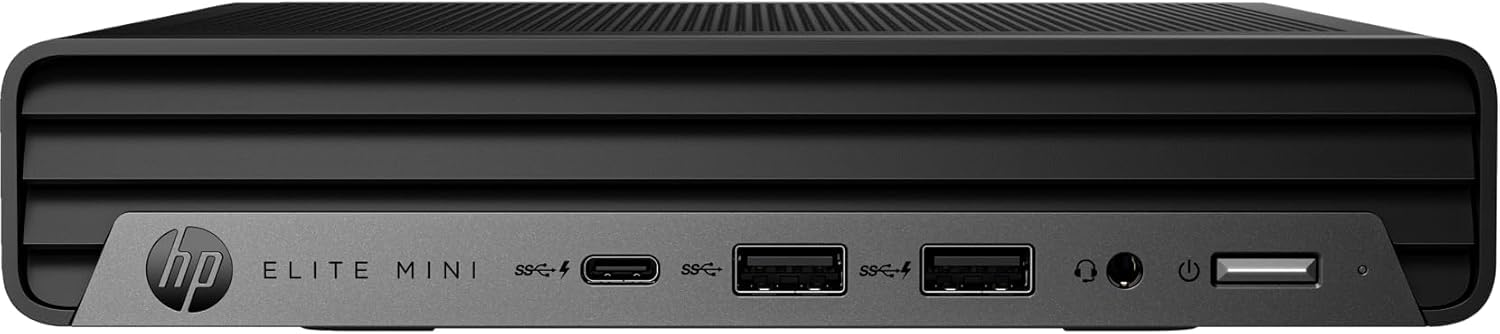
Figure 1: HP EliteDesk 800 G9 Mini Desktop
The HP EliteDesk 800 G9 Mini Desktop is a compact and powerful computing solution designed for efficiency. It features an Intel 12th Generation Core i5-12500T (6-Core) processor, 16GB of RAM, and a 256GB PCIe SSD, running on Windows 11 Pro. Integrated Intel WiFi 6 AX211 and Bluetooth provide robust wireless connectivity.
2. מה בקופסה
Upon unboxing your HP EliteDesk 800 G9 Mini Desktop, verify that all the following components are included:
- HP EliteDesk 800 G9 Mini Desktop PC
- HP OEM 90W Power Adapter
- מקלדת קווית
- עכבר קווית
- תיעוד (מדריך התחלה מהירה, מידע בטיחות)
3. המוצר נגמרview
3.1 לוח קדמי

Figure 2: Front Panel Ports and Features
- 1 מחבר אוזניות
- 1 SuperSpeed USB Type-A קצב איתות של 10Gbps
- 1 SuperSpeed USB Type-A קצב איתות של 10Gbps (טעינה)
- 1 יציאת USB מסוג C SuperSpeed עם קצב איתות של 20Gbps
3.2 פאנל אחורי
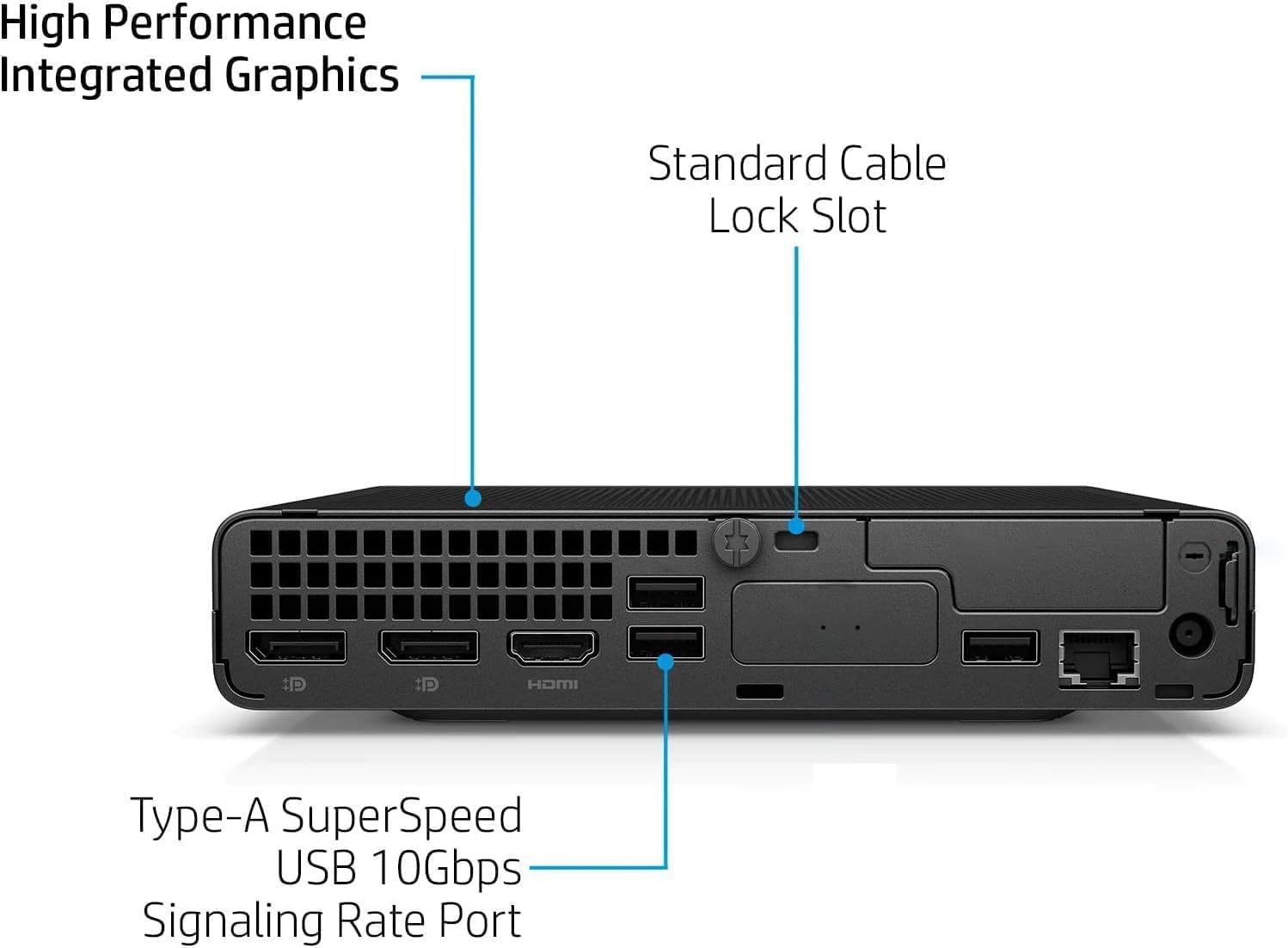
Figure 3: Rear Panel Ports and Features
- 1 External antenna connector
- 1 מחבר מתח
- 1 RJ-45 (אתרנט)
- 3 SuperSpeed USB Type-A קצב איתות של 10Gbps
- 2 DisplayPort 1.4
- 1HDMI 2.1
4. הוראות התקנה
בצע את השלבים הבאים כדי להגדיר את מחשב השולחן HP EliteDesk 800 G9 Mini:
- חבר ציוד היקפי: Connect your monitor(s) to the DisplayPort 1.4 or HDMI 2.1 ports. Connect the wired keyboard and mouse to the available USB Type-A ports.
- חיבור חשמל: Connect the HP OEM 90W Power Adapter to the power connector on the rear panel, then plug the power adapter into a wall outlet.
- חיבור רשת (אופציונלי): For a wired internet connection, connect an Ethernet cable to the RJ-45 port. For wireless, ensure the external antenna is connected (if applicable) and configure Wi-Fi during the initial Windows setup.
- הפעלה: Press the power button on the front panel to turn on the Mini Desktop.
- התקנה ראשונית של Windows: פעל לפי ההוראות שעל המסך כדי להשלים את הגדרת Windows 11 Pro, כולל שפה, אזור, רשת ויצירת חשבון משתמש.
5. מערכת הפעלה
Your HP EliteDesk 800 G9 Mini Desktop comes pre-installed with Windows 11 Pro. This operating system offers a modern interface, enhanced security features, and improved productivity tools. For detailed information on Windows 11 Pro features and usage, refer to the official Microsoft documentation or support webאֲתַר.
6. מפרטים
Below are the key technical specifications for your HP EliteDesk 800 G9 Mini Desktop:
| תכונה | מִפרָט |
|---|---|
| מעבד | Intel 12th Generation Core i5-12500T (6-Core, 18M Cache, Upto 4.0Ghz) |
| אַיִל | 16GB DDR5 SDRAM |
| אִחסוּן | SSD PCIe בנפח 256GB |
| מעבד גרפי | אינטל UHD גרפיקה |
| מַעֲרֶכֶת הַפעָלָה | Windows 11 Pro |
| קישוריות אלחוטית | Integrated Intel WiFi 6 AX211 + Bluetooth |
| מתאם מתח | 90 W external power adapter, up to 89% efficiency, active PFC |
| מִשׁקָל | 3.13 ליברה (כ-1.42 ק"ג) |
| רזולוציית מסך מקסימלית | 3840x2160 |
| יציאות USB (קדמיות) | 1 Headset connector; 1 SuperSpeed USB Type-A 10Gbps (charging); 1 SuperSpeed USB Type-A 10Gbps; 1 SuperSpeed USB Type-C 20Gbps |
| יציאות USB (אחוריות) | 3 SuperSpeed USB Type-A 10Gbps |
| Video Ports (Rear) | 2 DisplayPort 1.4; 1 HDMI 2.1 |
| רֶשֶׁת | 1 RJ-45 |
7. תחזוקה
To ensure the longevity and optimal performance of your HP EliteDesk 800 G9 Mini Desktop, regular maintenance is recommended:
- שמור על זה נקי: Regularly clean the exterior of the device with a soft, dry cloth. Ensure ventilation openings are free from dust and debris to prevent overheating.
- עדכוני תוכנה: Keep your Windows 11 Pro operating system and drivers updated to the latest versions. This ensures security patches and performance improvements.
- גיבוי נתונים: גבה באופן קבוע את הנתונים החשובים שלך לכונן חיצוני או לאחסון ענן כדי למנוע אובדן נתונים.
- הימנע מתנאים קיצוניים: אין לחשוף את המכשיר לטמפרטורות קיצוניות, ללחות או לאור שמש ישיר.
8. פתרון תקלות
If you encounter issues with your Mini Desktop, try the following basic troubleshooting steps:
- אין כוח: Ensure the power adapter is securely connected to both the device and a working power outlet. Check if the power outlet is functional.
- אין תצוגה: Verify that your monitor is properly connected to the Mini Desktop and powered on. Try connecting to a different video port or monitor if available.
- בעיות היקפיות: If the keyboard or mouse is not responding, ensure they are correctly plugged into the USB ports. Try different USB ports or restart the system.
- ביצועים איטיים: Close unnecessary applications, check for malware, and ensure your system has sufficient free storage space. Consider running a disk cleanup.
- קישוריות רשת: For Wi-Fi issues, restart your router and the Mini Desktop. For wired connections, check the Ethernet cable and router status.
For more advanced troubleshooting or persistent issues, refer to the HP support webאתר או צור קשר עם שירות הלקוחות.
9. אחריות ותמיכה
This HP EliteDesk 800 G9 Mini Desktop is an Amazon Renewed - Certified Refurbished product. It is backed by the Amazon Renewed Guarantee, which provides a replacement or refund within 90 days of receipt if the product does not work as expected. For specific warranty details and support, please refer to the Amazon Renewed program terms and conditions or contact Amazon customer service.