מָבוֹא
This manual provides comprehensive instructions for the TOZO OpenWear T13051 Open Ear Headphones. Designed for comfort and situational awareness, these headphones feature an open-ear design, adjustable ear hooks, and advanced audio technology. Please read this manual thoroughly to ensure proper use and optimal performance of your device.
מה יש בקופסה
ודא שכל הפריטים המפורטים להלן כלולים בחבילה שלך:
- OpenWear Earbuds (Left and Right)
- נרתיק טעינה
- מדריך למשתמש
- כבל USB-C® (A ל-C) (20 אינץ')
- מדריך מהיר
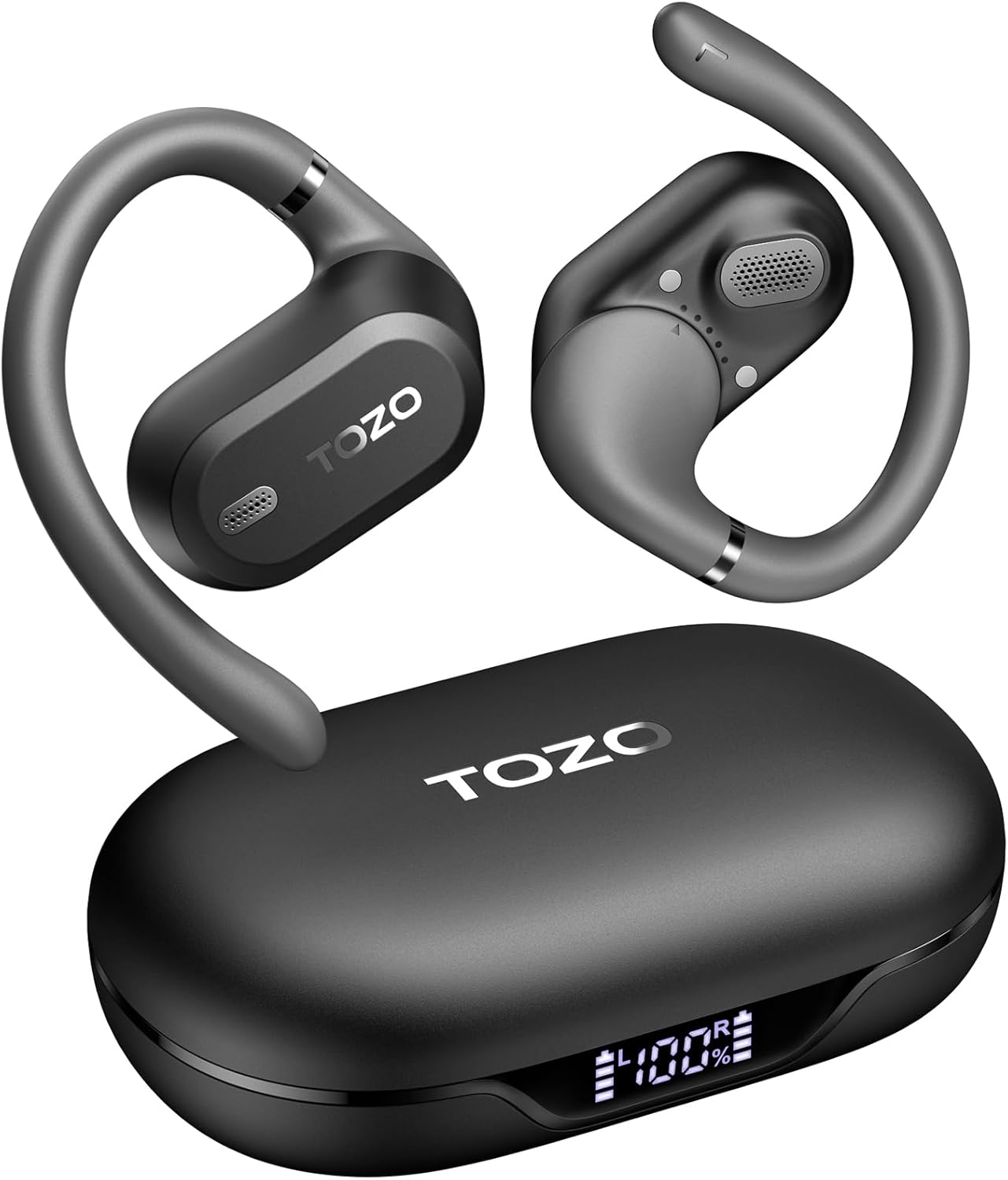
Image: TOZO OpenWear T13051 Open Ear Headphones and Charging Case. The image displays the two black open-ear earbuds with their flexible ear hooks, alongside their matching black charging case. The charging case features a digital display on the front.
המוצר נגמרview
רכיבים
The TOZO OpenWear headphones are designed with user comfort and sound quality in mind. Each earbud features a main body housing the audio components and a flexible ear hook for secure placement.

תמונה: תקריב view of a TOZO OpenWear earbud, highlighting the internal 14.2mm dynamic driver and speaker grille. The image emphasizes the audio technology for clear sound and bass.
בקרות
Each earbud is equipped with touch-sensitive controls for managing audio playback, calls, and other functions. Specific control gestures can be customized via the TOZO App.
וידאו: אוברview of the TOZO OpenWear Open Ear Headphones. The video demonstrates the physical design, including the flexible ear hooks and the charging case, providing a general introduction to the product's appearance and features.
הגדרה
טעינת האוזניות
לפני השימוש הראשון, טען את האוזניות ואת נרתיק הטעינה במלואם.
- Place the earbuds into the charging case. Ensure they are correctly seated; magnets will guide them into position.
- חבר את כבל ה-USB-C לשקע הטעינה במארז ולמקור חשמל.
- התצוגה הדיגיטלית על גבי מארז הטעינה תציג את אחוז הסוללהtage for the case and individual earbuds (L/R).
- A 10-minute charge provides approximately 2 hours of playtime. A full charge offers up to 38 hours of total playtime with the charging case.

Image: The TOZO OpenWear charging case open, showing the earbuds inside and a digital display indicating "38 hrs" of extended battery life, "630 songs", and "38 meetings". This highlights the long battery performance.
Image: A close-up of the TOZO OpenWear charging case's digital display, showing the battery levels for the left earbud (L), the charging case (center percentage), and the right earbud (R).
התאמה למכשיר שלך
- פתחו את מארז הטעינה. האוזניות ייכנסו אוטומטית למצב צימוד.
- במכשיר שלך (סמארטפון, טאבלט, מחשב נייד), הפעל את Bluetooth.
- חפש "TOZO OpenWear" in the list of available Bluetooth devices and select it to connect.
- לאחר החיבור, יישמע הנחיה קולית שתאשר את ההתאמה המוצלחת.
Image: A TOZO OpenWear earbud shown next to a smartphone displaying its Bluetooth settings, with "TOZO OpenWear" listed as a connected device. The charging case is also visible in the background.
הוראות לבישה
The TOZO OpenWear headphones feature a dual-axis adjustable design for a personalized and secure fit. Proper placement is crucial for both comfort and sound quality.
- Gently place the earbud over your ear, positioning the main body in front of your ear canal.
- Adjust the flexible ear hook to rest comfortably and securely behind your ear.
- Utilize the dual-axis rotation to adapt the earbud's angle both horizontally and vertically until it sits comfortably and the sound is clear.
- Ensure the speaker grille is positioned to direct sound towards your ear canal without blocking it.

Image: A diagram illustrating the dual-axis adjustment feature of the TOZO OpenWear ear hooks. It shows how the ear hook can rotate 40 degrees horizontally and 75 degrees vertically to adapt to different ear shapes for enhanced comfort and stability.

Image: A woman wearing a TOZO OpenWear earbud, demonstrating the comfortable and breathable fit of the open-ear design for all-day wear. The earbud sits gently on the ear without entering the ear canal.
הוראות הפעלה
בקרות בסיסיות
The earbuds feature touch controls for various functions. Refer to the Quick Guide for detailed touch gestures. Common functions include:
- הפעל/השהה: הקשה אחת על אחת האוזניות.
- הרצועה הבאה: הקש פעמיים על האוזניה הימנית.
- רצועה קודמת: הקש פעמיים על האוזניה השמאלית.
- הגבר קול: הקש שלוש פעמים על האוזניה הימנית.
- להנמיך קול: הקש שלוש פעמים על האוזניה השמאלית.
- מענה/סיום שיחה: הקשה אחת על אחת האוזניות.
- דחה שיחה: לחץ והחזק את אחת האוזניות למשך 2 שניות.
מצב אחזור נמוך
Activate low-latency mode for an enhanced audio-visual synchronization, ideal for gaming and video playback. This mode reduces audio delay to 60ms.
- Refer to the TOZO App or Quick Guide for specific instructions on activating/deactivating low-latency mode.
תכונות אפליקציית TOZO
Download the official TOZO App for a personalized audio experience. The app allows you to:
- Access 16 custom EQ settings to fine-tune your sound.
- Receive and install firmware updates for improved performance.
- Control various features and settings of your OpenWear headphones.

Image: Screenshots of the TOZO App interface, demonstrating features such as 5 types of EQ sound modes, firmware updates, and detailed EQ adjustment options for a personalized listening experience.
תַחזוּקָה
ניקוי
ניקוי קבוע מסייע לשמור על ביצועים והיגיינה אופטימליים.
- נגבו את האוזניות ואת נרתיק הטעינה בעזרת מטלית רכה, יבשה ונטולת סיבים.
- הימנעו משימוש בחומרים שוחקים, ממסים או תרסיסים.
- אין לטבול את מארז הטעינה במים.
אִחסוּן
Always store the headphones in their charging case when not in use to protect them and ensure they remain charged.
עמידות במים (IPX6)
The TOZO OpenWear headphones are rated IPX6 water-resistant, meaning they can withstand high-pressure water jets from any direction. This makes them suitable for workouts and outdoor activities where sweat and splashes may occur.
- The IPX6 rating applies to the earbuds only, not the charging case.
- אין לטבול את האוזניות במים במכוון למשך פרקי זמן ממושכים.
- ודאו שהאוזניות יבשות לפני החזרתן לנרתיק הטעינה כדי למנוע נזק.
פתרון בעיות
אם נתקלת בבעיות כלשהן, נסה את הפתרונות הבאים:
- אין צליל: Ensure earbuds are charged, properly paired, and volume is adjusted.
- בעיות זיווג: Turn off Bluetooth on your device, place earbuds in case, close and reopen, then try pairing again. Forget "TOZO OpenWear" from your device's Bluetooth list and re-pair.
- התאמה לא נוחה: Adjust the dual-axis ear hooks as described in the "Wearing Instructions" section.
- בעיות טעינה: Check the USB-C cable and power source. Ensure earbuds are correctly seated in the case.
If issues persist, please refer to the official TOZO website for detailed FAQs or contact customer support.
מפרטים
| תכונה | מִפרָט |
|---|---|
| שם הדגם | OpenWear T13051 |
| מותג | TOZO |
| טכנולוגיית קישוריות | אלחוטי (בלוטות' 5.4) |
| מיקום אוזניים | אוזן פתוחה |
| גודל מנהל התקן שמע | נהג דינמי 14.2 מ"מ |
| חיי סוללה (אוזניות) | עד 8.5 שעות (טעינה אחת) |
| חיי סוללה כוללים (עם מארז) | עד 38 שעות |
| זמן טעינה (טעינה מהירה) | 10 דקות לשעתיים זמן משחק |
| עמידות במים | IPX6 (אוזניות בלבד) |
| מצב אחזור נמוך | 60ms |
| סוג בקרה | מגע, שליטה באפליקציה |
| מכשירים תואמים | IOS/Android mobile phones, tablets, laptops |
| משקל פריט | 1.38 אונקיות (סה"כ) |
אחריות ותמיכה
TOZO products come with a standard manufacturer's warranty. For specific warranty details, registration, or to access customer support, please visit the official TOZO webאֲתַר:
You can also find additional support resources, FAQs, and contact information on their official webאֲתַר.


