מָבוֹא
The JBL GRIP is a compact, portable Bluetooth speaker designed to deliver powerful JBL Pro Sound. It features AI Sound Boost technology for optimized audio output with minimal distortion. With its durable, dustproof, and waterproof design, the JBL GRIP is suitable for various environments and activities. This manual provides essential information for the proper use and maintenance of your speaker.

Image: The JBL GRIP speaker lineup in different colors, highlighting its portability.
מה יש בקופסה
Upon unboxing your JBL GRIP speaker, please ensure all components are present:
- JBL GRIP Portable Bluetooth Speaker
- מדריך להתחלה מהירה
- USB-C Charging Cable (Note: USB charging cable is not included in some regions, please check packaging)

Image: A purple JBL GRIP speaker, representing the main product.
המוצר נגמרview
Familiarize yourself with the key features and components of your JBL GRIP speaker.
בקרות ויציאות
- לחצן הפעלה: Located on the top panel.
- לחצן התאמת בלוטות': Located on the top panel, for connecting to devices.
- לחצן הפעלה/השהה: Located on the top panel.
- לחצני עוצמת הקול למעלה / למטה: Located on the top panel.
- יציאת טעינה USB-C: Located on the side panel, protected by a cover.
- אור סביבה: Integrated on the side panel, offering customizable lighting effects.

תמונה: למעלה view of the JBL GRIP speaker, highlighting the control buttons.
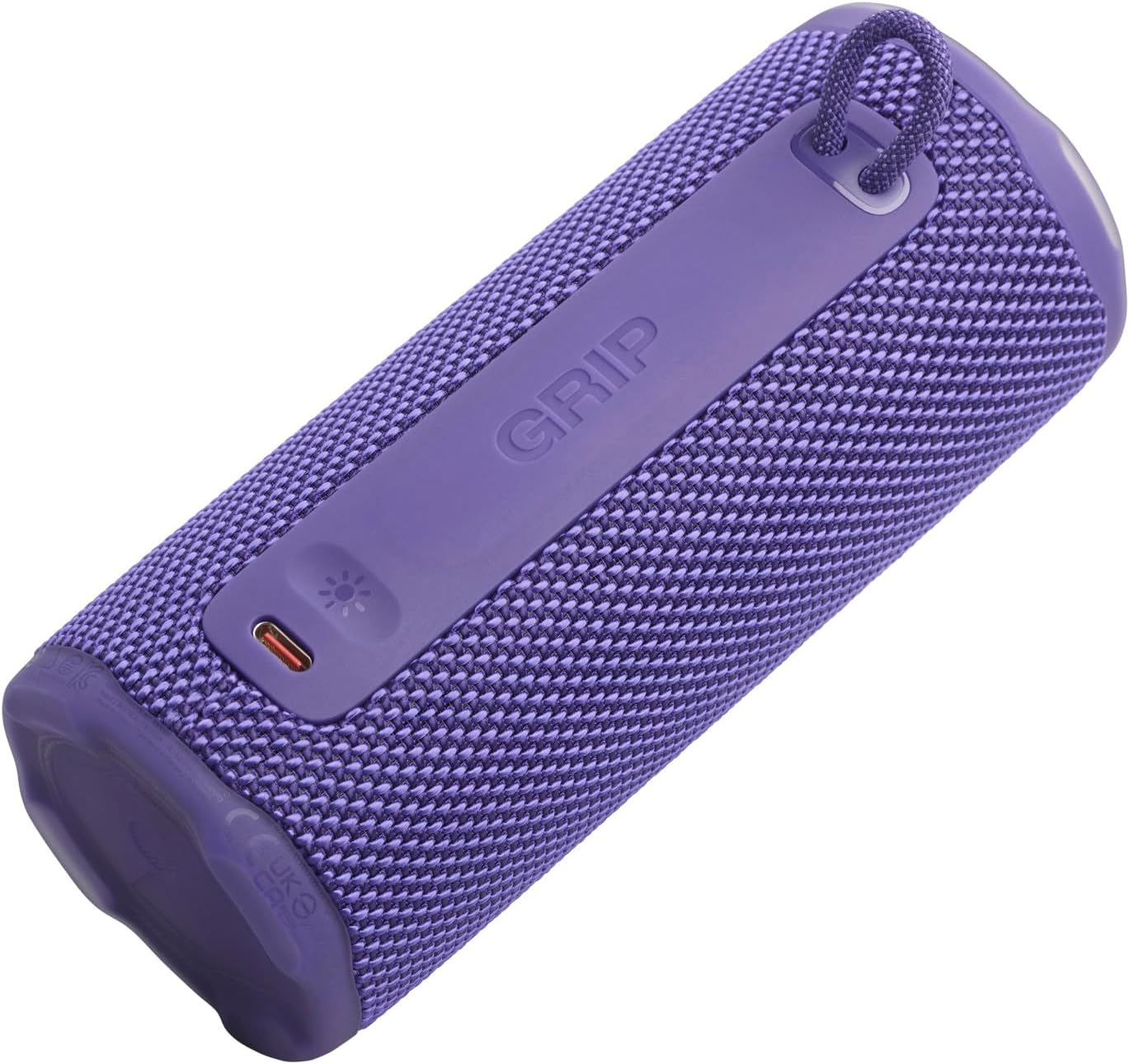
תמונה: צד view of the JBL GRIP speaker, showing the USB-C charging port and the ambient light strip.
תכונות מפתח
- AI Sound Boost: Real-time music analysis algorithm optimizes output and suppresses distortion for enhanced sound quality.
- IP68 עמיד בפני אבק ועמידות למים: Designed to withstand immersion in water and protect against dust ingress.
- אור סביבה: Customizable LED light on the speaker's rear panel to set the mood.
- זמן השמעה ארוך: Up to 12 hours of continuous playback, extendable by an additional 2 hours with Playtime Boost.
- Aura Cast Multi-Speaker Connection: Connect multiple JBL GRIP speakers for a wider sound experience.
- JBL Portable App Compatibility: Control settings, customize ambient light, and manage features via the dedicated app.

Image: An internal diagram of the JBL GRIP speaker, illustrating the AI Sound Boost chip and dual passive radiators for enhanced bass.
הגדרה
טעינת הרמקול
- אתר את יציאת הטעינה USB-C בצד הרמקול.
- פתח את מכסה המגן של יציאת ה-USB-C.
- Connect one end of the USB-C charging cable to the speaker and the other end to a compatible USB power adapter (not included).
- מחוון ה-LED יציג את מצב הטעינה. טעינה מלאה אורכת כשעתיים.
- Once fully charged, disconnect the cable and securely close the protective cover to maintain IP68 rating.
Bluetooth
- Power on the JBL GRIP speaker by pressing the Power button.
- Press the Bluetooth button on the top panel. The LED indicator will flash, indicating pairing mode.
- On your device (smartphone, tablet, etc.), go to Bluetooth settings and select "JBL GRIP" from the list of available devices.
- לאחר החיבור, נורית החיווי על הרמקול תידלק באופן קבוע.
הוראות הפעלה
השמעה בסיסית
- הפעל/השהה: לחץ על לחצן הפעל/השהה פעם אחת.
- בקרת עוצמת הקול: השתמשו בכפתורי הגברת עוצמת הקול (+) והנמכת עוצמת הקול (-).
- דלג על מסלול: Double-press the Play/Pause button for next track. Triple-press for previous track.
בקרת אור הסביבה
The JBL GRIP features an ambient light that can be customized to match your mood.
- Default Modes: Cycle through pre-set light themes by pressing the dedicated light button (if available, otherwise use app).
- התאמה אישית: For advanced customization of brightness and color, download and use the JBL Portable app.

Image: A JBL GRIP speaker displaying its customizable ambient light feature.
Aura Cast Multi-Speaker Connection
Aura Cast allows you to connect multiple JBL GRIP speakers for a synchronized audio experience.
- Ensure all JBL GRIP speakers are powered on and in pairing mode.
- Follow the instructions in the JBL Portable app to initiate Aura Cast pairing.
- Once connected, audio will play simultaneously across all linked speakers.

Image: A visual representation of multiple JBL speakers connected using Aura Cast for multi-room audio.
אפליקציית JBL ניידת
Download the JBL Portable app from your device's app store to unlock additional features and control options for your JBL GRIP speaker. The app allows you to:
- כוונן את הגדרות האקולייזר.
- Customize ambient light themes and brightness.
- Manage Aura Cast connections.
- עדכון קושחת הרמקול.

Image: A screenshot of the JBL Portable app interface, showing customization options for sound and lighting.
תַחזוּקָה
עמיד למים ואבק (IP68)
The JBL GRIP speaker is rated IP68, meaning it is dust-tight and protected against continuous immersion in water up to 1.5 meters for up to 30 minutes. To maintain this rating:
- ודא שמכסה יציאת ה-USB-C סגור היטב לפני חשיפת הרמקול למים או אבק.
- אין לחשוף את הרמקול למי מלח או לכימיקלים אחרים. אם הוא נחשף, יש לשטוף אותו במים מתוקים וייבש אותו היטב.
- Avoid using the speaker in extreme temperatures.

Image: A JBL GRIP speaker in water, demonstrating its IP68 waterproof capability.
ניקוי
כדי לנקות את הרמקול, השתמשו במטלית רכהamp בַּד. אין להשתמש בחומרי ניקוי שוחקים או ממסים.
פתרון בעיות
| בְּעָיָה | פתרון אפשרי |
|---|---|
| הרמקול לא נדלק. | ודא שהסוללה טעונה. חבר את הרמקול למקור חשמל באמצעות כבל USB-C. |
| לא ניתן לבצע צימוד דרך בלוטות'. |
|
| אין צליל או עוצמת קול נמוכה. |
|
| Ambient light not working. | Check settings in the JBL Portable app. Ensure the speaker is powered on. |
מפרטים
| תכונה | פְּרָט |
|---|---|
| שם הדגם | JBL GRIP |
| מספר דגם המוצר | JBLGRIPPUR |
| סוג רמקול | רמקול נייד |
| טכנולוגיה אלחוטית | בלוטות' |
| רצועת תדרים | 2400 מגה-הרץ - 2483.5 מגה-הרץ |
| תגובת תדר | 20 KHz |
| כוח פלט מרבי | 16 W |
| מקור כוח | סוללה (ליתיום-יון) |
| חיי סוללה | Up to 12 hours (extendable by 2 hours with Playtime Boost) |
| זמן טעינה | בערך שעתיים |
| דירוג עמיד למים/אבק | IP68 |
| מידות המוצר (D x W x H) | 6.5 x 6.4 x 15.3 ס"מ |
| משקל המוצר | 385 גרם |
| שיטת בקרה | אפליקציה |
| רכיבים כלולים | מדריך להתחלה מהירה |

Image: A diagram illustrating the dimensions and weight of the JBL GRIP speaker.
אחריות ותמיכה
The JBL GRIP speaker comes with a limited warranty. Please refer to the included Quick Start Guide or visit the official JBL webאתר לקבלת מידע מפורט על האחריות ופרטי קשר לתמיכה.
For technical assistance, troubleshooting, or to register your product, please visit www.jbl.com/support.