מידע בטיחות חשוב
- קראו והקשיבו להוראות אלו.
- אין להשתמש במוצר זה ליד מים.
- נקה רק עם מטלית יבשה.
- בדוק את הכרךtagשל אספקת החשמל המקומית שלך.
- Do not block any ventilation openings. Install under the manufacturer's instructions.
- אין להתקין ליד מקורות חום כלשהם כגון רדיאטורים, אוגרי חום, תנורים או מכשירים אחרים (כולל ampמחצבים) המייצרים חום.
- יש להשתמש אך ורק באביזרים/יתרונות המצורפים שצוינו על ידי היצרן.
- נתק מוצר זה במהלך סופות ברקים וחוסר שימוש ממושך.
- הפנה כל טיפול לצוות שירות מוסמך.
תוכן החבילה
The Donner MAMP4 5.1 Channel Audio Ampחבילת ליפיר כוללת:
- דונר מ.AMPמקלט סטריאו 4
- שְׁלַט רָחוֹק
- אנטנת FM
- מדריך למשתמש
מדריך התקנה
1. Connecting Speakers and Subwoofer
ה-MAMP4 amplifier supports a 5.1 channel setup, allowing connection of 5 speakers and 1 subwoofer. Ensure correct polarity (+/-) when connecting speakers.

Image: Diagram showing the 5.1 channel speaker and subwoofer connections on the rear panel of the Donner MAMP4 ampחיים יותר.

תמונה: מפורט view of the rear panel of the Donner MAMP4 amplifier, highlighting speaker terminals and various input/output ports.
2. חיבור מקורות שמע
ה amplifier offers multiple input options for various audio sources:
- Bluetooth 5.3: להזרמת שמע אלחוטית ממכשירים תואמים.
- USB: Connect a USB drive (up to 64 GB) for direct music playback.
- RCA: Connect devices like CD/DVD players or other audio equipment.
- AC-3: For surround sound input.
- אופטי/קואקסיאלי: Digital audio inputs for smart TVs and other digital sources.
- AUX IN: קלט עזר כללי.
- רדיו FM: חבר את אנטנת ה-FM המצורפת לקליטת רדיו.
- Microphone Inputs (2x 1/4''): For karaoke or public address.

Image: Front panel of the Donner MAMP4 amplifier showing various input options including USB, AUX, and microphone jacks, along with Bluetooth and FM indicators.
3. חיבור חשמל
Connect the power cord to a wall outlet. Ensure the unit is turned off before making any connections.
4. הפעלה ראשונית
לחץ על כפתור ההפעלה בלוח הקדמי כדי להפעיל את amplifier on. The LED display will illuminate.

Image: The Donner MAMP4 amplifier integrated into a home theater setup, demonstrating its role in enhancing stereo and surround sound.
הוראות הפעלה
1. בחירת קלט
Use the 'MODE' button on the front panel or the 'INPUT' button on the remote control to cycle through available input modes: Bluetooth, USB, FM, RCA, AC-3, Optical, Coaxial, and AUX.
2. Volume and EQ Control
Adjust the master volume using the large knob on the front panel or the 'VOL+/-' buttons on the remote. The amplifier features independent controls for Treble, Midrange, and Bass on both the unit and the remote, allowing for customized sound profiles. The MAMP4 automatically saves your mode selection, volume, and EQ settings for convenience.
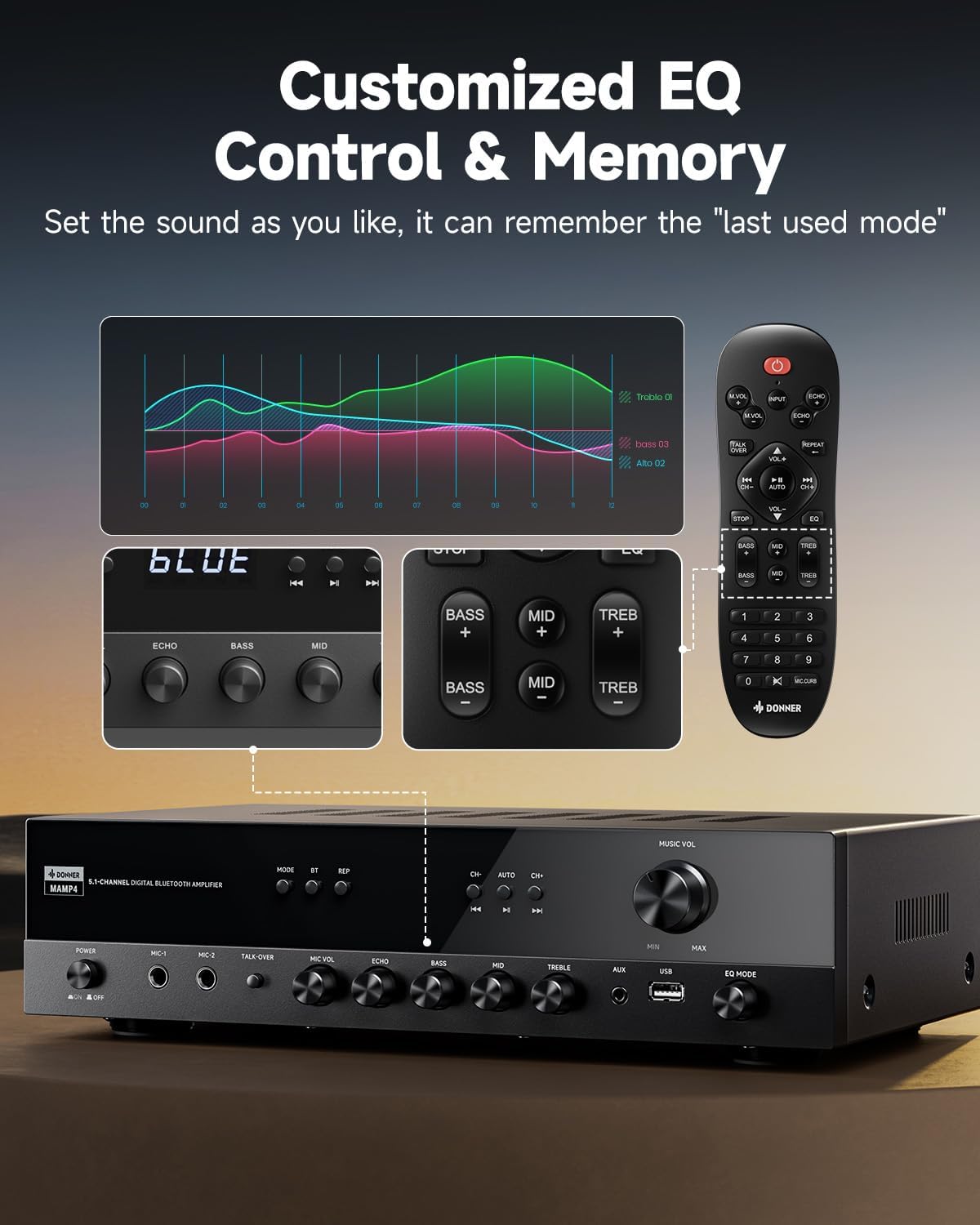
Image: Close-up of the Donner MAMP4 amplifier's front panel and remote control, illustrating the customizable EQ settings for bass, mid, and treble, and the memory function.
3. זיווג Bluetooth
Select 'Bluetooth' mode. On your device, search for 'DONNER MAMP4' and pair. Use the Play/Pause button or Prev/Next buttons on the remote to control playback.
4. תפעול רדיו FM
In FM mode, you can quickly select your preferred FM frequency by entering the numbers directly using the remote control. Use the 'CH+/-' buttons for automatic channel search.

Image: The Donner MAMP4 amplifier with its remote control, demonstrating the ease of selecting FM frequencies by direct numerical input.
5. פונקציות המיקרופון
ה amplifier includes dual 1/4'' microphone jacks. Adjust microphone volume and echo effect using dedicated knobs. The 'Talk Over' function lowers background music for clearer voice output during events or speeches.
6. שלט רחוק
The upgraded remote control provides full functionality, including treble, midrange, bass, echo, and Talkover settings in any input mode.

Image: Comparison of the new and old style remote controls for the Donner amplifier, highlighting the expanded functionality of the upgraded remote for input selection, EQ, echo, and Talkover.
7. Product Summary Video
Video: A product summary video for the Donner ampמשחרר, להראותasing its features and functionalities.
8. Donner 5.1 Channel Stereo Receiver Overview
וידאו: סיום רשמיview video from DonnerDirect, detailing the features and benefits of the Donner 5.1 Channel Stereo Receiver.
תַחזוּקָה
To ensure the longevity and optimal performance of your Donner MAMP4 ampמפיץ, יש לפעול לפי הנחיות התחזוקה הבאות:
- ניקוי: השתמשו במטלית רכה ויבשה לניקוי החלק החיצוני של היחידה. הימנעו משימוש בחומרי ניקוי נוזליים או בחומרים שוחקים.
- אוורור: Ensure that all ventilation openings on the amplifier are clear and unobstructed to prevent overheating.
- אִחסוּן: If the unit will not be used for an extended period, unplug the power cord from the outlet.
- סוללות שלט רחוק: Replace batteries in the remote control as needed. Dispose of used batteries properly according to local regulations.
פתרון בעיות
If you encounter issues with your Donner MAMP4 ampמפיץ אנרגיה, עיין בפתרונות הנפוצים הבאים:
- אין כוח: ודא שכבל החשמל מחובר היטב לשני השקעים amplifier and a working wall outlet. Check the power switch on the front panel.
- אין צליל: Verify that the correct input source is selected. Check all speaker and audio source connections for proper seating and polarity. Adjust volume levels.
- Hissing Sound in Standby: ה-MAMP4 has optimized noise reduction with added relays. If a persistent hissing sound occurs, ensure all connections are secure and try unplugging the unit for a few minutes before reconnecting.
- בעיות התאמת Bluetooth: להבטיח את amplifier is in Bluetooth mode and your device's Bluetooth is enabled and discoverable. Try restarting both devices.
- קליטת רדיו FM גרועה: Ensure the FM antenna is properly connected and extended. Try repositioning the antenna for better signal.
- המיקרופון לא עובד: Ensure microphones are securely plugged into the correct jacks. Adjust 'MIC VOL' and 'ECHO' knobs.
For persistent issues, please contact Donner customer support or refer to qualified service personnel.
מפרטים
| תכונה | תֵאוּר |
|---|---|
| דֶגֶם | MAMP4 |
| כוח פלט (RMS) | L/R Speakers: 60W/4R; Surround & Center Speakers: 25W × 3 |
| ערוצים | 5.1 ערוצים |
| גרסת בלוטות' | 5.3 |
| תמיכה ב- USB | עד 64 GB |
| כניסות שמע | 1 RCA, 1 AC-3, 2 Mic-in, AUX IN, Optical, Coaxial |
| תדר רדיו FM | 76-108 מגה-הרץ |
| בקרת EQ | Treble, Midrange, Bass (independent adjustment) |
| תכונות מיוחדות | Talk Over function, Settings Memory, Low Noise Design |
| מידות המוצר | 9.76 x 14.96 x 3.86 אינץ' |
| משקל פריט | 13.2 פאונד |
אחריות ותמיכה
For warranty information, technical support, or any inquiries regarding your Donner MAMP4 amplifier, please contact Donner customer service.
- יַצרָן: דונר
- דואר אלקטרוני של שירות לאחר המכירה: service@donnermusic.com
- סיוע מקצועי: הפנה כל טיפול לצוות שירות מוסמך.


