1. הקדמה
This manual provides essential information for the safe and efficient operation of your Anern FGI-DU4200 Dual Voltage Hybrid Solar Inverter. Please read this manual thoroughly before installation and use, and retain it for future reference. This inverter is designed to provide reliable power for various applications, integrating solar charging, AC utility charging, and inverter output functions.
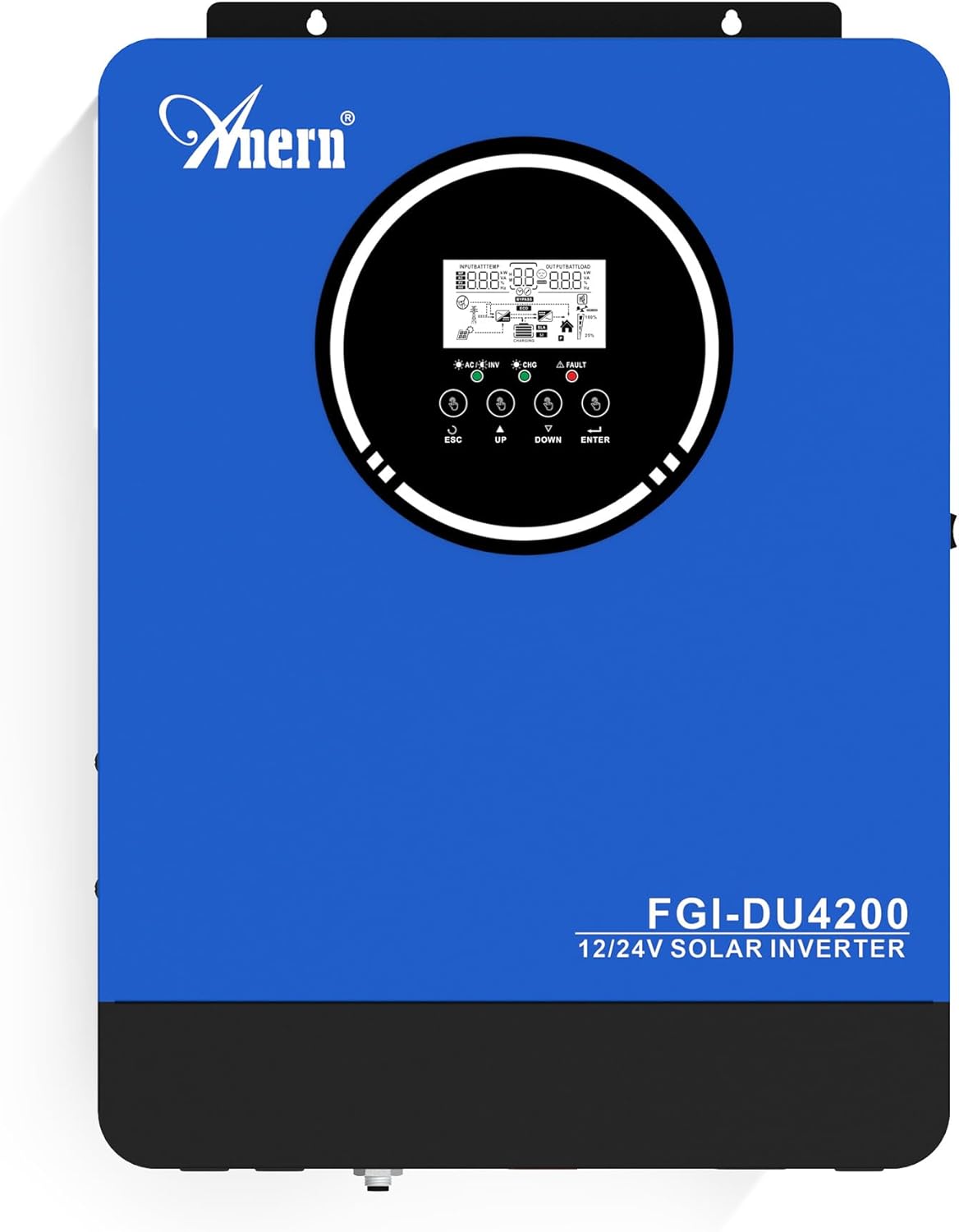
איור 1: Anern FGI-DU4200 נפח כפולtage Hybrid Solar Inverter. This image shows the front panel of the inverter, featuring the display screen and control buttons.
2. הוראות בטיחות
Please observe the following safety precautions to prevent injury and damage to the inverter or connected equipment:
- ההתקנה חייבת להתבצע על ידי אנשי מקצוע מוסמכים בהתאם לתקנות החשמל המקומיות.
- ודא שכל החיווט בגודל הנכון ומחובר כראוי.
- אין לפרק את הממיר. אין בתוכו חלקים הניתנים לתיקון על ידי המשתמש.
- הרחק את הממיר מחומרים דליקים, לחות ואור שמש ישיר.
- ודא אוורור נאות סביב הממיר כדי למנוע התחממות יתר.
- יש לנתק תמיד את כל מקורות החשמל (אנרגיה סולארית, סוללה, חשמל) לפני ביצוע כל תחזוקה או חיווט.
- יש ללבוש ציוד מגן אישי (PPE) מתאים במהלך ההתקנה והתחזוקה.
3. המוצר נגמרview ותכונות
The Anern FGI-DU4200 is a versatile hybrid solar inverter designed for both on-grid and off-grid applications. It features automatic dual-voltage operation and a 120A MPPT solar charge controller.
תכונות עיקריות:
- Automatic Dual-Voltagהמבצע: Automatically recognizes 12VDC (2300W output) or 24VDC (4200W output) battery systems.
- High-Efficiency Pure Sine Wave Output: Provides stable 220-230VAC ±5% output (50Hz) with 90% efficiency.
- Integrated 120A MPPT Solar Charge Controller: Maximizes solar power harvesting.
- מצבי טעינה מרובים: Solar, Solar and Utility, Solar Priority.
- מצבי פלט מרובים: Solar Priority, Utility Priority, SBU (Solar-Battery-Utility) Mode.
- Seamless Transfer: Grid/generator transfer time less than 20ms for critical loads.
- הגנה מקיפה: Overload, over-temperature, and short-circuit protection.
- תאימות סוללה: Supports 12V/24V Lithium, Lead-Acid, and Gel batteries.
- יכולת התחלה קרה: Ensures operation in extreme conditions.
- ניטור Wi-Fi: Allows system operation control via mobile phone (requires optional Wi-Fi module).

איור 2: מֵעַלview of key features including frequency range, waveform, charging currents, battery voltage, and protection mechanisms.

איור 3: Illustration of the inverter's dual voltage capability, supporting 4.2KW at 24V and 2.3KW at 12V battery systems.
4. התקנה והתקנה
4.1 פריקה ובדיקה
Upon receiving the inverter, carefully unpack it and inspect for any shipping damage. Ensure all components listed in the packing list are present. If any damage or missing parts are found, contact your dealer immediately.
4.2 הרכבת המהפך
Mount the inverter vertically on a sturdy wall or surface. Ensure there is sufficient clearance around the unit for proper ventilation (at least 20 cm on all sides). Avoid mounting in direct sunlight, near heat sources, or in areas with excessive dust or moisture.
4.3 חיבורי חיווט
All wiring must comply with local electrical codes. Use appropriate wire gauges for all connections to prevent overheating and ensure efficient power transfer.
4.3.1 חיבור סוללה
The inverter supports both 12VDC and 24VDC battery systems. The inverter automatically detects the battery voltage. Ensure correct polarity when connecting batteries. For 12V systems, batteries are typically connected in parallel. For 24V systems, batteries are typically connected in series.

איור 4: Wiring diagram illustrating parallel connection for 12V battery systems (2300W output) and series connection for 24V battery systems (4200W output).

איור 5: The inverter is compatible with various battery types, including Gel, AGM, Flooded (FLD), Lithium (LI), and Sealed Lead-Acid (SLD) batteries.
4.3.2 חיבור פאנל סולארי
Connect your solar panels to the designated PV input terminals. Ensure the open circuit voltage (Voc) of your solar array does not exceed the inverter's maximum PV input voltage (500Vdc). Observe correct polarity.
4.3.3 AC Input Connection (Utility/Generator)
Connect the AC utility grid or a compatible generator to the AC input terminals. The inverter supports 220-230VAC input. Ensure proper grounding.
4.3.4 AC Output Connection (Loads)
Connect your household or office loads to the AC output terminals. The inverter provides a pure sine wave output suitable for sensitive electronics. Do not exceed the rated output power of the inverter (2300W for 12VDC systems, 4200W for 24VDC systems).
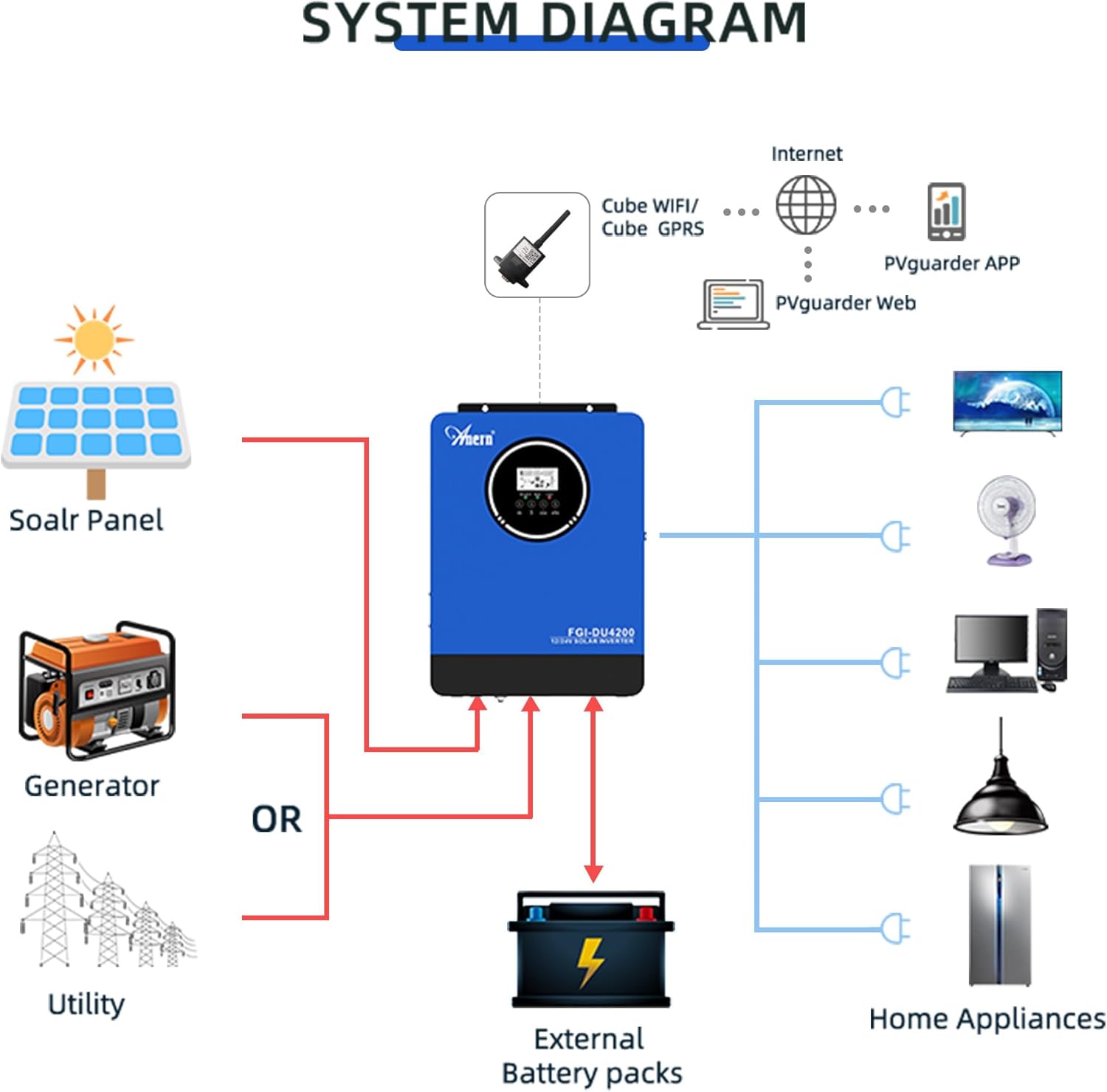
איור 6: Comprehensive system diagram showing connections for solar panels, generator/utility, external battery packs, and various home appliances.

איור 7: Example of an outdoor installation of the Anern FGI-DU4200 inverter, demonstrating its integration into a home solar power system.
5. הוראות הפעלה
5.1 הפעלה/כיבוי
After all connections are securely made, switch on the battery breaker first, then the solar array breaker, and finally the AC input breaker (if connected). Press the power button on the inverter to turn it on. To power off, reverse the sequence: turn off AC input, then solar, then battery, and finally the inverter power button.
5.2 צג LCD וכפתורי בקרה
The inverter features an LCD display that shows real-time operating status, input/output voltages, battery status, and error codes. Use the control buttons (ESC, UP, DOWN, ENTER) to navigate through menus and adjust settings.
5.3 מצבי טעינה
The inverter offers four selectable charging modes:
- עדיפות סולארית: Solar power charges the battery first. If solar is insufficient, utility power supplements.
- עדיפות שירות: Utility power charges the battery first. Solar power supplements if utility is unavailable.
- סולארי בלבד: Only solar power charges the battery.
- אנרגיה סולארית ותשתיות: Both solar and utility power charge the battery simultaneously.
5.4 מצבי פלט
The inverter offers three selectable output modes:
- עדיפות שירות: Loads are primarily powered by utility. If utility fails, the inverter switches to battery power.
- עדיפות סולארית: Loads are primarily powered by solar. If solar is insufficient, battery power is used. If both are insufficient, utility power is used (if connected).
- SBU (Solar-Battery-Utility) Mode: Loads are powered by solar first, then battery, and finally utility if both solar and battery are depleted or unavailable.
5.5 Wi-Fi Monitoring (Optional)
If equipped with the optional Wi-Fi module, the inverter can be monitored and controlled via a mobile application. Connect the Wi-Fi module to the designated port on the inverter and follow the instructions provided with the module for setup.

איור 8: Diagram illustrating the connection of an optional Wi-Fi module for remote monitoring and control of the inverter system via a mobile application or web מִמְשָׁק.
6. תחזוקה
תחזוקה שוטפת מבטיחה את אורך החיים והביצועים האופטימליים של הממיר שלכם.
- ניקוי: יש לנקות מעת לעת את החלק החיצוני של הממיר בעזרת מטלית יבשה. יש לוודא שפתחי האוורור נקיים מאבק ופסולת.
- חיבורים: Annually check all electrical connections for tightness and corrosion. Re-tighten if necessary.
- בדיקת סוללה: עבור סוללות עופרת-חומצה, יש לבדוק את מפלס האלקטרוליט ואת מצב הדקים בהתאם להנחיות יצרן הסוללה.
- סְבִיבָה: ודא שסביבת ההפעלה נשארת בטווחי הטמפרטורה והלחות שצוינו.
7. פתרון תקלות
סעיף זה מספק פתרונות לבעיות נפוצות. עבור בעיות שאינן מופיעות כאן, פנה לתמיכה הטכנית.
| בְּעָיָה | סיבה אפשרית | פִּתָרוֹן |
|---|---|---|
| הממיר לא נדלק | אין חיבור לסוללה; עוצמת סוללהtage too low; Power button not pressed. | בדוק את חיבורי הסוללה ונפחtage; Charge battery; Press and hold power button. |
| אין פלט AC | עומס יתר; קצר חשמלי; סוללה חלשה; תקלה בממיר. | Reduce load; Check for short circuits; Charge battery; Restart inverter. |
| טעינה סולארית לא עובדת | Solar panels disconnected; Insufficient sunlight; PV voltagנמוך/גבוה מדי; תקלת MPPT. | Check PV connections; Ensure adequate sunlight; Verify PV voltagה בטווח. |
| קוד שגיאה מוצג | Specific fault detected by the inverter. | Refer to the inverter's LCD display for the specific error code and consult the full manual (if available) or contact support for detailed interpretation and resolution. |
8. מפרטים
| פָּרָמֶטֶר | עֵרֶך |
|---|---|
| דֶגֶם | FGI-DU4200 |
| Rated Power (12VDC) | 2300W |
| Rated Power (24VDC) | 4200W |
| סוללה כרךtage | 12VDC / 24VDC (Auto-sensing) |
| פלט כרךtage | 220-230VAC ±5% (50Hz) |
| צורת גל | גל סינוס טהור |
| MPPT Solar Charge Controller Current | 120A |
| Max PV מערך מעגל פתוח כרךtage | 500Vdc |
| זרם טעינה AC | 60A |
| יְעִילוּת | 90% |
| זמן העברה | <20ms |
| מידות המוצר | 16.9 x 8.27 x 21.6 אינץ' |
| משקל פריט | 19.14 פאונד |
| יַצרָן | ענן |
9. אחריות ותמיכה
Anern products are designed for reliability and performance. For warranty information, please refer to the warranty card included with your product or visit the official Anern website. For technical support, troubleshooting assistance, or spare parts, please contact Anern customer service through their official channels. Please have your model number (FGI-DU4200) and purchase date ready when contacting support.
מידע ליצירת קשר: Refer to your product packaging or the official Anern webאתר לקבלת פרטי הקשר העדכניים ביותר.


