1. המוצר נגמרview
The Xprinter XP-420B is a high-speed direct thermal label printer designed for various applications, including shipping labels. It offers a maximum print speed of 152 mm/s (6 inches/second) and a resolution of 203 DPI, ensuring clear and precise prints. Its robust double-walled clamshell design enhances durability, and the intelligent print head temperature control system ensures stable output. This printer is compatible with both Windows and Mac operating systems, making it a versatile solution for your labeling needs.
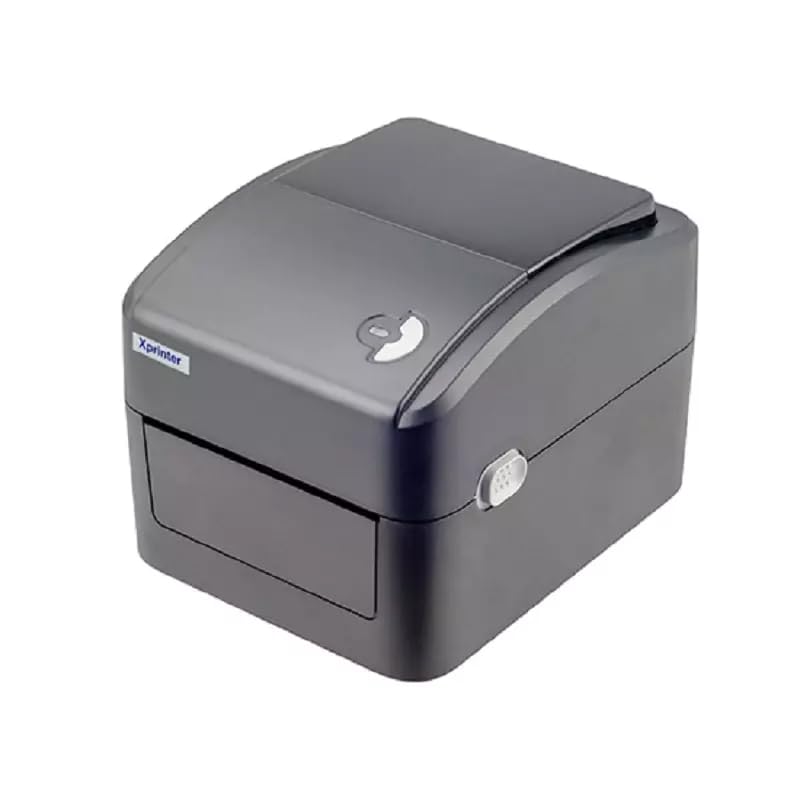
איור 1: חזית view of the Xprinter XP-420B thermal label printer.
2. מדריך התקנה
2.1 פריקה ובדיקה ראשונית
- הוציאו בזהירות את המדפסת ואת כל האביזרים מהאריזה.
- Verify that all components are present: printer unit, power adapter, USB cable, and user manual.
- Inspect the printer for any visible damage that may have occurred during transit.
2.2 חיבור המדפסת
- חבר את מתאם החשמל ליציאת החשמל של המדפסת ולאחר מכן חבר אותו לשקע חשמל.
- Connect one end of the provided USB cable to the printer's USB port and the other end to an available USB port on your computer.
- Power on the printer using the power switch, usually located on the side or rear.

Figure 2: Xprinter XP-420B showing USB connectivity.
2.3 טעינת תוויות
- Open the printer's top cover by pressing the release latches on both sides.
- Place the roll of thermal labels onto the label spindle, ensuring the labels feed from the bottom of the roll.
- Feed the leading edge of the labels through the label guide until it extends slightly past the print head.
- Adjust the movable label guides to fit the width of your labels snugly, without pinching them.
- Close the top cover firmly until it latches securely.
- The printer will automatically calibrate and detect the label size.
2.4 התקנת דרייבר
Before printing, you must install the appropriate printer drivers on your computer. Drivers are typically provided on a CD included with the printer or can be downloaded from the official Xprinter website. The XP-420B supports both Windows and Mac operating systems.
- עבור Windows: Run the setup executable from the driver CD or downloaded file ופעל לפי ההוראות שעל המסך.
- עבור Mac: Download the Mac driver from the Xprinter website and follow the installation prompts.
3. הוראות הפעלה
3.1 הדפסה בסיסית
- ודא שהמדפסת דולקת ומחוברת למחשב שלך.
- Open the document or application from which you wish to print (e.g., shipping software, word processor).
- בחר "הדפסה" מתפריט היישום.
- Choose "Xprinter XP-420B" as your printer.
- In the printer settings or preferences, ensure the correct label size is selected. The printer supports adjustable label sizes.
- לחץ על "הדפס" כדי לשלוח את העבודה למדפסת.
3.2 Adjusting Label Size
The XP-420B allows for adjustable label sizes. This adjustment is primarily done through the printer driver settings on your computer and by physically adjusting the label guides within the printer.
- התאמת תוכנה: In your printing application or printer driver settings, navigate to the "Page Setup" or "Paper Size" options. Select or define the custom dimensions for your labels (e.g., 4x6 inches for shipping labels).
- Physical Adjustment: As described in Section 2.3, ensure the internal label guides are set correctly to the width of your loaded labels.
4. תחזוקה
4.1 ניקוי ראש ההדפסה
Regular cleaning of the print head is crucial for maintaining print quality and extending the printer's lifespan. It is recommended to clean the print head after every roll of labels or if print quality degrades.
- כבה את המדפסת ונתק את כבל החשמל.
- פתח את המכסה העליון של המדפסת.
- המתן מספר דקות עד שראש ההדפסה יתקרר אם המדפסת הייתה בשימוש לאחרונה.
- Gently wipe the print head surface with an alcohol swab or a lint-free cloth lightly dampהסתיים עם איזופרופיל אלכוהול.
- יש לאפשר לראש ההדפסה להתייבש לחלוטין לפני סגירת המכסה וחיבור מחדש לחשמל.
4.2 ניקיון כללי
- השתמש במטלית רכה ויבשה כדי לנגב את החלק החיצוני של המדפסת.
- Remove any dust or label debris from the inside of the printer using a soft brush or compressed air.
- אין להשתמש בחומרי ניקוי שוחקים או ממסים.
5. פתרון תקלות
| בְּעָיָה | סיבה אפשרית | פִּתָרוֹן |
|---|---|---|
| המדפסת לא מגיבה | Power off; USB cable disconnected; Driver issue. | Ensure power is on and connected. Check USB cable. Reinstall printer driver. |
| איכות הדפסה ירודה (דהוי, קווים) | Dirty print head; Incorrect label type; Low print density setting. | Clean the print head (Section 4.1). Ensure you are using direct thermal labels. Adjust print density in driver settings. |
| תוויות לא מוזנות כראוי | Labels improperly loaded; Label guides not adjusted; Sensor obstruction. | Reload labels correctly. Adjust label guides. Clean any dust or debris from sensors. |
| Printer prints blank labels | Labels loaded upside down; Not a direct thermal label. | Ensure labels are loaded with the printable side facing up. Verify labels are direct thermal. |
6. מפרט מוצר
| תכונה | פְּרָט |
|---|---|
| מותג | Xprinter |
| שם הדגם | XP-420B |
| טכנולוגיית קישוריות | USB |
| טכנולוגיית הדפסה | תרמית ישירה |
| הַחְלָטָה | 203 DPI |
| מהירות הדפסה מקסימלית | 152 מ"מ/שנייה (6 אינץ'/שנייה) |
| זֵכֶר | 8MB SDRAM, 8MB פלאש |
| פלט מדפסת | מונוכרום |
| משקל פריט | 3 קילוגרם |
| מידות המוצר | 20D x 6W x 10H סנטימטרים |
| תְאִימוּת | Windows, Mac |
7. אחריות ותמיכה
7.1 מידע אחריות
The Xprinter XP-420B comes with a אחריות לשנה מתאריך הרכישה. אחריות זו מכסה פגמי ייצור ותקלות בשימוש רגיל. אנא שמור את הוכחת הרכישה שלך לצורך תביעות אחריות.
7.2 תמיכת לקוחות
For technical assistance, troubleshooting beyond this manual, or warranty service, please contact Xprinter customer support. Refer to the contact information provided with your product packaging or visit the official Xprinter webבאתר לקבלת פרטי התמיכה העדכניים ביותר.


