מָבוֹא
Thank you for choosing the Trevi XF 3150 KB Portable Karaoke Speaker. This powerful 130W speaker is designed to deliver high-quality audio with a Bass Reflex system, two 8-inch speakers, and a 1-inch tweeter. It features wireless audio connectivity, USB/SD card playback, AUX input, and dedicated inputs for microphones and guitars. Enjoy the integrated multicolor LED disco lights and the True Wireless Stereo (TWS) function for an enhanced audio experience. The speaker operates on an integrated rechargeable battery or via the included power adapter, offering versatility for any occasion. This manual provides essential information for safe and efficient use of your device.

חֲזִית view of the Trevi XF 3150 KB portable karaoke speaker, showcasing its design and active multicolor LED lights.
התקנה ושימוש ראשון
1. פתיחת האריזה ורכיבים
הוציאו בזהירות את כל הרכיבים מהאריזה. ודאו שהפריטים הבאים כלולים:
- Trevi XF 3150 KB Portable Karaoke Speaker
- מִיקרוֹפוֹן
- שְׁלַט רָחוֹק
- כבל חשמל
- תעודת אחריות
2. הפעלה וטעינה
The speaker can be powered by its internal rechargeable 7.4V battery or by connecting it to a power outlet using the included power adapter. For first use, it is recommended to fully charge the battery.
- טְעִינָה: Connect the power cable to the DC IN port on the rear panel of the speaker and then to a power outlet. The charging indicator will illuminate.
- הפעלה/כיבוי: לחץ והחזק את כּוֹחַ button on the control panel or remote control to turn the speaker on or off.
3. לוח הבקרה נגמרview
Familiarize yourself with the main controls located on the top panel of the speaker.

מְפוֹרָט view of the speaker's control panel, showing various input and sound adjustment knobs, along with function buttons.
4. פונקציות שלט רחוק
השלט הרחוק המצורף מאפשר הפעלה נוחה מרחוק.

The remote control for the Trevi XF 3150 KB speaker, featuring buttons for mute, mode, record, playback, volume, channel selection, scan, EQ, and power.
5. חיבור אלחוטי (בלוטות')
Connect your smartphone, tablet, or laptop wirelessly to the speaker.
- הפעל את הרמקול.
- הקש על MODE button until "BLUE" appears on the display, indicating Bluetooth mode.
- Enable Bluetooth on your device and search for "Trevi XF 3150 KB".
- Select the speaker to pair. A confirmation sound will indicate a successful connection.

Illustration of connecting a smartphone to the speaker via Bluetooth for wireless music streaming.
6. פונקציית TWS (סטריאו אלחוטי אמיתי)
לחוויית סטריאו משופרת, ניתן לחבר שני רמקולים מדגם Trevi XF 3150 KB באופן אלחוטי.
- ודא ששני הרמקולים מופעלים ונמצאים במצב Bluetooth.
- On one speaker (the primary), press and hold the TWS/REP לַחְצָן.
- The primary speaker will search for and connect to the secondary speaker. A confirmation sound will indicate successful pairing.
- לאחר החיבור, התאם את המכשיר שלך לרמקול הראשי באמצעות Bluetooth כמתואר לעיל.

Diagram illustrating the True Wireless Stereo (TWS) function, allowing two speakers to connect for a wider soundstage.
7. ניגון באמצעות כרטיס USB/SD
הפעל אודיו files directly from a USB flash drive or micro-SD card.
- הכנס כונן הבזק מסוג USB לתוך USB port or a micro-SD card into the SD slot on the rear panel.
- הקש על MODE כפתור כדי לבחור מצב USB או SD.
- Playback will start automatically. Use the playback controls (Play/Pause, Next/Previous Track) on the control panel or remote.
8. קלט AUX
חברו התקני שמע חיצוניים באמצעות כבל שמע 3.5 מ"מ.
- חבר קצה אחד של כבל שמע 3.5 מ"מ אל AUX IN port on the speaker and the other end to the audio output of your external device.
- הקש על MODE כפתור כדי לבחור מצב AUX.
- שלוט בהשמעה ובעוצמת הקול מהמכשיר החיצוני שלך.
9. כניסות למיקרופון וגיטרה
Connect the included microphone or a guitar for karaoke or live performances.
- חבר את המיקרופון ל כניסת מיקרופון port (6.3mm jack) or a guitar to the GUITAR IN port (6.3mm jack) on the rear panel.
- כוונן את עוצמת הקול של המיקרופון באמצעות MIC VOL knob and guitar volume using the גיטרה כרך כפתור בלוח הבקרה.
- השתמש ב- MIC BASS, מיקרופון טרבל, הֵד, ו לְעַכֵּב knobs to fine-tune the microphone sound.
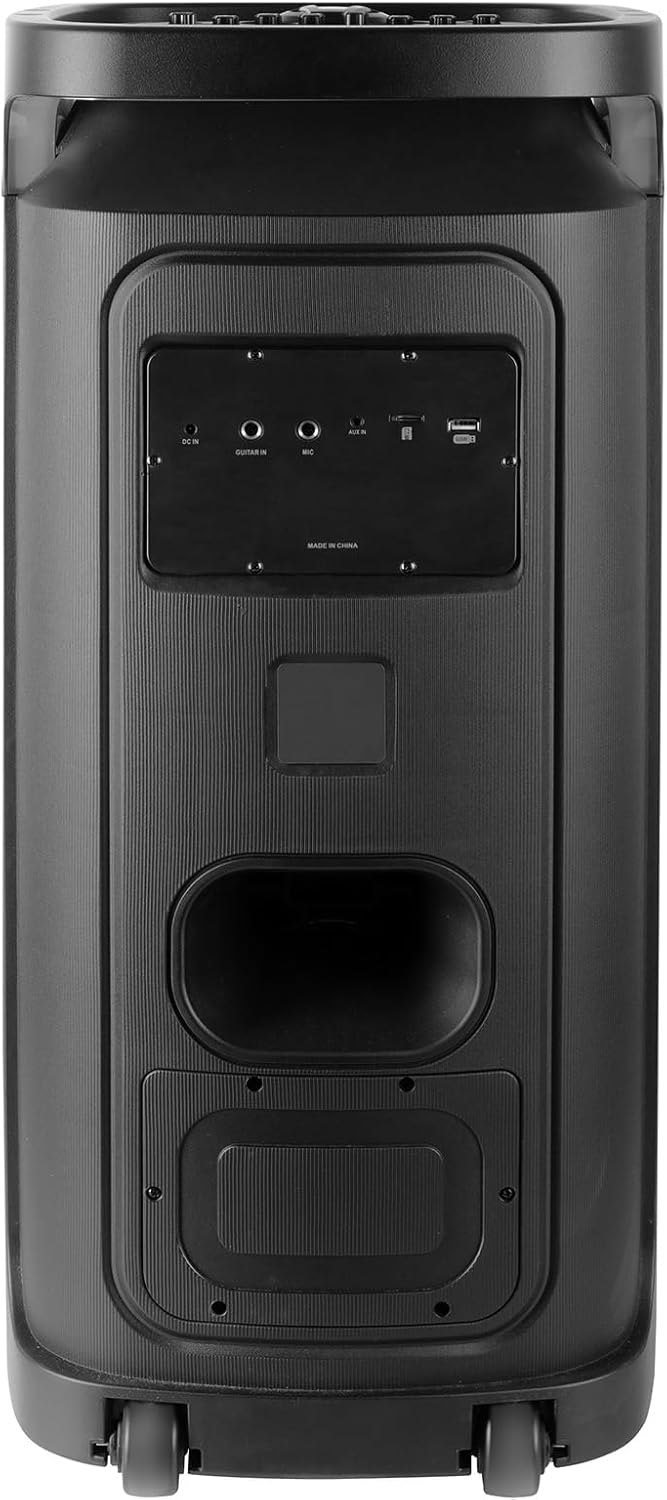
Rear panel of the Trevi XF 3150 KB speaker, displaying the various input ports including DC IN, AUX IN, MIC IN, GUITAR IN, USB, and SD card slot.
הוראות הפעלה
1. השמעת אודיו בסיסית
Once an audio source is connected (Bluetooth, USB, SD, AUX), use the following controls:
- כֶּרֶך: Adjust the main volume using the large central knob or the VOL + / VOL- כפתורים בשלט.
- הפעל/השהה: הקש על PLAY/PAUSE לַחְצָן.
- הרצועה הבאה / הקודמת: השתמש ב- הַבָּא ו קוֹדֵם כפתורים.
- שיוויון: הקש על EQ button on the remote to cycle through preset equalization modes (e.g., Pop, Rock, Jazz, Classic, Flat).
- בס/טרבל: השתמש ב- בס ו לְשַׁלֵשׁ knobs on the control panel for manual sound adjustment.
- באס נוסף: הקש על אקסטרה באס button for enhanced bass output.
2. פונקציית קריוקי
Utilize the included microphone and dedicated controls for karaoke sessions.
- Connect the microphone as described in the Setup section.
- לְהַתְאִים MIC VOL לרמה הרצויה לך.
- לְהִשְׁתַמֵשׁ הֵד ו לְעַכֵּב knobs to add vocal effects.
- ה PRI (Microphone Priority) button can be pressed to lower the music volume automatically when speaking into the microphone.
3. Disco Light Effects
Enhance your listening experience with dynamic multicolor LED lights.
- הקש על LED button on the control panel to turn the disco lights on or off.
- The lights will cycle through various colors and patterns automatically.

The Trevi XF 3150 KB speaker displaying its dynamic multicolor LED disco light effects, creating a party atmosphere.
תַחזוּקָה
1. ניקיון
כדי לשמור על המראה והפונקציונליות של הרמקול שלך:
- תמיד נתקו את כבל החשמל לפני הניקוי.
- השתמש במטלית רכה ויבשה כדי לנגב את המשטחים החיצוניים.
- אין להשתמש בחומרי ניקוי שוחקים, שעווה או ממיסים מכיוון שהם עלולים לפגוע בגימור.
- הימנעו מלחות להיכנס לפתחים כלשהם.
2. טיפול בסוללה
To prolong the life of the integrated rechargeable battery:
- טען את הסוללה במלואה לפני השימוש הראשון.
- הימנעו מריקון מוחלט של הסוללה לעתים קרובות.
- If storing the speaker for an extended period, charge the battery to approximately 50% and recharge every few months.
- Do not expose the speaker to extreme temperatures, as this can affect battery performance.
פתרון בעיות
If you encounter issues with your Trevi XF 3150 KB speaker, refer to the following common problems and solutions:
| בְּעָיָה | סיבה אפשרית | פִּתָרוֹן |
|---|---|---|
| הרמקול לא נדלק. | Battery is depleted or power cable is not connected. | Connect the power cable and charge the battery. Ensure the power button is pressed correctly. |
| אין פלט קול. | Volume is too low, incorrect input mode, or audio source issue. | הגבירו את עוצמת הקול. לחצו על MODE button to select the correct input. Check the audio source device. |
| לא ניתן לבצע התאמה בין מכשירי בלוטות'. | Speaker is not in Bluetooth mode, device is too far, or already paired to another device. | Ensure speaker is in Bluetooth mode. Move device closer. Disconnect from other devices and try again. |
| המיקרופון לא עובד. | Microphone not connected properly, MIC VOL is low, or microphone is faulty. | Ensure microphone is securely plugged into the כניסת מיקרופון port. Increase MIC VOL. Test with another microphone if available. |
| חיבור TWS נכשל. | Speakers are too far apart, or one speaker is not in Bluetooth mode. | Ensure both speakers are in Bluetooth mode and within close proximity. Repeat the TWS pairing steps. |
מפרטים
| שם הדגם | XF 3150 KB |
| מותג | טרווי |
| כוח פלט | 130W (מקסימום) |
| גודל רמקול | 2 x 8-inch woofers, 1 x 1-inch tweeter |
| טכנולוגיית קישוריות | Bluetooth, USB, SD, AUX |
| טכנולוגיית תקשורת אלחוטית | בלוטות' |
| מקור כוח | Battery, Corded Electric (7.4V rechargeable battery) |
| תכונות מיוחדות | Built-in Microphone, Wireless Connectivity, Disco Lights, TWS Function |
| מידות המוצר | 34D x 32.6W x 74H ס"מ |
| משקל פריט | 1 קילוגרם |
| שיטת בקרה | מְרוּחָק |
| מצב פלט שמע | סטריאו |
| סוג הרכבה | קומה עומדת |
| שימושים מומלצים | For smartphones or tablets, For computers, For home parties, For karaoke |
| מכשירים תואמים | Smartphone, Tablet, Laptop, MP3 Player, Computer, Karaoke System |
מידע על אחריות
מוצר זה מגיע עם א אחריות מוגבלת. Please refer to the included warranty card for detailed terms and conditions, including coverage period and claim procedures. Keep your proof of purchase for warranty service.
תְמִיכָה
For further assistance, product information, or to explore other Trevi products, please visit the official Trevi brand store:


