1. הקדמה
This manual provides essential information for setting up, operating, and maintaining your DOOGEE Tab A9 Pro Android 15 Tablet. Please read it thoroughly to ensure proper usage and to maximize your device's capabilities.
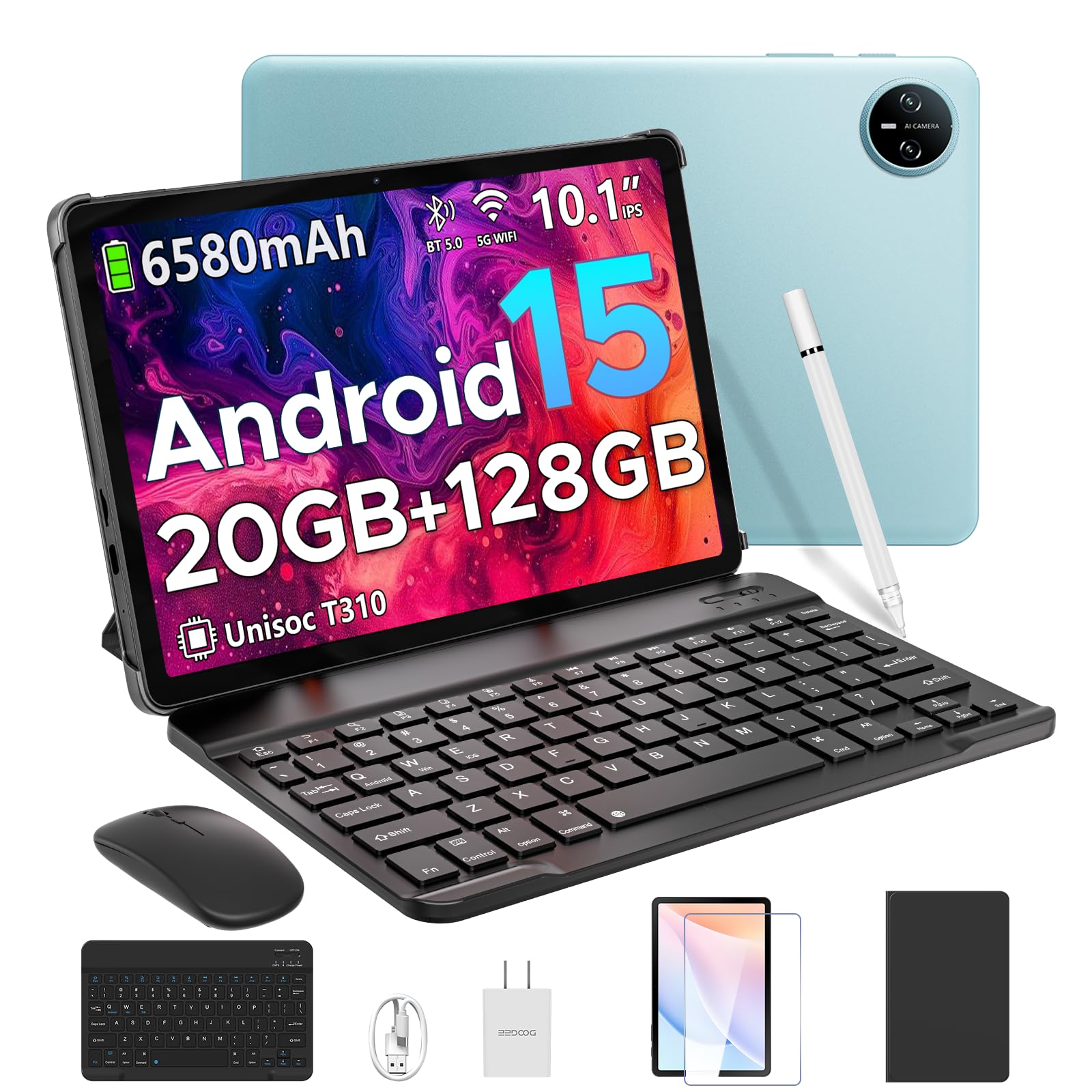
Image 1.1: The DOOGEE Tab A9 Pro Tablet.
2. מה בקופסה
Your DOOGEE Tab A9 Pro package includes the following items:
- DOOGEE Tab A9 Pro Tablet (x1)
- כבל USB מסוג C (x1)
- מטען (x1)
- ידני (x1)
- תעודת אחריות (x1)
- מקלדת בלוטות' (מהדורת VIP)
- עכבר בלוטות' (מהדורת VIP)
- סטיילוס (מהדורת VIP)
- Leather Protective Cover (VIP Edition)
- Tempered Film (VIP Edition)

Image 2.1: All items included in the DOOGEE Tab A9 Pro package.
3. המוצר נגמרview
The DOOGEE Tab A9 Pro features a sleek design with essential components for user interaction and connectivity.
3.1 תכונות פיזיות
- לְהַצִיג: 10.1-inch IPS HD Ultra-Clear Display.
- מצלמות: 8MP Main Camera (rear) and 5MP Front Camera.
- שֶׁמַע: High-Quality Dual Speakers and a 3.5mm Audio Jack.
- יציאות: Type-C USB port for charging and data transfer.
- כפתורים: Power button and volume controls located on the side.

תמונה 3.1: אחורי view of the DOOGEE Tab A9 Pro, highlighting the camera module.

תמונה 3.2: צד view of the tablet, illustrating the power button, volume controls, and ports.
סרטון 3.1: הצגת סרטון קצרasing the ultra-thin body and design of the DOOGEE Tab A9 Pro.
4. התקנה
4.1 טעינה ראשונית
Before first use, fully charge your tablet using the provided Type-C USB cable and charger. The battery indicator on the screen will show charging progress.
4.2 הפעלה/כיבוי
- כדי להפעיל: לחץ והחזק את לחצן ההפעלה עד להופעת הלוגו של DOOGEE.
- כדי לכבות: לחץ והחזק את לחצן ההפעלה, ולאחר מכן בחר 'כיבוי' מהאפשרויות שמופיעות על המסך.
4.3 אשף ההתקנה הראשונית
Upon first power-on, follow the on-screen instructions to complete the initial setup, including language selection, Wi-Fi connection, and Google account login.
5. מערכת הפעלה (אנדרואיד 15)
The DOOGEE Tab A9 Pro runs on the Android 15 operating system, offering a smart, fluid, and secure user experience with enhanced privacy features.

Image 5.1: Visual representation of the Android 15 system interface.
סרטון 5.1: אוברview of the DOOGEE Tab A9 Pro running Android 15.
6. ביצועים ואחסון
The tablet is designed for smooth operation and ampקיבולת האחסון.
6.1 מעבד
Powered by the energy-efficient Unisoc T310 octa-core processor, the tablet ensures seamless performance for various tasks.

Image 6.1: Diagram illustrating the Unisoc T310 Quad-Core Processor.
6.2 זיכרון RAM ואחסון
The tablet features 20GB of RAM (4GB physical + 16GB virtual) and 128GB of internal storage. Storage can be expanded up to 2TB using a microSD card (sold separately).

Image 6.2: Visual representation of the tablet's RAM and ROM configuration.
7. תצוגה ושמע
Experience vibrant visuals and clear sound with your tablet.
7.1 תצוגה
The 10.1-inch IPS HD display offers wide viewing angles and a resolution of 1280x800 for an immersive visual experience.

Image 7.1: The 10.1-inch IPS HD display with key specifications.
7.2 אודיו
Built-in dual speakers deliver clear and dynamic sound for movies, music, and video calls.

Image 7.2: Illustration of the tablet's dual speaker system.
8. מצלמות
Capture moments and conduct video calls with the integrated cameras.
8.1 מצלמה ראשית
The 8MP main camera allows you to take sharp photos.

Image 8.1: Close-up of the 8MP main camera on the tablet's rear.
מצלמה 8.2 הקדמית
מצלמת הקדמית של 5MP מתאימה לסלפי ושיחות וידאו.

Image 8.2: The 5MP front camera in use for a video call.
9. קישוריות
Stay connected with various wireless options.
9.1 אינטרנט אלחוטי
Supports 2.4G/5G dual-band Wi-Fi for smooth, high-speed internet access.

Image 9.1: Features of WiFi 5 connectivity on the tablet.
9.2 Bluetooth
Equipped with Bluetooth 5.0 for connecting wireless accessories.
9.3 GPS
Built-in GPS provides accurate navigation for travel and outdoor activities.
10. אביזרים נלווים
The DOOGEE Tab A9 Pro comes with a suite of accessories to enhance its functionality.
10.1 מקלדת בלוטות'
Connect the Bluetooth keyboard for a desktop-like typing experience, ideal for productivity tasks.

Image 10.1: The tablet connected to its Bluetooth keyboard for efficient typing.
10.2 Mouse and Stylus
The included mouse and stylus further enhance navigation and interaction, especially for note-taking and creative tasks.

Image 10.2: The tablet shown with its accompanying keyboard and mouse.

Image 10.3: The tablet being used with the stylus for precise input.
10.3 תיק מגן
The protective case shields your tablet from drops and scratches and can also function as a stand.

Image 10.4: The tablet securely placed within its protective case.
11. ניהול סוללה
The tablet is equipped with a high-capacity battery for extended use.
11.1 קיבולת סוללה
Features a long-lasting 6580mAh battery, providing hours of power for various activities without frequent recharging.

Image 11.1: Diagram showing the 6580mAh battery inside the tablet.
Video 11.1: A video highlighting the large battery capacity of the DOOGEE Tab A9 Pro.
12. תכונות אבטחה
Protect your device and data with built-in security options.
12.1 ביטול נעילת פנים
Effortlessly unlock your tablet using facial recognition technology.

Image 12.1: Illustration of the facial recognition unlock feature.
12.2 Fortified Privacy Shield
Android 15 provides enhanced privacy controls, robust data encryption, timely security patches, and proactive app screening for unbreakable security.

תמונה 12.2: נגמרview of Android 15's privacy features.
13. Multitasking & Productivity
Optimize your workflow and entertainment with these features.
13.1 Split-Screen Multitasking
Run two applications simultaneously side-by-side for enhanced productivity.

Image 13.1: The tablet displaying two apps in split-screen mode.
13.2 Built-in WPS Office
The tablet comes with WPS Office pre-installed, providing PC-level productivity for documents, spreadsheets, and presentations (Note: WPS Office feature may be unavailable in certain regions).

תמונה 13.2: תצוגת הטאבלטasing WPS Office applications.
Video 13.1: A video demonstrating the DOOGEE Tab A9 Pro's capabilities for learning and work.
14. תחזוקה
14.1 ניקוי
השתמשו במטלית רכה ונטולת סיבים כדי לנקות את המסך וגוף הטאבלט. הימנעו משימוש בכימיקלים חזקים או בחומרים שוחקים.
14.2 עדכוני תוכנה
בדוק באופן קבוע אם קיימים עדכוני מערכת והתקן אותם כדי להבטיח ביצועים אופטימליים, אבטחה וגישה לתכונות חדשות. נווט אל הגדרות > מערכת > עדכון מערכת כדי לבדוק אם יש עדכונים.
15. פתרון תקלות
סעיף זה עוסק בבעיות נפוצות שאתה עשוי להיתקל בהן עם הטאבלט שלך.
15.1 הטאבלט לא נדלק
- ודא שהטאבלט טעון כראוי. חבר אותו למטען למשך 30 דקות לפחות.
- לחץ והחזק את לחצן ההפעלה למשך 10-15 שניות כדי לבצע הפעלה מחדש כפויה.
15.2 ביצועים איטיים
- סגור יישומי רקע מיותרים.
- נקה נתוני מטמון עבור אפליקציות בשימוש תכוף.
- Ensure sufficient storage space is available. Delete old fileאו להעביר אותם לאחסון חיצוני.
- הפעל מחדש את הטאבלט.
15.3 בעיות קישוריות Wi-Fi
- הפעל מחדש את נתב ה-Wi-Fi ואת הטאבלט.
- שכח מרשת ה-Wi-Fi והתחבר מחדש.
- ודא שאתה נמצא בטווח קליטה של אות ה-Wi-Fi.
15.4 Accessories Not Connecting
- Ensure Bluetooth is enabled on the tablet and the accessory.
- Check if the accessory is charged and in pairing mode.
- Refer to the accessory's individual manual for specific pairing instructions.
16. מפרטים
| תכונה | מִפרָט |
|---|---|
| מותג | דוגי |
| שם הדגם | TABA9PRO |
| מספר דגם של פריט | טאב A9 פרו |
| מַעֲרֶכֶת הַפעָלָה | אנדרואיד 15 |
| גודל תצוגת מסך עומד | 10.1 אינץ' |
| רזולוציית מסך | 1280*800 HD |
| רזולוציית מסך מקסימלית | 1280*800 פיקסלים |
| מותג מעבד | יוניסוק |
| מעבד גרפי | Mali-G52 1-Core-2EE |
| קיבולת אחסון זיכרון | 128 ג'יגה-בייט (ניתן להרחבה עד 2 טרה-בייט באמצעות microSD) |
| אַיִל | 20 ג'יגה-בייט (4 ג'יגה-בייט פיזי + 16 ג'יגה-בייט וירטואלי) |
| סוג אלחוטי | 802.11ac, 802.11n (2.4G/5G Dual-band WiFi) |
| בלוטות' | 5.0 |
| קיבולת סוללה | סוללת ליתיום פולימר 6580mAh (כלולה) |
| חיי סוללה ממוצעים | Up to 2 years (estimated lifespan) |
| משקל פריט | 1.05 פאונד |
| מידות המוצר | 9.55 x 6.33 x 0.31 אינץ' |
| צֶבַע | Blue (other colors available) |
| תאריך ראשון זמין | 23 באפריל, 2025 |
17. אחריות ותמיכה
17.1 מידע אחריות
Your DOOGEE Tab A9 Pro comes with a 2-Year Limited Warranty. Please refer to the included Warranty Card for detailed terms and conditions.
17.2 תמיכת לקוחות
For any questions or technical assistance, please contact our support team. We aim to respond within 24 hours.
- תמיכה מקוונת: זמין 24/7.
- החזרות: 30-day money-back guarantee and free returns.