המוצר נגמרview
The TOOLTOP T256 Thermal Camera is a compact and high-performance infrared imager designed for industrial heating repair, home inspection, electrical inspection, HVAC testing, car maintenance, and pet observation. It features a 256x192 IR resolution, a wide temperature measurement range, and a lightweight, portable design.
תכונות מפתח כוללות:
- 256x192 IR Resolution: Equipped with a high-quality optical lens and a high-resolution detector for excellent imaging.
- קל משקל ונייד: Weighing only 22g, its small size and plug-and-play functionality, combined with a durable aluminum alloy shell, make it highly convenient.
- טווח טמפרטורות רחב: Capable of measuring temperatures from -15℃ to 600℃.
- Temperature Alarm & Tracking: Supports high temperature alarm with customizable thresholds, along with high and low temperature tracking.
- Optional Magnetic Macro Lens: Features an all-germanium optical lens with 93% transmittance, allowing observation of components as small as 2x1mm.
מדריך התקנה
This section provides instructions for setting up your TOOLTOP T256 Thermal Camera.
1. פורקים
הוצא בזהירות את כל הרכיבים מהאריזה. ודא שכל הפריטים המפורטים בסעיף "מה בקופסה" נמצאים.
2. חיבור למכשיר
The T256 Thermal Camera is designed for use with Android devices via a Type-C connection. Ensure your device supports USB OTG (On-The-Go) functionality.

איור 1: The TOOLTOP T256 Infrared Thermal Imager. This image shows the compact design of the thermal camera with its Type-C connector and lens.

איור 2: T256 connected to a smartphone. This image illustrates the thermal camera plugged into the Type-C port of an Android smartphone, displaying a thermal image on the screen.
- Locate the Type-C port on your Android smartphone or tablet.
- Gently insert the Type-C connector of the T256 Thermal Camera into your device's port.
- ודא שהחיבור מאובטח.
3. התקנת אפליקציה
To operate the T256, you need to install the dedicated application on your Android device. The application allows for professional thermal imaging analysis.
- Scan the QR code provided in the included user manual or search for the "TOOLTOP Thermal Camera" app on the Google Play Store.
- הורד והתקן את האפליקציה.
- Launch the app. It should automatically detect the connected T256 camera.
הוראות הפעלה
This section details the various functions and settings of your TOOLTOP T256 Thermal Camera.
1. פעולה בסיסית
Once the camera is connected and the app is running, the thermal image will be displayed on your device's screen. Point the camera at the object or area you wish to inspect.
2. מדידת טמפרטורה
The T256 supports various temperature measurement modes:
- Highest, Lowest, Central Point: The app automatically displays the highest, lowest, and central temperature points within the field of view.
- מדידת שטח: You can define specific areas (points, lines, rectangular boxes) on the screen to measure their temperature.
- אזעקת טמפרטורה: Set customized alarm thresholds. The device will alert you if temperatures exceed or fall below these thresholds.
- מעקב אחר טמפרטורה גבוהה ונמוכה: The camera can track and highlight the hottest and coldest spots in real-time.
3. Macro Lens Usage (Optional)
For detailed inspection of small components, attach the optional magnetic macro lens. This lens provides enhanced magnification for observing intricate details.

איור 3: T256 with Macro Lens. This image shows the thermal camera with the magnetic macro lens attached, highlighting its capability for detailed observation of small electronic components.
- The macro lens is lightweight and attaches magnetically.
- It features all-germanium optical transmittance of 93%.
- Allows observation of components as small as 2x1mm.
- Optimal macro observation distance is 30-50mm.
4. Image Enhancement and Display
The application offers features to optimize the thermal image display.
- שיפור פרטים: Adjust sharpness and contrast to make the field of view clearer and more defined.
- Vanadium Oxide Detector: The high-resolution detector preserves more details in the thermal image.

איור 4: Vanadium Oxide Detector comparison. This image compares the detail preservation of a 120x90 resolution (10800 temperature points) versus the T256's 256x192 resolution (49152 temperature points), showing significantly more detail with the higher resolution.
5. הגדרות שפה
The application supports multiple languages for user convenience.

איור 5: Multiple languages available. This image displays the language selection interface within the app, showing options for Chinese, English, Korean, Portuguese, Russian, Spanish, Italian, Dutch, Polish, Japanese, French, and Finnish.
To change the language, navigate to the settings menu within the app and select your preferred language from the available options.
6. פלטות צבעים
The T256 offers six different color palettes to visualize thermal data, allowing you to choose the best mode for various scenarios and preferences.
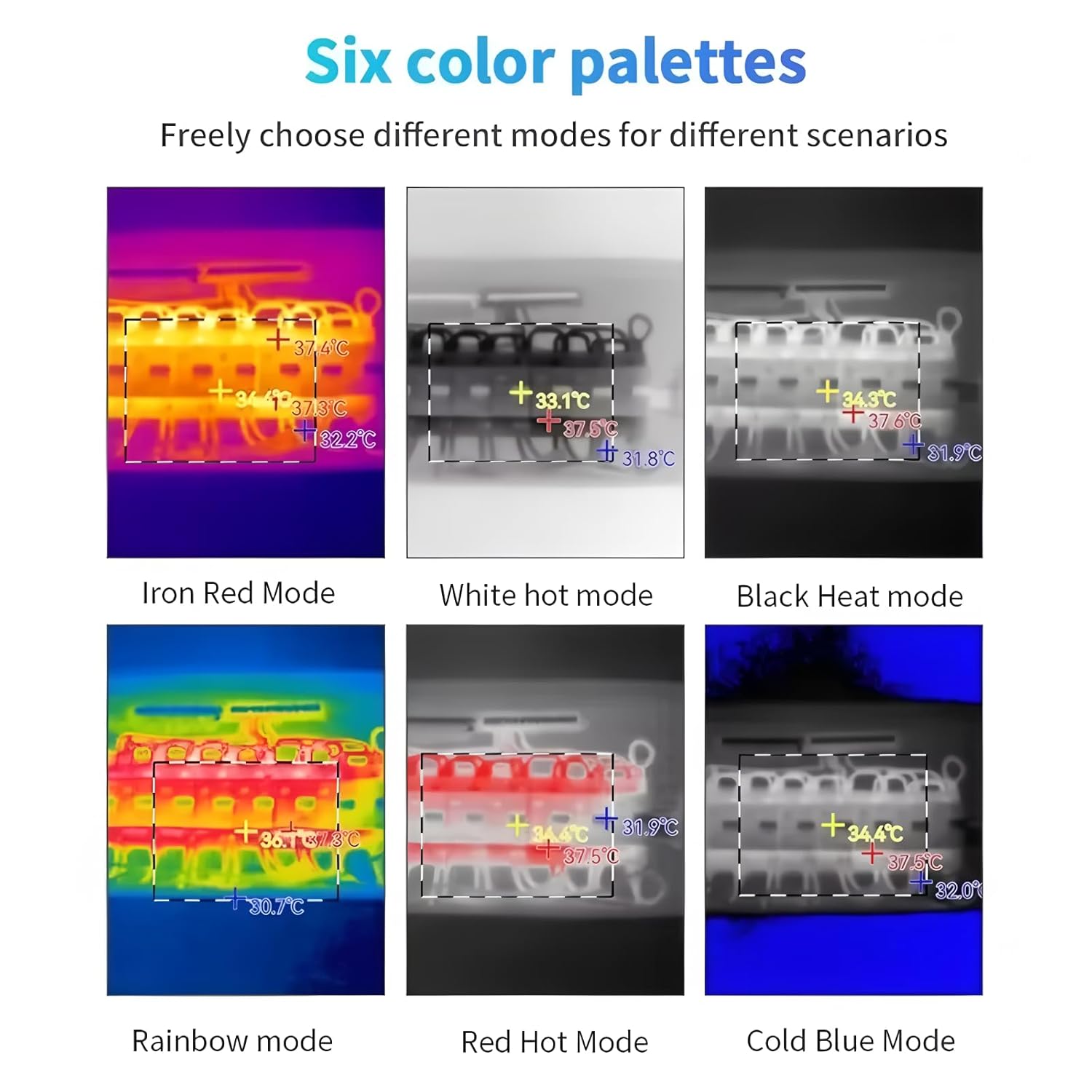
איור 6: Six color palettes. This image displays examples of the six available color palettes: Iron Red Mode, White Hot Mode, Black Heat Mode, Rainbow Mode, Red Hot Mode, and Cold Blue Mode, each displaying a different visual representation of temperature variations.
- Iron Red Mode
- White Hot Mode
- Black Heat Mode
- מצב קשת
- Red Hot Mode
- Cold Blue Mode
Select the palette that best highlights the temperature differences relevant to your inspection.
7. טווח יישום
The TOOLTOP T256 Thermal Camera is versatile and can be used in a wide range of applications:

איור 7: Multiple application range. This image displays six common applications for the thermal camera: Electrical inspection, Home Inspection, Equipment Repair, HVAC testing, Car maintenance, and Pet Observation.
- בדיקת חשמל
- Home Inspection
- Equipment Repair
- HVAC testing
- תחזוקת רכב
- Pet Observation
תַחזוּקָה
Proper maintenance ensures the longevity and optimal performance of your thermal camera.
1. ניקיון
Use the provided cloth to gently clean the camera body and lens. Avoid using abrasive materials or harsh chemicals that could damage the lens coating or housing.
2. אחסון
When not in use, store the thermal camera in the provided cloth bag and box to protect it from dust, moisture, and physical damage. Store in an environment with a temperature range of -45℃ to 85℃.
פתרון בעיות
If you encounter issues with your TOOLTOP T256 Thermal Camera, refer to the following common solutions:
- מצלמה לא זוהתה:
- Ensure the Type-C connection is secure.
- Verify your Android device supports USB OTG.
- הפעל מחדש את האפליקציה או את הטלפון החכם שלך.
- התמונה מטושטשת או לא ברורה:
- Clean the camera lens with the provided cloth.
- Adjust the focus if applicable (for macro lens, ensure correct distance).
- Check the "Detail enhancement" settings in the app.
- קריאות הטמפרטורה נראות לא מדויקות:
- Ensure the camera is stable and not moving excessively during measurement.
- Verify the emissivity settings in the app, if adjustable, match the material being measured.
- Ensure the camera is within its specified operating temperature range (-10℃ to 75℃).
If problems persist, please contact TOOLTOP customer support for further assistance.
מפרטים
| תכונה | פְּרָט |
|---|---|
| דֶגֶם | T256 |
| הַחְלָטָה | 256 x 192 |
| אֹרֶך גַל | 8-14 בבוקר |
| קצב פריימים | 25 הרץ |
| NETD | <50mk@25℃ |
| FOV (שדה של View) | 56°x42° |
| עֲדָשָׁה | 3.2 מ"מ |
| טווח מדידת טמפרטורה | -15℃~600℃ |
| דיוק מדידת טמפרטורה | ±2℃ or 2% |
| Temperature Measurement Features | Highest, lowest, central point and area temperature measurement |
| שפות נתמכות | סינית, אנגלית, קוריאנית, פורטוגזית, רוסית, ספרדית, איטלקית, הולנדית, פולנית, יפנית, צרפתית, פינית |
| טמפרטורת עבודה | -10℃~75℃ |
| טמפרטורת אחסון | -45℃~85℃ |
| דירוג IP | IP54 |
| מידות | 25 מ"מ x 40 מ"מ x 14 מ"מ |
| משקל נטו | 22 גרם |
| מספר דגם של פריט | TT-T256S+Macro lens |
| יַצרָן | TOOLTOP |
| ASIN | B0F5N1TYDQ |
| צֶבַע | צִבעוֹנִי |
| משקל פריט (חבילה) | 1 קילוגרם (2.2 פאונד) |
| מפרט נפגש | CE, RoHS |
מה יש בקופסה
הפריטים הבאים כלולים בחבילת המוצר שלך:
- 1 x Thermal Imager (T256)
- 1 x בד
- 1 x שקית בד
- 1 x מדריך למשתמש
- 1 x קופסה
- 1 x Macro Lens (Optional, included with T256+ Macro Lens model)
אחריות ותמיכה
TOOLTOP products are manufactured to high-quality standards. For warranty information and support, please refer to the official TOOLTOP webאתר או צור קשר עם המפיץ המקומי שלך.
משך זמינות חלקי חילוף באיחוד האירופי: 1 שנה.
For technical assistance or inquiries, please reach out to TOOLTOP customer service.


