1. הקדמה
Thank you for choosing the EYESUN Stationary Exercise Bike Cycling Bike 630W. This manual provides essential information for the safe assembly, operation, maintenance, and troubleshooting of your new exercise bike. Please read this manual thoroughly before use and retain it for future reference.
2. מידע בטיחות
To ensure your safety and prolong the life of your exercise bike, please observe the following precautions:
- התייעץ עם רופא לפני תחילת כל תוכנית אימונים חדשה.
- Place the exercise bike on a flat, stable surface. Ensure adequate clearance around the bike (at least 0.6 meters or 2 feet).
- הרחק ילדים וחיות מחמד מהציוד במהלך הפעולה.
- בדוק את האופניים לאיתור חלקים רופפים או פגומים לפני כל שימוש. אין להשתמש אם רכיבים כלשהם פגומים.
- לבשו נעליים וביגוד ספורטיבי מתאים. הימנעו מבגדים רפויים שעלולים להיתפס בחלקים נעים.
- אין לחרוג מקיבולת המשקל המרבית של 330 ק"ג (150 ליברות).
- Use the emergency brake to stop the flywheel instantly if needed.
- Adjust the seat and handlebars to a comfortable and safe position before beginning your workout.
3. תכולת החבילה
פרקו בזהירות את כל הרכיבים וודאו שקיבלתם את כל הפריטים המפורטים להלן. אם חסרים או פגומים חלקים כלשהם, אנא צרו קשר עם תמיכת הלקוחות.
- מכלול המסגרת הראשית
- מייצב קדמי
- מייצב אחורי
- דוושות (ימין ושמאל)
- מוט מושב ומושב
- עמוד כידון וכידון
- צג LCD
- ערכת חומרה (ברגים, דיסקיות, אומים, כלים)
- מדריך למשתמש

תמונה 3.1: נגמרview of the EYESUN Stationary Exercise Bike 630W. The image displays the complete exercise bike with its main components, including the frame, flywheel, seat, handlebars, and LCD monitor.
4. הוראות הרכבה
The EYESUN Cycling Bike 630W is designed for straightforward assembly. Most of the main frame is pre-assembled. Please follow these steps carefully.

Image 4.1: The exercise bike arrives largely pre-assembled, simplifying the setup process. Key components like the main frame are already connected, requiring fewer steps for completion.
הרכבה שלב אחר שלב:
- חבר מייצבים: Secure the front and rear stabilizers to the main frame using the provided bolts and washers. Ensure they are tightened firmly for stability.
- התקן דוושות: Identify the left (L) and right (R) pedals. The left pedal tightens counter-clockwise, and the right pedal tightens clockwise. Thread them into the crank arms and tighten securely.
- הרכבת מוט מושב ומושב: הכנס את מוט המושב לשלדה הראשית וכוון אותו לגובה הרצוי. קבע באמצעות כפתור הכוונון. חבר את המושב למוט המושב.
- התקנת עמוד הכידון והכידון: הכנס את מוט הכידון לשלדה הראשית והתאם את גובהו. חבר את הכידון לעמוד ואבטח אותו.
- Connect LCD Monitor: Attach the LCD monitor to the handlebar assembly. Connect the sensor cable from the main frame to the back of the monitor. Ensure the sensor cable is inserted vertically and perpendicularly to the flywheel for correct data tracking.

Image 4.2: Proper connection of the app sensor cable to the LCD monitor. The image illustrates the correct vertical insertion of the sensor cable to ensure accurate data tracking.
5. הוראות הפעלה
התאמת התנגדות
The EYESUN Cycling Bike 630W features an adjustable brake pad resistance system. The resistance knob is located conveniently on the main frame.
- הגדל את ההתנגדות: Turn the resistance knob clockwise to increase the intensity of your workout.
- הקטנת התנגדות: Turn the resistance knob counter-clockwise to reduce the intensity.
- עצירת חירום: Press down firmly on the resistance knob to engage the emergency brake and stop the flywheel instantly.

Image 5.1: The resistance knob allows for quick adjustment of workout intensity and serves as an emergency stop mechanism. Turning clockwise increases resistance, counter-clockwise decreases it, and pressing down stops the flywheel.
פונקציות צג LCD
The integrated LCD monitor tracks your workout data:
- זְמַן: משך האימון שלך.
- מְהִירוּת: מהירות רכיבה נוכחית.
- מֶרְחָק: מרחק שעבר במהלך הסשן הנוכחי.
- קלוריות: קלוריות משוערות שנשרפות.
- מַד מֶרְחָק: מרחק מצטבר כולל.
The monitor typically cycles through these metrics automatically. Refer to the monitor's specific instructions for detailed operation and battery replacement.
6. התאמות
כוונון נכון של המושב והכידון הוא קריטי לנוחות ולאימונים יעילים.
התאמת מושב
- Height Adjustment (5-way): שחררו את כפתור הכוונון שעל מוט המושב. הרם או הנמך את המושב עד שהרגל שלך תהיה מעט כפופה בברך כאשר הדוושה נמצאת בנקודה הנמוכה ביותר שלה. הדקו את הכפתור היטב.
- כוונון קדימה/אחורה: Loosen the knob beneath the seat. Slide the seat forward or backward to find a comfortable position relative to the handlebars. Tighten the knob securely.
כוונון כידון
- Height Adjustment (3-way): שחררו את כפתור הכוונון שעל מוט הכידון. הרמו או הנמיכו את הכידון לגובה נוח המאפשר תנוחת פלג גוף עליון רגועה. הדקו את הכפתור היטב.

Image 6.1: The exercise bike offers 5-way seat adjustment (up/down, forward/back) and 3-way handlebar adjustment (up/down) to accommodate various user heights and preferences, ensuring a comfortable and ergonomic riding position.
7. Smart Tracking & App Integration
Your EYESUN Cycling Bike 630W features Bluetooth connectivity, allowing you to connect to various fitness applications for enhanced workout tracking and entertainment.
- קישוריות בלוטות': The bike can connect to compatible fitness apps such as FantomFite, KINOMAP, and Zwift.
- סנכרון נתונים: Supports syncing workout data with Google Fit and Apple Health.
- מחזיק לטאבלט: Use the built-in tablet holder to enjoy music or videos during your ride.
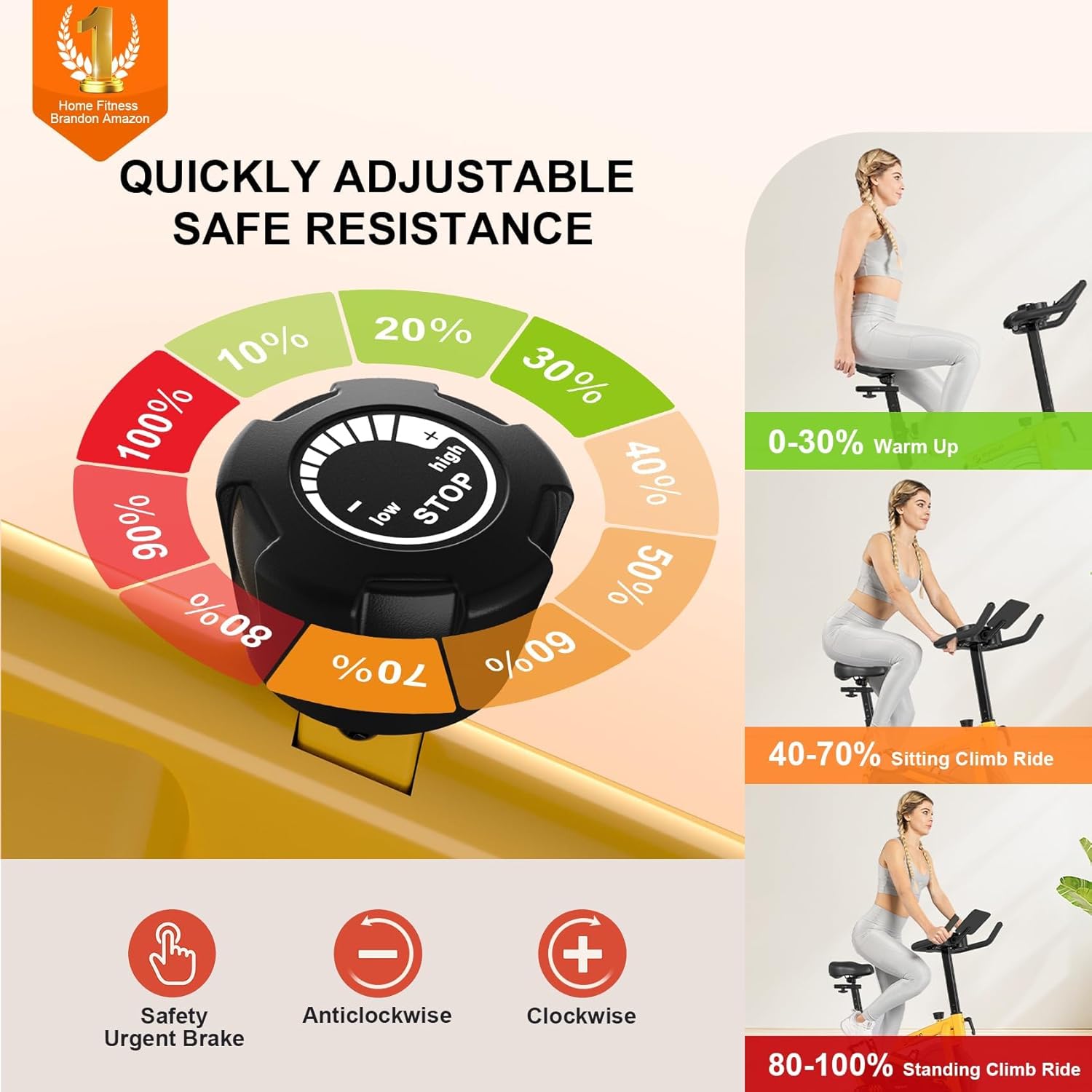
Image 7.1: The LCD monitor displays key workout metrics, while the bike's Bluetooth connectivity allows integration with popular fitness applications like Zwift and Kinomap for interactive training sessions.
8. תחזוקה
תחזוקה שוטפת מבטיחה את אורך החיים והביצועים האופטימליים של אופני הכושר שלכם.
- ניקוי: נגב את האופניים עם מודעהamp מטלית לאחר כל שימוש כדי להסיר זיעה ואבק. הימנעו מחומרי ניקוי שוחקים.
- סִיכָה: Periodically check the belt drive system. While generally maintenance-free, ensure no debris interferes with its operation.
- בְּדִיקָה: Regularly inspect all bolts, nuts, and moving parts for tightness and wear. Tighten any loose fasteners. Check pedals, seat, and handlebar for secure attachment.
- כרית בלם: Monitor the brake pad for wear. If resistance becomes inconsistent or noise increases, the brake pad may need replacement. Contact customer support for assistance.

Image 8.1: The EYESUN bike features a smooth belt drive for quiet operation and a stable U-shaped bottom for enhanced safety during workouts. Regular inspection of these components is recommended.
9. פתרון תקלות
עיין בטבלה שלהלן לקבלת בעיות נפוצות ופתרונותיהן.
| בְּעָיָה | סיבה אפשרית | פִּתָרוֹן |
|---|---|---|
| האופניים לא יציבים או מתנדנדים | Uneven surface; loose stabilizers | Ensure bike is on a flat surface. Tighten all bolts on the front and rear stabilizers. |
| רעש חריקה או חריקה | Loose parts; worn brake pad; debris in flywheel | Check and tighten all bolts. Inspect the brake pad for wear. Clean any debris from the flywheel area. |
| צג LCD שאינו מציג נתונים | Loose sensor cable; dead batteries; incorrect sensor orientation | Check if the sensor cable is securely connected. Replace batteries in the monitor. Ensure the sensor cable is inserted vertically and perpendicularly to the flywheel. |
| ההתנגדות לא משתנה | Resistance knob mechanism issue; worn brake pad | Inspect the resistance knob and brake pad. Contact customer support if the issue persists. |
10. מפרטים
| תכונה | פְּרָט |
|---|---|
| מספר דגם | Cycling Bike 630W |
| מידות המוצר | 98.04 x 59.94 x 100.84 ס"מ (38.6 x 23.6 x 39.7 אינץ ') |
| משקל פריט | 20 ק"ג (44.1 פאונד) |
| קיבולת משקל מקסימלית | 330 פאונד (150 ק"ג) |
| מערכת כונן | כונן חגורה |
| מנגנון התנגדות | חיכוך |
| חוֹמֶר | סגסוגת פלדה |
| מושב מתכוונן | 5-way (Height & Forward/Backward) |
| כידון מתכוונן | 3-way (Height) |
| תכונות מיוחדות | LCD Display, Phone Holder, Transport Wheels, Water Bottle Holder |
| מקור כוח | יָדָנִי |
11. אחריות ותמיכה
EYESUN provides a 24-month worry-free warranty for your exercise bike. For any questions, concerns, or warranty claims, please contact our customer service team.
- תמיכה בדוא"ל: support@eyesun.net (24/7 support available)
- הפעלת אחריות: לְבַקֵר eyesun.net/warranty to activate your extended warranty.


