1. המוצר נגמרview
The Grandstream WP816 is a compact, portable Wi-Fi phone designed for clear communication. It features dual-band Wi-Fi 6 for reliable connectivity, supports two SIP accounts and two lines, and delivers HD voice quality with dual microphones, Acoustic Echo Cancellation (AEC), and Noise Shield Technology. The phone includes integrated Bluetooth for headset connectivity, a long-lasting 1500mAh rechargeable battery providing 6 hours of talk time and 120 hours of standby time, and a configurable push-to-talk button. It is equipped with a Type C USB port for fast charging and a 3.5mm headset jack. Additional features include an accelerometer and an emergency button.
תכונות עיקריות:
- Dual-band Wi-Fi 6 with efficient antenna design and advanced roaming support.
- Supports 2 SIP accounts and 2 lines.
- HD voice with dual MIC design, AEC, and Noise Shield Technology.
- Integrated Bluetooth for headset connection.
- Rechargeable 1500mAh battery: 6 hours talk time, 120 hours standby.
- Configurable button for push-to-talk functionality.
- Type C USB port (supports fast charging) and 3.5mm headset jack.
- Built-in accelerometer and emergency button.
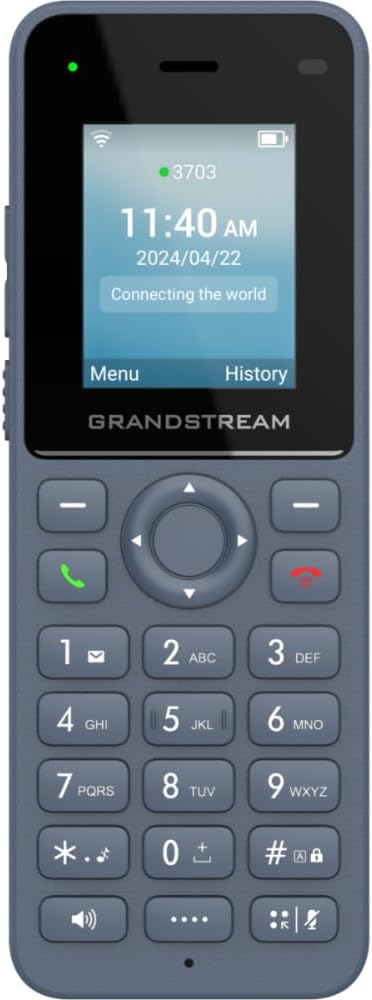
איור 1: חזית view of the Grandstream WP816 Wi-Fi Phone, displaying its screen, keypad, and branding.
2. התקנה
2.1. מה בקופסה:
- Grandstream WP816 Wi-Fi Phone
- (Additional accessories such as power adapter, charging cradle, and battery are typically included but not explicitly detailed in the provided 'whats_in_the_box' field, which only states "Phone". Assuming standard phone accessories.)
2.2. טעינת הטלפון:
- Connect the power adapter to the charging cradle and a power outlet.
- Place the WP816 phone into the charging cradle. Ensure the phone is seated correctly and the charging indicator illuminates.
- Allow the phone to charge fully before initial use. This typically takes several hours. The Type C USB port also supports fast charging.
2.3. הגדרה ראשונית:
- הפעלה: לחץ והחזק את לחצן ההפעלה/סיום שיחה עד שהמסך יידלק.
- חיבור Wi-Fi: Navigate to the "Settings" menu, then "Wi-Fi". Select your desired Wi-Fi network and enter the password if prompted. The phone supports dual-band Wi-Fi 6.
- תצורת חשבון SIP: Access the "Settings" menu to configure your SIP accounts. The phone supports 2 SIP accounts. Refer to your VoIP service provider for specific SIP settings (SIP server, User ID, Password).
- תאריך ושעה: ודא שהתאריך והשעה מוגדרים כהלכה, באופן ידני או באמצעות סנכרון רשת.
3. הוראות הפעלה
3.1. ביצוע שיחות:
- חִיוּג: הזן את מספר הטלפון באמצעות לוח המקשים.
- התחלת שיחה: Press the Green Call button to place the call.
- סיום שיחה: Press the Red End Call button to terminate the conversation.
3.2. קבלת שיחות:
- כאשר הטלפון מצלצל, לחץ על כפתור השיחה הירוק כדי לענות.
- To reject an incoming call, press the Red End Call button.
3.3. Speakerphone Function:
- During a call, press the Speaker button (often indicated by a speaker icon) to activate the speakerphone.
- Press the Speaker button again to switch back to the earpiece.
3.4. Push-to-Talk (PTT):
- The WP816 features a configurable button for Push-to-Talk functionality.
- Consult your system administrator or service provider for configuration details and usage of the PTT feature.
3.5. Bluetooth Headset Connectivity:
- Ensure your Bluetooth headset is in pairing mode.
- On the WP816, navigate to "Settings" > "Bluetooth".
- הפעל את בלוטות' וסרוק אחר מכשירים זמינים.
- Select your headset from the list and follow any on-screen prompts to complete pairing.
4. תחזוקה
4.1. טיפול בסוללה:
- כדי למקסם את חיי הסוללה, הימנעו מטמפרטורות קיצוניות.
- Charge the phone regularly. Do not let the battery completely drain for extended periods.
- אם לא נעשה שימוש בטלפון למשך זמן רב, טען אותו עד כ-50% ואחסן אותו במקום קריר ויבש.
4.2. ניקוי:
- השתמש במטלית רכה ויבשה כדי לנקות את החלק החיצוני של הטלפון.
- הימנע משימוש בכימיקלים קשים, ממיסים לניקוי או חומרי ניקוי חזקים.
5. פתרון תקלות
5.1. אין חשמל:
- ודא שהסוללה מוכנסת וטעונה כהלכה.
- ודא ששקע הטעינה מחובר כראוי למקור חשמל.
5.2. Cannot Connect to Wi-Fi:
- Check if the Wi-Fi network is active and within range.
- Confirm the Wi-Fi password is entered correctly.
- Restart the phone and the Wi-Fi router.
5.3. Poor Call Quality:
- Ensure you are within good Wi-Fi signal range.
- בדוק את מהירות ויציבות חיבור האינטרנט שלך.
- Verify SIP account settings with your service provider.
5.4. Phone Not Responding:
- Perform a soft reset by removing and reinserting the battery.
- If the issue persists, a factory reset might be necessary (refer to advanced settings, note this will erase all data).
6. מפרטים
| תכונה | פְּרָט |
|---|---|
| דֶגֶם | WP816 |
| מותג | גראנדסטרים |
| מידות המוצר | 7 x 5 x 4 אינץ' |
| משקל פריט | 13.8 אונקיות (390 גרם) |
| סוללות | נדרשת סוללה אחת שאינה סטנדרטית |
| קישוריות | Dual-band Wi-Fi 6, Integrated Bluetooth |
| חשבונות SIP | 2 SIP accounts, 2 lines |
| תכונות קוליות | HD voice, Dual MIC design with AEC and Noise Shield Technology |
| קיבולת סוללה | 1500mAh |
| זמן דיבור | 6 שעות |
| זמן המתנה | 120 שעות |
| נמלים | Type C USB (fast charging support), 3.5mm headset jack |
| תכונות נוספות | Accelerometer, Emergency button, Configurable Push-to-Talk button |
| צֶבַע | אָפוֹר |
| חוֹמֶר | פּלָסטִי |
| סוג טלפון | אלחוטי |
| סוג חייגן | חיוג צלילים |
| פעולה מרובת שורות | פעולה מרובת שורות |
7. אחריות ותמיכה
For warranty information and technical support, please refer to the documentation provided with your purchase or visit the official Grandstream webאתר. שמור את הוכחת הרכישה שלך לצורך תביעות אחריות.


