
1. הקדמה
This manual provides essential instructions for the safe and efficient use of your DCHK Haribo HBT-03 Wireless Earbuds. Please read this manual thoroughly before using the product and retain it for future reference.
תכולת החבילה:
- Haribo HBT-03 Wireless Earbuds (Left and Right)
- מארז טעינה עם מסך מגע LCD
- כבל טעינה USB-C ל- USB-A
- Three (3) Pairs of Eartips (Small, Medium, Large)
- מדריך למשתמש (מסמך זה)

Image 1.1: Haribo HBT-03 Wireless Earbuds and Charging Case. The image displays the white earbuds seated in their open charging case, which features an LCD screen displaying 'HARIBO' and 'Swipe to Unlock'. A red gummy bear charm is attached to the case.
2. המוצר נגמרview
The DCHK Haribo HBT-03 Wireless Earbuds are designed for a high-quality audio experience with convenient features.
תכונות עיקריות:
- Bluetooth 5.4: מספק קישוריות אלחוטית יציבה ויעילה.
- LCD Touchscreen Case: Offers intuitive control over various functions directly from the charging case.
- ביטול רעשים פעיל (ANC): מפחית רעשי סביבה לחוויית האזנה סוחפת.
- מצב שקיפות: מאפשר לך לשמוע את הסביבה שלך תוך כדי האזנה לשמע.
- דרייברים דינמיים בגודל 13 מ"מ: Delivers powerful bass and clear audio.
- עמידות במים IPX4: מגן מפני התזות וזיעה.
- הפעלה מורחבת: עד 12 שעות של זמן נגינה כולל עם מארז הטעינה.

Image 2.1: Key features of the Haribo HBT-03 Earbuds. Icons illustrate wireless earbuds, pocket size, LCD display, Bluetooth 5.4, 12-hour play time, and 13mm driver.
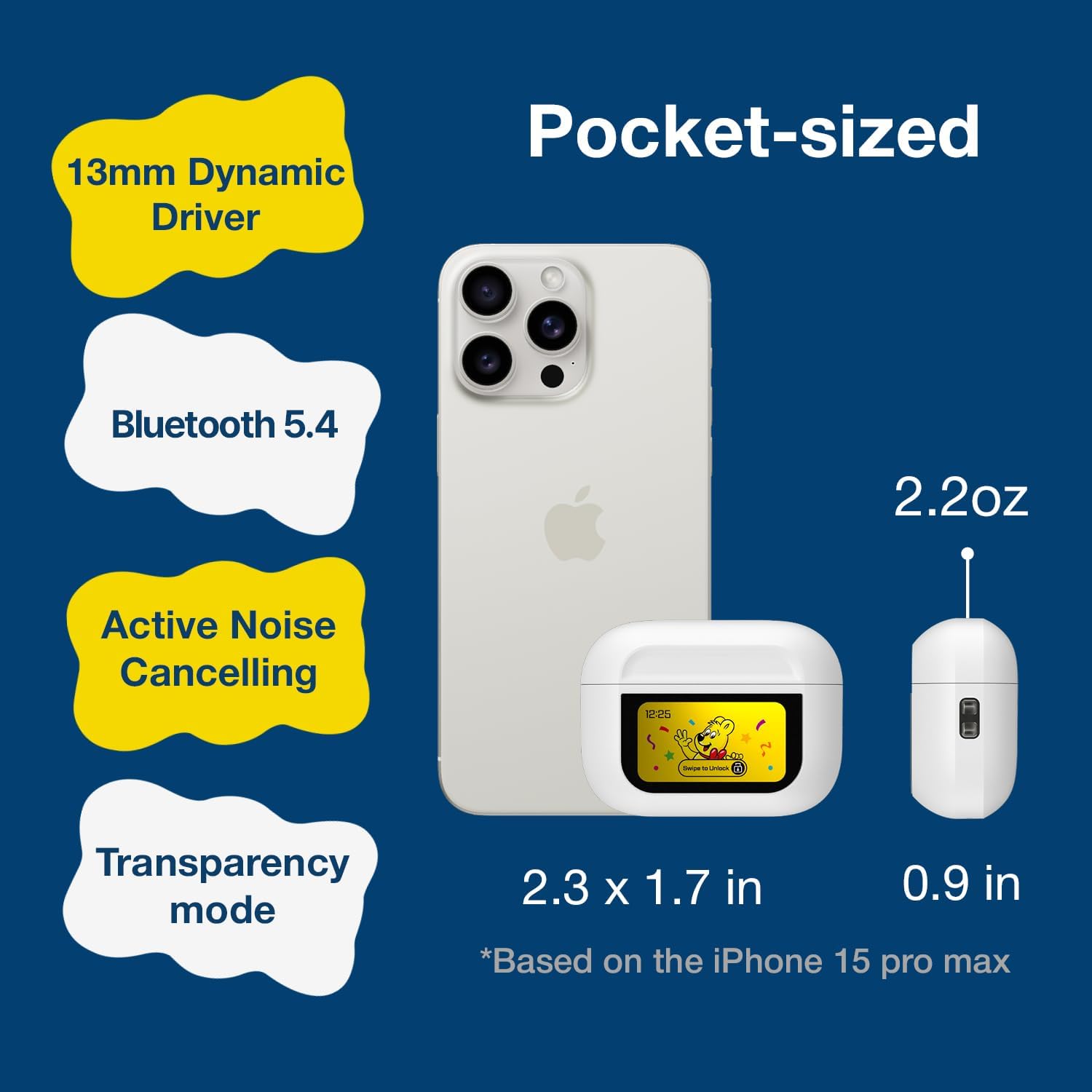
Image 2.2: The compact size of the Haribo HBT-03 Earbuds and case, shown next to a smartphone for scale. The case dimensions are approximately 2.3 x 1.7 inches, and the earbuds weigh 2.2 ounces.
3. התקנה
3.1 טעינת האוזניות והנרתיק
- הניחו את האוזניות במארז הטעינה. ודאו שהן יושבות כראוי.
- Connect the USB-C end of the charging cable to the port on the charging case.
- חבר את קצה ה-USB-A של כבל הטעינה למקור מתח USB תואם (למשל, מתאם קיר, יציאת USB של המחשב).
- The LCD screen on the case will display the charging status and battery levels.
A full charge for the case takes approximately 1.5 hours. The earbuds charge while inside the case.

Image 3.1: Charging information for the Haribo HBT-03 Earbuds. The image indicates a 1.5-hour charging time, 5 hours of single play time, and up to 12 hours of total play time with the charging case.
3.2 זיווג עם מכשיר
- ודאו שהאוזניות טעונות ומונחות בתוך מארז הטעינה.
- פתחו את מכסה מארז הטעינה. האוזניות ייכנסו אוטומטית למצב צימוד.
- במכשיר שלך (סמארטפון, טאבלט, מחשב נייד), הפעל את Bluetooth.
- חפש available Bluetooth devices and select "HBT-03" from the list.
- Once connected, the earbuds will indicate successful pairing, and the device will show them as connected.
The Bluetooth 5.4 technology provides an improved transmission range of up to 32 feet (10 meters).

Image 3.2: Bluetooth 5.4 connectivity features of the Haribo HBT-03 Earbuds, highlighting a 32ft improved transmission range, high-quality audio, optimized energy consumption, and extraordinary connection stability.
3.3 התאמת האוזניות
- Select the eartips that provide the most comfortable and secure fit for your ears. A proper seal is crucial for optimal sound quality and noise cancellation.
- הכניסו בעדינות כל אוזניה לתעלת האוזן וסובבו קלות כדי להבטיח התאמה הדוקה.

Image 3.3: Available eartip sizes (Small: 0.45in, Medium: 0.47in, Large: 0.51in) for the Haribo HBT-03 Earbuds, designed for a perfectly fitting and secure experience.
4. תפעול
4.1 בקרות מגע באוזניות
לאוזניות יש אזורים רגישים למגע לשליטה בפונקציות שונות:
- הפעל/השהה: הקשה אחת על אחת האוזניות.
- הרצועה הבאה: הקש שלוש פעמים על האוזניה הימנית.
- רצועה קודמת: הקש שלוש פעמים על האוזניה השמאלית.
- הגבר קול: החליקו למעלה באחת מהאוזניות.
- להנמיך קול: החלק למטה על כל אחת מהאוזניות.
- מענה/סיום שיחה: הקשה אחת על אחת האוזניות.
- דחה שיחה: לחיצה ארוכה על כל אחת מהאוזניות.
- Activate Voice Assistant (Siri, Bixby, Google Assistant): לחיצה ארוכה על האוזניה השמאלית.
- Toggle ANC/Transparency/Normal Mode: לחיצה ארוכה על האוזניה הימנית.
- מצב משחק/מצב מוזיקה: הקשה ארבע פעמים על אחת האוזניות.
4.2 LCD Touchscreen Case Functions
The charging case features a full-color LCD touchscreen for advanced controls and settings. Swipe to unlock the screen and navigate through the options.

תמונה 4.1: נגמרview of the various functions available on the Haribo HBT-03 Earbuds' LCD touchscreen case. These include Battery Level Display, Change Song, Volume Control, Screen Brightness Adjustment, Equalizing (EQ modes), Like Button (for TikTok), Find My Earbuds, Remote Photo Capture, Set Current Time, Noise Reduction (ANC/Transparency), Flashlight, Screen Lock, Language Switch, Settings Menu (Power Off, Factory Reset), and Set Alarm.
Available functions on the LCD screen include:
- תצוגת רמת סוללה: Shows battery status of both earbuds and the case.
- בקרות השמעת מוזיקה: הפעלה, השהיה, דילוג על רצועות.
- התאמת עוצמת הקול: שליטה על רמת פלט השמע.
- טיפול בשיחות: מענה, סיום או דחיית שיחות.
- ביטול רעשים ושקיפות: מעבר בין מצבי ANC, שקיפות ורגיל.
- מצבי EQ: Select from 5 adjustable EQ modes (Standard, Classic, Jazz, Rock, Popular).
- בקרת מצלמה: Remotely trigger your smartphone camera.
- החלפת שפה: שנה את שפת התצוגה.
- התאמה אישית של טפט: Personalize the screen background.
- התאמת בהירות המסך: Modify display intensity.
- מצא את האוזניות שלי: מסייע באיתור אוזניות שאינן במקומן.
- פָּנַס כִּיס: Activates a small light on the case.
- שָׁעוֹן עֶצֶר: הגדר טיימר ספירה לאחור.
- תפריט הגדרות: Access options like Power Off and Factory Reset.
4.3 הפעלה/כיבוי
- הפעלה: פתחו את מכסה מארז הטעינה, והאוזניות יידלקו אוטומטית.
- כיבוי: Place the earbuds back into the charging case and close the lid. They will automatically power off and begin charging. You can also power off via the LCD screen settings.
5. תחזוקה
5.1 ניקוי
- נקו באופן קבוע את האוזניות ואת נרתיק הטעינה בעזרת מטלית רכה, יבשה ונטולת סיבים.
- הסירו את קצות האוזניים ונקו אותם עם סבון עדין ומים במידת הצורך. ודאו שהם יבשים לחלוטין לפני חיבורם מחדש.
- Use a cotton swab to gently clean the charging contacts on both the earbuds and inside the case.
- הימנעו משימוש בחומרים שוחקים, אלכוהול או חומרי ניקוי כימיים.
5.2 אחסון
- כאשר אינן בשימוש, אחסנו את האוזניות בנרתיק הטעינה שלהן כדי להגן עליהן ולשמור עליהן טעונות.
- יש לאחסן את המוצר במקום קריר ויבש, הרחק מטמפרטורות קיצוניות ואור שמש ישיר.
5.3 עמידות למים (IPX4)
The earbuds are rated IPX4, meaning they are resistant to splashing water from any direction. This makes them suitable for workouts and light rain. They are לֹא designed for submersion in water or exposure to pressurized water jets.
6. פתרון תקלות
אם אתם נתקלים בבעיות עם האוזניות שלכם, עיינו בבעיות הנפוצות ובפתרונות הבאות:
| בְּעָיָה | פתרון אפשרי |
|---|---|
| האוזניות לא מתחברות למכשיר |
|
| אין צליל באחת האוזניות או משתיהן |
|
| מארז טעינה לא נטען |
|
| פקדי המגע אינם מגיבים |
|
| LCD screen not responding |
|
7. מפרטים
| תכונה | פְּרָט |
|---|---|
| שם הדגם | HBT-03 |
| גרסת בלוטות' | 5.4 |
| טווח בלוטות' | עד 32.8 רגל (10 מטר) |
| גודל מנהל התקן שמע | דרייבר דינמי 13 מ"מ |
| תגובת תדר | 20 הרץ - 20 קילוהרץ |
| עַכָּבָּה | 32 אוהם |
| בקרת רעש | ביטול רעש פעיל (ANC) |
| עמידות במים | IPX4 |
| חיי סוללה של אוזניות | Approx. 4.5 - 8 hours (depending on usage) |
| זמן נגינה כולל (עם כיסוי) | עד 12 שעות |
| מארז טעינה קיבולת סוללה | 300 מיליאמפר/שעה |
| זמן טעינה (מארז) | כ. 1.5 שעות |
| יציאת טעינה | USB-C |
| סוג בקרה | בקרת מגע (אוזניות), מסך מגע (כיסוי) |
| חוֹמֶר | ABS פלסטיק |
| משקל פריט | 2.2 אונקיות (סה"כ) |
| מידות המארז | 2.4 x 0.95 x 1.8 אינץ' (בערך) |
8. מידע בטיחות
- אין לפרק או לשנות את המוצר.
- Avoid exposing the product to extreme temperatures, direct sunlight, or open flames.
- Keep the product away from water and liquids, except for the IPX4-rated resistance to splashes.
- אין להשתמש באוזניות בעוצמות שמע גבוהות מדי למשך פרקי זמן ממושכים כדי למנוע נזק לשמיעה.
- הרחק מהישג ידם של ילדים וחיות מחמד.
- יש להשליך סוללות ורכיבים אלקטרוניים בצורה אחראית בהתאם לתקנות המקומיות.
9. אחריות ותמיכה
DCHK provides a limited warranty for this product. For specific warranty terms and conditions, please refer to the warranty card included in your package or contact DCHK customer support.
תמיכת לקוחות:
If you have any questions, require technical assistance, or need to report an issue, please contact our customer support team through the retailer's platform or the official DCHK webאֲתַר.


