1. הקדמה
This manual provides detailed instructions for setting up, operating, and maintaining your BenQ EW2790U 27-inch 4K monitor. Please read this manual thoroughly before using the monitor to ensure proper functionality and to prevent damage.
2. מידע בטיחות
יש להקפיד תמיד על אמצעי הזהירות הבסיסיים הבאים כדי להפחית את הסיכון לשריפה, התחשמלות ופציעה:
- אין לחשוף את הצג לגשם או לחות.
- אל תפתח את הצג גasinז; הפנה את הטיפול לטכנאים מוסמכים.
- ודא אוורור נאות סביב הצג.
- Use only the power cord and adapter provided by BenQ.
- נתק את הצג מהחשמל במהלך סופות ברקים או כאשר אינו בשימוש למשך תקופות ארוכות.
3. תכולת החבילה
ודא שכל הפריטים נמצאים בחבילה שלך:
- BenQ EW2790U 27-inch 4K Monitor
- כבל חשמל
- כבל HDMI
- כבל USB-C
- מדריך להתחלה מהירה
- תעודת אחריות
4. התקנה
4.1 הרכבת המעמד
- הנח את הצג כשפניו כלפי מטה על משטח רך ונקי כדי למנוע שריטות.
- חברו את בסיס המעמד לצוואר המעמד ואבטחו אותו באמצעות הבורג המצורף.
- יישר את מכלול המעמד עם חריץ ההרכבה בגב הצג ודחף עד שייכנס למקומו בנקישה.

Figure 4.1: Assembled BenQ EW2790U monitor.
4.2 כבלים חיבור
חבר את הכבלים הדרושים לצג ולמחשב שלך:
- כּוֹחַ: חבר את כבל החשמל לכניסת החשמל של הצג ולאחר מכן לשקע חשמל.
- וִידֵאוֹ:
- HDMI: Connect an HDMI cable from your computer's HDMI output to one of the monitor's HDMI ports (HDMI 1, 2, or 3).
- USB-C: Connect a USB-C cable from your computer's USB-C port to the monitor's USB-C (65W) port for video, data, and power delivery.
- USB במורד: Connect USB-A devices to the USB-A 3.2 downstream ports on the monitor.
- שֶׁמַע: חבר אוזניות לשקע האוזניות אם תרצה.

איור 4.2: אחורי view of BenQ EW2790U showing connectivity ports.

איור 4.3: מפורט view of BenQ EW2790U input/output ports.
4.3 התאמת הארגונומיה
The EW2790U monitor offers various adjustments for comfortable viewing:
- התאמת גובה: הרם או הנמך את הצג לגובה העיניים המועדף עליך.
- הטיה: כוונן את הזווית האנכית של המסך.
- לְהִסְתוֹבֵב: סובב את המסך אופקית.
- צִיר: סובב את המסך ב-90 מעלות למצב צפייה לאורך.

Figure 4.4: BenQ EW2790U monitor pivot adjustment.
5. הפעלת המוניטור
5.1 הפעלה/כיבוי
Press the Power key located on the bottom right of the monitor to turn it on or off.

Figure 5.1: Monitor controls: Scenario hotkey, 5-way controller, and Power key.
5.2 תפריט תצוגה על המסך (OSD).
Use the 5-way controller on the bottom bezel to navigate the OSD menu and adjust settings such as brightness, contrast, color mode, and input source.
5.3 Scenario Hotkey
The Scenario hotkey allows quick access to custom or preset optimal monitor settings for various uses like work, studying, gaming, or watching movies.
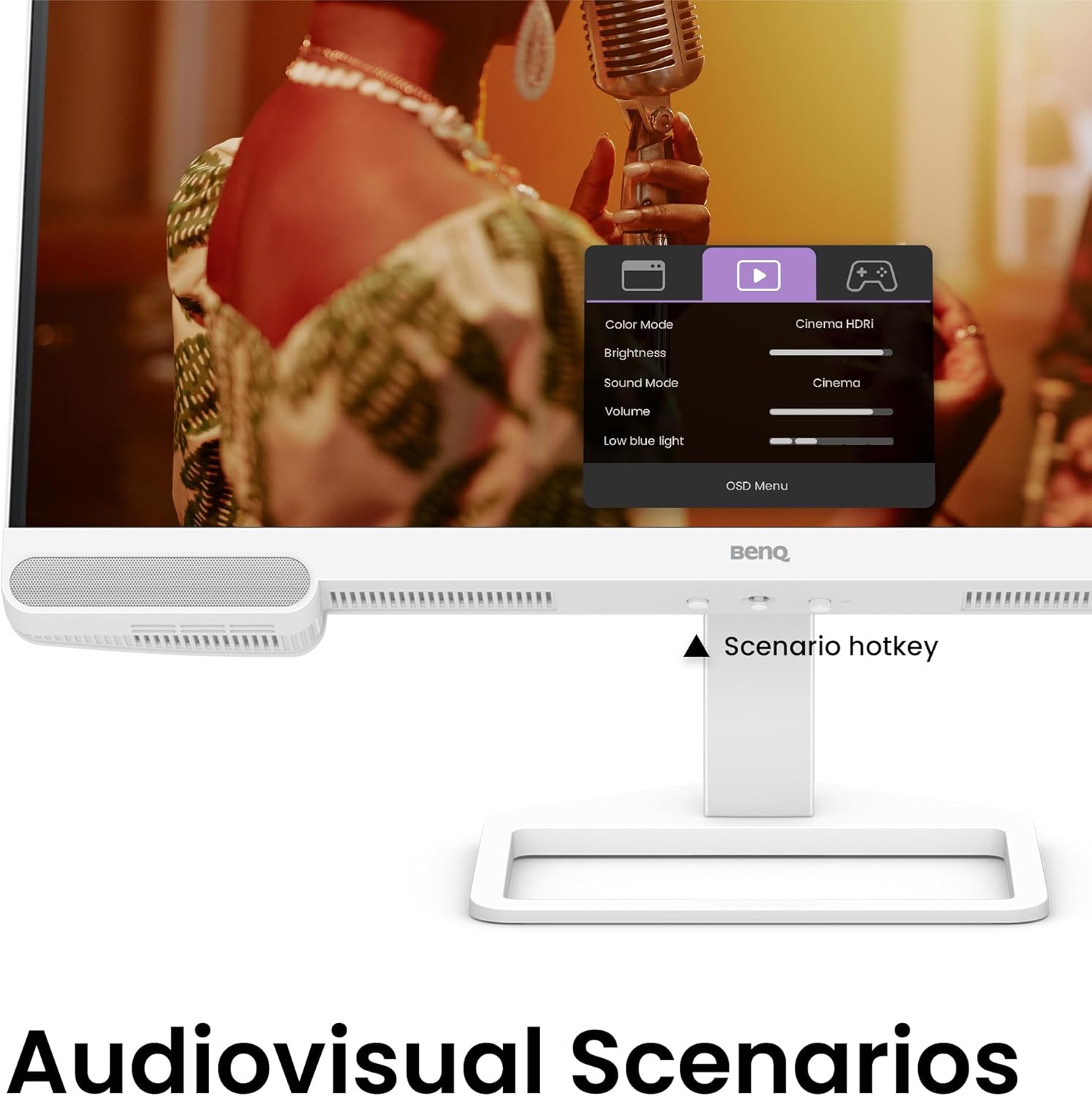
Figure 5.2: OSD menu accessed via Scenario hotkey.
5.4 AI Contrast Technology
The exclusive AI Contrast technology intelligently adjusts the contrast based on the displayed content, optimizing image quality without affecting other areas of the screen.

Figure 5.3: Demonstration of AI Contrast technology.
רמקולים מובנים 5.5
The monitor includes a pair of 5W built-in speakers for audio output. Adjust the volume through the OSD menu or your connected device.

Figure 5.4: BenQ EW2790U built-in 5W speakers.
6. תחזוקה
6.1 ניקוי הצג
- נתק תמיד את הצג לפני הניקוי.
- השתמש קלות במטלית רכה נטולת מוך דampנשטפו במים או בחומר ניקוי עדין ולא שוחק.
- אין לרסס חומר ניקוי ישירות על המסך.
- Avoid using alcohol, ammonia, or abrasive cleaners, as they may damage the screen or casing.
6.2 אחסון
Store the monitor in a cool, dry place away from direct sunlight and extreme temperatures. If storing for an extended period, consider using the original packaging for protection.
7. פתרון תקלות
| בְּעָיָה | סיבה אפשרית | פִּתָרוֹן |
|---|---|---|
| אין תמונה על המסך | כבל חשמל מנותק; כבל וידאו מנותק; נבחר מקור קלט שגוי. | Ensure power and video cables are securely connected. Press the Scenario hotkey to select the correct input source. |
| התמונה מטושטשת או מעוותת | רזולוציה שגויה; כבל וידאו רופף. | Set the display resolution to 3840x2160. Check video cable connections. |
| אין קול מהרמקולים | Volume too low; Muted; Incorrect audio output selected on computer. | Adjust volume via OSD menu or computer settings. Ensure monitor is selected as audio output device. |
| AI Contrast not working as expected | Feature disabled; Specific content not optimized. | Check OSD settings to ensure AI Contrast is enabled. Performance may vary with different content. |
8. מפרטים
| תכונה | פְּרָט |
|---|---|
| גודל מסך | 27 אינץ' |
| הַחְלָטָה | 3840x2160 (4K UHD) |
| יחס גובה-רוחב | 16:9 |
| כיסוי צבע | 95% P3 |
| AI Contrast Technology | כֵּן |
| רמקולים מובנים | 2 x 5W |
| קישוריות | 1x USB Type-C (65W), 3x HDMI (2.0), USB-C 3.2 downstream, USB-A 3.2 downstream, Headphone Jack |
| עיצוב ארגונומי | כוונון גובה, הטיה, סיבוב, סיבוב על ציר |
| משקל פריט | 21.4 פאונד |
| מידות המוצר (LxWxH) | 17 x 8 x 21 אינץ' |
9. אחריות ותמיכה
Your BenQ EW2790U monitor is covered by a manufacturer's warranty. Please refer to the warranty card included in your package for specific terms and conditions. For technical support, product registration, or service inquiries, please visit the official BenQ webלאתר או לפנות למחלקת שירות הלקוחות שלהם.
Official BenQ Webאֲתַר: www.benq.com


