1. הקדמה
תודה על הרכישהasing the Artec Kids Mini Piano. This electronic keyboard is designed to provide an engaging and educational musical experience for children aged 6 and above. Featuring a 37-key keyboard, various instrument tones, rhythm patterns, and interactive play modes, it encourages creativity and musical exploration. Please read this manual thoroughly before use to ensure proper operation and to maximize your enjoyment of the product.
2. מידע בטיחות
WARNING: Not suitable for children under 3 years due to small parts. Choking hazard.
- מקור כוח: This device operates on 4 AAA batteries or via a USB Type-A to DC cable.
- כרך ידtage: DC 5V.
- צריכת חשמל: 2.5W.
- צריכה נוכחית: 0.5A.
- השגיח תמיד על ילדים במהלך המשחק.
- אין לערבב סוללות ישנות וחדשות. אין לערבב סוללות אלקליין, סטנדרטיות (פחמן-אבץ) או סוללות נטענות (ניקל-קדמיום).
- הסר את הסוללות אם המוצר אינו בשימוש למשך תקופה ארוכה.
- הרחק את המוצר ממים ולחות.
- אל תנסה לפרק או לשנות את המוצר.
3. תכונות מוצר
- מקלדת עם 37 מקשים: Allows for two-handed play.
- התאמת עוצמת הקול: 16 levels of volume control.
- Automatic Performance (8 Songs): Includes popular tunes like "Twinkle Twinkle Little Star" and "Canon."
- One-Key-One-Song Mode: Play along with accompaniment by pressing any key.
- Percussion & Animal Sounds (4 Types Each): Switch between various percussion and animal sounds.
- Instrument Tones (8 Types): Piano, Xylophone, Organ, Guitar, Violin, Harp, Trumpet, Clarinet.
- Rhythm Patterns (16 Types): Rock, Reggae, Samba, and more.
- הקלטה והשמעה: Record up to 150 notes and play them back.
- אפשרויות חשמל: Operates on 4 AAA batteries or via USB power.
- Key Stickers: Includes stickers to label white keys for easy learning.

Figure 1: Artec Kids Mini Piano in Mint Green, highlighting its 37-key design and various functions for children aged 6 and up.
4. התקנה
4.1 אספקת חשמל
The Kids Mini Piano can be powered by either 4 AAA batteries (not included) or a USB Type-A to DC cable (included).
4.1.1 התקנת סוללה
- Locate the battery compartment on the underside of the piano.
- השתמש במברג כדי לפתוח את מכסה תא הסוללות.
- הכניסו 4 סוללות AAA חדשות, תוך הקפדה על קוטביות נכונה (+/-).
- סגור את מכסה תא הסוללות ואבטח אותו באמצעות הבורג.
4.1.2 חיבור חשמל USB
Connect the included USB Type-A to DC cable to the DC 5V input port on the piano. Plug the USB Type-A end into a compatible USB power adapter (not included) or a computer USB port.

Figure 2: The Kids Mini Piano can be powered by 4 AAA batteries or a USB cable, offering flexibility for play at home or on the go.
4.2 Attaching Key Stickers
The piano comes with stickers to help beginners identify notes on the white keys. Carefully peel and apply these stickers to the corresponding white keys as shown in the diagram.
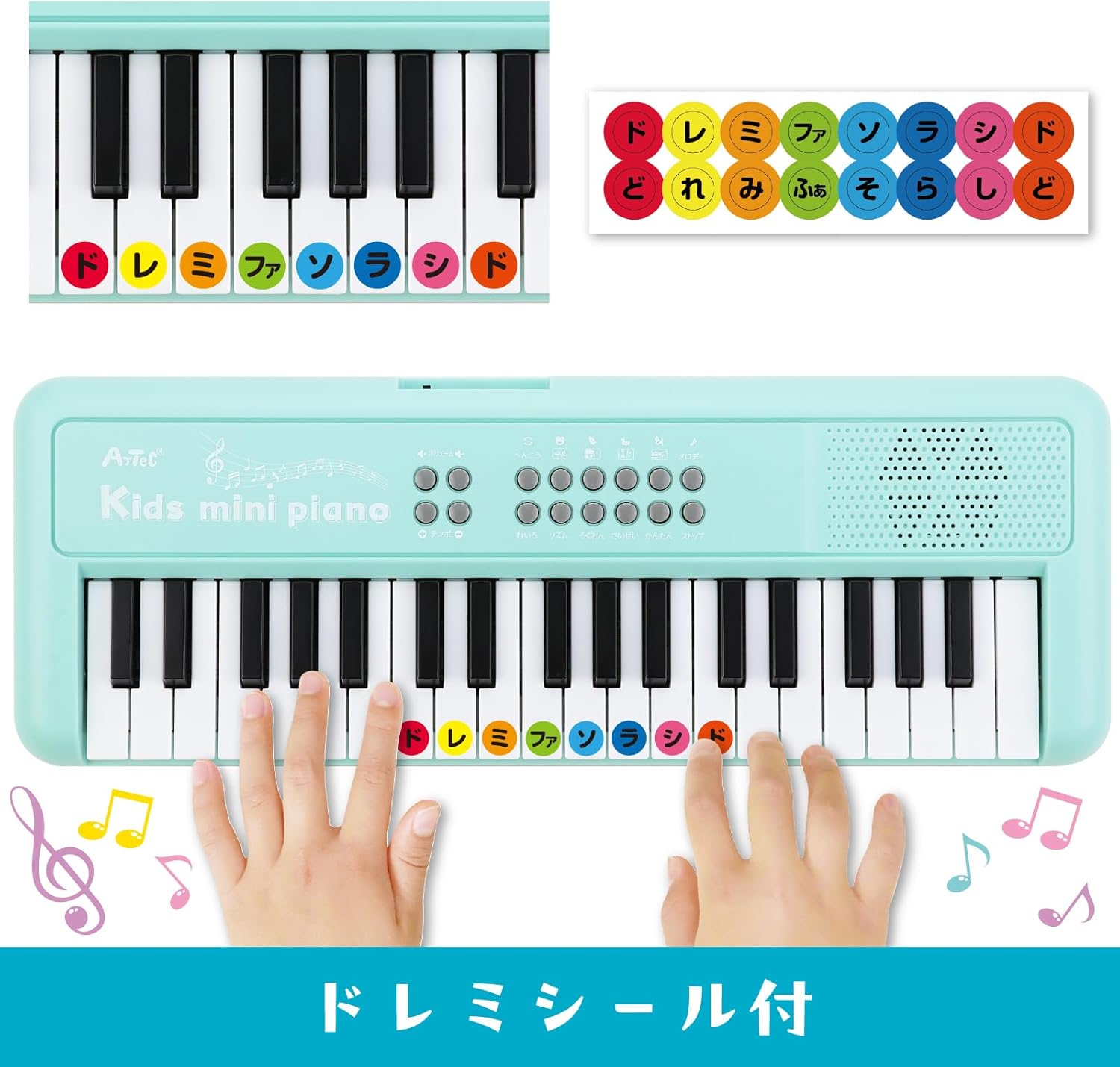
Figure 3: Apply the included 'Do Re Mi' stickers to the white keys for easy note identification and learning.
4.3 Music Stand Assembly
The detachable music stand can be inserted into the designated slot above the keyboard to hold sheet music or the included key stickers guide.
Video 1: This video demonstrates the assembly of the music stand and the application of key stickers on a similar electronic piano. Note that the piano color in the video may vary from the Mint Green product.
5. הוראות הפעלה

איור 4: מפורט view of the control panel, showing buttons for various functions including volume, tempo, melody, tone, rhythm, recording, and playback.
5.1 הפעלה/כיבוי
Locate the power button (usually on the top left or right of the control panel) and press it to turn the piano ON or OFF.
5.2 התאמת עוצמת הקול
Use the volume control buttons (often labeled with '+' and '-') to adjust the sound level. There are 16 levels of volume adjustment available.
5.3 מצבי משחק
5.3.1 מצב משחק חינם
In this mode, you can play the keys freely to create your own melodies. This is the default mode when the piano is turned on.
5.3.2 One-Key-One-Song Mode
Select a demo song, then press the 'One-Key-One-Song' button. The accompaniment will play, and you can press any key to play the melody notes in time with the music, making it easy to perform songs.
5.4 Instrument Tones (8 Types)
Press the 'Tone' button repeatedly to cycle through the 8 available instrument tones: Piano, Xylophone, Organ, Guitar, Violin, Harp, Trumpet, and Clarinet. Each press will change the sound of the keyboard.
5.5 Rhythm Patterns (16 Types)
Press the 'Rhythm' button repeatedly to select from 16 different rhythm patterns, including Rock, Reggae, and Samba. The selected rhythm will play as background music.
5.6 Percussion & Animal Sounds (4 Types Each)
Dedicated buttons allow you to switch between 4 types of percussion sounds and 4 types of animal sounds. These can be played along with your melodies or rhythms.
5.7 הקלטה והשמעה
- Press the 'Record' button to start recording your performance. The indicator light will illuminate.
- Play your desired melody (up to 150 notes).
- Press the 'Record' button again to stop recording.
- Press the 'Playback' button to listen to your recorded melody.
5.8 Demo Songs (8 Songs)
Press the 'Demo' button to play through the 8 pre-programmed demo songs. These include popular tunes like "Twinkle Twinkle Little Star," "Frère Jacques," "Mary Had a Little Lamb," "Happy Farmer," "Chouchou," "Für Elise," "Turkish March," and "Canon."
Video 2: This video demonstrates various functions of a multi-functional 37-key children's piano, including different instrument sounds, rhythms, and demo songs. The piano color in the video is pink.
Video 3: This video showcases the features of a 37-key electronic piano, including playing different notes and demonstrating various sounds. The piano color in the video is white.
6. תחזוקה
- Clean the piano with a soft, dry cloth. Do not use abrasive cleaners or solvents.
- Avoid exposing the piano to direct sunlight, high temperatures, or humidity.
- Store the piano in a cool, dry place when not in use.
- If the piano is not functioning correctly, first check the batteries or USB connection.
7. פתרון תקלות
| בְּעָיָה | סיבה אפשרית | פִּתָרוֹן |
|---|---|---|
| אין צליל או עוצמת קול נמוכה. | Low batteries, incorrect power connection, volume too low. | Replace batteries, ensure USB cable is securely connected, increase volume. |
| מקשים לא מגיבים. | בעיית חשמל, תקלה פנימית. | בדוק את ספק הכוח. אם הבעיה נמשכת, צור קשר עם תמיכת הלקוחות. |
| צליל מעוות. | Low batteries, volume too high. | Replace batteries, reduce volume. |
8. מפרטים
- מספר דגם: 75535
- מידות המוצר: 15.5 x 42.5 x 4.5 ס"מ
- משקל מוצר: 600 גרם
- חומר עיקרי: מָתנַיִם
- גיל מומלץ: 6 שנים ומעלה
- ספק כוח: 4 x AAA batteries (sold separately) or USB Type-A to DC cable (included)
- כרך ידtage: DC 5V
- צריכת חשמל: 2.5W
- צריכה נוכחית: 0.5A

Figure 5: Product dimensions and included items: Kids Mini Piano, Do Re Mi stickers, and a 1m USB Type-A to DC cable.
9. אחריות ותמיכה
For warranty information, returns, or technical support, please refer to your purchase receipt or contact the retailer directly. Keep your proof of purchase for any warranty claims.


