מָבוֹא
Thank you for choosing the Porodo Lifestyle 4K Digital Camera. This camera is designed to capture your world in stunning detail, offering 4K video recording and high-resolution 50MP images. With features like 16x digital zoom, a flip flash, and a 180° rotating screen, it is ideal for vlogging, photography, and various content creation needs. This manual provides essential information on setting up, operating, and maintaining your camera to ensure optimal performance and longevity.
מידע בטיחות
- Do not expose the camera to extreme temperatures, direct sunlight, or high humidity.
- הימנעו מהפלת המצלמה או מחשיפתה לפגיעות חזקות.
- Keep the camera away from water and liquids unless specifically designed for underwater use (this model is not).
- אל תנסה לפרק או לשנות את המצלמה. פעולה זו תגרום לביטול האחריות.
- השתמש רק בסוג הסוללה ובשיטת הטעינה שצוינו.
- הרחק מהישג ידם של ילדים.
תוכן החבילה
אנא סמן את התיבה עבור הפריטים הבאים:
- Porodo Lifestyle 4K Digital Camera
- סוללה נטענת (650mAh)
- כבל טעינה מסוג C
- מדריך למשתמש (מסמך זה)
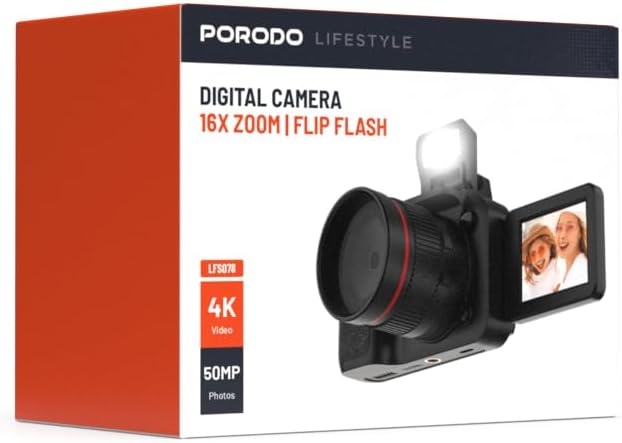
תמונה: חזית view of the Porodo Lifestyle 4K Digital Camera retail box, showing the camera and key features.

תמונה: גב view of the Porodo Lifestyle 4K Digital Camera retail box, displaying product specifications and features.
המוצר נגמרview
Familiarize yourself with the various parts of your Porodo Lifestyle 4K Digital Camera.

Image: The Porodo Lifestyle 4K Digital Camera shown with its 180° rotating screen flipped open and the integrated flash extended upwards.
- עֲדָשָׁה: Main optical component for capturing images and videos.
- Flip Flash: מספק תאורה נוספת בתנאי תאורה חלשים.
- 180° Rotating Screen (2.2'' Display): מאפשר גמישות viewing angles, ideal for vlogging and selfies.
- לחצן הפעלה: מדליק/מכבה את המצלמה.
- לחצן תריס: מצלם תמונות או מתחיל/מפסיק הקלטת וידאו.
- בקרות זום: Adjusts the 16x digital zoom.
- לחצני ניווט: For menu navigation and settings adjustment.
- סוג C נמל: לטעינה והעברת נתונים.
- חריץ לכרטיס זיכרון: For inserting an SD card (not included).
הגדרה
1. התקנה וטעינה של הסוללה
- אתר את מכסה תא הסוללה בתחתית המצלמה.
- החלק את התפס כדי לפתוח את המכסה.
- הכנס את סוללת 650mAh המצורפת, וודא שהמגעים מיושרים כהלכה.
- Close the battery compartment cover until it clicks securely.
- Connect the camera to a power source using the Type-C charging cable. The charging indicator will illuminate.
- טעינה מלאה אורכת כשעתיים. המחוון ישתנה או יכבה לאחר השלמת הטעינה.
2. התקנת כרטיס זיכרון
A memory card (SD card, not included) is required to store photos and videos.
- Locate the memory card slot, usually on the side or bottom of the camera.
- Insert the SD card with the metal contacts facing the correct direction (refer to the diagram near the slot if available) until it clicks into place.
- כדי להוציא, דחפו בעדינות את הכרטיס פנימה עד שייחלץ.
3. הפעלה ראשונית
- לחץ והחזק את לחצן ההפעלה למשך מספר שניות עד שהמסך יידלק.
- Upon first use, you may be prompted to set the date and time. Use the navigation buttons to adjust and confirm.
הוראות הפעלה
Basic Photo Mode (50MP)
- Turn on the camera. It will typically default to photo mode.
- Frame your shot using the 2.2'' display.
- Press the Shutter button halfway down to focus (if applicable).
- Press the Shutter button fully to capture a 50MP image.

Image: A person holding the Porodo Lifestyle 4K Digital Camera, demonstrating a typical usage scenario for capturing photos.

תמונה: עוד אחת view of a person holding the Porodo Lifestyle 4K Digital Camera, illustrating the camera's ergonomic design during use.
Basic Video Mode (4K)
- Switch the camera to video mode (usually via a dedicated button or menu option).
- Press the Shutter button once to start 4K video recording. A recording indicator (e.g., red dot, timer) will appear on the screen.
- לחץ שוב על לחצן הצמצם כדי לעצור את ההקלטה.

Image: The Porodo Lifestyle 4K Digital Camera highlighting its 4K video resolution capability.
Using the 16X Digital Zoom
- While in photo or video mode, use the zoom controls (often marked with 'W' for Wide and 'T' for Telephoto) to adjust the 16x digital zoom.
- Press 'T' to zoom in and 'W' to zoom out.
Using the Flip Flash
- To activate the flash, manually flip it up from its resting position.
- The camera will automatically use the flash when needed in low-light conditions, depending on your flash settings (e.g., Auto, Fill-in, Red-eye reduction).
- To turn off the flash, gently push it back down until it locks into place.
Using the 180° Rotating Screen
- The 2.2'' display can be rotated 180 degrees.
- Flip the screen out from the side of the camera and rotate it to face forward for selfies or vlogging, or to various angles for creative shots.
- Ensure the screen is securely positioned before shooting.

Image: The Porodo Lifestyle 4K Digital Camera illustrating its 2.2-inch display and 180-degree flip screen functionality.
Playback and Deleting Files
- Enter Playback mode (usually via a dedicated button or menu option).
- השתמשו בכפתורי הניווט כדי לגלול בין התמונות והסרטונים שלכם.
- כדי למחוק א file, select it and press the Delete button (often marked with a trash can icon). Confirm deletion when prompted.
חיבור למחשב
- כבה את המצלמה.
- חבר את המצלמה למחשב באמצעות כבל Type-C המצורף.
- Turn on the camera. It should appear as a removable disk drive on your computer.
- You can now transfer photos and videos to your computer.
תַחזוּקָה
ניקוי המצלמה
- השתמש במטלית רכה ונטולת סיבים כדי לנקות את גוף המצלמה.
- For the lens and screen, use a specialized lens cleaning cloth and solution. Do not use abrasive materials.
- Avoid spraying cleaning solutions directly onto the camera. Apply to the cloth first.
טיפול בסוללה
- Recharge the battery fully before first use.
- הימנעו מריקון מוחלט של הסוללה לעתים קרובות כדי להאריך את חייה.
- If storing the camera for an extended period, charge the battery to about 50% and remove it from the camera.
אִחסוּן
- אחסנו את המצלמה במקום קריר ויבש, הרחק מאור שמש ישיר וטמפרטורות קיצוניות.
- Use a camera bag or case to protect it from dust and scratches.
פתרון בעיות
| בְּעָיָה | סיבה אפשרית | פִּתָרוֹן |
|---|---|---|
| המצלמה לא נדלקת. | הסוללה מתה או לא מותקנת כראוי. | טען את הסוללה. ודא שהסוללה מוכנסת עם הקוטביות הנכונה. |
| לא ניתן לצלם תמונות/סרטונים. | כרטיס הזיכרון מלא, לא מוכנס, או פגום. | הכנס כרטיס זיכרון. מחק נתונים מיותרים. files. Format the card (this will erase all data). |
| תמונות/סרטונים מטושטשים. | Lens is dirty. Insufficient light. Camera shake. | Clean the lens. Use the flash or shoot in brighter conditions. Hold the camera steady. |
| הפלאש לא עובד. | Flash is not flipped up. Flash setting is off. | Ensure the flash is manually flipped up. Check flash settings in the menu. |
| המצלמה קופאת. | תקלה בתוכנה. | הסר והכנס מחדש את הסוללה כדי לאפס את המצלמה. |
מפרטים
Detailed technical specifications for the Porodo Lifestyle 4K Digital Camera:

Image: Visual representation of the camera's core capabilities: 4K video, 50MP photos, and 16x digital zoom.

Image: A detailed table outlining the technical specifications of the Porodo Lifestyle 4K Digital Camera.
- שם הדגם: Porodo Lifestyle 4K Digital Camera – 50MP, 16x Zoom, Flip Flash, 180° Rotating Screen
- מספר דגם של פריט: 6849108448116
- מותג: פורודו
- מַקסִימוּם Webרזולוציית תמונה של מצלמת: 50 מגה פיקסל
- רזולוציית וידאו: 4K (3840x2160)
- זום דיגיטלי: 16X
- זום אופטי: 1.0
- לְהַצִיג: 2.2'' (180° Rotating Screen)
- קיבולת סוללה: 650mAh (1 P76 battery included)
- זמן עבודה: עד 3 שעות
- זמן טעינה: בערך שעתיים
- יציאת טעינה: סוג-C
- טכנולוגיית חיישן תמונה: CMOS
- נתמך File פורמטים: JPG (images), AVI (videos)
- ייצוב תמונה: דִיגִיטָלי
- יחס גובה-רוחב: 16:9, 4:3
- תיאור מדידה: לְזַהוֹת
- מידות המוצר: 6 x 13 x 9 ס"מ; 310 גרם
- ארץ מוצא: סִין
אחריות ותמיכה
Porodo products are designed with quality and reliability in mind. For warranty information and technical support, please refer to the official Porodo webאתר או צור קשר עם המפיץ המקומי שלך.
תמיכה מקוונת: בקר ב Porodo Store on Amazon לקבלת מידע ועדכונים על המוצר.
אפשרויות אחריות מורחבת: Additional warranty plans may be available through authorized retailers. Please check with your point of purchase for details.


