1. הקדמה
תודה על הרכישהasing the XO F41 Mirror Bluetooth Speaker. This device combines a digital clock display with a portable Bluetooth speaker, offering multiple playback options including Bluetooth, TF card, and FM radio. Please read this manual carefully before use to ensure proper operation and to maximize your experience with the product.

Image 1.1: The XO F41 Mirror Bluetooth Speaker in use, showing its digital clock display.
2. תכונות מוצר
- קישוריות Bluetooth 5.3: להזרמת שמע אלחוטית יציבה ויעילה.
- תצוגת מראה: Clear digital time display with adjustable brightness.
- מצבי השמעה מרובים: Supports Bluetooth, TF card, and FM radio.
- מיקרופון משולב: לשיחות ללא ידיים.
- זמן השמעה ארוך: Up to 8 hours at 50% volume, 5 hours at 100% volume.
- עיצוב קומפקטי ונייד: Easy to carry and place anywhere.
- טעינת USB-C: שקע טעינה מודרני ונוח.
3. תכולת החבילה
אנא בדקו את החבילה עבור הפריטים הבאים:
- XO F41 Mirror Bluetooth Speaker
- כבל טעינה USB-C
- מדריך למשתמש

Image 3.1: The XO F41 Mirror Bluetooth Speaker packaging.
4. פריסת המכשיר ובקרות
הכירו את הכפתורים והיציאות של הרמקול:
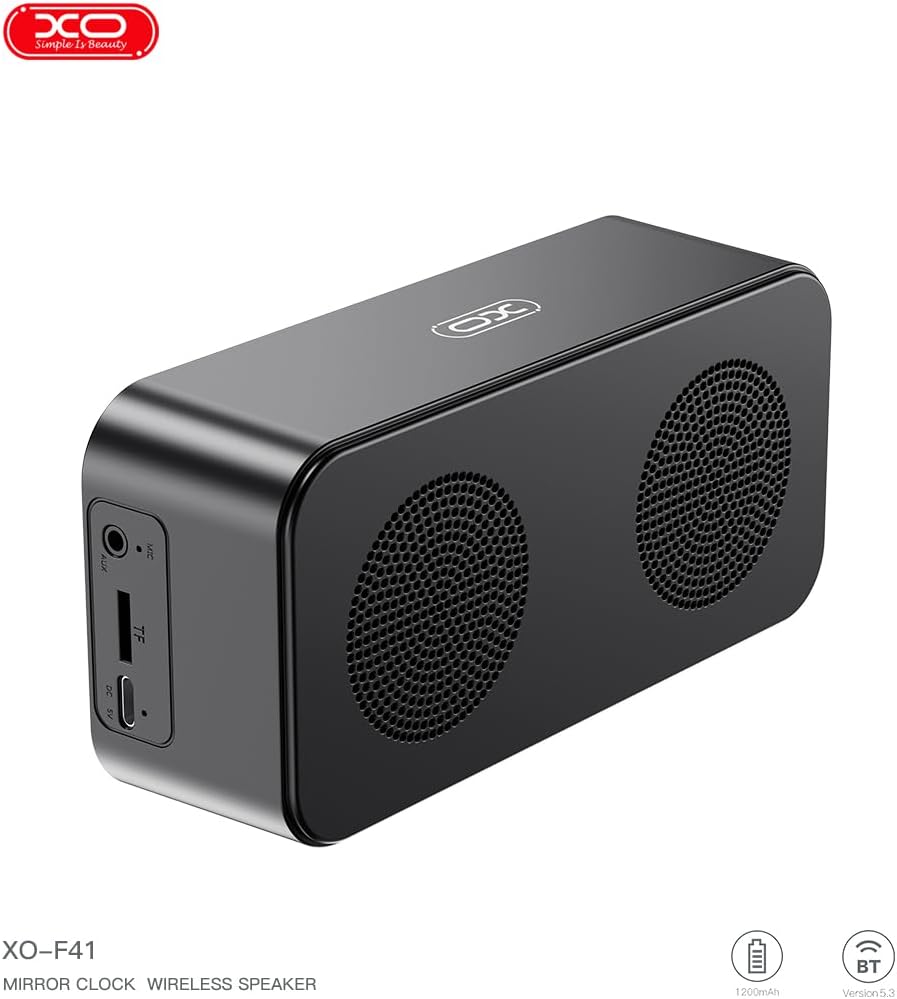
תמונה 4.1: צד view of the XO F41 with ports labeled.
- לחצן הפעלה: לחץ לחיצה ממושכת כדי להפעיל/לכבות. לחיצה קצרה כדי להחליף מצבים.
- לחצן הפעלה/השהה: השמעה או השהיה של אודיו. מענה/ניתוק שיחות.
- הגברת עוצמת הקול/הרצועה הבאה: לחיצה קצרה להגברת עוצמת הקול, לחיצה ארוכה לרצועה הבאה.
- הורדת עוצמת הקול/הרצועה הקודמת: לחיצה קצרה להנמכת עוצמת הקול, לחיצה ארוכה לרצועה הקודמת.
- יציאת USB-C: לטעינת המכשיר.
- חריץ כרטיס TF: הכנס כרטיס TF (MicroSD) להשמעת מוזיקה מקומית.
- יציאת AUX: עבור קלט שמע קווי.
5. התקנה
5.1 טעינת הרמקול
- חברו את כבל ה-USB-C המצורף ליציאת הטעינה ברמקול.
- חבר את הקצה השני של הכבל לספק כוח USB (לא כלול) או ליציאת USB של מחשב.
- The charging indicator will illuminate. It takes approximately 3 hours for a full charge.
- The indicator will turn off or change color once fully charged.
5.2 הפעלה/כיבוי
- כדי להפעיל: לחץ והחזק את לחצן ההפעלה למשך כ-3 שניות. תשמע הנחיה קולית.
- כדי לכבות: לחץ והחזק את לחצן ההפעלה למשך כ-3 שניות. תשמע הנחיה קולית.
6. הוראות הפעלה
6.1 זיווג בלוטות '
- Ensure the speaker is powered on and in Bluetooth mode. If not, short press the Power button to cycle through modes until "BT" or a Bluetooth icon appears on the display.
- במכשיר הנייד שלך, הפעל את Bluetooth וחפש מכשירים זמינים.
- Select "XO-F41" from the list of devices.
- לאחר הצימוד, הרמקול יציין חיבור מוצלח, ותוכלו להתחיל להשמיע אודיו מהמכשיר שלכם.
6.2 מצב כרטיס TF
- הכנס כרטיס TF (MicroSD) עם אודיו MP3 files לתוך חריץ כרטיס TF.
- The speaker will automatically switch to TF card mode and begin playing music. If not, short press the Power button to cycle to TF card mode.
- Use the Volume Up/Down buttons for track navigation and the Play/Pause button for playback control.
מצב רדיו 6.3 FM
- Short press the Power button to switch to FM radio mode. The display will show the FM frequency.
- לחץ לחיצה ארוכה על כפתור ההפעלה/השהיה כדי לסרוק ולשמור אוטומטית תחנות FM זמינות.
- Short press the Volume Up/Down buttons to switch between saved stations.
6.4 הגדרות שעון ושעון מעורר
The XO F41 features a digital clock display. Specific instructions for setting the time and alarm are typically found in the detailed manual included with the product. Generally, a dedicated 'M' (Mode) or 'Set' button is used to enter time/alarm setting mode, and volume buttons are used to adjust values.

Image 6.1: The XO F41 speaker functioning as a bedside clock.
6.5 כוונון בהירות התצוגה
The display brightness is adjustable. Look for a dedicated button (often labeled with a sun icon or similar) or a combination of button presses (e.g., double-pressing the Power button) to cycle through brightness levels. Refer to the included quick start guide for exact steps.
7. תחזוקה
- ניקוי: השתמשו במטלית רכה ויבשה לניקוי משטח הרמקול. אין להשתמש בחומרי ניקוי שוחקים או ממסים.
- אִחסוּן: יש לאחסן את הרמקול במקום קריר ויבש, הרחק מאור שמש ישיר וטמפרטורות קיצוניות, כאשר אינו בשימוש למשך תקופות ממושכות.
- עמידות במים: מכשיר זה אינו עמיד למים. יש להימנע מחשיפה למים או ללחות מוגזמת.
- טיפול בסוללה: כדי להאריך את חיי הסוללה, הימנעו מפריקה מלאה של הסוללה לעתים קרובות. טען את המכשיר באופן קבוע, גם אם אינו בשימוש רציף.
8. פתרון תקלות
| בְּעָיָה | סיבה אפשרית | פִּתָרוֹן |
|---|---|---|
| הרמקול לא נדלק. | סוללה חלשה. | טען את הרמקול למשך 30 דקות לפחות. |
| לא ניתן לבצע צימוד דרך בלוטות'. | Speaker not in pairing mode; Bluetooth disabled on device; too far from device. | Ensure speaker is in Bluetooth mode. Enable Bluetooth on your device. Move speaker closer to your device (within 10 meters). |
| No sound from TF card. | TF card not inserted correctly; unsupported file format; no audio files on card. | Reinsert TF card. Ensure files are in MP3 format. Verify audio files are present on the card. |
| קליטת רדיו FM גרועה. | אות חלש; הפרעות סביבתיות. | Move the speaker to a different location. Re-scan for stations. |
9. מפרטים
| תכונה | פְּרָט |
|---|---|
| מספר דגם | XO-F41 |
| גרסת בלוטות' | Bluetooth V5.3 |
| תדר בלוטות' | 2.402GHz-2.480GHz |
| קיבולת סוללה | 1200mAh |
| כניסת טעינה | USB-C, DC5V/0.5A |
| זמן טעינה | בערך שעתיים |
| זמן משחק | 8H (50% volume); 5H (100% volume) |
| מרחק יעיל | פחות מ -10 מטר |
| כוח מקסימלי | 5W |
| יחידת רמקול | 52 מ"מ |
| יחס אות לרעש | >80dB |
| מידות המוצר | 15 x 3.81 x 11 ס"מ (כ-150 x 45 x 72 מ"מ) |
| משקל המוצר | 320 g (approx. 0.28 kg) |
| חוֹמֶר | פּלָסטִי |
| תכונה מיוחדת | בהירות מתכווננת |

Image 9.1: Detailed product parameters.
10. מידע על אחריות
The XO F41 Mirror Bluetooth Speaker comes with a standard manufacturer's warranty. Please refer to the warranty card included in your package for specific terms, conditions, and duration. Keep your purchase receipt as proof of purchase for any warranty claims.
11. תמיכת לקוחות
For further assistance, technical support, or inquiries regarding your XO F41 Mirror Bluetooth Speaker, please contact the retailer or manufacturer's customer service department. Contact details are typically provided on the product packaging or the official brand webאֲתַר.