1. הקדמה
Thank you for choosing the FLYLINKTECH 5000A Jump Starter. This portable device is designed to provide instant power to jump-start 12V vehicles, charge electronic devices, and offer emergency lighting. Please read this manual thoroughly before use to ensure safe and optimal performance.
2. מידע בטיחות חשוב
- ודאו תמיד שהמתנע קפיצות טעון במלואו לפני השימוש.
- אל תנסה להתניע סוללה קפואה באמצעות התנעה מהירה.
- חבר את clamps correctly: red to positive (+), black to negative (-). Reverse polarity can cause damage.
- אל תחבר את cl האדום והשחורamps ביחד.
- הרחק מהישג ידם של ילדים.
- השתמש באזור מאוורר היטב.
- הימנע מחשיפת המכשיר לטמפרטורות קיצוניות או לאור שמש ישיר לתקופות ממושכות.
- If the device becomes excessively hot during use, disconnect it immediately.
- עיין במדריך למשתמש של הרכב שלך לקבלת נהלים ספציפיים להתנעה עם קפיצות.
3. תכולת החבילה
ודא שכל הפריטים נמצאים בחבילה שלך:
- FLYLINKTECH 5000A Jump Starter (Model BD10)
- כבלים מגשרים חכמים
- כבל טעינה USB-C
- מארז אחסון EVA
- מדריך למשתמש

Image: Contents of the FLYLINKTECH 5000A Jump Starter package, including the jump starter unit, smart jumper cables, USB-C charging cable, and EVA storage case.
4. המוצר נגמרview
Familiarize yourself with the components and ports of your jump starter:
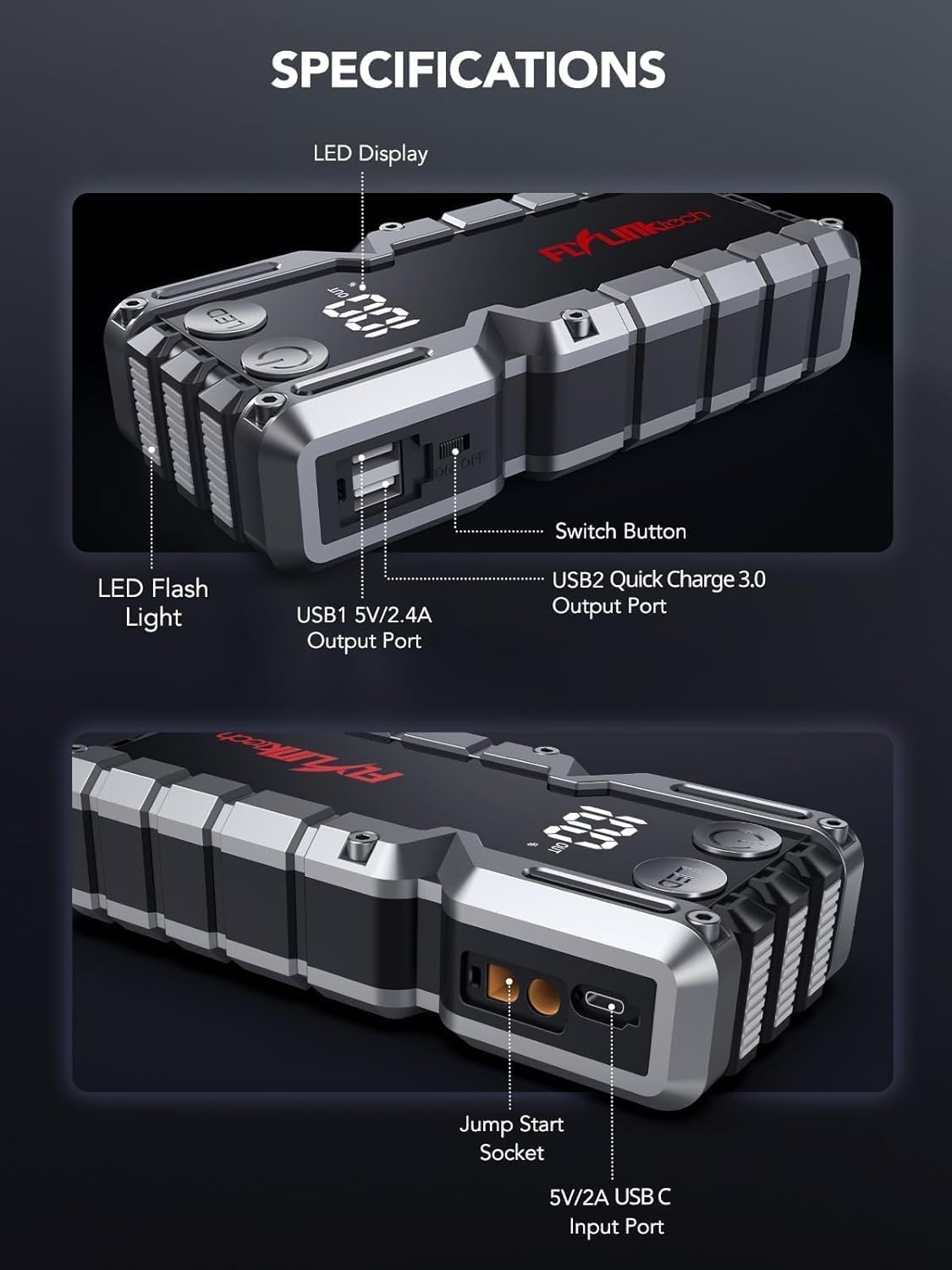
תמונה: מפורט view of the jump starter showing the LED display, LED flashlight, power button, switch button, USB1 5V/2.4A output port, USB2 Quick Charge 3.0 output port, Jump Start Socket, and 5V/2A USB-C input port.
- תצוגת לד: מראה אחוז הסוללהtage.
- פנס לד: מספק תאורה עם מספר מצבים.
- לחצן הפעלה: מפעיל את המכשיר ושולט במצבי פנס.
- כפתור מחליף: בקרת חשמל ראשית.
- יציאת USB1 (5V/2.4A): Standard USB charging port.
- USB2 Output (QC3.0): Quick Charge 3.0 port for faster charging.
- Jump Start Socket: מתחבר לכבלי הגשר החכמים.
- USB-C Input (5V/2A): Used to recharge the jump starter.
5. טעינת מתנע הקפיצה
לפני השימוש הראשון, יש לטעון את המתנע במלואו. מומלץ לטעון את היחידה כל 3-6 חודשים כדי לשמור על תקינות הסוללה.
- חבר את כבל הטעינה USB-C המצורף ליציאת הקלט USB-C במתנע הקפיצות.
- Connect the other end of the USB-C cable to a 5V/2A USB wall adapter (not included) or a car charger.
- תצוגת ה-LED תציג את התקדמות הטעינה. היחידה טעונה במלואה כאשר התצוגה מציגה 100%.

Image: The jump starter connected via USB to charge a smartphone and a tablet, demonstrating its power bank functionality.
6. התנעת רכב באמצעות חיבור חשמל
Follow these steps carefully to safely jump-start your 12V vehicle:
- הכן את מתנע הקפיצה: Ensure the jump starter is at least 50% charged. Turn off your vehicle's ignition and all accessories (headlights, radio, etc.).
- חיבור כבלי ג'אמפר חכמים: Insert the blue plug of the smart jumper cables into the Jump Start Socket on the jump starter. Ensure a firm connection. The indicator light on the smart clamp יהבהב באדום וירוק.
- חיבור לסוללת הרכב:
- צרף את אדום (+) clamp לקוטב החיובי של מצבר הרכב שלך.
- צרף את שחור (-) כלורידamp לקונסולה השלילית של מצבר הרכב שלך.
לאחר החיבור הנכון, נורית החיווי על ה-smart cl נדלקתamp יהפוך לירוק קבוע.
- הפעל את הרכב: Go into your vehicle and start the engine. If the vehicle does not start immediately, wait 30 seconds and try again. If it still doesn't start, press the "BOOST" button on the smart clamp for 3 seconds until the green light turns solid, then try starting the car again within 30 seconds.
- הסר כבלים: Once the engine starts, immediately remove the smart jumper cables from the vehicle battery, then disconnect them from the jump starter.

Image: Visual guide for jump-starting: 1. Insert jump clamp into booster. 2. Connect clamps to car battery. 3. Start your car. 4. Remove clamps.

תמונה: ה-smart clamps connected to the jump starter, illustrating the 10-layer safety protections including short circuit, reverse charge, over charge, reverse polarity, over discharge, over current, reverse connection, and high temperature protection.
7. שימוש כסוללת גיבוי
The jump starter can also be used to charge your electronic devices.
- Connect your device's USB charging cable to either the USB1 (5V/2.4A) or USB2 (QC3.0) output port on the jump starter.
- מתנע המכשיר יתחיל לטעון אותו באופן אוטומטי.
- The LED display will show the remaining battery capacity of the jump starter.

Image: The jump starter functioning as a portable power bank, with two USB output ports (5V/2.4A and Quick Charge 3.0) actively charging a smartphone and a tablet.
8. שימוש בפנס הלד
The built-in 600-lumen LED flashlight has three modes for various situations:
- כדי להפעיל/לכבות: Press and hold the LED button for 3 seconds.
- כדי לעבור בין מצבים: Once the light is on, short press the LED button to switch between:
- קבוע מופעל: לתאורה כללית.
- מצב SOS: מהבהב את אות ה-SOS הבינלאומי למקרי חירום.
- מצב Strobe: Rapid flashing for warning or signaling.

Image: The jump starter with its LED flashlight active, illustrating the three available modes: standard flashlight, SOS signal, and strobe light for emergencies.
9. תחזוקה
- ניקוי: נגבו את היחידה בעזרת מטלית רכה ויבשה. אין להשתמש בכימיקלים חזקים או בחומרים שוחקים.
- אִחסוּן: Store the jump starter in its EVA case in a cool, dry place away from direct sunlight. Ensure it is charged to at least 50% before storing for extended periods. Recharge every 3-6 months.
- טיפול בסוללה: The internal lithium-ion battery is designed for long life. Avoid fully discharging the unit frequently.

Water-resistant design.

Rugged ABS shell for drop resistance.

Operates in extreme temperatures (-4°F to 140°F).
10. פתרון תקלות
| בְּעָיָה | סיבה אפשרית | פִּתָרוֹן |
|---|---|---|
| Vehicle won't start after connecting. | Jump starter battery too low; incorrect clamp חיבור; מצבר הרכב מת לחלוטין. | ודא שהמתנע טעון במלואו. בדוק את ה-Camp connections (red to +, black to -). Press the "BOOST" button on the smart clamp for 3 seconds and try again. |
| קל חכםamp indicator light is red/flashing. | קוטביות הפוכה; קצר חשמלי; טמפרטורה גבוהה מדי. | נתק clamps and re-connect correctly. Check for any short circuits. Allow unit to cool down if overheated. |
| מתנע קפיצה לא נטען. | כבל טעינה או מתאם פגומים; חיבור רופף. | Ensure USB-C cable and adapter are working and connected securely. Try a different cable or adapter. |
| פנס LED לא עובד. | Not activated correctly; low battery. | Press and hold the LED button for 3 seconds to activate. Ensure the jump starter has sufficient charge. |
11. מפרטים
| תכונה | פְּרָט |
|---|---|
| שיא זרם | 5000A |
| קיבולת סוללה | 18000mAh (66.6Wh) |
| התחל כרךtage | 12V |
| תאימות למנוע | עד 9.0 ליטר בנזין / 8.0 ליטר דיזל |
| יציאת USB 1 | 5V/2.4A |
| יציאת USB 2 | QC3.0 |
| כניסת USB-C | 5V/2A |
| פנס לד | 600-Lumen (Constant, SOS, Strobe) |
| טמפרטורת הפעלה | -4°F עד 140°F (-20°C עד 60°C) |
| מידות | 4.2 x 9 x 19 ס"מ |
| מִשׁקָל | 540 גרם (1.19 פאונד) |
| הגנות בטיחות | 10-Layer (Short Circuit, Reverse Polarity, Over-Current, etc.) |
12. אחריות ותמיכה
The FLYLINKTECH 5000A Jump Starter comes with an industry-leading אחריות לשנה מתאריך הרכישה. אחריות זו מכסה פגמי ייצור ומבטיחה ביצועים אמינים.
For technical support, warranty claims, or any questions regarding your product, please contact FLYLINKTECH customer service through the retailer's platform or visit our official webאֲתַר.
אנא שמור את הוכחת הרכישה שלך לצורך אימות האחריות.


