1. המוצר נגמרview
The MOBAPAD N1 HD is a versatile wireless controller designed for an enhanced gaming experience across multiple platforms. It features advanced technologies such as Hall Effect Joysticks for precise control, ALPS Dual-Axis Motors for immersive HD vibration, and six-axis motion control. This controller is compatible with Nintendo Switch, PC, iOS, and Android devices, offering seamless connectivity and responsive performance.

תמונה: חזית view of the MOBAPAD N1 HD Wireless Controller, showcasinהעיצוב הארגונומי ופריסת הכפתורים שלו.
2. תכונות עיקריות
- תאימות מרובת פלטפורמות: Fully compatible with Nintendo Switch, PC, iOS, and Android devices, ensuring broad usability.
- ג'ויסטיקים עם אפקט הול: Provides smooth, precise, and durable control with minimal wear, ideal for accurate gaming.
- ALPS Dual-Axis Motors with HD Vibration: Delivers realistic and immersive haptic feedback for enhanced gameplay.
- בקרת תנועה עם שישה צירים: Built-in gyroscope enables enhanced motion control for compatible games.
- NFC for Amiibo Scanning: Supports NFC technology for scanning Amiibo figures on Nintendo Switch.

Image: The controller illustrating its immersive motion control capabilities with swirling lines around it.

Image: The controller positioned in front of a collection of Amiibo figures, highlighting its NFC scanning function.

Image: The controller shown alongside icons for Switch, Android/iOS, and PC, demonstrating its multi-device compatibility.
3. הגדרה וחיבור
Follow these steps to connect your MOBAPAD N1 HD controller to your desired device.
3.1. חיבור לנינטנדו סוויץ'
- מתפריט HOME בחר בקרים, אז שנה אחיזה/סדר.
- בזמן שמוצג על המסך "לחץ על L + R בבקר", לחץ והחזק את המקש כפתור בית on the MOBAPAD N1 HD controller for 3-5 seconds until the player LEDs begin to flash.
- Once connected, the player LED(s) corresponding to the controller number will remain lit.
3.2. חיבור למחשב (Windows)
- Connect the controller to your PC using a USB-C cable. The controller will be recognized as a wired controller.
- For wireless connection, ensure your PC has Bluetooth enabled. Go to Bluetooth & other devices settings.
- בחר "הוסף Bluetooth או התקן אחר" ובחר "Bluetooth".
- לחץ והחזק את כפתור בית on the controller until the LEDs flash rapidly, indicating pairing mode.
- Select "MOBAPAD N1 HD" from the list of available devices.
3.3. חיבור למכשירי iOS/אנדרואיד
- הפעל Bluetooth במכשיר iOS או Android שלך.
- Go to Bluetooth settings and search for new devices.
- לחץ והחזק את כפתור בית on the controller until the LEDs flash rapidly.
- Select "MOBAPAD N1 HD" from the list of available devices to pair.
4. הפעלת הבקר
Familiarize yourself with the controller's layout and functions for optimal gameplay.
4.1. פריסת כפתורים
- סטיק אנלוגי שמאלי: For movement and camera control. Features Hall Effect technology.
- סטיק אנלוגי ימני: For camera control and aiming. Features Hall Effect technology.
- D-Pad: Directional input for menu navigation and specific game actions.
- כפתורי A/B/X/Y: כפתורי פעולה סטנדרטיים.
- כפתורי שמאל/ימין: כפתורי כתף.
- כפתורי ZL/ZR: כפתורי טריגר.
- לחצן מינוס (-): Typically for opening in-game menus or specific functions.
- כפתור פלוס (+): Typically for opening in-game menus or specific functions.
- כפתור בית: Returns to the system's home screen. Also used for pairing and NFC scanning.
- כפתור לכידת: Takes screenshots or video clips (Nintendo Switch).
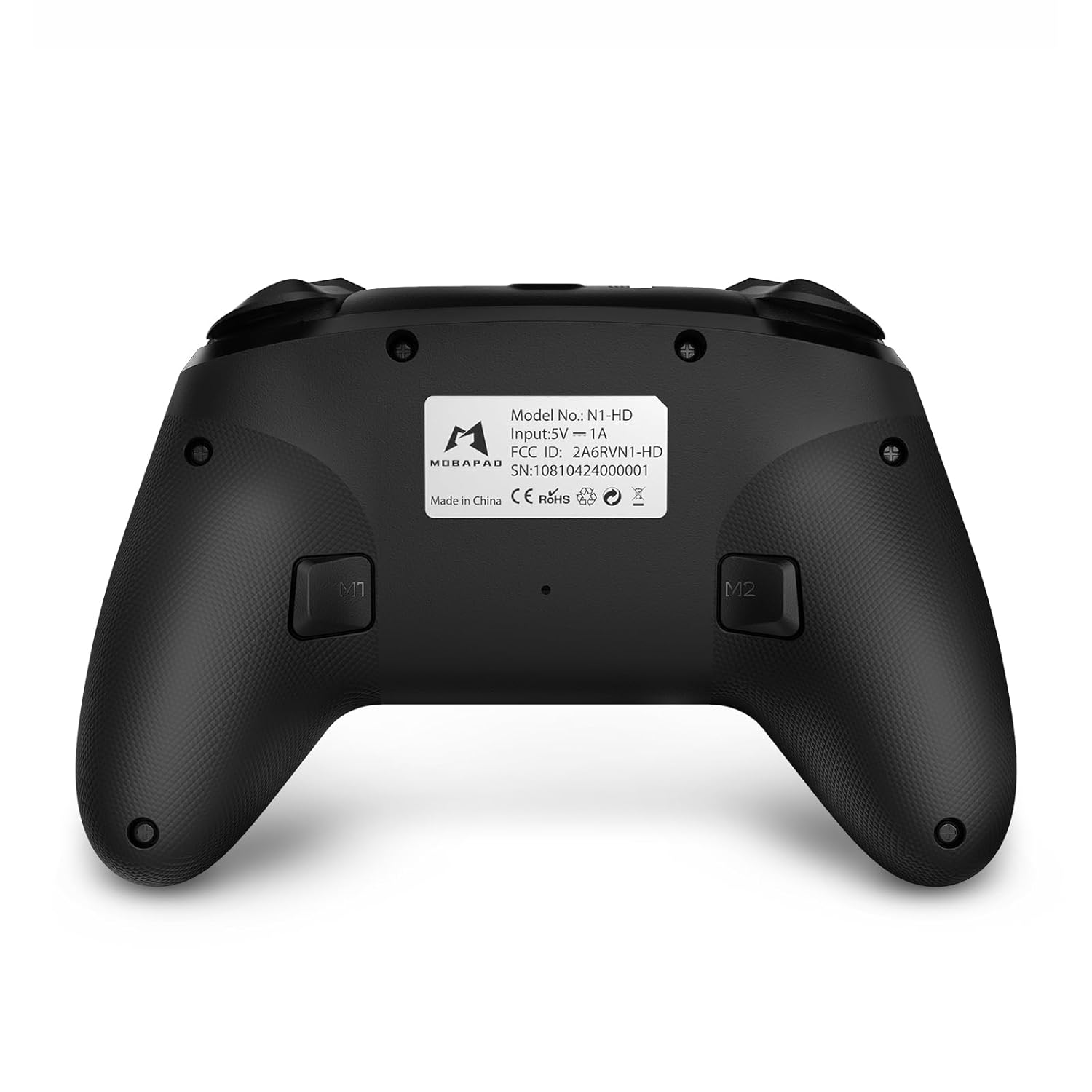
- לחצני M1/M2: Programmable back buttons for custom macros or remapping.
תמונה: חזית מפורטת view of the MOBAPAD N1 HD controller, showing all buttons and joysticks.

תמונה: גב view of the MOBAPAD N1 HD controller, highlighting the M1 and M2 programmable buttons and product label.
4.2. NFC Functionality (Amiibo Scanning)
To use the NFC function for Amiibo scanning on Nintendo Switch:
- Ensure your controller is connected to the Nintendo Switch.
- In a compatible game, when prompted to scan an Amiibo, place the Amiibo figure directly over the כפתור בית area on the controller.
- Hold the Amiibo in place until the game registers the scan.
5. תחזוקה וטיפול
תחזוקה נאותה מבטיחה את אורך החיים והביצועים האופטימליים של הבקר שלך.
- ניקוי: השתמש במטלית רכה ויבשה כדי לנגב את הבקר. במקרה של לכלוך עיקש, נגבו מעטampשטפו את המטלית במים. הימנעו מכימיקלים חזקים או מחומרים שוחקים.
- אִחסוּן: יש לאחסן את הבקר במקום קריר ויבש, הרחק מאור שמש ישיר וטמפרטורות קיצוניות.
- טיפול בסוללה: The controller contains a Lithium Ion battery. Avoid fully discharging the battery frequently. If storing for extended periods, charge the battery to about 50% to prolong its lifespan. Do not expose the battery to fire or extreme heat.
- טיפול: הימנעו מהפלת הבקר או מחשיפתו לפגיעות חזקות, שכן הדבר עלול לגרום נזק לרכיבים פנימיים.
6. פתרון תקלות
If you encounter issues with your MOBAPAD N1 HD controller, refer to the following common solutions.
| בְּעָיָה | סיבה אפשרית | פִּתָרוֹן |
|---|---|---|
| הבקר לא מתחבר. | סוללה חלשה, מחוץ לטווח, מצב צימוד שגוי, הפרעות. | Charge the controller fully. Ensure it is within range of the device. Re-enter pairing mode (hold Home button). Move closer to the device or away from other wireless devices. |
| כפתורים או ג'ויסטיקים אינם מגיבים. | Software glitch, physical obstruction, damage. | Restart the controller and the connected device. Check for any debris around the buttons/joysticks. If issues persist, contact customer support. |
| Vibration is weak or absent. | Vibration setting off, game does not support vibration, motor issue. | Check in-game settings and system settings to ensure vibration is enabled. Verify if the game supports vibration feedback. |
| NFC scanning fails. | Incorrect placement, game not prompting scan, controller not connected. | Ensure the Amiibo is placed directly over the Home button area. Confirm the game is prompting for an Amiibo scan. Verify controller is properly connected to the Switch. |
7. מפרטים
| תכונה | פְּרָט |
|---|---|
| מספר דגם | Mobapad N1 HD Black |
| מידות (L x W x H) | 5.91 x 2.36 x 3.94 אינץ' |
| מִשׁקָל | 7.05 אונקיות |
| סוג סוללה | סוללת ליתיום יון אחת (כלול) |
| קישוריות | Wireless (Bluetooth), USB-C (wired) |
| תְאִימוּת | Nintendo Switch, PC, iOS, Android |
| תכונות מיוחדות | Hall Effect Joysticks, ALPS Dual-Axis Motors, HD Vibration, Six-Axis Gyroscope, NFC |
8. אחריות ותמיכה
For warranty information or technical support, please contact MOBAPAD customer service. Refer to the official MOBAPAD webבאתר או במסמכי הרכישה שלך לקבלת תנאי אחריות ספציפיים ופרטי יצירת קשר.
You can visit the official MOBAPAD store on Amazon for more information: MOBAPAD Store