1. המוצר נגמרview
The MiBOXER Y3 RGB+CCT Vertical Remote provides comprehensive control over compatible RGB+CCT LED lighting systems. This remote allows for precise adjustments of RGB colors, color temperature (CCT), and brightness. Utilizing 2.4GHz wireless technology, it ensures reliable communication with your lighting devices. Its ergonomic vertical design and intuitive interface are designed for ease of use, enabling users to effortlessly customize lighting for various environments.
תכונות עיקריות:
- RGB, CCT, and Brightness Control: Adjust colors, color temperature, and brightness with ease.
- טכנולוגיה אלחוטית 2.4GHz: Ensures reliable, long-range connectivity.
- עיצוב אנכי: Ergonomic and easy-to-use layout for quick adjustments.
- Multi-Color and Dimmable: Create customized lighting scenes with vibrant colors and dimming options.
- תאימות רב-תכליתית: Works with MiBOXER RGB+CCT lighting products.
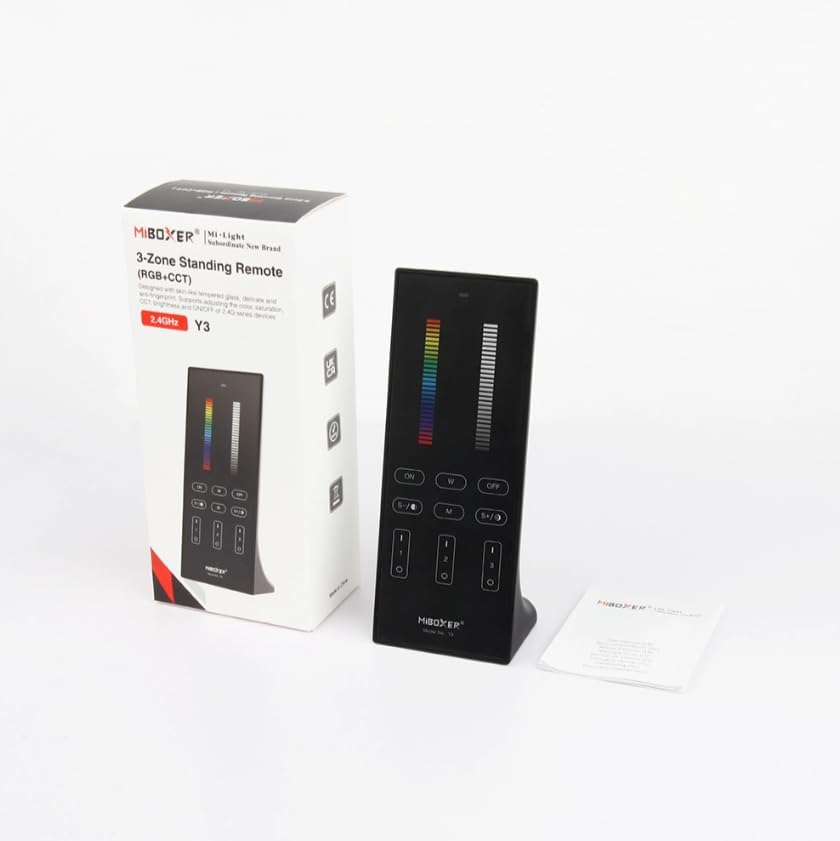
Figure 1: MiBOXER Y3 RGB+CCT Vertical Remote with its retail packaging.
2. הוראות התקנה
2.1 התקנת סוללה
The MiBOXER Y3 remote requires two AAA batteries (not included). To install:
- אתר את מכסה תא הסוללה בגב השלט.
- החלק את המכסה כלפי מטה כדי לפתוח.
- הכניסו שתי סוללות AAA, תוך הקפדה על קוטביות נכונה (+ ו-).
- החלק את המכסה בחזרה למקומו עד שיינעל היטב.
2.2 קישור השלט רחוק למכשירי תאורה
To control your MiBOXER RGB+CCT lighting devices, the remote must be linked to them. This process typically involves a specific sequence of actions on both the remote and the lighting device. Refer to your specific MiBOXER lighting product's manual for detailed linking instructions, as the procedure may vary slightly between different light models. A common linking procedure is as follows:
- Ensure the lighting device is powered off.
- Power on the lighting device.
- Within 3 seconds of powering on the light, press the "Zone ON" button (labeled "I" or "1") on the remote for the desired zone.
- האור אמור להבהב מספר פעמים, מה שמעיד על חיבור מוצלח.
- If linking fails, repeat the process.
To unlink a device from a zone, power on the light and within 3 seconds, press the "Zone ON" button (labeled "I" or "1") five times rapidly for the corresponding zone. The light should flash multiple times to confirm unlinking.
3. הוראות הפעלה
The MiBOXER Y3 remote features an intuitive layout for controlling various lighting parameters. Familiarize yourself with the buttons and sliders as shown in Figure 2.

Figure 2: MiBOXER Y3 Remote Control button layout and functions.
3.1 פונקציות כפתור:
| כפתור/בקרה | פוּנקצִיָה |
|---|---|
| נורית חיווי | Flashes to confirm button presses. |
| Slider RGB | Slide to select desired RGB color. |
| מחוון בהירות | Slide to adjust light brightness (0-100%). |
| Master ON (I/ON) | מדליק את כל האורות המקושרים. |
| Master OFF (O/OFF) | מכבה את כל האורות המקושרים. |
| White Light (W) | Activates pure white light mode. |
| Speed-/CCT-/Saturation- | Decreases speed in dynamic mode, decreases color temperature (warmer white), or decreases color saturation. |
| Speed+/CCT+/Saturation+ | Increases speed in dynamic mode, increases color temperature (cooler white), or increases color saturation. |
| Dynamic Mode (M) | Cycles through various dynamic lighting effects. Press repeatedly to change effects. |
| Zone ON (1, 2, 3 - "I") | Turns ON lights linked to the specific zone. Used for linking/unlinking. |
| Zone OFF (1, 2, 3 - "O") | מכבה אורות המקושרים לאזור הספציפי. |
3.2 פעולה כללית:
- הדלקה/כיבוי של אורות: Use the "Master ON" or "Master OFF" buttons for all lights, or "Zone ON" / "Zone OFF" for specific zones.
- התאמת צבע: Slide your finger along the "RGB Slider" to select your desired color.
- התאמת בהירות: Slide your finger along the "Brightness Slider" to increase or decrease the light intensity.
- Adjusting Color Temperature (CCT): In white light mode, use the "CCT-" and "CCT+" buttons to make the white light warmer or cooler.
- מצבים דינמיים: Press the "M" button to activate dynamic lighting modes. Use "Speed-" and "Speed+" to adjust the speed of the current dynamic effect.
- Saturation Adjustment: In RGB mode, use "Saturation-" and "Saturation+" to adjust the intensity of the color.
4. תחזוקה
Proper maintenance ensures the longevity and optimal performance of your MiBOXER Y3 remote.
- ניקוי: Wipe the remote with a soft, dry cloth. Do not use abrasive cleaners, solvents, or wet cloths, as these can damage the surface or internal components.
- החלפת סוללה: Replace batteries when the indicator light becomes dim or the remote's response becomes inconsistent. Always use new AAA batteries and dispose of old batteries responsibly.
- אִחסוּן: Store the remote in a cool, dry place away from direct sunlight and extreme temperatures. If storing for extended periods, remove the batteries to prevent leakage.
- הימנע מלחות: This remote is not waterproof. Keep it away from water and high humidity environments.
5. פתרון תקלות
If you encounter issues with your MiBOXER Y3 remote, refer to the following troubleshooting steps:
| בְּעָיָה | סיבה אפשרית | פִּתָרוֹן |
|---|---|---|
| Remote not responding to button presses. | סוללות מתות או חלשות. שלט רחוק לא מחובר לתאורה. מחוץ לטווח. | החלף סוללות. Re-link the remote to the lighting devices (refer to Section 2.2). Move closer to the lighting devices. |
| אורות לא משנים צבע/בהירות. | נבחר מצב שגוי. Remote not linked to the specific zone. | Ensure you are in the correct mode (e.g., RGB for color, CCT for white temperature). Verify the remote is linked to the correct zone. |
| Indicator light not flashing. | סוללות מתות. תקלה פנימית. | החלף סוללות. אם הבעיה נמשכת לאחר החלפת הסוללה, צור קשר עם תמיכת הלקוחות. |
| Interference with other 2.4GHz devices. | Proximity to other wireless devices. | Move the remote or other 2.4GHz devices further apart. |
6. מפרטים
Technical specifications for the MiBOXER Y3 RGB+CCT Vertical Remote.
| תכונה | פְּרָט |
|---|---|
| מספר דגם | Y3 |
| מותג | מיבוקסר |
| סוג בקרה | RGB+CCT Vertical Remote |
| טכנולוגיה אלחוטית | 2.4GHz |
| ספק כוח | 2x סוללות AAA (לא כלולות) |
| תכונה מיוחדת | RGB/CCT/brightness dimmable |
| משקל פריט | 4.8 אונקיות (כ-136 גרם) |
| מידות חבילה | 6.5 x 3 x 2 אינץ' (כ-16.5 x 7.6 x 5.1 ס"מ) |


Figure 3: Dimensions of the MiBOXER Y3 Remote Control and its packaging.
7. אחריות ותמיכה
For warranty information, please refer to the documentation provided with your specific MiBOXER lighting product or contact the retailer where the product was purchased. MiBOXER products typically come with a manufacturer's warranty covering defects in materials and workmanship.
For technical support or further assistance, please visit the official MiBOXER website or contact their customer service department. Contact details are usually available on the product packaging or the brand's official online presence.


