1. הקדמה
Thank you for choosing the SAMA GT850-White 850W Power Supply. This unit is designed to provide stable and efficient power to your computer system, featuring a fully modular design, 80 PLUS Gold certification, and compatibility with the latest ATX 3.1 and PCIe 5.1 standards. Please read this manual carefully before installation and use to ensure optimal performance and safety.
2. מידע בטיחות
- Always disconnect the AC power cord from the wall outlet before installing or removing the power supply.
- אין לפתוח את יחידת ספק הכוח. עוצמת קול גבוההtages are present inside, which can cause serious injury or death.
- Ensure your computer case and components are properly grounded.
- Use only genuine SAMA modular cables. Third-party cables might not be compatible and could cause serious damage to your system.
- Avoid operating the power supply in high humidity or high-temperature environments.
- Do not insert any objects into the fan grille or ventilation openings.
3. תכולת החבילה
ודא שכל הפריטים נמצאים בחבילה שלך:
- SAMA GT850-White 850W Power Supply Unit
- Modular Cable Set (Flat White Cables)
- כבל מתח AC
- ברגי הרכבה (4x)
- מדריך למשתמש (מסמך זה)

Figure 1: SAMA GT850-White 850W Power Supply with its fully modular white flat cables.
4. תכונות מוצר
- Fully Modular Design & Streamlined Cable Management: Connect only the necessary cables, reducing clutter and improving airflow within your PC case. Flat cables further enhance cable management.
- ATX 3.1 & PCIe 5.1 Compatibility: Designed to meet the latest ATX 3.1 standards, featuring native PCIe 5.1 ports and cables for seamless compatibility with high-end GPUs like the RTX 3090 Ti and RTX 40 series.
- תעודת זהב 80 פלוס: Achieves up to 91.15% efficiency at 50% load, minimizing energy waste, heat generation, and enhancing system stability.
- ECO Fan with FDB Bearing & Quiet Operation: Equipped with a 120mm ECO fan featuring Fluid Dynamic Bearing (FDB) technology, providing efficient cooling with noise levels as low as ≤20dB-A under heavy loads.
- Premium Japanese Capacitors: Built with high-quality Japanese capacitors for stable power delivery and long-term reliability.
- Compact Body Size: The 140mm compact design allows for greater flexibility in case compatibility.
- הגנה מקיפה: Features multiple power protection circuit designs, including OCP, OVP, UVP, OPP, and SCP.

Figure 2: Key features of the SAMA GT850-White Power Supply, including 80 Plus Gold efficiency and ATX 3.1 / PCIe 5.1 readiness.

Figure 3: The compact 140mm body size of the SAMA GT850-White Power Supply, with dimensions indicated.
5. התקנה והתקנה
- הכן את מארז המחשב שלך: Ensure your PC case has adequate space for the power supply and proper ventilation.
- התקן את ספק הכוח: Secure the SAMA GT850-White into the designated PSU bay of your PC case using the provided mounting screws.
- חיבור כבלים מודולריים: Identify the necessary cables for your motherboard, CPU, GPU, and peripherals. Connect these cables to the corresponding modular ports on the power supply. Refer to the labels on the PSU for correct connections.
- חיבור לרכיבים:
- לוח אם: חבר את כבל ה-ATX בעל 24 פינים ללוח האם שלך.
- מעבד: Connect the 4+4-pin or 8-pin CPU power cable(s) to your motherboard.
- GPU: Connect the appropriate PCIe cables (e.g., 12V-2x6 for RTX 40 series, or 6+2-pin for other GPUs) to your graphics card(s).
- ציוד היקפי: Connect SATA power cables to SSDs, HDDs, and other SATA-powered devices. Connect Molex cables if needed.
- ניהול כבלים: Route the cables neatly behind the motherboard tray or in designated cable management channels to improve airflow and aesthetics. Use cable ties if necessary.
- חבר מתח AC: Once all internal connections are secure, connect the AC power cord to the power supply and then to a wall outlet.
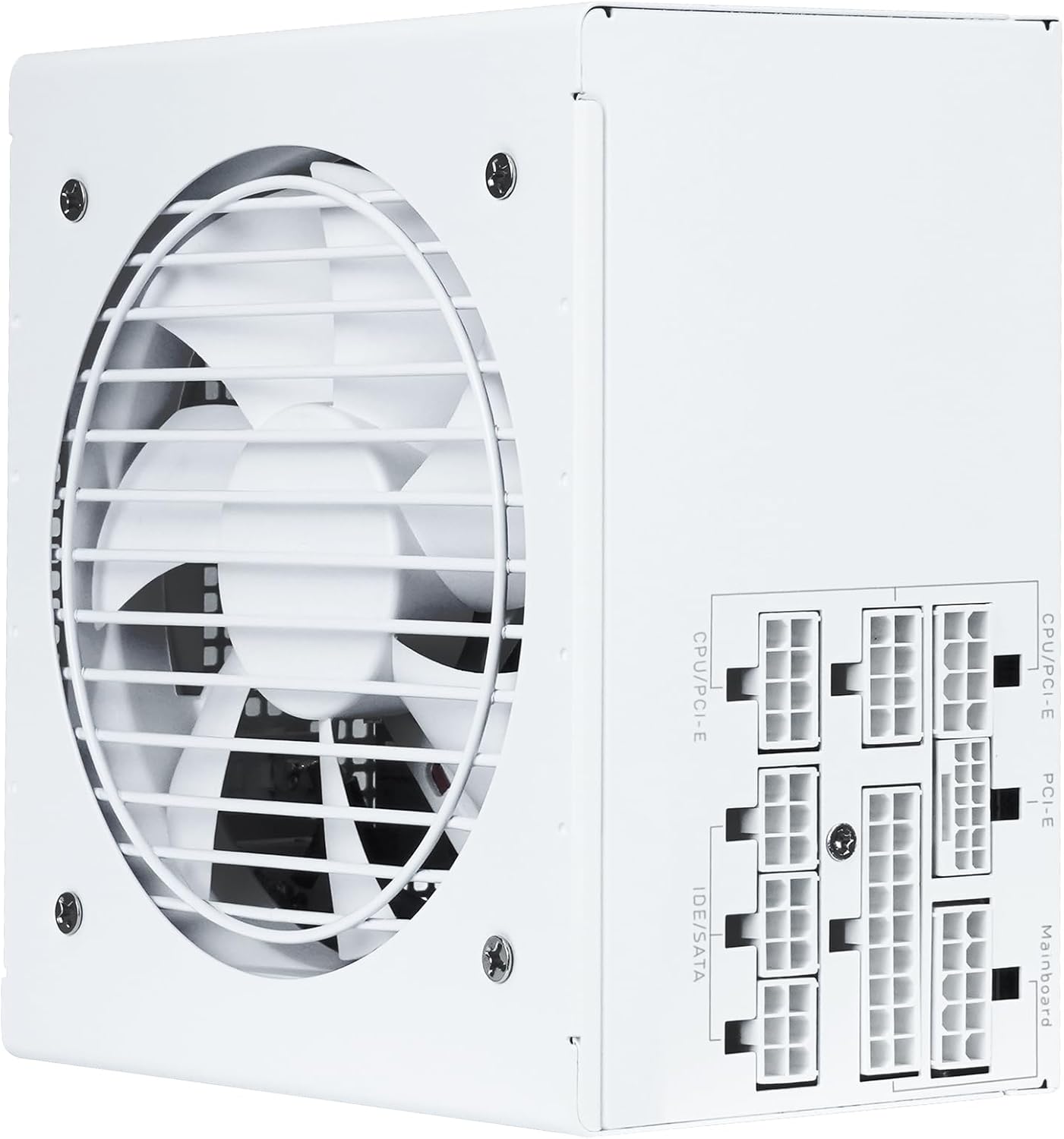
איור 4: מעלview of the modular cable connection ports on the SAMA GT850-White Power Supply.
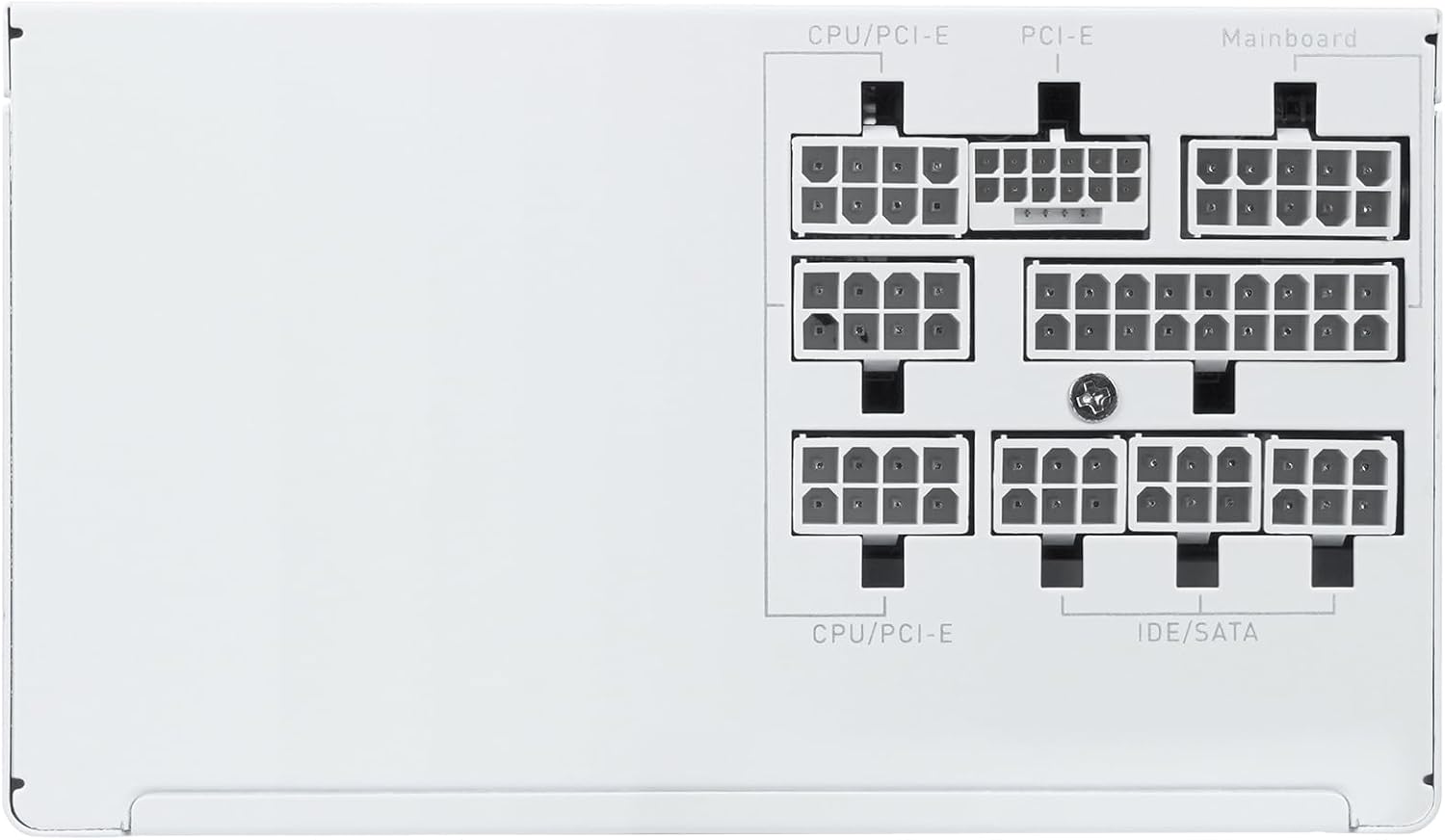
Figure 5: Close-up of the clearly labeled modular ports for organized cable management.
6. הוראות הפעלה
- הפעלה: After connecting all cables, flip the power switch on the back of the PSU to the 'ON' (I) position. Then, power on your computer using the case's power button.
- כיבוי: To shut down your system, use the operating system's shutdown function. For a complete power cycle, flip the power switch on the back of the PSU to the 'OFF' (O) position and disconnect the AC power cord.
- ECO Fan Mode: The 120mm ECO fan operates intelligently. At low loads, the fan may remain off for silent operation. It will automatically activate as the load increases to maintain optimal temperatures.
7. תחזוקה
- ניקוי: Periodically clean the exterior of the power supply and its fan grille to prevent dust buildup, which can hinder cooling performance. Use compressed air or a soft, dry cloth. Ensure the power supply is off and disconnected from the AC outlet before cleaning.
- ניהול כבלים: Regularly check cable connections to ensure they are secure. Re-organize cables if they become dislodged or interfere with airflow.
8. פתרון תקלות
- אין כוח:
- Check if the AC power cord is securely connected to both the wall outlet and the power supply.
- ודא שמתג ההפעלה בגב ספק הכוח נמצא במצב 'ON' (I).
- Verify all modular cables are correctly and firmly seated in both the power supply and the respective components.
- בדוק את שקע הקיר עם מכשיר אחר כדי לוודא שיש לו חשמל.
- חוסר יציבות מערכת/כיבויים אקראיים:
- ודא שדרישות החשמל של המערכת שלך אינן עולות על קיבולת 850W של ספק הכוח.
- בדוק אוורור תקין בתוך מארז המחשב שלך כדי למנוע התחממות יתר.
- Confirm all power connections are secure.
- רעש מאוורר מוגזם:
- The fan speed adjusts based on load. High load will result in higher fan speed and noise.
- Ensure the fan grille is free from dust and obstructions.
- If the fan is constantly loud even under low load, contact customer support.
9. מפרטים
| תכונה | מִפרָט |
|---|---|
| דֶגֶם | GT850-White |
| פלט וואטtage | 850 וואט |
| הסמכת יעילות | 80 פלוס זהב |
| תקן ATX | תואם ל-ATX 3.1 |
| תקן PCIe | תואם PCIe 5.1 |
| גורם צורה | ATX |
| שיטת קירור | Air (120mm FDB ECO Fan) |
| מידות המוצר (L x W x H) | 5.51 x 5.91 x 3.39 אינץ' (140 x 150 x 86 מ"מ) |
| משקל פריט | 4.66 פאונד |
| מינימום קלט כרךtage | 85 וולט (AC) |
| קבלים | Japanese Capacitors |
10. אחריות ותמיכה
The SAMA GT850-White Power Supply comes with a 5-year warranty, ensuring long-term reliability and peace of mind. For technical support, warranty claims, or any questions regarding your product, please contact SAMA customer service through their official webהאתר או הקמעונאי שבו המוצר נרכש.
אנא שמור את הוכחת הרכישה שלך לצורך אימות האחריות.