1. הקדמה
Thank you for choosing the WOLFANG WB03 Baby Monitor. This device is designed to provide reliable and secure monitoring of your baby, offering peace of mind through advanced features and a clear display. This manual provides essential information for setting up, operating, and maintaining your baby monitor.
The WOLFANG WB03 features a 5-inch HD display, a 1080P camera with 360-degree rotation and zoom, infrared night vision, two-way audio, temperature detection, and cry detection. It operates on a secure, non-Wi-Fi connection, ensuring privacy and stability.
2. תכולת החבילה
אנא בדקו את החבילה עבור הפריטים הבאים:
- יחידת הורים (מוניטור)
- יחידת תינוקות (מצלמה)
- מדריך למשתמש
- 2 x מתאמי חשמל
- 2 x כבלי USB
- תושבת לקיר
- ברגים להתקנה על הקיר
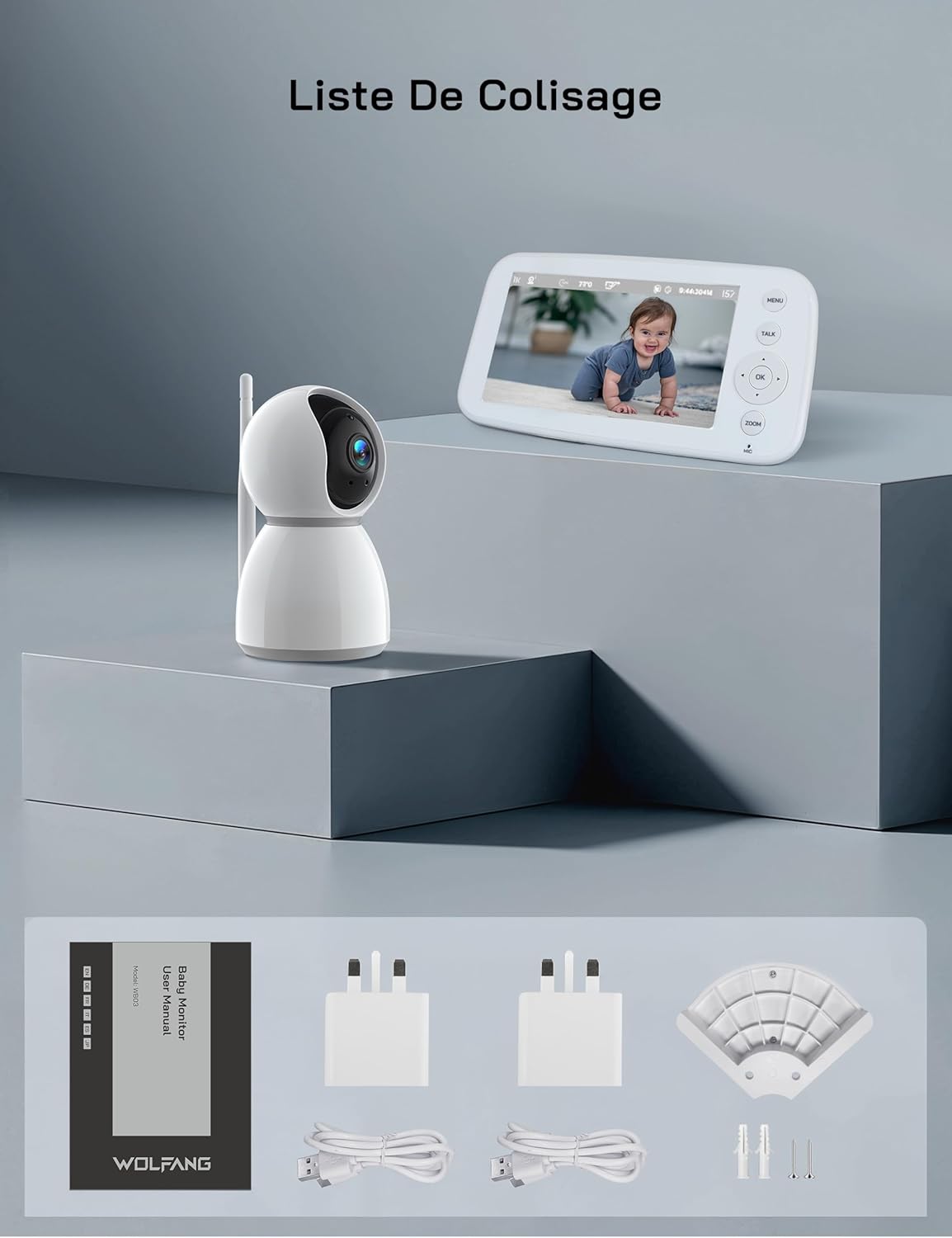
איור 2.1: Visual representation of the WOLFANG WB03 baby monitor package contents, including the monitor, camera, user manual, two power adapters, two USB cables, and wall mounting hardware.
3. המוצר נגמרview
The WOLFANG WB03 system consists of a Parent Unit (monitor) and a Baby Unit (camera). Familiarize yourself with the components and their functions.

איור 3.1: The WOLFANG WB03 baby monitor system, featuring a white parent unit with a screen displaying a baby, and a white pan-tilt camera unit.
יחידת הורים (מוניטור)
- מסך HD בגודל 5 אינץ': For clear video feed.
- לחצני שליטה: Menu, Talk, OK, Navigation (Up/Down/Left/Right), Zoom.
- מִיקרוֹפוֹן: For two-way talk.
- רַמקוֹל: For audio from the baby unit and lullabies.
- אַנטֶנָה: For wireless connection.
- יציאת חשמל: Type-C for charging.
יחידת תינוקות (מצלמה)
- 1080P Camera Lens: High-resolution video capture.
- נוריות אינפרא אדום: לראיית לילה.
- מִיקרוֹפוֹן: To pick up baby's sounds.
- רַמקוֹל: לשיחה דו-כיוונית ושירי ערש.
- חיישן טמפרטורה: To monitor room temperature.
- אַנטֶנָה: For wireless connection.
- יציאת חשמל: Type-C for continuous power.

איור 3.2: An illustration highlighting key features of the WOLFANG WB03 baby monitor, including VOX Mode, Night Vision, 8 Lullabies, Remote Pan/Tilt, Type-C charging, Two-Way Intercom, 2350 mAh Battery, and Temperature Detection.
4. הוראות התקנה
4.1 טעינת יחידת ההורים
- Connect one USB cable to a power adapter and plug it into the Parent Unit's Type-C port.
- חבר את מתאם החשמל לשקע בקיר.
- Charge the Parent Unit for at least 3 hours before first use. The battery indicator on the screen will show charging status.
4.2 הפעלת יחידת התינוק
- Connect the second USB cable to a power adapter and plug it into the Baby Unit's Type-C port.
- Plug the power adapter into a wall outlet. The Baby Unit requires continuous power to operate.
- The Baby Unit will automatically power on once connected to power.
4.3 מיקום יחידת התינוק
מקמו את יחידת התינוק במקום המספק מרחב נקי view of your baby. Ensure it is at least 1.5 to 2 meters (5 to 6 feet) away from the Parent Unit to avoid audio feedback (bip sound).
- Place the camera on a flat, stable surface, such as a dresser or shelf.
- Alternatively, use the included wall mount bracket to secure the camera to a wall.
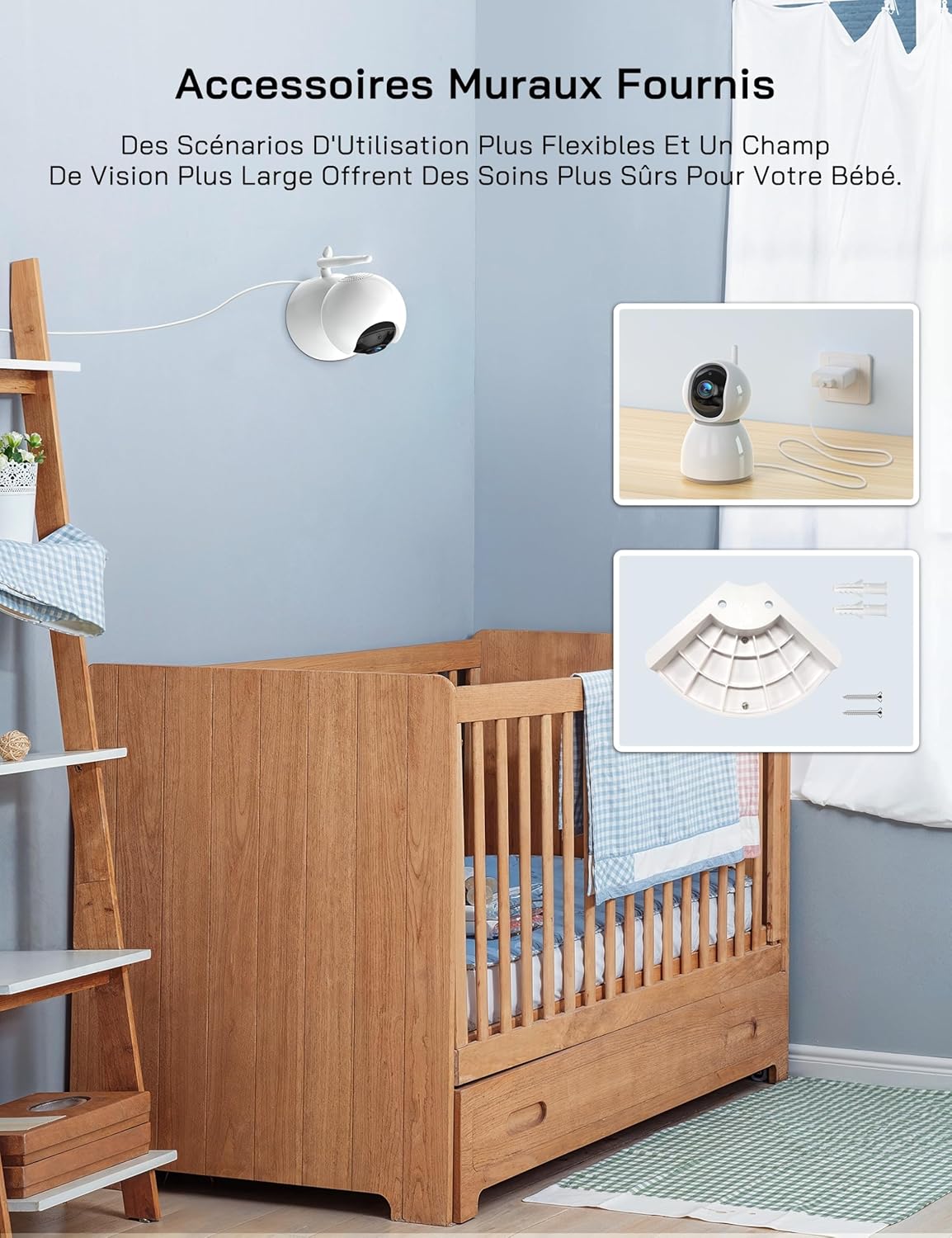
איור 4.1: An image showing the included wall mount bracket and screws, demonstrating how the camera can be securely mounted to a wall above a crib.
4.4 צימוד (במידת הצורך)
The Parent Unit and Baby Unit are pre-paired at the factory. If the connection is lost or you are adding additional cameras (up to 4 cameras supported), follow these steps:
- ביחידת ההורים, לחצו על הלחצן תַפרִיט לַחְצָן.
- Navigate to the Camera icon (📷) and select it.
- Choose an empty camera channel (e.g., CAM 2, CAM 3, CAM 4).
- Select the 'Pair' option. The monitor will display 'Pairing...'.
- Within 10 seconds, press the pairing button on the back of the Baby Unit.
- Once paired, the video feed from the Baby Unit will appear on the Parent Unit screen.
5. הוראות הפעלה
5.1 הפעלה/כיבוי
- יחידת הורים: Press and hold the Power button on the side of the monitor to turn it on or off.
- יחידת תינוקות: The camera powers on automatically when connected to a power source. Disconnect from power to turn off.
5.2 ניטור בסיסי
Once both units are powered on and paired, the Parent Unit will automatically display the live video feed from the Baby Unit.
5.3 סיבוב, הטיה וזום
The camera offers 360-degree horizontal rotation and 90-degree vertical tilt, along with 2x digital zoom.
- הזזה/הטיה: Use the navigation buttons (Up/Down/Left/Right) on the Parent Unit to adjust the camera's viewזווית ing.
- זום: הקש על זום button on the Parent Unit to activate 2x digital zoom. Use navigation buttons to move the zoomed area.

איור 5.1: An image showing the camera's 360-degree rotation and 2x zoom capability, with the monitor displaying the zoomed view של תינוק.
5.4 שיחה דו-כיוונית
Communicate with your baby remotely using the two-way talk feature.
- לחץ והחזק את לְדַבֵּר button on the Parent Unit.
- דברו בצורה ברורה לתוך המיקרופון ביחידת ההורים. קולכם יועבר ליחידת התינוק.
- שחרר את לְדַבֵּר button to hear your baby's sounds again.

איור 5.2: An image depicting the two-way talk feature, with a mother in the kitchen communicating with her baby in the nursery via the monitor.
5.5 ראיית לילה אינפרא אדום
The Baby Unit automatically activates infrared night vision in low-light conditions, providing a clear black-and-white video feed.

איור 5.3: Two images demonstrating the clear infrared night vision feature, showing a sleeping baby in a dimly lit room.
5.6 ניטור טמפרטורה
The Baby Unit continuously monitors the room temperature and displays it on the Parent Unit screen. An alarm will sound if the temperature exceeds 30°C (86°F) or falls below 14°C (57.2°F).
5.7 Cry Detection (VOX Mode)
The VOX (Voice Operated eXchange) mode conserves battery life by turning off the screen when no sound is detected. The screen will automatically activate when your baby cries or makes significant noise.
- To enable/disable VOX mode or adjust sensitivity (Low/Medium/High), navigate to the VOX settings in the Parent Unit's menu.
- If you wish to keep the screen on continuously, you must disable cry detection and the automatic screen off feature in the settings.
5.8 שירי ערש
The monitor includes 8 soothing lullabies to help calm your baby.
- הקש על תַפרִיט button on the Parent Unit.
- Navigate to the Music icon (🎵) and select it.
- Choose a lullaby to play or select 'Loop' for continuous playback.
5.9 תזכורת להאכלה
Set a timer to remind you of feeding times.
- הקש על תַפרִיט button on the Parent Unit.
- Navigate to the Timer icon (🕑) and select it.
- Set your desired feeding interval (e.g., 2h, 3h, 4h).
5.10 Multi-Camera Support and Split Screen
The WOLFANG WB03 supports connecting up to 4 cameras simultaneously. The 5-inch screen supports split-screen display for simultaneous viewing or scheduled rotation of camera feeds.
- To switch between cameras or activate split-screen mode, access the camera settings in the Parent Unit's menu.
- אתה יכול view multiple cameras at once in split-screen or set a timed rotation to cycle through each camera's view.
6. תחזוקה
6.1 ניקוי
- Wipe the surfaces of the Parent Unit and Baby Unit with a dry, soft cloth.
- אין להשתמש בתרסיסי ניקוי או בחומרי ניקוי נוזליים.
6.2 טיפול בסוללה (יחידת הורים)
- כדי למקסם את חיי הסוללה, הימנעו מפריקת הסוללה לחלוטין לעתים קרובות.
- If storing the unit for an extended period, charge the battery to about 50% and store it in a cool, dry place.
7. פתרון תקלות
| בְּעָיָה | פִּתָרוֹן |
|---|---|
| Monitor beeps or produces feedback noise. | Ensure the Baby Unit and Parent Unit are at least 1.5 to 2 meters (5 to 6 feet) apart. Proximity can cause audio interference. |
| No video/audio on the Parent Unit. |
|
| המצלמה לא נדלקת. | The camera must be continuously plugged into a power source. Ensure the power adapter and cable are securely connected and the outlet is functional. |
| Screen turns off automatically. | This is likely due to VOX mode. If you want the screen to stay on, disable cry detection and the automatic screen off feature in the Parent Unit's settings. |
| Temperature alarm sounds frequently. | Check the room temperature displayed on the monitor. Adjust the room's climate control if necessary to keep the temperature within the safe range (14°C to 30°C). |
8. מפרטים
| תכונה | פְּרָט |
|---|---|
| שם הדגם | WB03 |
| גודל תצוגה של יחידת ההורים | 5 אינץ' |
| רזולוציית מצלמה | 1080P |
| צג רזולוציה | 720P |
| טכנולוגיית קישוריות | אלחוטי (FHSS) |
| דרישת Wi-Fi | אַף לֹא אֶחָד |
| Parent Unit Battery Capacity | 2350 מיליאמפר/שעה |
| חיי סוללה (מצב רגיל) | כ. 8 שעות |
| חיי סוללה (מצב VOX) | משוער. 10+ שעות |
| זווית סיבוב המצלמה | 360 מעלות |
| זווית הטיה של המצלמה | 90 מעלות |
| זום דיגיטלי | 2x |
| תכונות מיוחדות | Two-Way Audio, Infrared Night Vision, Temperature Detection, Cry Detection, Feeding Alarm, 8 Lullabies, Split Screen, Wall Mountable |
| מידות המוצר (L x W x H) | 16 x 8.3 x 1.9 ס"מ |
| משקל פריט | 411 גרם |
| שימוש מומלץ | ניטור תינוקות (בתוך הבית) |
9. אחריות ותמיכה
9.1 מידע אחריות
וולפנג מספק 2 שנות אחריות למוצר and accessory upgrade services. We are committed to delivering high-quality imaging products and support.
9.2 תמיכת לקוחות
Our customer service team is available 24 hours a day on weekdays to assist you. If you have any questions, require assistance, or need support, please contact us via our official email:
support.vc@wolfang.co
We aim to resolve any issues to your satisfaction as quickly as possible.


