1. הקדמה
The TOPDON ArtiDiag EU-BBA is a specialized full-system diagnostic tool designed for Mercedes-Benz, BMW, and V.A.G group vehicles. This manual provides detailed instructions for setting up, operating, and maintaining your device to ensure accurate and efficient vehicle diagnostics and maintenance.
2. המוצר נגמרview ומה יש בקופסה
The ArtiDiag EU-BBA is a compact and powerful diagnostic scanner. Before starting, please verify all components are present.

Image: The ArtiDiag EU-BBA device, diagnostic cable, charging cable, carrying case, quick user guide, and user manual.
תכולת הקופסה:
- 1 x ArtiDiag EU-BBA Diagnostic Tool
- 1 x Diagnostic Cable (OBD2)
- 1 x כבל טעינה
- 1 x תיק נשיאה
- 1 x מדריך למשתמש מהיר
- מדריך למשתמש אחד (מסמך זה)
3. הוראות התקנה
3.1 טעינה ראשונית
The device contains a 3000mAh Lithium Ion battery. For initial use, it is recommended to fully charge the device using the provided charging cable. The device can also charge when connected to a vehicle's OBD2 port.
3.2 חיבור לרכב
- אתר את יציאת ה-OBD2 של הרכב, בדרך כלל מתחת ללוח המחוונים בצד הנהג.
- Connect the diagnostic cable to the ArtiDiag EU-BBA device.
- חבר את הקצה השני של כבל האבחון ליציאת OBD2 של הרכב.
- סובב את ההצתה של הרכב למצב 'ON' (מנוע כבוי).
- The ArtiDiag EU-BBA will power on automatically.
3.3 Software Updates and Language Selection
The ArtiDiag EU-BBA supports lifetime free updates. Connect the device to a Wi-Fi network to download the latest software and vehicle data. Updates can be performed with a single click from the device's main menu. The device supports 11 languages, which can be selected in the settings menu.
4. הוראות הפעלה
The ArtiDiag EU-BBA features a 4-inch touchscreen display for intuitive navigation. The main interface provides access to various diagnostic and service functions.

Image: The ArtiDiag EU-BBA displaying diagnostic trouble codes for a BMW vehicle.
4.1 אבחון מערכת מלא
This function allows for a comprehensive scan of all available electronic control units (ECUs) in the vehicle. It covers systems such as Engine (ECM), Transmission (TCM), Anti-lock Braking System (ABS), Supplemental Restraint System (SRS), Tire Pressure Monitoring System (TPMS), ESP, Immobilizer, Gateway, Steering, and Radio.

Image: The ArtiDiag EU-BBA connected to a vehicle, illustrating its capability for full system diagnostics.
To perform a full system diagnostic:
- From the main menu, select 'Diagnostics'.
- The device will automatically identify the vehicle's VIN (Vehicle Identification Number). Confirm the vehicle information.
- Select 'Full System Scan' to initiate a scan of all accessible modules.
- Review the displayed fault codes and system status.
4.2 בקרה דו-כיוונית (בדיקות אקטיביות)
Bi-directional control allows you to send commands to vehicle ECUs to test specific components. This helps in accurately pinpointing issues without disassembling parts.

תמונה: דוגמהamples of bi-directional control, including throttle modulation, window operation, fuel pump activation, and AC clutch testing.
Examples of components that can be tested include:
- מצערת מווסתת
- פתיחה/סגירה של חלונות
- Activating the fuel pump
- Turning the AC clutch on/off
- Wiper activation
4.3 ECU Online Coding
ECU Online Coding enables customization of vehicle settings, activation of hidden features, disabling unwanted functions, and component matching. This function allows for optimization of vehicle performance and personalization.

Image: The ArtiDiag EU-BBA demonstrating ECU coding options for vehicle customization.
Consult your vehicle's service manual or a qualified technician before performing ECU coding to avoid unintended consequences.
4.4 All Service Functions
The ArtiDiag EU-BBA provides a comprehensive suite of service functions for routine maintenance and repairs. These functions help reset and initialize vehicle systems after component replacement or service.

Image: A selection of maintenance service functions available on the ArtiDiag EU-BBA.
Key service functions include:
- איפוס שמן
- איפוס בלם חניה אלקטרוני (EPB)
- איפוס מערכת ניהול סוללות (BMS)
- למידת מצערת
- כותרתamp התאמות
- Power Window Normalization
- התחדשות מסנן חלקיקים דיזל (DPF)
- Anti-lock Braking System (ABS) Bleeding
- איפוס חיישן זווית היגוי (SAS)
- איפוס מערכת ניטור לחץ אוויר בצמיגים (TPMS)
- התאמת תיבת הילוכים
- התאמת השעיה
- Sunroof Initializing
- קוד מזרק
- איפוס AdBlue
4.5 מצבי OBD2 מלאים
The device supports all 10 OBD2 test modes for comprehensive engine diagnostics on compliant vehicles.

Image: An illustration of the full OBD2 diagnostic modes available.
מצבים אלה כוללים:
- קריאה וניקוי קודי תקלות אבחון (DTC)
- View זרם נתונים חי
- View הקפאת נתוני מסגרת
- סטטוס מוכנות I/M
- בדיקת חיישן O2
- מבחן צג על הלוח
- בדיקת מערכת EVAP
- קרא מידע על הרכב (VIN, CID, CVN)
4.6 תכונות נוספות
The ArtiDiag EU-BBA includes several practical functions to streamline diagnostics:
- Smart AutoVIN: מזהה אוטומטית מידע על הרכב בעת החיבור.
- VAG Guided Function: Provides step-by-step instructions for V.A.G vehicles.
- Data Report and Share: צור ושתף דוחות אבחון.
- Graphic Live Data: Visualize live sensor data for easier analysis.
- משוב משתמש: Submit feedback directly from the device.
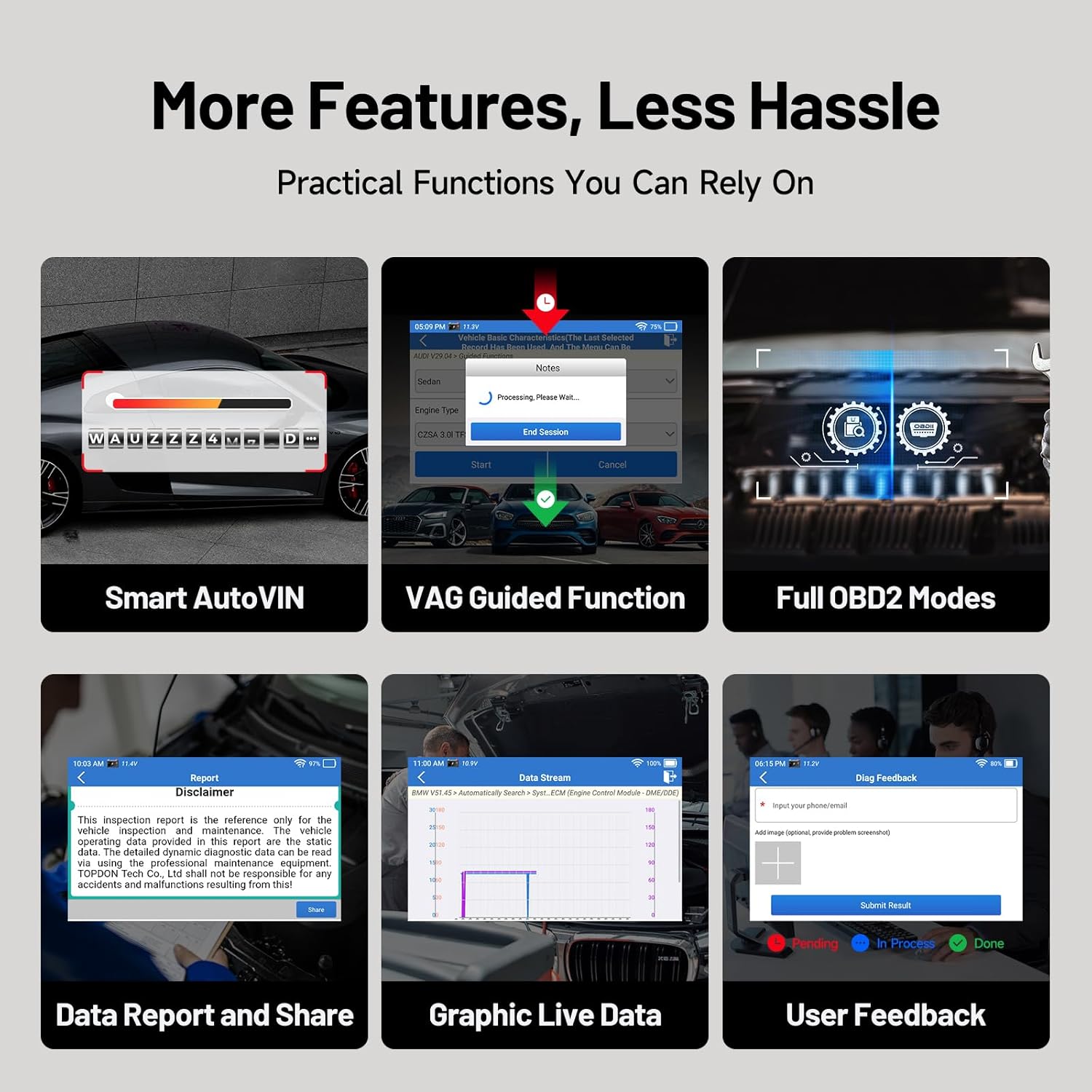
תמונה: מעלview of additional practical functions on the ArtiDiag EU-BBA.
5. תחזוקה
5.1 עדכוני תוכנה
Ensure your device is always up-to-date by regularly checking for and installing software updates via Wi-Fi. These updates provide new features, vehicle coverage, and bug fixes.
5.2 ניקוי ההתקן
Wipe the device screen and body with a soft, damp מטלית. הימנעו משימוש בחומרי ניקוי שוחקים או ממסים שעלולים לפגוע במסך או במכשיר.asing.
5.3 טיפול בסוללה
כדי להאריך את חיי הסוללה, הימנעו מפריקה מלאה של המכשיר לעתים קרובות. אחסנו את המכשיר במקום קריר ויבש כאשר אינו בשימוש למשך תקופות ממושכות.
6. פתרון תקלות
If you encounter issues with your ArtiDiag EU-BBA, consider the following:
- המכשיר לא נדלק: Ensure the device is charged or properly connected to the vehicle's OBD2 port.
- בעיות התחברות: Verify the diagnostic cable is securely connected to both the device and the vehicle. Ensure the vehicle's ignition is on.
- כשלים בעדכון תוכנה: Check your Wi-Fi connection. Ensure there is sufficient storage space on the device.
- Inaccurate readings or functions: Ensure the vehicle's make, model, and year are correctly identified. Perform a software update to ensure the latest vehicle data is installed.
For persistent issues, utilize the 'User Feedback' function on the device or contact TOPDON customer support.
7. מפרטים

Image: Key technical specifications and internal components of the ArtiDiag EU-BBA.
| תכונה | מִפרָט |
|---|---|
| לְהַצִיג | 4-inch, 800x480 pixels |
| מעבד | 1.3GHz Quad-Core |
| אַיִל | 2GB |
| ROM | 32GB |
| מַעֲרֶכֶת הַפעָלָה | אנדרואיד 8.1 |
| סוֹלְלָה | יון ליתיום 3000mAh |
| מידות | 25 x 17.5 x 7.6 ס"מ |
| מִשׁקָל | 897 גרם |
| שפות נתמכות | 11 (including English, French, German, Spanish, Italian, Portuguese, Polish, Russian, Chinese) |
8. אחריות ותמיכה
8.1 מידע אחריות
The TOPDON ArtiDiag EU-BBA comes with a 1-year warranty from the date of purchase, covering manufacturing defects. Please retain your proof of purchase for warranty claims.
8.2 תמיכת לקוחות
For technical assistance, warranty inquiries, or any questions regarding the operation of your device, please contact TOPDON customer support. Refer to the official TOPDON webאתר לקבלת פרטי הקשר העדכניים ביותר.


