1. הקדמה
Thank you for choosing the LONPOO LP42M Active Bookshelf Speakers. These speakers are designed to deliver high-quality audio with versatile connectivity options, suitable for various home audio setups. This manual provides essential information for safe and efficient use of your new speakers.
2. מידע בטיחות
אנא קרא בעיון את כל הוראות הבטיחות לפני השימוש במוצר. שמור מדריך זה לעיון עתידי.
- מקור כוח: השתמשו רק במתאם החשמל המצורף. ודאו שהעוצמהtage תואם לספק הכוח המקומי שלך.
- אוורור: Do not block any ventilation openings. Maintain adequate space around the speakers for proper airflow.
- מים ולחות: Do not expose the speakers to water, rain, or moisture. Avoid placing liquid-filled objects on or near the speakers.
- חוֹם: Keep the speakers away from heat sources such as radiators, heat registers, stoves, or other heat-producing appliances.
- ניקוי: Unplug the speakers from the power outlet before cleaning. Use a soft, dry cloth. Do not use liquid cleaners or aerosol cleaners.
- שֵׁרוּת: אל תנסה לתת שירות למוצר זה בעצמך. הפנה את כל השירות לאנשי שירות מוסמכים.
3. תכולת החבילה
ודא שכל הפריטים נמצאים בחבילה:
- LONPOO LP42M Active Bookshelf Speaker Pair (1 powered speaker, 1 passive speaker)
- שלט רחוק x 1
- Speaker Wire (6.56ft / 2m) x 1
- Optical Cable (4.92ft / 1.5m) x 1
- AC Power Cord (3.94ft / 1.2m) x 1

4. המוצר נגמרview
The LONPOO LP42M speakers feature a classic wooden design with advanced audio components and multiple connectivity options.
4.1 Front Panel (Powered Speaker)
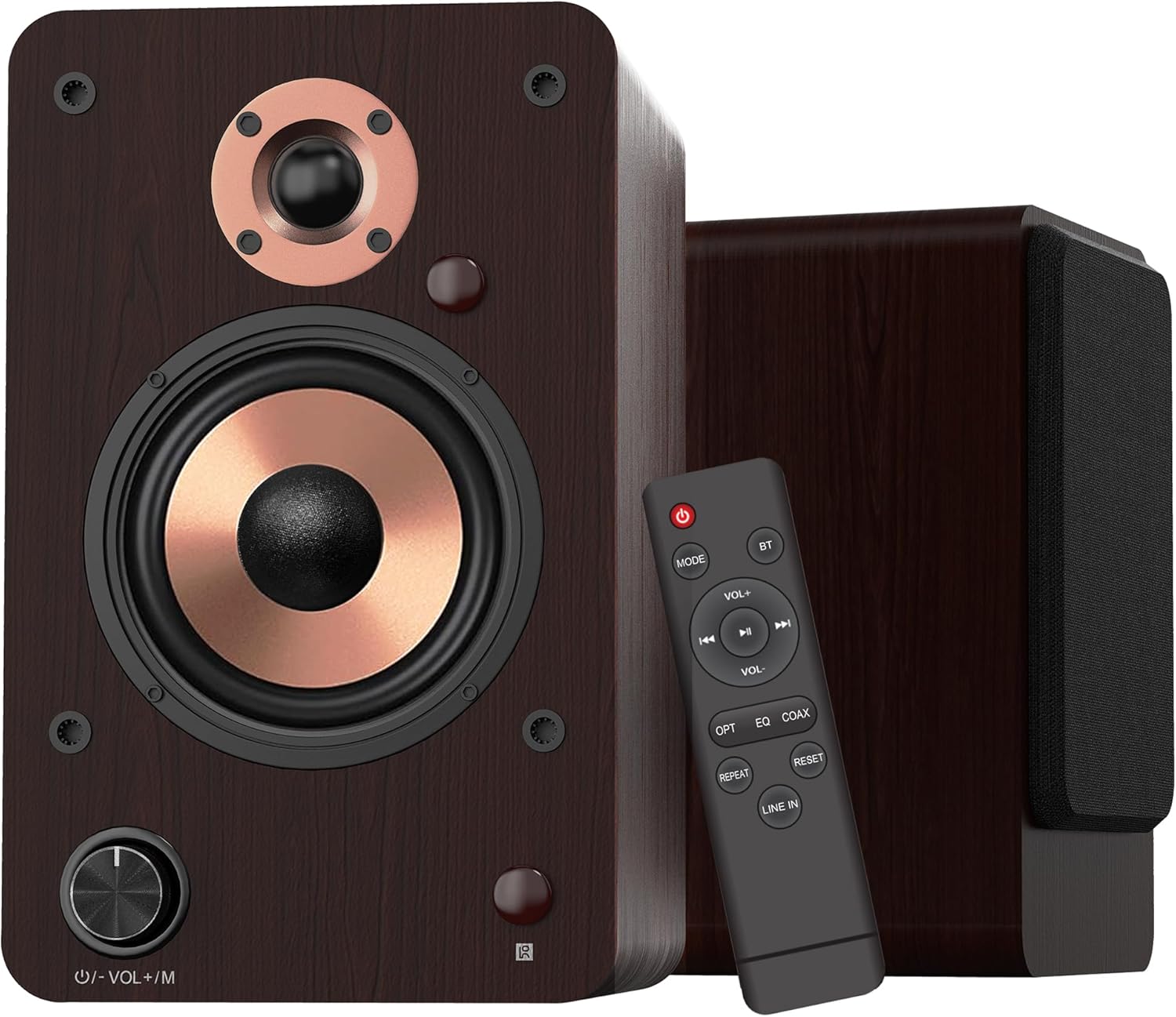
- כפתור עוצמת קול/מצב: Rotate to adjust volume. Press to cycle through input modes.
- מחוון LED: Displays the current input mode (Red: Standby, Blue: Bluetooth, Green: Optical, Purple: Coaxial/USB, Yellow: AUX, Light Blue: Line-in).
4.2 רכיבי רמקול

- טוויטר כיפת משי בגודל 1 אינץ': מספק תדרים גבוהים חדים וברורים.
- 4-inch Aluminum Cone Woofer: Provides rich and powerful bass.
- 12mm MDF Wood Cabinet: Ensures solid construction and minimizes resonance for improved audio clarity.
4.3 Rear Panel (Powered Speaker)

- כפתור טרבל: מכוונן את פלט התדרים הגבוהים.
- לחצן BASS: מכוונן את הפלט בתדרים נמוכים.
- מתג הפעלה: מפעיל או מכבה את מערכת הרמקולים.
- AC PORT: מתחבר לכבל חשמל AC.
- דובר בחוץ: Connects to the passive speaker using the provided speaker wire.
- LINE IN (RCA L/R): For connecting devices with RCA audio output (e.g., turntables, CD players).
- AUX IN: לחיבור מכשירים עם יציאת שמע 3.5 מ"מ.
- אוֹפּטִי: For connecting devices with optical audio output (e.g., TVs, game consoles).
- חַד צִירִי: For connecting devices with coaxial audio output.
- כניסת USB: For connecting USB flash drives for audio playback or connecting to a PC.
5. התקנה
5.1 פירוק
הוצא בזהירות את כל הרכיבים מהאריזה. שמור את האריזה להובלה או אחסון עתידיים.
5.2 מיקום רמקול
For optimal sound quality, place the speakers on a stable surface, such as a bookshelf or speaker stands. Position them along a wall or near a corner of the room to enhance bass response. Ensure the speakers are equidistant from your listening position for a balanced stereo image.
5.3 חיבור הרמקולים
Connect the powered speaker to the passive speaker using the provided speaker wire. Ensure the red wire connects to the red terminal and the white/black wire connects to the black terminal on both speakers.

5.4 חיבור למקורות שמע
The LP42M speakers offer multiple input options:
- בלוטות': לחיבור אלחוטי לטלפונים חכמים, טאבלטים או מכשירים אחרים התומכים ב-Bluetooth.
- USB: Connect a USB flash drive for direct audio playback or connect to a PC using a USB cable.
- אוֹפּטִי: Use the optical cable to connect to TVs, game consoles, or other digital audio sources.
- חַד צִירִי: Use a coaxial cable to connect to compatible digital audio sources.
- RCA (Line In): Use RCA cables to connect to devices like turntables, CD players, or DVD players.
- כניסת AUX: Use a 3.5mm audio cable to connect to devices with a headphone jack.


5.5 חיבור מתח
Connect the AC power cord to the AC port on the rear of the powered speaker, then plug the other end into a wall outlet.
6. הוראות הפעלה
6.1 הפעלה/כיבוי
הפוך את כּוֹחַ switch on the rear panel of the powered speaker to the 'ON' position to turn on the speakers. Flip it to 'OFF' to power down.
6.2 בחירת קלט
הקש על Volume/Mode Knob on the front of the powered speaker or the 'MODE' button on the remote control to cycle through the available input modes: Bluetooth, Optical, Coaxial, RCA (Line In), USB, and AUX-in. The LED indicator will change color to reflect the selected mode.

6.3 בקרת עוצמת הקול
סובב את ה Volume/Mode Knob on the front of the powered speaker clockwise to increase volume and counter-clockwise to decrease volume. Alternatively, use the 'VOL+' and 'VOL-' buttons on the remote control.
בקרת 6.4 צלילים
השתמש ב- לְשַׁלֵשׁ ו בס knobs on the rear panel of the powered speaker to adjust the high and low frequencies to your preference.

6.5 זיווג בלוטות '
- Switch the speaker to Bluetooth mode (blue LED indicator).
- On your device (smartphone, tablet), enable Bluetooth and search for 'LP42M'.
- Select 'LP42M' to pair. Once connected, the blue LED will remain solid.
6.6 השמעת USB
הכנס כונן הבזק מסוג USB המכיל קבצי שמע MP3/WMA files into the USB port. The speaker will automatically switch to USB mode and begin playback. Use the remote control for playback functions (play/pause, next/previous track).
6.7 פונקציות שלט רחוק

- לחצן הפעלה: Turns the speakers on/off (standby).
- מצב: מחזורי בין מצבי קלט.
- BT: עובר ישירות למצב בלוטות'.
- VOL+/VOL-: מתאים את עוצמת הקול.
- Play/Pause, Next/Previous: Controls audio playback (USB/Bluetooth).
- העדיף: Directly switches to Optical mode.
- EQ: Cycles through sound equalization presets.
- לְשַׁדֵל: Directly switches to Coaxial mode.
- לַחֲזוֹר עַל: Repeats current track or playlist (USB).
- אפס: מאפס הגדרות.
- קו בשורה: Directly switches to Line In (RCA) mode.
7. תחזוקה
תחזוקה נכונה מבטיחה את אורך החיים והביצועים של הרמקולים שלכם.
- ניקוי: Use a soft, dry, lint-free cloth to clean the speaker cabinets. Do not use abrasive cleaners, waxes, or solvents.
- אָבָק: נקו באופן קבוע את סורגי הרמקולים ומשטחיהם כדי למנוע הצטברות אבק.
- סְבִיבָה: הימנעו מהצבת רמקולים באור שמש ישיר, ליד מקורות חום או באזורים עם לחות גבוהה.
8. פתרון תקלות
אם נתקלת בבעיות, עיין בבעיות הנפוצות ובפתרונות הבאות:
| בְּעָיָה | סיבה אפשרית | פִּתָרוֹן |
|---|---|---|
| אין קול | Power not connected; incorrect input mode; volume too low; cables loose. | Ensure power is on; select correct input mode; increase volume; check all cable connections. |
| בלוטות' לא מתחבר | Speaker not in Bluetooth mode; device too far; already paired with another device. | Switch speaker to Bluetooth mode; ensure device is within 10m range; disconnect from other devices and try pairing again. |
| שמע מעוות | Volume too high; poor source quality; loose cable connection. | Reduce volume on speaker and source; try a different audio source; check cable connections. |
| השלט רחוק לא עובד | Batteries dead; obstruction between remote and speaker; remote not pointed at sensor. | Replace batteries; remove obstructions; ensure remote is pointed at the speaker's sensor. |
9. מפרטים
| תכונה | מִפרָט |
|---|---|
| סוג רמקול | רמקולי מדף ספרים פעילים |
| כוח פלט | 100W (50W x 2) |
| קוטר וופר | 4 inches (Aluminum Cone) |
| קוטר טוויטר | 1 inch (Silk Dome) |
| תגובת תדר | 40Hz-20kHz |
| עַכָּבָּה | 4 אוהם |
| יחס אות לרעש (S/N) | 80dB |
| קישוריות | Bluetooth 5.3, Optical, Coaxial, RCA (Line In), USB, AUX-in (3.5mm) |
| טווח בלוטות' | עד 10 מטר (33 רגל) |
| שיטת בקרה | שלט רחוק, כפתורים על הרמקול |
| חומר ארון | 12mm MDF Wood |
| מידות (כל רמקול) | 9.84" (H) x 7.07" (W) x 6.1" (L) / 25cm (H) x 18cm (W) x 15.5cm (L) |
| משקל (זוג) | 5.05 ק"ג (11.13 פאונד) |
| צֶבַע | חוּם |
10. סרטוני מוצר רשמיים
Watch these official videos for additional setup and feature demonstrations:
LONPOO Premium Bookshelf Speakers LP-42M
וידאו: סיום רשמיview of the LONPOO LP-42M Premium Bookshelf Speakers, showcasinהעיצוב והתכונות העיקריות שלהם.
Active Bookshelf Speaker 100W
Video: A short demonstration highlighting the active features and 100W power output of the bookshelf speakers.
11. אחריות ותמיכה
The LONPOO LP42M speakers come with a Limited Warranty. Please refer to the warranty card included in your package for detailed terms and conditions.
For technical support, troubleshooting assistance, or warranty claims, please contact LONPOO customer service through the official webהאתר או הקמעונאי שלך.


