מָבוֹא
This manual provides instructions for the TOKQI M01 3-Axis Phone Gimbal Stabilizer. This device is designed to provide stable and smooth video footage when using your smartphone, enhancing your mobile videography experience. It features intelligent tracking and is compatible with a wide range of smartphone models.
מה יש בקופסה

Image: Contents of the TOKQI M01 Gimbal box. The image displays the gimbal unit, a mini tripod, a USB charging cable, and the user manual, all neatly arranged next to the product packaging.
Upon unboxing your TOKQI M01 Gimbal, please verify that all the following components are present:
- TOKQI M01 3-Axis Phone Gimbal Stabilizer
- מיני חצובה
- כבל טעינה USB
- מדריך למשתמש
הגדרה
1. טעינת הגימבל
Before first use, fully charge the gimbal. Connect the USB charging cable to the gimbal's charging port and a suitable USB power adapter (not included). The indicator lights will show charging status.
2. Installing the Gimbal Show App
For full functionality, download and install the "Gimbal Show" application on your smartphone. Scan the QR codes below or search for "Gimbal Show" in your app store.
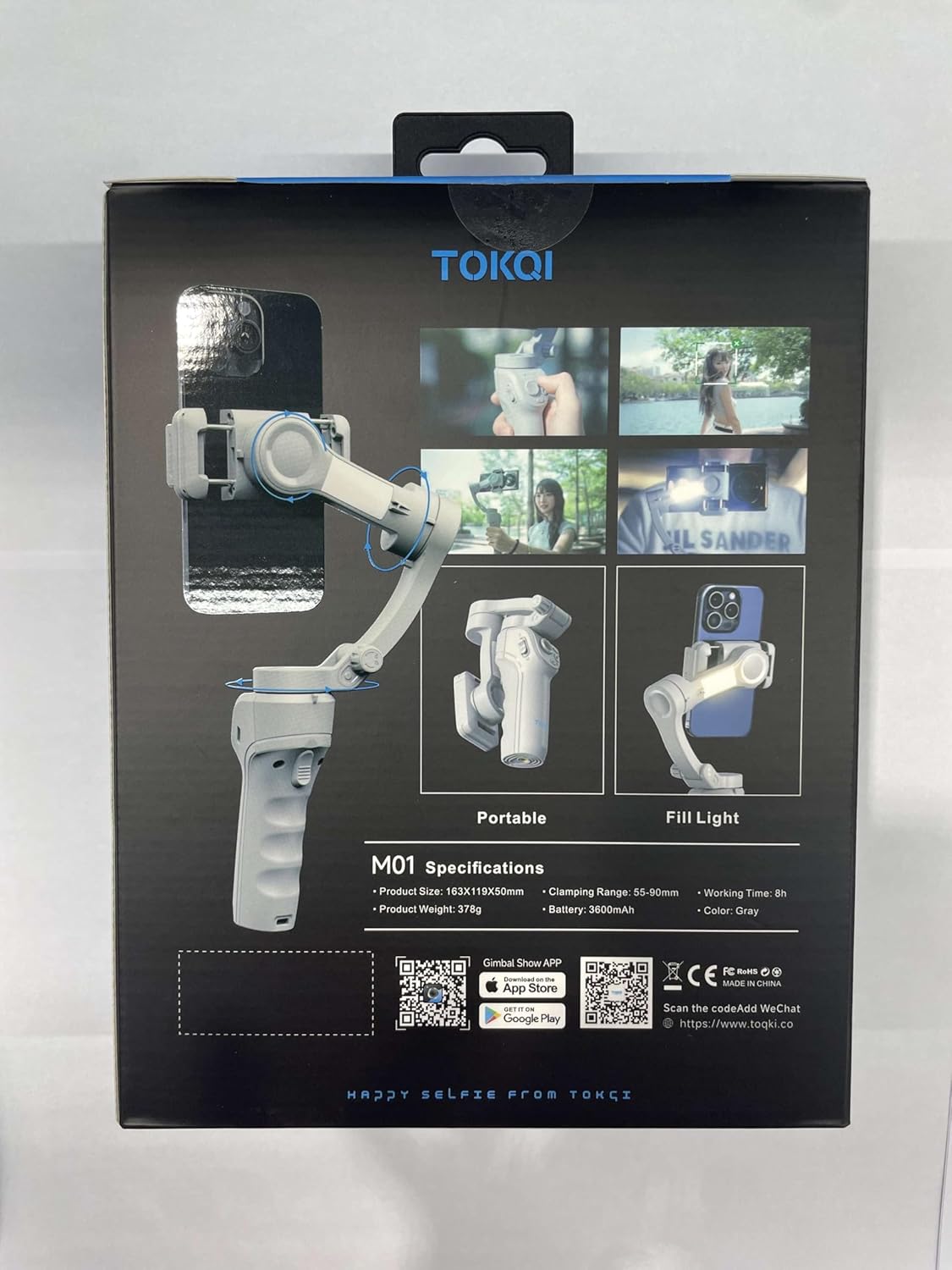
תמונה: אחורי view of the TOKQI M01 Gimbal product box. This side displays key specifications such as product size, weight, clamping range, battery capacity, and working time. It also features QR codes for downloading the "Gimbal Show" app from the App Store and Google Play, along with a WeChat contact QR code.
Note: Specific app store links are placeholders. Please refer to the QR codes on the product packaging for direct links.
3. הרכבת הטלפון החכם שלך
- להאריך את קליבר הטלפוןamp זְרוֹעַ.
- הנח בזהירות את הטלפון החכם שלך בתוך ה-clamp, תוך הקפדה על כך שהוא ממורכז ומאובטח.
- Adjust the phone's position to achieve balance. The phone should remain level when the gimbal is powered off.

תמונה: חזית view of the TOKQI M01 Gimbal. This image highlights the main control panel with its joystick, power button, mode button, and fill light button, providing a clear view של ממשק המשתמש.
הפעלת הגימבל
הפעלה/כיבוי
Press and hold the power button (usually marked with a power symbol) for 3 seconds to turn the gimbal on or off.
כפתורי בקרה מעלview
- ג'ויסטיק: Controls pan and tilt movements of the phone.
- לחצן הפעלה: Long press to power on/off. Short press for specific functions (refer to app for customization).
- לחצן מצב (M): Cycles through different gimbal modes (e.g., Pan Follow, Lock Mode, FPV Mode).
- Fill Light Button (*): Activates or adjusts the integrated fill light.
- Shutter Button (Camera Icon): Triggers photo capture or video recording when connected via Bluetooth to the app.
גימבל מצבים
The TOKQI M01 typically offers several operating modes to suit different shooting scenarios. Use the Mode button to switch between them:
- Pan Follow (PF): המצלמה נעה ימינה/שמאלה בעקבות תנועות היד שלך, בעוד שצירי ההטיה והגלגול נעולים.
- מצב נעילה (L): All three axes are locked, keeping the camera pointing in a fixed direction regardless of gimbal movement.
- מצב FPV (FPV): All three axes follow your hand movements, providing a first-person view אֵפֶקְט.
- Additional modes may be available via the Gimbal Show app.
Intelligent Target Tracking
To use the intelligent target tracking feature, ensure your gimbal is connected to the "Gimbal Show" app via Bluetooth. Within the app, select the tracking function and draw a box around the subject you wish to track on your phone's screen. The gimbal will automatically adjust to keep the subject in frame.
שימוש באור המילוי
Press the Fill Light button to turn on the integrated fill light. Press again to cycle through brightness levels or turn off the light. This feature is useful for illuminating subjects in low-light conditions.
חיבור החצובה
The included mini tripod can be screwed into the 1/4-inch screw hole at the bottom of the gimbal handle. This allows you to place the gimbal on a flat surface for stable shots or time-lapses.
תַחזוּקָה
- ניקוי: השתמשו במטלית רכה ויבשה לניקוי הגימבל. אין להשתמש בחומרי ניקוי נוזליים או ממסים.
- אִחסוּן: Store the gimbal in a cool, dry place, away from direct sunlight and extreme temperatures. When storing for extended periods, ensure the battery is charged to approximately 50% to prolong its lifespan.
- הימנע מהשפעה: הגן על הגימבל מפני נפילות ופגיעות, אשר עלולות לפגוע במנועים וברכיבים הפנימיים.
פתרון בעיות
| בְּעָיָה | סיבה אפשרית | פִּתָרוֹן |
|---|---|---|
| הגימבל לא נדלק. | סוללה חלשה. | טען את הגימבל במלואו. |
| Gimbal vibrates or is unstable. | Phone not balanced correctly. | Re-balance the phone in the clamp. Ensure it is centered. |
| לא ניתן להתחבר לאפליקציה דרך בלוטות'. | Bluetooth off on phone; app not open; gimbal not in pairing mode. | Ensure phone Bluetooth is on. Open Gimbal Show app. Restart gimbal and try pairing again. |
| Tracking feature not working. | Poor lighting; subject too far/fast; app not configured. | Ensure adequate lighting. Keep subject within optimal range. Verify tracking settings in the app. |
מפרטים
- דֶגֶם: M01
- גודל מוצר: 163 x 119 x 50 מ"מ
- משקל מוצר: 378 גרם (כ-0.83 פאונד)
- Item Weight (Shipping): 1.5 פאונד
- Clampטווח ing: 55 - 90 מ"מ
- קיבולת סוללה: 3600 מיליאמפר/שעה
- זמן עבודה: עד 8 שעות
- מכשירים תואמים: Smartphones, Cellphones
- צֶבַע: אָפוֹר
- יַצרָן: TOKQI
- זמין ראשון: 13 בפברואר 2025
אחריות ותמיכה
For product support, technical assistance, or warranty inquiries, please contact TOKQI customer service. You may also find additional resources and FAQs on the official TOKQI website or through the Gimbal Show app.
For direct communication, you can scan the WeChat QR code found on the product packaging or visit the link below:
אנא שמור את הוכחת הרכישה שלך עבור תביעות אחריות.


