1. הקדמה
This manual provides detailed instructions for the installation, operation, and maintenance of your PNI House WiFi800 NVR and PNI IP840 Outdoor Camera Wireless Surveillance Kit. Please read this manual thoroughly before using the product to ensure proper setup and functionality. Keep this manual for future reference.
2. מידע בטיחות
- ודא שכל חיבורי החשמל מאובטחים ועומדים בדרישות המתח שצוינוtage (12V DC).
- Do not expose the NVR to moisture or extreme temperatures.
- The PNI IP840 cameras are IP65 rated for outdoor use; however, avoid submerging them in water.
- Installation should be performed by qualified personnel if you are unsure about electrical connections or mounting procedures.
- הרחק את המוצר משדות מגנטיים חזקים.
- Use only original or certified replacement parts and accessories.
3. תכולת החבילה
ודא שכל הפריטים המפורטים להלן נמצאים בחבילה שלך:
- PNI House WiFi800 NVR (1 unit)
- PNI IP840 Outdoor Cameras (2 units)
- Power Adapters (for NVR and cameras)
- USB Mouse (for NVR)
- Fixing Screws and Wall Plugs (for cameras)
- User Manuals (for NVR and cameras)

Image: PNI House WiFi800 NVR with included USB mouse and power adapter.

Image: PNI IP840 Outdoor Camera with its power adapter and mounting hardware.
4. המוצר נגמרview
4.1 PNI IP840 Outdoor Camera
The PNI IP840 camera is a high-resolution wireless outdoor surveillance camera featuring 8MP 4K video, pan/tilt functionality, and advanced night vision. It is designed for robust performance in various weather conditions.
- חיישן: 1/2.7" CMOS, 8MP
- הַחְלָטָה: 3840x2160 (4K)
- עֲדָשָׁה: 3.6 מ"מ, 90° viewזווית ing
- הזזה/הטיה: אופקי 355°, אנכי 90°
- ראיית לילה: 4 IR LEDs and 4 White LEDs, up to 15m
- אִחסוּן: חריץ לכרטיס MicroSD (עד 256GB, כרטיס לא כלול)
- קישוריות: WiFi 2.4GHz, ONVIF support
- תכונות: Motion Detection, Human Shape Detection, Rotation after movement, ICSee app support
- עמידות בפני מזג אוויר: מדורג IP65

תמונה: חזית view of the PNI IP840 outdoor camera, showing the lens, LEDs, and antennas.

Image: Close-up of the PNI IP840 camera's connection cables for power and wired network.
4.2 PNI House WiFi800 NVR
The PNI House WiFi800 NVR (Network Video Recorder) is the central unit for managing and recording video from your surveillance cameras. It supports up to 8 channels at 5MP or 4 channels at 4K (8MP) resolution.
- Video Channels: 8 channels (5MP) / 4 channels (4K/8MP)
- דחיסת וידאו: H.265AI/H.265+
- רזולוציית השמעה: 1080P (HDMI output)
- אִחסוּן: Supports 1x 2.5" HDD (up to 14TB) or 1x MicroSD card (up to 128GB)
- ממשק רשת: RJ45 10/100/1000 Mbit/s
- תדר אלחוטי: 2.4 GHz (for NVR-camera communication)
- פלטים: 1x HDMI, 1x USB 2.0
- תכונות: Mobile/PC viewing (Android, iOS, Windows), ICSee/XMEye app support, Integrated voice prompt speaker

Image: Rear panel of the PNI House WiFi800 NVR, displaying its various ports including power, HDMI, Ethernet, USB, and reset button.

תמונה: צד view of the PNI House WiFi800 NVR, showing its antennas and port layout.
5. התקנה
5.1 הגדרה ראשונית של NVR
- חבר חשמל: Connect the NVR to its power adapter and plug it into an electrical outlet.
- חיבור תצוגה: Connect the NVR to a monitor or TV using an HDMI cable.
- חבר עכבר: Plug the USB mouse into the NVR's USB port for navigation.
- חיבור רשת (אופציונלי): For remote access and firmware updates, connect the NVR to your router using an Ethernet cable.
- Storage Installation (Optional): If using an HDD, open the NVR casing and install a 2.5" SATA HDD. Alternatively, insert a MicroSD card into the designated slot.
5.2 התקנת מצלמה
- בחר מיקום: Select a suitable outdoor location for each camera, ensuring good Wi-Fi signal strength and an unobstructed view. The IP65 rating allows for outdoor exposure.
- הר מצלמה: Use the provided screws and wall plugs to securely mount the camera to a wall or ceiling.
- חבר חשמל: Connect the camera to its power adapter and plug it into an electrical outlet. Ensure the power cable is protected from the elements.
5.3 Pairing Cameras with NVR
The cameras are typically pre-paired with the NVR in the kit. If not, or if adding new cameras:
- Ensure both the NVR and cameras are powered on.
- On the NVR interface (connected to a monitor), navigate to the camera management or channel settings.
- Select the option to add or search for wireless cameras. The NVR will scan for available PNI IP840 cameras.
- עקוב אחר ההנחיות שעל המסך כדי להשלים את תהליך ההתאמה.
5.4 Mobile App Configuration (ICSee / XMEye)
- הורד אפליקציה: Download the ICSee or XMEye app from your smartphone's app store (Android or iOS).
- רישום חשבון: Create a new user account or log in if you already have one.
- הוסף מכשיר: In the app, select "Add Device" or scan the QR code displayed on the NVR's monitor (if available) or the NVR itself.
- עקוב אחר ההנחיות: Follow the in-app instructions to connect your NVR and cameras to your mobile device for remote viewשליטה ובקרה.
6. הוראות הפעלה
6.1 בשידור חי View
Access live video feeds from your cameras via the NVR's connected monitor or through the ICSee/XMEye mobile application. The NVR interface allows for multi-channel display.
6.2 הקלטה
- הקלטה רציפה: Configure the NVR to record continuously to the installed HDD or MicroSD card.
- הקלטה מופעלת תנועה: Set up recording to trigger only when motion is detected by the cameras.
- הקלטה מתוזמנת: Define specific time periods for recording.
6.3 השמעה
כדי לחזורview foo מוקלטtage:
- On the NVR interface, select the "Playback" option.
- Choose the desired camera, date, and time range.
- Use the controls to play, pause, fast forward, or rewind footage.
- Mobile app playback functions similarly, allowing remote access to recorded video.
6.4 Motion Detection and AI Functions
The PNI IP840 cameras feature advanced detection capabilities:
- זיהוי תנועה: Configurable sensitivity to detect movement within the camera's field of view.
- זיהוי צורות אנושיות: Intelligent analysis to differentiate human figures from other moving objects, reducing false alarms.
- Rotation After Movement: The camera can be set to automatically track detected movement within its pan/tilt range.
- התראות אזעקה: Enable push notifications to your mobile phone when an alarm event (e.g., motion detection) occurs.
Access these settings through the NVR menu or the mobile application to customize detection zones, sensitivity, and notification preferences.
6.5 בקרת סיבוב/הטיה/זום (PTZ)
For PNI IP840 cameras, you can remotely control the camera's orientation:
- Use the PTZ controls available in the NVR interface or the ICSee/XMEye mobile app.
- Drag your finger on the live view screen in the app to pan (horizontal 355°) and tilt (vertical 90°) the camera.
- Digital zoom functionality may be available through the app.
7. תחזוקה
- ניקוי: Regularly clean the camera lenses with a soft, dry cloth to ensure clear image quality. Do not use harsh chemicals.
- עדכוני קושחה: Periodically check for firmware updates for both the NVR and cameras through the mobile app or NVR interface. Updates can improve performance and add new features.
- בדוק חיבורים: Ensure all power and network cables are securely connected and free from damage.
- ניהול אחסון: Regularly back up important recordings and manage storage space on your HDD or MicroSD card.
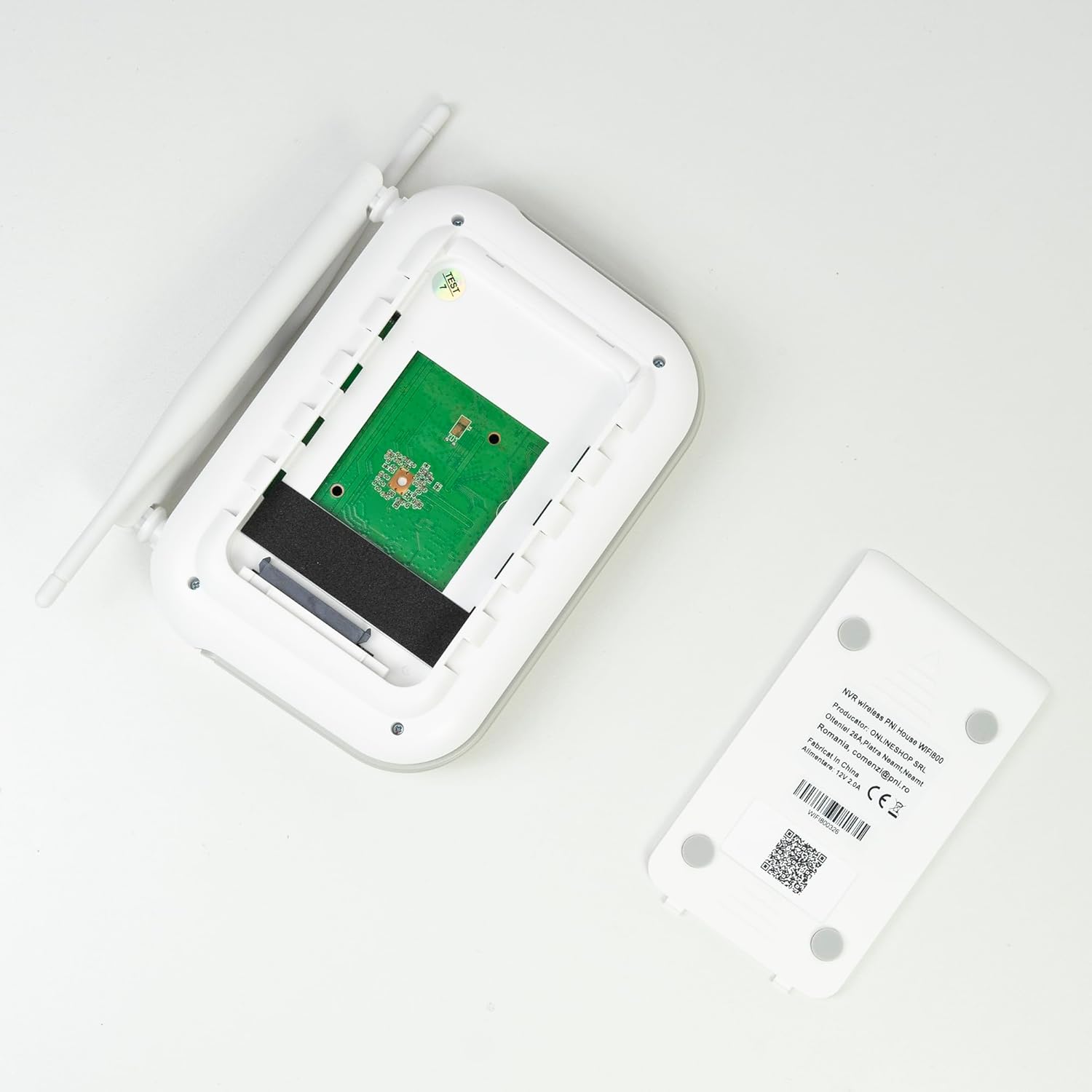
תמונה: פנימי view of the PNI House WiFi800 NVR, illustrating the circuit board and the bay for HDD installation.
8. פתרון תקלות
- אין תמונה על המסך:
- Check NVR power supply and HDMI cable connection to the monitor.
- ודא שהצג מוגדר למקור הקלט הנכון.
- Cameras Not Connecting:
- Verify cameras are powered on.
- Check Wi-Fi signal strength at camera locations.
- Re-pair cameras with the NVR if necessary (refer to Section 5.3).
- אין גישה מרחוק דרך אפליקציה:
- Ensure the NVR is connected to the internet via Ethernet.
- בדוק את חיבור האינטרנט של הסמארטפון שלך.
- Verify NVR is correctly added to the ICSee/XMEye app.
- איכות תמונה ירודה:
- ניקוי עדשות מצלמה.
- בדוק אם יש חסימות בשדה הראייה של המצלמה view.
- Ensure adequate lighting for night vision.
- בעיות הקלטה:
- Check if an HDD or MicroSD card is properly installed and formatted.
- אימות לוחות זמנים של הקלטות והגדרות זיהוי תנועה.
- ודא שיש מספיק מקום אחסון זמין.
9. מפרטים
9.1 PNI IP840 Outdoor Camera Specifications
| תכונה | פְּרָט |
|---|---|
| חיישן תמונה | CMOS 1/2.7 אינץ' |
| חיישן רזולוציה | 8MP |
| רזולוציית וידאו | 3840x2160 (4K) |
| סוג עדשה | 3.6 מ"מ |
| Viewזווית | 90° |
| פאן/הטיה | אופקי: 355°, אנכי: 90° |
| תאורת אינפרא אדום | 4x IR LEDs, 4x White LEDs |
| מרחק IR | עד 15 מ' |
| דחיסת וידאו | H.265X (compatible with H.264+/H.264) |
| שֶׁמַע | Integrated Microphone and Speaker |
| תדר אלחוטי | 2.4 גיגה-הרץ |
| פרוטוקולים נתמכים | ONVIF |
| אִחסוּן | חריץ לכרטיס MicroSD (מקסימום 256GB) |
| ספק כוח | 12V/1A |
| מחלקת הגנה | IP65 |
| טמפרטורת הפעלה | -26°C ~ +80°C |
| מידות | 86x135x146 מ"מ |
| מִשׁקָל | 371 גרם |
9.2 PNI House WiFi800 NVR Specifications
| תכונה | פְּרָט |
|---|---|
| ערוצי וידאו | 8 ערוצים 5MP / 4 ערוצים 4K (8MP) |
| דחיסת וידאו | H.265AI/H.265+ |
| רזולוציית השמעה | 1080P (HDMI) |
| קיבולת אחסון | 1x 2.5" HDD (max 14TB) / 1x MicroSD card (max 128GB) |
| ממשק רשת | RJ45 - 10/100/1000 Mbit/s |
| פלט וידאו | 1x HDMI |
| ממשק USB | 1x USB 2.0 |
| מעבד | MSR621Q |
| ספק כוח | 12V/2A |
| מידות | 170x120x35 מ"מ |
| מִשׁקָל | 245 גרם |
| Wi-Fi Frequency (NVR-Camera) | 2.4 גיגה-הרץ |
| הנחיה קולית | Yes, integrated speaker |
10. אחריות ותמיכה
For warranty information, please refer to the documentation provided at the time of purchase or contact your retailer. For technical support, product inquiries, or assistance with troubleshooting, please visit the official PNI website or contact PNI customer service directly. Keep your purchase receipt as proof of purchase.
יַצרָן: חנות מקוונת SRL
מספר דגם: PNI-WF8-840-2


