1. מבוא ומעלהview
The Infinity Smart Watch for Women is designed to seamlessly integrate into your daily life, offering a blend of elegance and advanced functionality. Featuring a vibrant AMOLED 1.1" screen, this smartwatch provides comprehensive health and fitness tracking, communication features, and smart notifications. It is compatible with both iOS and Android phones.

איור 1: חזית view of the Infinity Smart Watch for Women, showcasing its elegant design and vibrant AMOLED display.
2. מה בקופסה
- Infinity Smart Watch (Model WS_BLK)
- כבל טעינה
- מדריך למשתמש
3. התקנה
3.1 טעינה ראשונית
Before first use, fully charge your smartwatch. Connect the magnetic charging cable to the charging points on the back of the watch and plug the USB end into a compatible power adapter (not included) or computer USB port. The watch display will indicate charging status.

Figure 2: The smartwatch connected to its magnetic charging cable, showing the battery charging indicator.
3.2 התקנה וצימוד של אפליקציה
- Scan the QR code provided in the manual or on the watch screen (if available) to download the companion app. Alternatively, search for the app name (e.g., 'VeryFit' or 'FitCloudPro' as seen in related videos) in your smartphone's app store (iOS App Store or Google Play Store).
- התקן את האפליקציה בסמארטפון שלך.
- פתחו את האפליקציה ופעל לפי ההוראות שעל המסך כדי ליצור חשבון ולהגדיר את הפרו שלכם.file.
- ודא שה-Bluetooth מופעל בטלפון החכם שלך.
- In the app, navigate to the device pairing section and select your Infinity Smart Watch from the list of available devices.
- אשר את בקשת הצימוד הן בטלפון החכם והן בשעון החכם.
Video 1: Official product video demonstrating the Infinity Smart Watch for Women, including its features and design. This video provides a visual guide to the watch's capabilities.
4. הוראות הפעלה
4.1 ניווט בסיסי
- החלק למעלה: View recent notifications/messages.
- החלק למטה: Access quick settings (brightness, Do Not Disturb, flashlight, phone finder, settings).
- החלק שמאלה/ימינה: Scroll through main features like activity data, heart rate, sleep tracking, and weather.
- לחץ על כפתור הצד: חזור לצג השעון או גש לתפריט הראשי.
4.2 ביצוע מענה לשיחות
Once paired with your smartphone, you can make and answer calls directly from your smartwatch.
- להתקשר: Access the phone function from the main menu, use the dial pad or select a contact from your synced phonebook.
- כדי לענות לשיחה: כאשר שיחה נכנסת, השעון יציג את מזהה המתקשר. הקש על הסמל הירוק כדי לענות או על הסמל האדום כדי לדחות.
4.3 התראות חכמות
Receive alerts for incoming calls, text messages, and app notifications directly on your wrist. Configure notification preferences within the companion app.

Figure 3: The smartwatch interface showing options for Bluetooth calls, smart notifications, and voice assistant.
4.4 התאמה אישית של לוחות השעון
The smartwatch offers a variety of customizable watch faces to suit your style. You can change them directly on the watch or through the companion app, which provides over 200 options.
5. תכונות ניטור בריאות
The Infinity Smart Watch is equipped with a comprehensive suite of health and fitness tracking features:
- ניטור קצב הלב: עוקב באופן רציף אחר קצב הלב שלך לאורך כל היום.
- ניטור לחץ דם: Provides on-demand blood pressure readings.
- ניטור שינה: מנתח את דפוסי השינה שלך, כולל שינה עמוקה, שינה קלה וזמני ערות.
- מד צעדים: Counts your steps, distance traveled, and calories burned.
- מצבי ספורט מרובים: Supports over 100 sports modes, allowing you to track specific workouts like walking, running, cycling, and swimming.
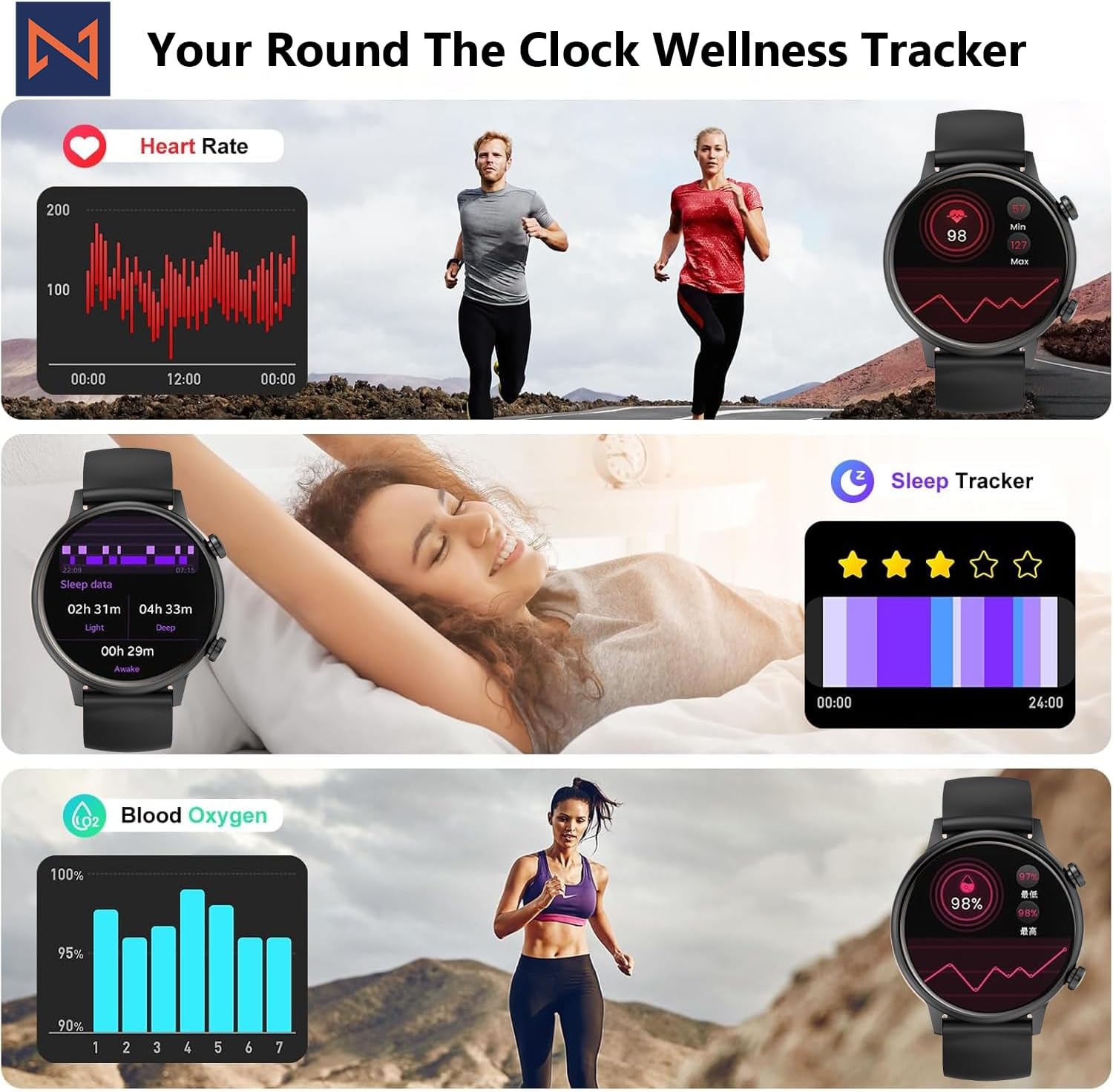
Figure 4: The smartwatch interface showing real-time heart rate, sleep tracking, and blood oxygen levels.

Figure 5: The smartwatch showing a selection of its multiple sports tracking modes.
6. עמידות במים
The Infinity Smart Watch has an IP68 waterproof rating, making it resistant to dust, sweat, and water. It is suitable for daily wear, including hand washing, face washing, and swimming. פֶּתֶק: Avoid using the watch in hot water (e.g., hot showers, saunas) or for deep-sea diving, as extreme temperatures or high-pressure water may compromise its water resistance.

Figure 6: The smartwatch demonstrating its IP68 waterproof capability during water exposure.
7. סוללה וטעינה
The smartwatch features a 200 mAh Lithium Polymer battery. A full charge typically takes approximately 2 hours, providing 3-5 days of working time and up to 30 days of standby time, depending on usage.
8. מפרטים
| תכונה | פְּרָט |
|---|---|
| מספר דגם | WS_BLK |
| גודל מסך | מסך AMOLED בגודל 1.1 אינץ' |
| דירוג עמיד למים | IP68 |
| קיבולת סוללה | 200 מיליamp שעות (ליתיום פולימר) |
| קישוריות | בלוטות' |
| מַעֲרֶכֶת הַפעָלָה | אנדרואיד (תואם ל-iOS) |
| קיבולת אחסון זיכרון | 128 מגה-בייט |
| משקל פריט | 5 אונקיות |
| יַצרָן | Kizzy Enterprises Inc |
9. פתרון תקלות
- שעון לא נדלק: ודא שהשעון טעון במלואו. לחץ לחיצה ארוכה על כפתור הצד כדי להפעיל אותו.
- לא ניתן להתאים לטלפון: Ensure Bluetooth is enabled on your phone and the watch is within range. Restart both devices and try pairing again through the app.
- התראות שלא התקבלו: Check app settings on your phone to ensure notification permissions are granted for the smartwatch app. Also, verify that 'Do Not Disturb' mode is not active on the watch.
- קריאות בריאות לא מדויקות: Ensure the watch is worn snugly on your wrist, not too tight or too loose. Clean the sensors regularly. Note that the blood pressure monitor may not be medically accurate and is for reference only.
- הקפאת מסך: Restart the smartwatch by long-pressing the side button until it powers off, then power it back on. If the issue persists, check for app updates.
10. אחריות ותמיכה
For warranty information, technical support, or service inquiries, please refer to the contact details provided on the product packaging or the manufacturer's official webאתר. שמור את קבלת הרכישה כהוכחת קנייה לתביעות אחריות.


