1. הקדמה
This manual provides instructions for the installation, operation, and maintenance of the Dahua 4G LTE Wireless Outdoor IP Camera, model DH-IPC-HFW1239DTP-4G-IL. This device is designed for outdoor surveillance, offering remote monitoring capabilities through 4G LTE connectivity. It features 2MP resolution, night vision, two-way audio, and is built to withstand various weather conditions.
2. המוצר נגמרview
The Dahua 4G LTE Wireless Outdoor IP Camera is a robust surveillance solution. Key features include:
- רזולוציה של 2 מגה פיקסל: לוכד וידאו ברורtage.
- קישוריות 4G LTE: Enables remote access and real-time monitoring without requiring a local Wi-Fi network.
- ראיית לילה: Provides visibility up to 50 meters in low-light conditions using IR LEDs.
- עיצוב עמיד בפני מזג אוויר: דירוג IP67 לשימוש חיצוני, מגן מפני חדירת אבק ומים.
- שמע דו כיווני: מאפשר תקשורת בזמן אמת דרך המצלמה.
- Intruder Alert System: Sends notifications upon detection of unusual activity.
- תאימות לבית חכם: משתלב עם אמזון אלקסה וגוגל אסיסטנט לשליטה קולית.
- דחיסת וידאו: Utilizes H.265 for efficient storage and transmission.
2.1 רכיבים כלולים
- Dahua 4G LTE Wireless Outdoor IP Camera
- מתאם מתח
- חומרת הרכבה (ברגים, עוגנים)
- מדריך להתחלה מהירה
2.2 מוצר Views
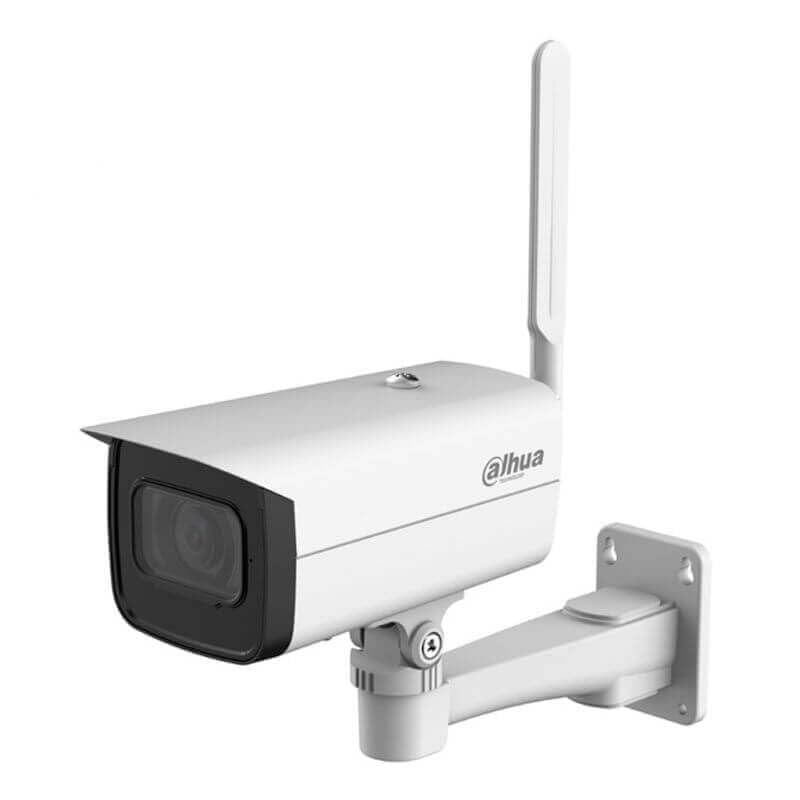
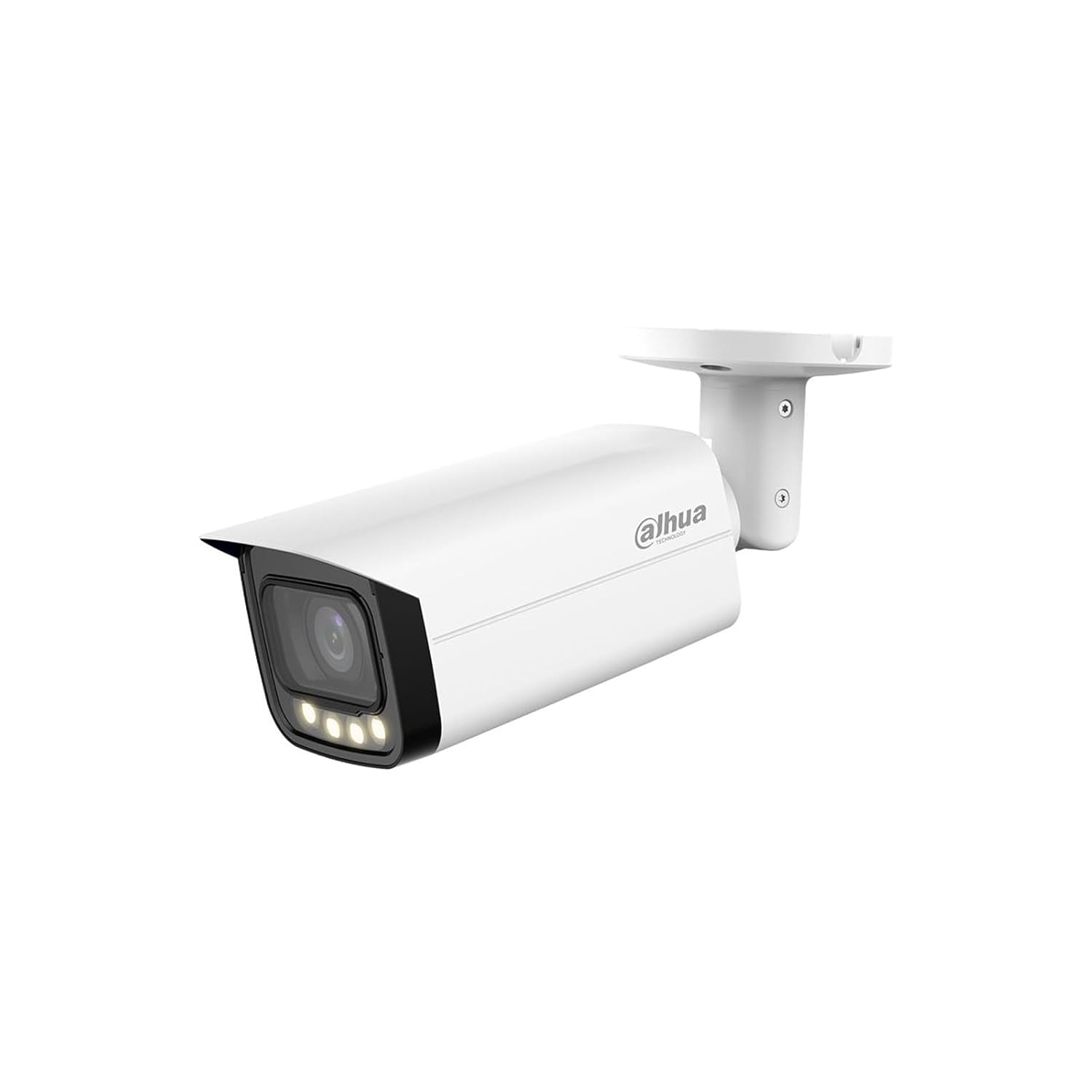

3. הוראות התקנה
Follow these steps to set up your Dahua 4G LTE Wireless Outdoor IP Camera:
- פרק את המצלמה: Carefully remove all components from the packaging. Verify that all included items are present.
- Insert SIM Card (for 4G LTE models): Locate the SIM card slot, typically protected by a cover. Insert a activated 4G LTE SIM card according to the diagram provided in the quick start guide. Ensure it is correctly seated.
- חיבור חשמל: Connect the provided power adapter to the camera's power input port and then plug it into a suitable power outlet. The camera will power on and initiate its startup sequence.
- Download Mobile Application: Download the official Dahua mobile application (e.g., DMSS) from your smartphone's app store (iOS App Store or Google Play Store).
- Initial Device Pairing:
- Open the Dahua mobile application and create an account or log in.
- הקש על סמל ה-'+' כדי להוסיף מכשיר חדש.
- סרוק את קוד ה-QR הממוקם על המצלמה או על האריזה שלה.
- Follow the on-screen prompts to complete the device pairing process. This may involve setting a device password.
- הרכבת המצלמה:
- Choose a suitable outdoor location that provides the desired viewing angle and has good 4G LTE signal strength.
- Use the provided mounting template (if available) to mark drill holes.
- קדחו חורים והכנסו עוגני קיר במידת הצורך.
- אבטחו את תושבת ההרכבה למשטח באמצעות הברגים המצורפים.
- חבר את המצלמה לתושבת ההרכבה והתאם את זוויתה לכיסוי אופטימלי.
4. הוראות הפעלה
Once the camera is set up, you can begin monitoring and utilizing its features through the mobile application.
4.1 ניטור מרחוק
גישה לעדכוני וידאו חיים ולסרטונים מוקלטיםtage from anywhere using the Dahua mobile application. Ensure your smartphone has an active internet connection.
4.2 שמע דו-כיווני
כדי להשתמש בתכונת השמע הדו-כיווני:
- בשידור חי view interface of the app, locate the microphone icon.
- Tap the microphone icon to speak through the camera's speaker.
- The camera's built-in microphone will capture audio from the camera's vicinity.
4.3 ראיית לילה
The camera automatically switches to night vision mode in low-light conditions. Infrared LEDs illuminate the area, providing clear black-and-white video. The camera can detect motion up to 50 meters in darkness.
4.4 Intruder Alerts
Configure motion detection zones and sensitivity settings within the mobile application. When motion is detected, the camera will send instant notifications to your smartphone, allowing you to view the event in real-time.
4.5 שילוב בית חכם
To integrate with Amazon Alexa or Google Assistant:
- Open the Alexa or Google Home app on your smartphone.
- חפש the Dahua skill/service and enable it.
- Link your Dahua account with your smart home assistant account.
- Discover devices. You can then use voice commands to view הזנות של המצלמה בצגים חכמים תואמים.
5. תחזוקה
תחזוקה שוטפת מבטיחה ביצועים אופטימליים ואורך חיים של המצלמה שלך.
5.1 ניקוי
- נקו מעת לעת את עדשת המצלמה ואת ביתה בעזרת מטלית רכהamp בַּד.
- Do not use harsh chemicals or abrasive cleaners, as these can damage the lens or finish.
- ודא שהמצלמה כבויה לפני הניקוי.
5.2 עדכוני קושחה
Check the Dahua mobile application regularly for available firmware updates. Keeping your camera's firmware up-to-date ensures you have the latest features, security patches, and performance improvements. Follow the in-app instructions for firmware updates.
6. פתרון תקלות
אם נתקלת בבעיות עם המצלמה שלך, עיין בשלבי פתרון הבעיות הנפוצים הבאים:
- אין כוח: Ensure the power adapter is securely connected to both the camera and a working power outlet. Check the power indicator light on the camera.
- No 4G LTE Connection: Verify that the SIM card is correctly inserted and activated. Check the signal strength indicator in the mobile app. If signal is weak, try repositioning the camera or contacting your mobile service provider.
- לא ניתן להתחבר לאפליקציה: Ensure your smartphone has an active internet connection. Restart the camera and your smartphone. Try re-pairing the device if the issue persists.
- איכות וידאו ירודה: Check the camera lens for dirt or obstructions. Ensure there is adequate lighting in the monitored area. Adjust video resolution settings in the app if necessary.
- זיהוי תנועה לא עובד: Verify that motion detection is enabled in the app settings. Adjust sensitivity and detection zones. Ensure there are no constant movements (e.g., tree branches) triggering false alarms.
- בעיות שמע דו-כיווניות: Check the microphone and speaker settings in the app. Ensure there are no physical obstructions blocking the camera's microphone or speaker.
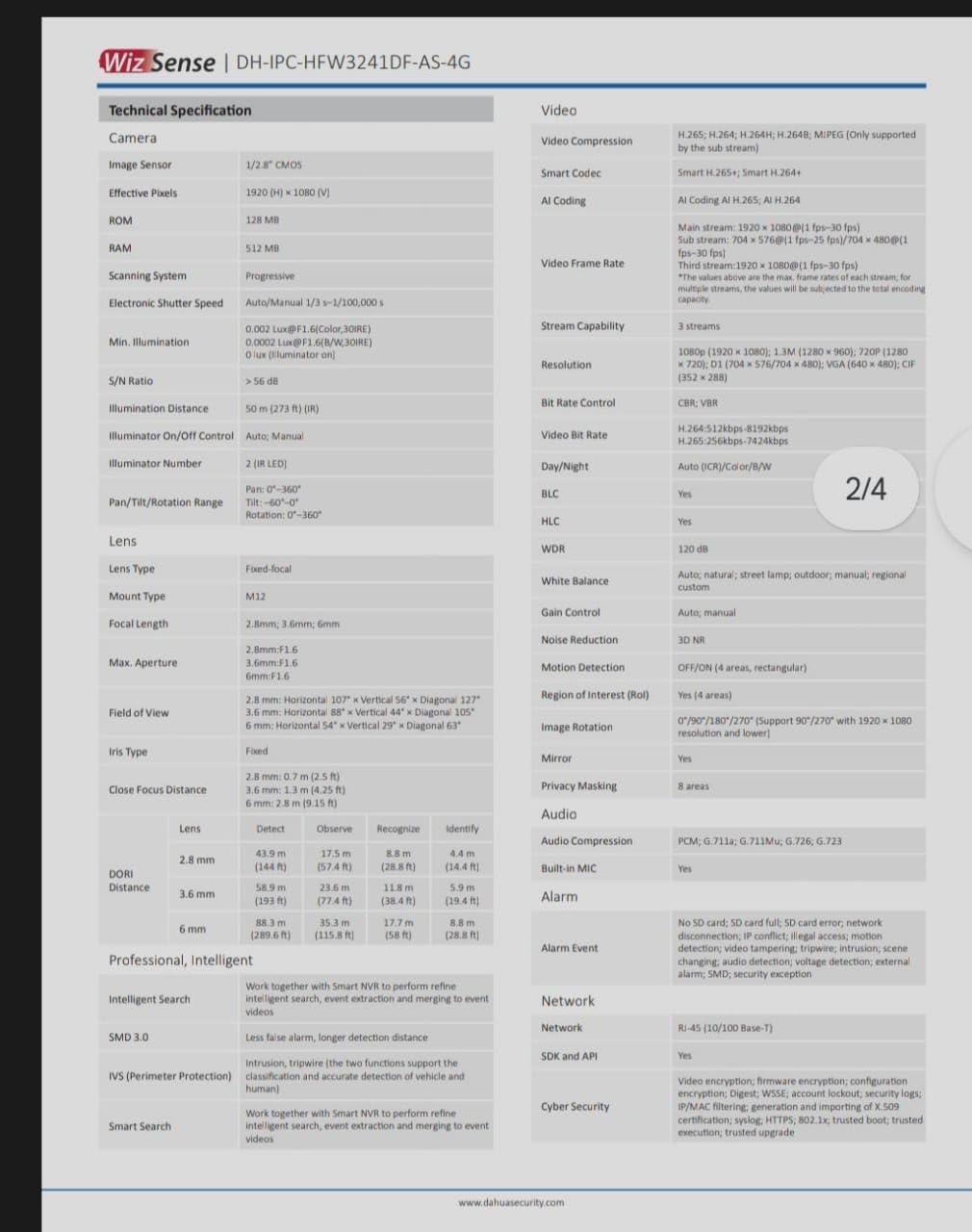
7. מפרטים
Detailed technical specifications for the Dahua 4G LTE Wireless Outdoor IP Camera (DH-IPC-HFW1239DTP-4G-IL):
| תכונה | מִפרָט |
|---|---|
| מספר דגם | DH-IPC-HFW1239DTP-4G-IL |
| חיישן תמונה | CMOS 1/2.7 אינץ' |
| הַחְלָטָה | 2MP (1920 x 1080) |
| קצב פריימים | 30 פריימים לשנייה |
| עֲדָשָׁה | Fixed-focal (specific focal length may vary by variant) |
| ראיית לילה | IR LEDs, up to 50 meters |
| תקשורת אלחוטית | 4G LTE, Wi-Fi, בלוטות' |
| שֶׁמַע | אודיו דו-כיווני (מיקרופון ורמקול מובנים) |
| דחיסת וידאו | H.265 |
| אִחסוּן | Micro SD card slot (up to 256GB, card not included) |
| דירוג עמיד בפני מזג אוויר | IP67 |
| ספק כוח | 12V DC (כלול מתאם) |
| שיטת בקרה | אפליקציה לנייד |
| מידות (L x W x H) | 12 x 5 x 10 Centimeters (approximate) |
| מִשׁקָל | 500 גרם (בערך) |
| טמפרטורת הפעלה | Refer to product datasheet for specific range |
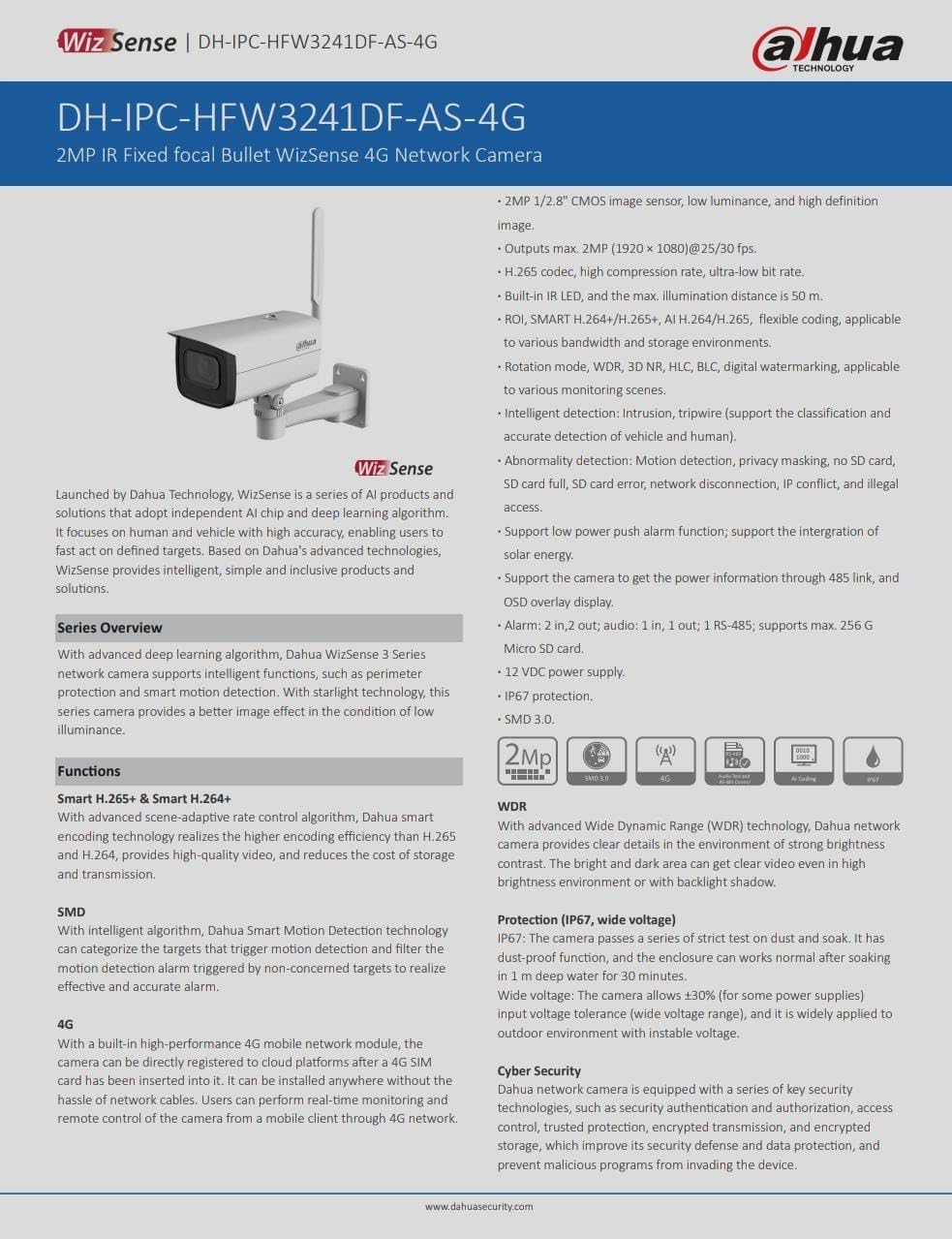
7.1 Datasheet Reference
For more detailed technical specifications, please refer to the official product datasheets:


8. אחריות ותמיכה
למידע על אחריות, אנא עיינו בכרטיס האחריות המצורף למוצר שלכם או בקרו באתר הרשמי של Dahua website. For technical support, contact Dahua customer service through their official channels. Keep your purchase receipt for warranty claims.


