1. הקדמה
The HUMZOR NP716 is an advanced bidirectional automotive diagnostic scan tool designed for comprehensive vehicle system analysis and maintenance. This device features ECU coding capabilities, all-system diagnostics, and over 17 special reset functions. Equipped with an Android 11.0 operating system and a 5.5-inch screen, it provides a user-friendly interface for efficient vehicle servicing. This manual provides detailed instructions for setting up, operating, maintaining, and troubleshooting your NP716 device.
2. המוצר נגמרview
2.1 תכונות עיקריות
- בקרה דו-כיוונית: Perform active tests to control vehicle components and systems.
- קידוד ECU: Customize vehicle settings and perform module replacement functions.
- כל אבחוני המערכת: Read and clear fault codes, view live data, and retrieve ECU information for all available vehicle systems.
- 17+ Special Reset Functions: Includes ABS Bleeding, Oil Reset, SAS Reset, TPMS Reset, EPB Reset, DPF Reset, Battery Reset, Injector Code, Throttle Learning, Gear Learning, CVT Learning, Windows, Suspension, Light, and Seat Reset.
- מַעֲרֶכֶת הַפעָלָה: אנדרואיד 11.0 לחוויית משתמש חלקה ואינטואיטיבית.
- לְהַצִיג: מסך מגע בגודל 5.5 אינץ'.
- קישוריות: Built-in Wi-Fi module.
- עדכוני תוכנה: Includes 3 years of free software updates.
2.2 תכולת החבילה
The NP716 package typically includes the following components:
- HUMZOR NP716 Diagnostic Tablet
- VCI (Vehicle Communication Interface) Connector
- כבל טעינה USB
- מתאם מתח
- תיק נשיאה מגן
- Quick Start Guide (refer to this manual for full instructions)

Image 2.2.1: The HUMZOR NP716 diagnostic tablet, VCI module, and protective carrying case.

Image 2.2.2: A visual representation of the items included in the NP716 product package.
2.3 מידות מכשיר
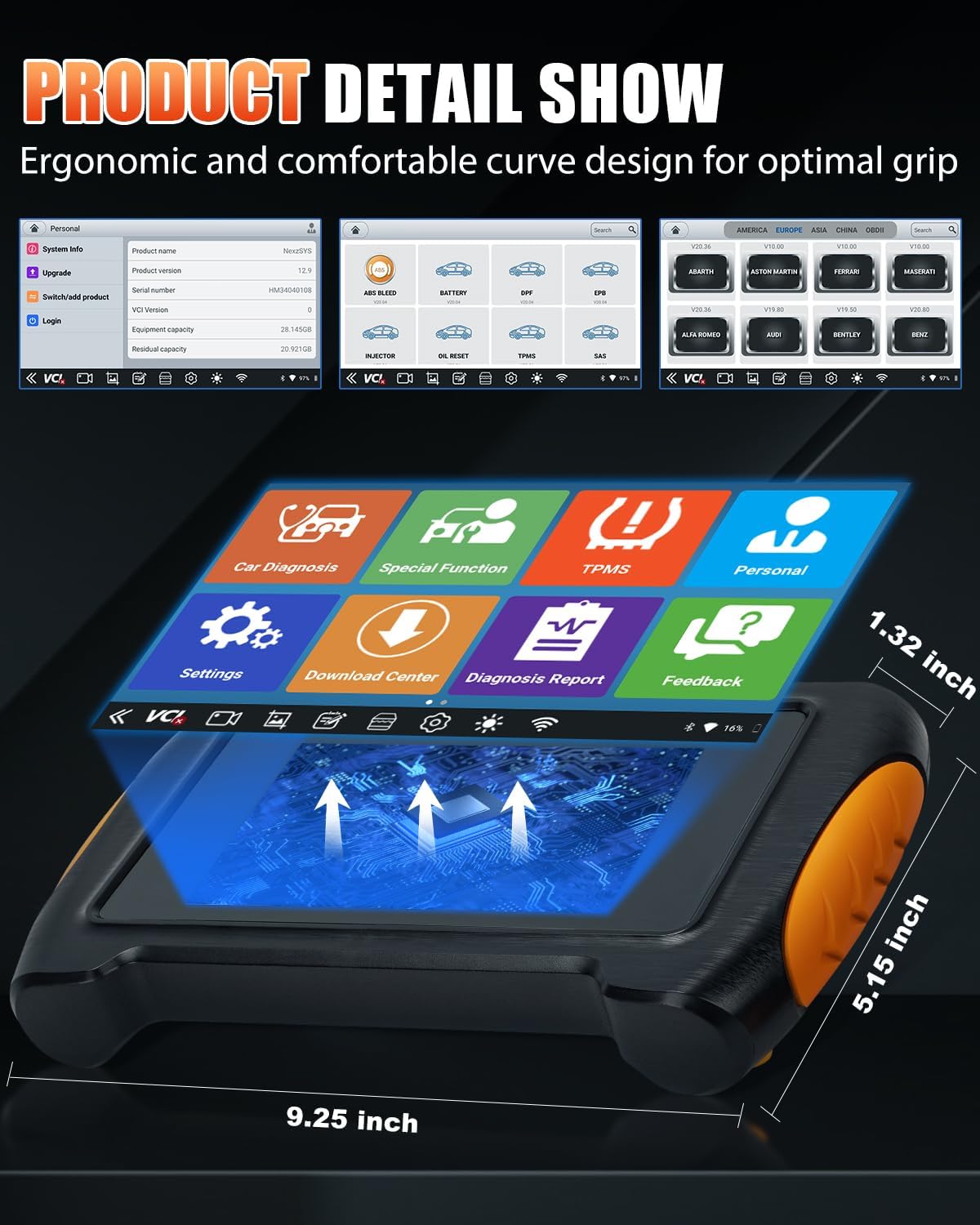
Image 2.3.1: The NP716 tablet showing approximate dimensions: 9.25 inches length, 5.15 inches width, and 1.32 inches thickness.
3. התקנה
3.1 טעינה ראשונית
Before first use, ensure the NP716 tablet is fully charged. Connect the provided USB charging cable to the tablet and the power adapter, then plug the adapter into a standard electrical outlet. The charging indicator will illuminate.
3.2 הפעלה/כיבוי
- הפעלה: לחץ והחזק את לחצן ההפעלה הממוקם בצד הטאבלט עד שהמסך יידלק.
- כיבוי: לחץ והחזק את לחצן ההפעלה, ולאחר מכן בחר 'כיבוי' מהאפשרויות שמופיעות על המסך.
3.3 חיבור VCI
The VCI (Vehicle Communication Interface) module connects the NP716 tablet to your vehicle's OBD-II port.
- Locate the vehicle's OBD-II port, typically under the dashboard on the driver's side.
- Plug the VCI module firmly into the OBD-II port. The VCI indicator lights should illuminate.
- The NP716 tablet will automatically attempt to establish a wireless connection with the VCI module. Ensure Bluetooth and Wi-Fi are enabled on the tablet.
3.4 Wi-Fi and Software Updates
Connect the NP716 to a stable Wi-Fi network to download vehicle software and system updates.
- מהתפריט הראשי, הקש על 'הגדרות'.
- Select 'Wi-Fi' and choose your desired network. Enter the password if prompted.
- Once connected, navigate to the 'Download Center' or 'Upgrade' section on the main menu to download and install available software updates. Regular updates ensure compatibility with newer vehicles and improved functionality.
4. הוראות הפעלה
4.1 ניווט בממשק הראשי
The NP716 operates on Android 11.0, providing a familiar tablet-like interface. The main screen features icons for various functions:
- Car Diagnosis: For standard OBD-II and full system diagnostics.
- פונקציה מיוחדת: Access to various reset and service functions.
- TPMS: Dedicated functions for Tire Pressure Monitoring Systems.
- אִישִׁי: משתמש מקצועיfile והגדרות.
- הגדרות: תצורת המכשיר.
- מרכז הורדות: Manage software downloads and updates.
- דוח אבחון: View and manage saved diagnostic reports.
- מָשׁוֹב: Provide feedback to the manufacturer.
4.2 Car Diagnosis (OE-Level Full System Diagnostic)
This function allows for comprehensive scanning of all available electronic control units (ECUs) in the vehicle.

Image 4.2.1: The diagnostic interface displaying various vehicle systems such as ENG (Engine), SRS (Airbag), ABS (Anti-lock Braking System), AFS (Adaptive Front-lighting System), and Battery.
- Tap 'Car Diagnosis' on the main menu.
- Select the vehicle make, model, and year. The tool can often identify the VIN automatically.
- Choose 'Auto Scan' for a full system scan or select specific systems (e.g., Engine, ABS, SRS, Transmission).
- The tool will display diagnostic trouble codes (DTCs), live data streams, and freeze frame data.
- קראו את הקודים: Retrieve current, pending, and permanent DTCs.
- קודים ברורים: מחק את ה-DTCs לאחר ביצוע התיקונים. פֶּתֶק: Clearing codes does not fix the underlying problem.
- View נתונים חיים: Monitor real-time sensor data and operating parameters.
4.3 בקרה דו-כיוונית (בדיקות פעילות)
Bidirectional control allows the diagnostic tool to send commands to vehicle ECUs to perform specific tests and functions, verifying component integrity.
- Within the 'Car Diagnosis' section, after selecting the vehicle, navigate to 'Active Test' or 'Bidirectional Control'.
- Select the component or system you wish to test (e.g., fuel pump, ABS motor, window motor).
- Follow the on-screen prompts to activate or deactivate the component and observe its response.
4.4 פונקציות מיוחדות (17+ שירותי איפוס)
The NP716 offers a wide range of service and reset functions for common maintenance tasks.

Image 4.4.1: A visual representation of the various special functions, including ABS Bleeding, Battery Reset, DPF Reset, EPB Reset, Injector Code, Oil Reset, TPMS Reset, SAS Reset, Throttle Learning, Gear Learning, CVT Learning, Windows, Suspension, Light, and Seat Reset.
כדי לגשת לפונקציות אלה:
- Tap 'Special Function' on the main menu.
- Select the desired reset or service function from the list.
- Follow the on-screen instructions carefully, as specific procedures may vary by vehicle make and model.
Common special functions include:
- דימום במערכת העצבים המרכזית: Bleeds air from the ABS system after brake component replacement.
- איפוס שמן: Resets the oil service light and calculates optimal oil life change interval.
- איפוס SAS: Calibrates the Steering Angle Sensor after replacement or alignment.
- איפוס TPMS: Resets Tire Pressure Monitoring System sensors.
- איפוס EPB: Resets the Electronic Parking Brake after brake pad replacement.
- איפוס DPF: Performs Diesel Particulate Filter regeneration and reset.
- איפוס סוללה: Registers new battery replacement with the vehicle's ECU.
- קוד מזרק: מתכנת קודי מזרק חדשים לתוך ה-ECU.
- למידת מצערת: Adapts the throttle body to its new position after cleaning or replacement.
4.5 קידוד ECU
ECU Coding allows for advanced customization and adaptation of vehicle modules. This function should only be performed by experienced technicians.
- Access 'ECU Coding' through the 'Car Diagnosis' menu after vehicle identification.
- Select the specific control module for coding.
- Follow the on-screen instructions to perform coding, adaptations, or module replacement procedures.
- אַזהָרָה: Incorrect ECU coding can lead to vehicle malfunctions. Always ensure you have the correct procedures and data before proceeding.
5. תחזוקה
5.1 טיפול במכשירים
- יש לשמור על ניקיון המכשיר באמצעות מטלית רכה ויבשה. יש להימנע מחומרי ניקוי שוחקים או ממסים.
- אחסנו את המכשיר בנרתיק הנשיאה המגן שלו כאשר אינו בשימוש כדי למנוע נזק.
- הימנע מחשיפת המכשיר לטמפרטורות קיצוניות, לאור שמש ישיר או לחות גבוהה.
5.2 ניהול סוללה
The NP716 is equipped with a Lithium Ion battery. To prolong battery life:
- טען את המכשיר באופן קבוע, תוך הימנעות מפריקה מוחלטת.
- If storing the device for an extended period, ensure it is charged to approximately 50-70%.
5.3 עדכוני תוכנה
Regularly check for and install software updates via the 'Download Center' to ensure optimal performance, expanded vehicle coverage, and new features.
6. פתרון תקלות
6.1 המכשיר לא נדלק
- ודא שהסוללה טעונה. חבר את המכשיר לספק הכוח ונסה שוב.
- If the device is unresponsive, perform a hard reset by holding the power button for approximately 10-15 seconds.
6.2 בעיות חיבור VCI
- Verify the VCI module is securely plugged into the vehicle's OBD-II port.
- Check if the VCI indicator lights are on.
- Ensure Bluetooth and Wi-Fi are enabled on the NP716 tablet.
- Restart both the NP716 tablet and the vehicle's ignition.
6.3 Unable to Communicate with Vehicle
- Confirm the vehicle's ignition is in the 'ON' position (engine off).
- Ensure the VCI is properly connected and communicating with the tablet.
- Verify that the correct vehicle make, model, and year have been selected in the diagnostic software.
- Check for any blown fuses in the vehicle's OBD-II circuit.
6.4 כשלים בעדכון תוכנה
- ודא חיבור Wi-Fi יציב וחזק.
- בדוק אם יש מספיק שטח אחסון במכשיר.
- Try restarting the device and attempting the update again.
7. מפרטים
| תכונה | מִפרָט |
|---|---|
| מותג | HUMZOR |
| דֶגֶם | NexzPad (NP716) |
| מַעֲרֶכֶת הַפעָלָה | אנדרואיד 11.0 |
| גודל מסך | 5.5 אינץ' |
| מקור כוח | מופעל על סוללה (סוללת ליתיום יון אחת כלולה) |
| משקל פריט | 907 גרם |
| מידות חבילה | 38.1 x 30.48 x 10.16 ס"מ |
| מספר חלק של היצרן | NP716-HZ02 |
8. אחריות ותמיכה
For warranty information and technical support, please refer to the documentation provided with your purchase or contact HUMZOR customer service directly. Keep your purchase receipt as proof of purchase for warranty claims.
For the latest software updates and additional resources, visit the official HUMZOR webאֲתַר.


