1. הוראות בטיחות חשובות
אנא קרא בעיון את כל ההוראות לפני השימוש בהליכון זה. שמור מדריך זה לעיון עתידי.
- Always place the treadmill on a flat, stable surface. Do not place it on a carpet, as this may affect heat dissipation.
- הרחק ילדים וחיות מחמד מההליכון במהלך הפעולה.
- Ensure the safety key is properly attached before starting the treadmill. In case of emergency, pull the safety key to stop the machine.
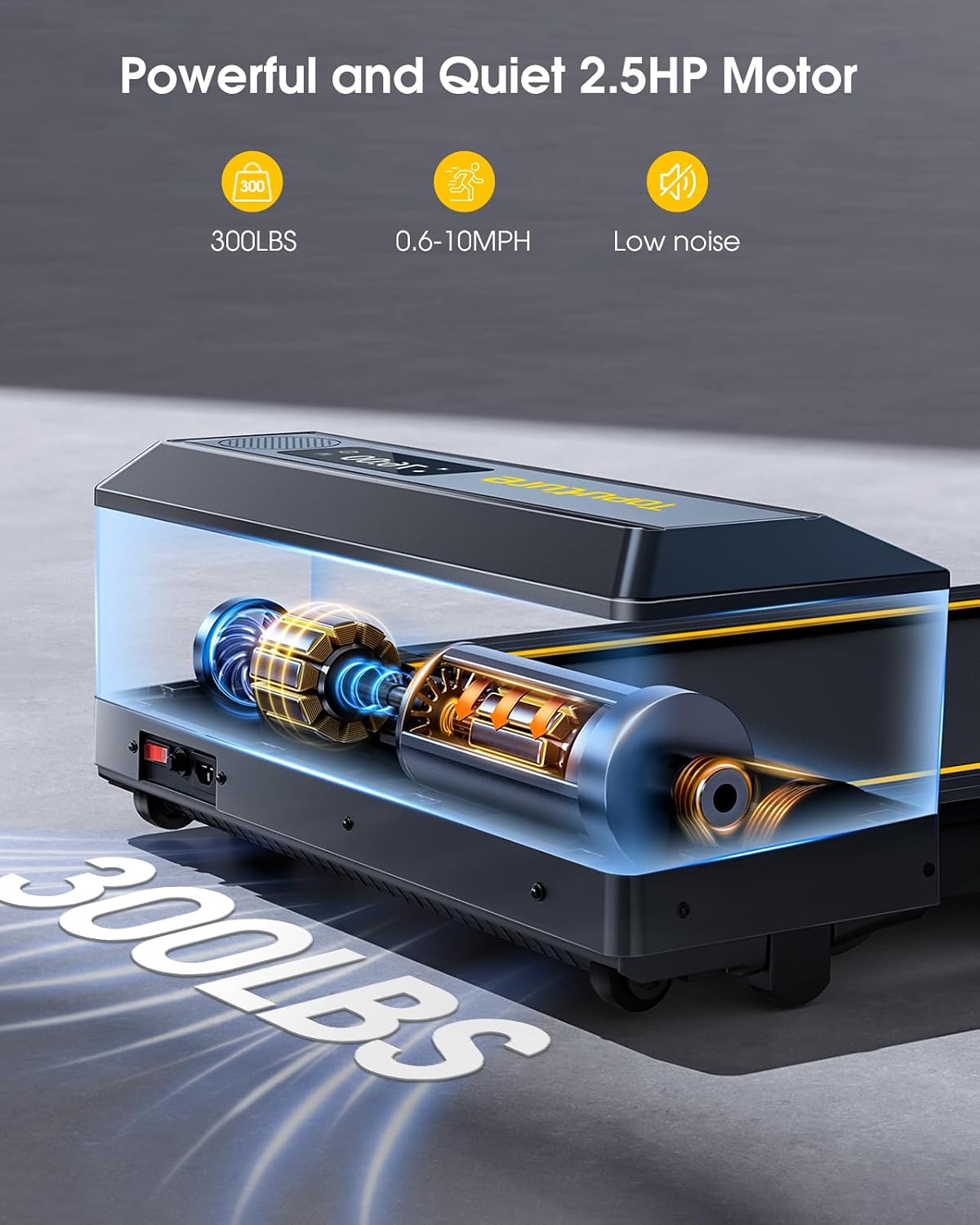
- אין לחרוג מקיבולת המשקל המרבית של כ-136 ק"ג (300 ליברות).
- Wear appropriate athletic footwear. Avoid loose clothing that could get caught in moving parts.
- אם אתם חווים סחרחורת, בחילות, כאבים בחזה או כל תסמין חריג אחר, הפסיקו את האימון מיד ופנו לרופא.
- נתקו את ההליכון משקע החשמל כאשר אינו בשימוש, לפני ניקוי או ביצוע תחזוקה.
- אין להפעיל את ההליכון אם יש לו כבל או תקע פגומים, או אם הוא אינו פועל כראוי.
2. תכולת החבילה
ודא שכל הרכיבים נמצאים בחבילה:
- TOPUTURE 2-in-1 Folding Treadmill Unit
- שְׁלַט רָחוֹק
- כבל חשמל
- מדריך למשתמש (מסמך זה)
- חומר סיכה (לתחזוקה)
3. המוצר נגמרview
The TOPUTURE 2-in-1 Folding Treadmill is designed for both walking and running, offering versatility for home and office use.
תכונות עיקריות:
- עיצוב 2 ב-1: Functions as an under-desk walking pad and a full running treadmill.
- מנוע חזק: 2.5 HP motor supports speeds from 0.6 to 10 MPH.
- Dual LED Screen: Displays real-time workout data.
- שטח ריצה גדול: 104 x 42 cm (41" x 16.5") for comfortable use.
- מערכת בלימת זעזועים: 7-layer non-slip belt and silicone absorbers protect joints.
- קישוריות: Bluetooth speaker and smart app control.
- מד דופק: Integrated sensors for real-time tracking.
- חסכון במקום: Foldable design with transport wheels for easy storage.
רכיבים:
- חגורת ריצה
- Handrails (foldable)
- Control Panel with Dual LED Display
- חריץ מפתח בטיחות
- גלגלי הובלה
- Power Switch and Inlet

4. התקנה והרכבה
The TOPUTURE treadmill requires no assembly. Follow these steps for initial setup.
4.1 פירוק
Carefully remove the treadmill from its packaging. Inspect for any damage during transit. Keep packaging materials for potential future transport or returns.
4.2 פתיחת ההליכון
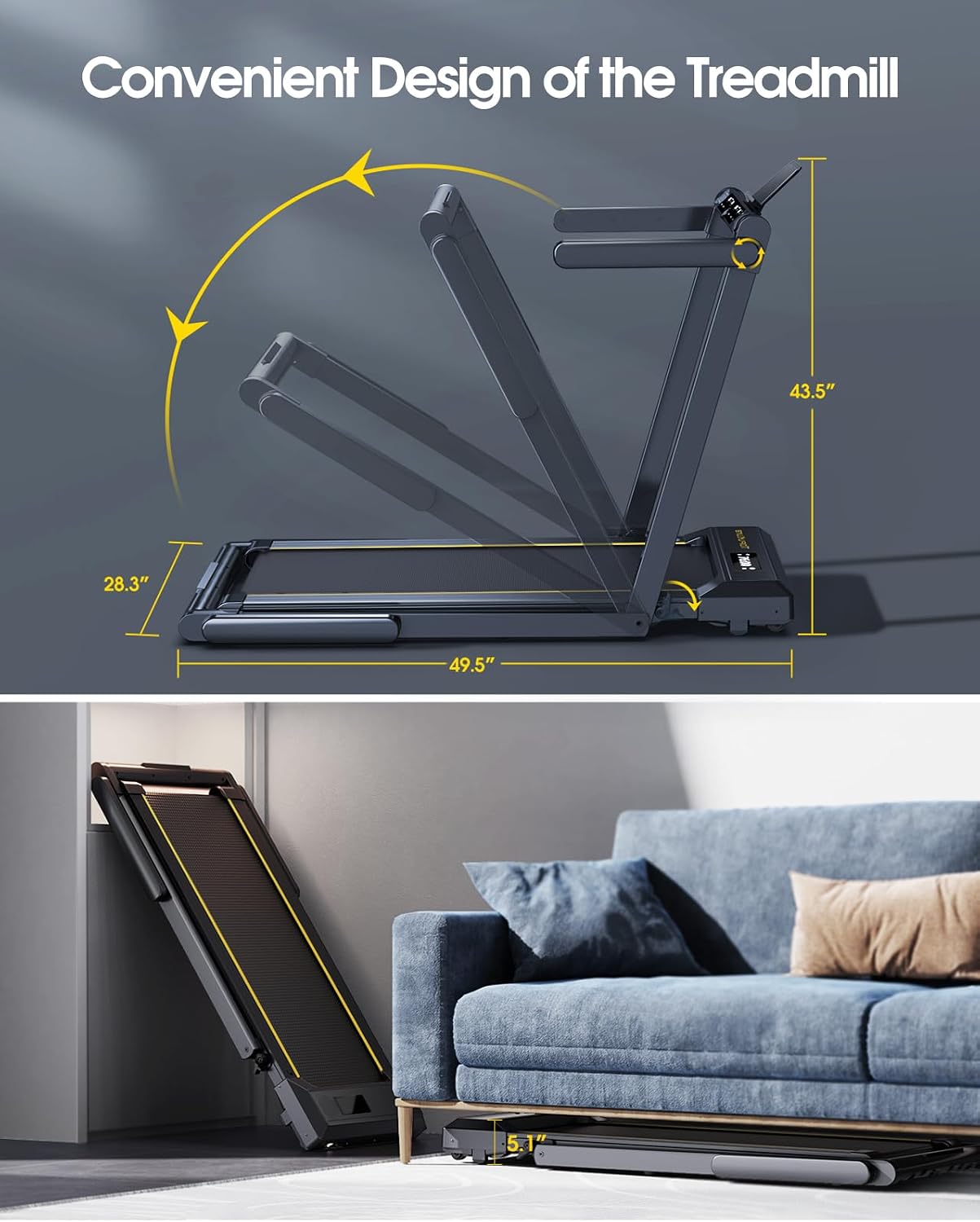
The treadmill can be used in two configurations: folded for walking or unfolded for running.
- To transition from walking pad to running treadmill, lift the handrail assembly until it locks into place.
- To fold for storage or walking mode, release the quick-release buckle and lower the handrail assembly.
4.3 מיקום
Place the treadmill on a firm, level surface. Ensure there is adequate clear space around the treadmill (at least 2 meters behind and 0.5 meters on each side) for safe operation. Do not place the treadmill on a carpet, as this can impede motor cooling and lead to overheating.
4.4 חיבור מתח
Connect the power cord to the treadmill's power inlet and then plug it into a grounded electrical outlet. Ensure the power switch is in the 'OFF' position before plugging in.
5. הוראות הפעלה
5.1 הפעלה/כיבוי
Flip the main power switch located near the power cord inlet to the 'ON' position. The display will illuminate.
מפתח בטיחות אחד
Attach the safety key clip to your clothing. Insert the magnetic end of the safety key into the designated slot on the control panel. The treadmill will not start without the safety key in place. Pulling the safety key will immediately stop the treadmill.
מצבי הפעלה של 5.3
The treadmill offers two distinct operating modes:
5.3.1 Walking Mode (Under Desk)
- In this mode, the handrail is folded down.
- Speed range: 0.6 - 5 MPH.
- Ideal for light exercise or walking while working.
5.3.2 מצב ריצה
- In this mode, the handrail is upright and locked.
- Speed range: 5 - 10 MPH.
- Suitable for jogging and running workouts.

5.4 לוח בקרה ושלט רחוק
The treadmill can be controlled via the touch screen on the unit or the included remote control.
5.4.1 Display Functions:
The dual LED screen displays the following metrics:
- זְמַן: משך האימון שלך.
- מְהִירוּת: מהירות נוכחית במייל לשעה.
- קלוריות: קלוריות משוערות שנשרפות.
- מֶרְחָק: מרחק מכוסה במיילים.
- דופק: Your pulse rate (when using sensors).

5.4.2 לחצני בקרה:
- התחל הפסק: Initiates or pauses/stops the workout.
- SPEED +/-: מתאים את מהירות הריצה.
- מצב: מעבר בין מצבי תצוגה או תוכניות אימון שונות.
- תוכנית (PROG): בוחר מבין 12 תוכניות אימון מוגדרות מראש.
- הַפסָקָה: The remote control includes a pause button to temporarily stop your workout without losing data.
5.5 Bluetooth Speaker Connectivity
To play audio through the treadmill's built-in Bluetooth speaker:
- ודא שההליכון דולק.
- הפעל Bluetooth במכשיר הנייד שלך.
- חפש the treadmill's Bluetooth name (e.g., 'TOPUTURE Treadmill') in your device's Bluetooth settings.
- Pair your device. You can now play music through the treadmill's speakers.
5.6 בקרת אפליקציה חכמה
Enhance your workout experience by connecting the treadmill to a compatible fitness app.
- Download the recommended 'Sport APP' from your device's app store.
- Open the app and follow the on-screen instructions to connect to your TOPUTURE treadmill via Bluetooth.
- Utilize the app to access various training courses and track your progress.
5.7 ניטור דופק
כדי למדוד את קצב הלב שלך:
- Grip the metal sensor parts on both sides of the treadmill screen with both hands.
- Hold for approximately 3 seconds. Your heart rate will be displayed on the screen.
6. תחזוקה
תחזוקה שוטפת מבטיחה את אורך החיים והביצועים האופטימליים של ההליכון שלכם.
6.1 שימון
The running belt requires periodic lubrication to reduce friction and wear. The unique lubrication hole design makes this process straightforward.
- תֶדֶר: Lubricate every 30-50 hours of use, or every 1-2 months depending on usage.
- נוֹהָל: Apply a small amount of the provided silicone lubricant into the lubrication hole located on the side of the treadmill deck. Run the treadmill at a low speed (e.g., 1-2 MPH) for a few minutes to distribute the lubricant evenly.
6.2 ניקוי
Regularly clean the treadmill to prevent dust and debris buildup.
- חִיצוֹנִי: Wipe down the frame and control panel with a soft, damp בַּד. הימנע מחומרי ניקוי שוחקים.
- חגורת ריצה: Periodically wipe the running belt with a damp cloth to remove sweat and dust. Ensure the treadmill is unplugged before cleaning.
6.3 התאמת חגורה
If the running belt feels loose, slips, or is off-center, it may require adjustment. Refer to the detailed instructions in the full user manual or contact customer support for guidance on how to properly tension and center the belt using the adjustment bolts at the rear of the treadmill.
7. פתרון תקלות
סעיף זה עוסק בבעיות נפוצות שאתם עשויים להיתקל בהן עם ההליכון שלכם.
| בְּעָיָה | סיבה אפשרית | פִּתָרוֹן |
|---|---|---|
| ההליכון לא נדלק. | Power cord not plugged in; Power switch off; Safety key not in place. | Ensure power cord is securely plugged in; Turn power switch ON; Insert safety key correctly. |
| חגורת הריצה מחליקה או מהססת. | רצועה רופפת מדי; סיכה לא מספקת. | Adjust belt tension (refer to manual or support); Apply lubricant as per Section 6.1. |
| רעש יוצא דופן במהלך הפעולה. | רכיבים רופפים; חוסר סיכה; גוף זר. | Check for loose screws; Lubricate belt; Inspect for any objects under the belt. |
| התצוגה לא עובדת כראוי. | Loose cable connection; Software glitch. | Power cycle the treadmill (turn off, unplug, wait 1 minute, plug in, turn on); Contact customer support if issue persists. |
| השלט רחוק לא מגיב. | סוללות מתות; חסימה. | Replace remote control batteries; Ensure no objects are blocking the signal path. |
If you encounter an issue not listed here, or if the suggested solutions do not resolve the problem, please contact TOPUTURE customer support for assistance.
8. מפרט מוצר
| תכונה | מִפרָט |
|---|---|
| מספר דגם | TP1 |
| כוח סוס מוטורי | 2.5 HP |
| טווח מהירות (מצב הליכה) | 0.6 - 5 מייל לשעה |
| טווח מהירות (מצב ריצה) | 5 - 10 מייל לשעה |
| שטח ריצה (אורך x רוחב) | 104 ס"מ x 42 ס"מ (41 אינץ' x 16.5 אינץ') |
| קיבולת משקל מקסימלית | 300 ליברות (כ-136 ק"ג) |
| מידות המוצר (לא מקופל) | 125.7 x 71.8 x 110.5 ס"מ (כ-49.5 אינץ' x 28.3 אינץ' x 43.5 אינץ') |
| מידות המוצר (מקופל) | 133 x 71.8 x 13 ס"מ (כ-52.4 אינץ' x 28.3 אינץ' x 5.1 אינץ') |
| משקל פריט | 39.5 ק"ג (87.08 פאונד) |
| חוֹמֶר | סגסוגת אלומיניום פלדה |
| סוג תצוגה | Dual LED Screen |
| תכונות מיוחדות | No Assembly, Touch Screen, Foldable, Heart Rate Monitor, Built-In Speaker, Compact, Shock Absorbent |
9. אחריות ותמיכת לקוחות
TOPUTURE is committed to providing quality products and customer satisfaction. For any assistance, questions, or warranty inquiries, please contact our after-sales service team.
You can find more information and contact details on the official TOPUTURE store page: Visit the TOPUTURE Store
Please have your model number (TP1) and purchase information ready when contacting support.


