1. הקדמה
This manual provides essential instructions for the safe and efficient use of your Trevi XR 8A44 DOUBLE Portable Speaker System. Please read this manual thoroughly before operating the device and retain it for future reference.
2. המוצר נגמרview
The Trevi XR 8A44 DOUBLE is a versatile portable speaker system designed for high-quality audio playback. It features two independent, separable speaker units that can function together as a stereo pair or individually. Each unit delivers 10W of power, totaling 20W when combined. The system supports Bluetooth 5.3, Micro SD card playback, and AUX-IN connectivity. It is also IPX5 water resistant, making it suitable for various environments.
2.1 תכונות עיקריות
- Separable wireless speaker design, forming two independent units.
- Total output power of 2 x 10W (20W combined).
- IPX5 water resistance for protection against water jets.
- Clear sound with 2 stereo speakers and 2 passive bass radiators.
- Volume, playback, and pause controls integrated.
- Wireless audio via Bluetooth v5.3.
- Two independent MP3 players for Micro SD card playback (one per unit).
- Two AUX-IN inputs for wired connections.
- Convenient carrying strap.
- Light disc illumination for visual effects.
- מחוון LED למצב טעינת הסוללה.
- Rechargeable high-capacity lithium battery via TYPE-C port.
2.2 תכולת החבילה
- Trevi XR 8A44 DOUBLE Speaker Units (x2)
- כבל טעינה (USB Type-C)
- מדריך למשתמש (מסמך זה)
- תעודת אחריות
2.3 Product Diagram and Controls
Refer to the images below for an understanding of the speaker's physical components and controls.


3. התקנה
3.1 טעינת הסוללה
Before first use, fully charge both speaker units. Use the provided USB Type-C charging cable and connect it to a compatible USB power adapter (not included).
- Locate the Type-C charging port on each speaker unit.
- Connect the Type-C end of the cable to the speaker and the USB-A end to a power source.
- מחוון ה-LED יציג את מצב הטעינה. בדרך כלל הוא יכבה או ישנה צבע לאחר טעינה מלאה.
פֶּתֶק: להשגת חיי סוללה אופטימליים, הימנעו מריקון מלא של הסוללה לעתים קרובות.
3.2 הפעלה/כיבוי
To power on or off each speaker unit:
- הפעלה: Press and hold the Power button (usually integrated with the Play/Pause button) for a few seconds until you hear an audible prompt or see the light disc illuminate.
- כיבוי: לחץ והחזק את לחצן ההפעלה שוב למשך מספר שניות עד שהרמקול יכבה.
3.3 Separating and Connecting Speakers
The Trevi XR 8A44 DOUBLE consists of two units that can be magnetically connected or separated for different audio experiences.
- להפרדה: Gently pull the two speaker units apart. They are held together by magnets.
- להתחבר: Align the magnetic ends of the two speaker units and push them together until they snap into place.

4. הוראות הפעלה
צימוד Bluetooth 4.1 (מצב רמקול יחיד)
To connect a single speaker unit to your Bluetooth-enabled device:
- Ensure the speaker is powered on and not connected to another device. It should enter pairing mode automatically (indicated by a flashing LED or audible prompt).
- במכשיר שלך (סמארטפון, טאבלט וכו'), הפעל את Bluetooth וחפש מכשירים זמינים.
- Select "Trevi XR 8A44 DOUBLE" from the list of found devices.
- Once connected, the speaker will provide an audible confirmation, and the LED indicator will stabilize.
צימוד סטריאו אלחוטי אמיתי 4.2 (TWS) (מצב שני רמקולים)
To use both speaker units together for a stereo experience:
- Ensure both speaker units are powered on and not connected to any Bluetooth device.
- On one of the speakers (this will be the primary unit), double-press the Power/Play/Pause button. The speakers will attempt to pair with each other.
- Once successfully paired, you will hear an audible confirmation. One speaker will act as the left channel and the other as the right.
- Now, on your Bluetooth-enabled device, search for "Trevi XR 8A44 DOUBLE" and connect. Only one entry will appear for the combined system.
פֶּתֶק: TWS pairing is typically automatic when speakers are separated and powered on, but manual initiation might be required if they don't connect automatically.
4.3 ניגון מכרטיס מיקרו SD
Each speaker unit has an independent Micro SD card slot for MP3 playback.
- הכנס כרטיס Micro SD (טעון מראש עם קבצי שמע MP3) files) into the designated slot on the speaker unit.
- The speaker should automatically switch to Micro SD playback mode.
- Use the Play/Pause and Volume (+/-) buttons to control playback.
פֶּתֶק: If both speakers are in TWS mode, inserting a Micro SD card into one speaker will play audio only through that speaker, overriding the TWS Bluetooth connection for that unit. To use both speakers with Micro SD, each would need its own card and would play independently.
4.4 AUX-IN Connection
For wired audio playback, use the AUX-IN port on each speaker unit.
- חבר קצה אחד של כבל שמע 3.5 מ"מ (לא כלול) ליציאת AUX-IN ברמקול.
- חבר את הקצה השני ליציאת השמע של המכשיר שלך (למשל, נגן MP3, מחשב נייד).
- The speaker should automatically switch to AUX-IN mode.
- Control volume from both the speaker and your connected device.
4.5 Volume and Playback Controls
The speaker units feature integrated controls:
- הפעל/השהה: לחץ לחיצה קצרה על כפתור ההפעלה/הפעלה/השהיה.
- הגבר קול: לחיצה קצרה על כפתור '+'.
- להנמיך קול: לחיצה קצרה על כפתור '-'.
- הרצועה הבאה: לחץ לחיצה ארוכה על כפתור '+'.
- רצועה קודמת: לחץ לחיצה ארוכה על כפתור '-'.
4.6 Light Disc Illumination
The speaker units feature an illuminated light disc. The operation of the light disc may vary:
- אורות הפעלה/כיבוי: A dedicated button (if present) or a long press of a specific control button (e.g., Play/Pause) might cycle through light modes or turn them on/off. Refer to the quick start guide included in your package for exact button functionality.
5. תחזוקה
5.1 ניקוי
- נגבו את החלק החיצוני של הרמקול בעזרת מטלית רכהamp בַּד.
- אין להשתמש בחומרי ניקוי שוחקים, אלכוהול או ממסים כימיים.
- ודא שכל היציאות יבשות לפני טעינה או חיבור כבלים.
5.2 עמידות למים (IPX5)
The Trevi XR 8A44 DOUBLE is rated IPX5 water resistant. This means it is protected against low-pressure water jets from any direction. It is לֹא מיועד להיות שקוע במים.
- אין לטבול את הרמקולים במים.
- ודא שמכסה שקע הטעינה (אם קיים) סגור היטב לפני חשיפה למים.
- Dry the speakers thoroughly after exposure to water before charging.

5.3 טיפול בסוללה
- טען את הסוללה באופן קבוע, גם אם אינה בשימוש, כדי לשמור על בריאותה.
- אחסנו את הרמקולים במקום קריר ויבש, הרחק מאור שמש ישיר וטמפרטורות קיצוניות.
- אל תנסה להחליף את הסוללה בעצמך. פנה לאנשי שירות מוסמכים.
6. פתרון תקלות
| בְּעָיָה | סיבה אפשרית | פִּתָרוֹן |
|---|---|---|
| הרמקול לא נדלק. | הסוללה התרוקנה. | טען את הרמקול במלואו באמצעות כבל Type-C המצורף. |
| לא ניתן לבצע צימוד דרך בלוטות'. | הרמקול אינו במצב צימוד; ה-Bluetooth של המכשיר כבוי; הרמקול מחובר למכשיר אחר. | Ensure speaker is in pairing mode (flashing LED). Turn off and on Bluetooth on your device. Disconnect from other devices. Try TWS pairing steps if using two speakers. |
| No sound from Micro SD card. | הכרטיס לא הוכנס כהלכה; לא נתמך file format; card is empty or corrupted. | Re-insert Micro SD card. Ensure files are in MP3 format. Check card content on a computer. |
| צימוד TWS נכשל. | Speakers are too far apart; one speaker is already connected to a Bluetooth device. | ודא שהרמקולים קרובים זה לזה. נתק את שני הרמקולים מכל מכשירי Bluetooth לפני ביצוע צימוד TWS. |
| עיוות שמע או עוצמת קול נמוכה. | Volume too low on speaker or source device; low battery; poor Bluetooth connection. | Increase volume on both speaker and source device. Charge the battery. Move source device closer to the speaker. |
7. מפרטים
| שם הדגם: | Trevi XR 8A44 DOUBLE |
| מותג: | טרווי |
| כוח פלט: | 2 x 10W (סה"כ 20W) |
| קישוריות: | Bluetooth v5.3, Micro SD, AUX-IN (3.5mm) |
| מקור כוח: | Rechargeable Lithium Battery (via Type-C USB) |
| עמידות במים: | IPX5 (מוגן מפני סילוני מים) |
| מצב פלט אודיו: | Stereo (when TWS paired) |
| Frequency Response (Lower Limit): | 100 הרץ |
| שיטת בקרה: | כפתורי מגע |
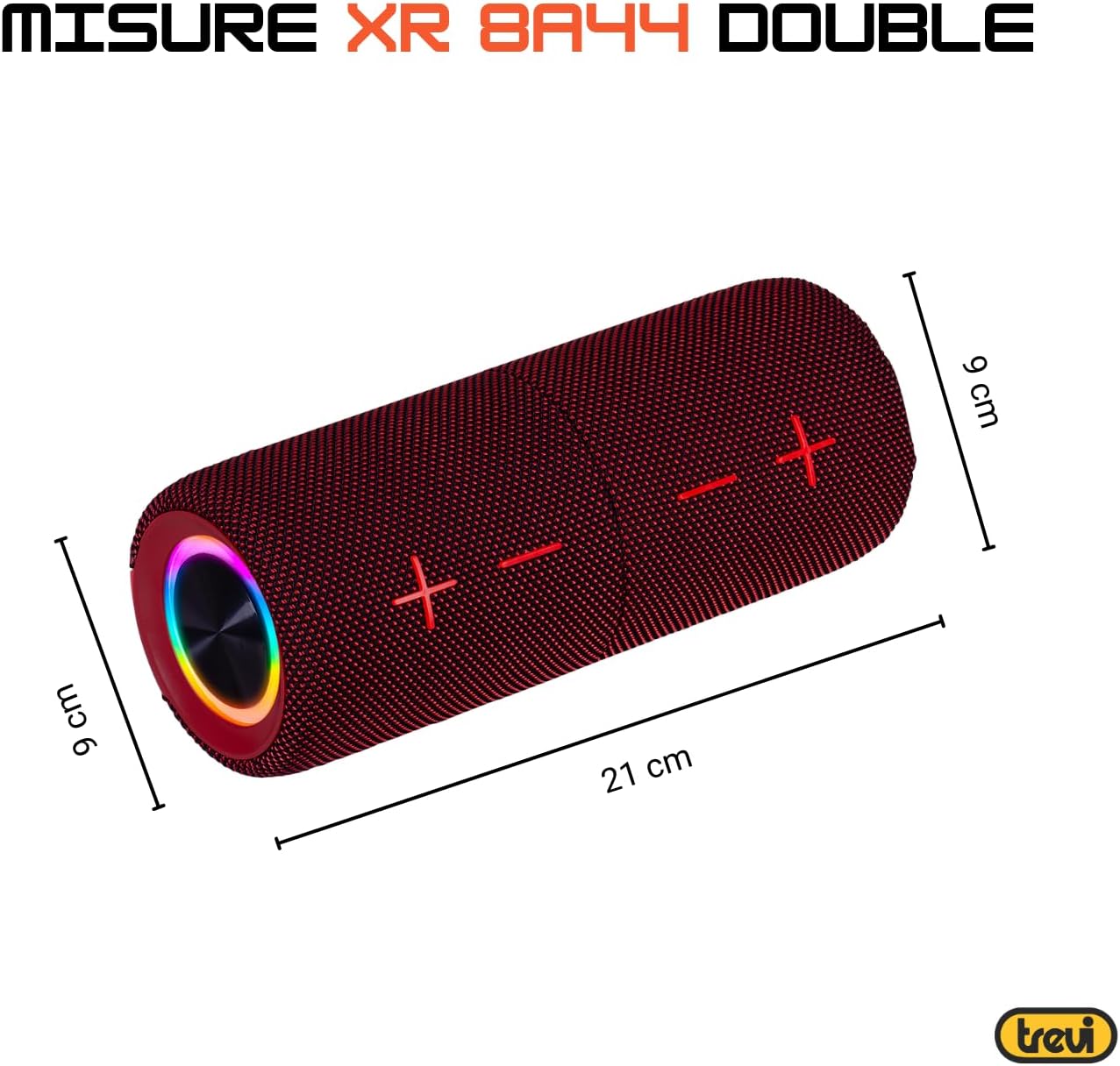
| מידות (ליחידה): | Approx. 8D x 21W x 8H cm (based on image: 21cm length, 9cm diameter) |
| משקל (ליחידה): | כ-200 גרם |
| חוֹמֶר: | מְלָאכוּתִי |
| מכשירים תואמים: | Laptop, MP3 Player, Smartphone, Game Console, Tablet, TV |
| רכיבים כלולים: | Speakers, Charging Cable, User Manual, Warranty Certificate |
8. אחריות ותמיכה
8.1 אחריות מוגבלת
Your Trevi XR 8A44 DOUBLE Portable Speaker System comes with a limited warranty. Please refer to the included warranty certificate for specific terms, conditions, and duration of coverage. Keep your proof of purchase for warranty claims.
8.2 תמיכת לקוחות
If you encounter any issues not covered in the troubleshooting section or require further assistance, please contact Trevi customer support. Contact information can typically be found on the official Trevi website or on the warranty certificate.
- תמיכה מקוונת: Visit the official Trevi webאתר לשאלות נפוצות, רישום מוצרים ופרטי יצירת קשר עם תמיכה.
- דוא"ל/טלפון: Refer to your warranty documentation for direct contact methods.


