1. הקדמה
This manual provides essential information for the proper use and maintenance of your Realme 12 Plus 5G RMX3867 smartphone. Please read this guide thoroughly before operating your device to ensure optimal performance and longevity. Keep this manual for future reference.
2. רשימת אריזה
Upon opening the package, verify that all items listed below are present and in good condition. If any items are missing or damaged, please contact your retailer.

Image: Contents of the Realme 12 Plus 5G RMX3867 retail box. Includes the phone, phone case, quick guide, detachable camera decoration replacement guide, safety guide, screwdriver, two screws, USB cable, and SIM card ejector.
- Realme 12 Plus 5G RMX3867 Smartphone
- כיסוי לטלפון
- מדריך מהיר
- Detachable Camera Decoration Replacement Guide
- מדריך בטיחות
- מַברֵג
- ברגים (x2)
- כבל USB
- מוציא כרטיס סים
Note: Some accessories, such as the detachable camera decoration, may come in a separate package or require assembly. Refer to the specific guides provided.

Image: Contents of the Detachable Camera Decoration Protective Cover Set. Includes a packaging box, detachable deco case (x1), two screws, and a phone case (x1).
3. התקנה
3.1. התקנת כרטיס SIM
- אתר את מגש כרטיס ה-SIM בצד המכשיר.
- Insert the provided SIM card ejector tool into the small hole next to the tray.
- לחץ בעדינות עד שהמגש ייצא החוצה.
- Place your Nano-SIM card(s) into the tray with the gold contacts facing down. Ensure the card is correctly oriented according to the tray's diagram.
- הכנס בזהירות את המגש בחזרה לטלפון עד שייכנס למקומו בנקישה.

תמונה: תחתית view of the Realme 12 Plus 5G RMX3867, showing the USB-C port, speaker grille, microphone, and SIM card tray slot.
3.2. הפעלה / כיבוי
- כדי להפעיל: Press and hold the Power button (located on the right side of the device) until the realme logo appears.
- כדי לכבות: לחץ והחזק את לחצן ההפעלה עד להופעת תפריט אפשרויות צריכת החשמל. הקש על "כיבוי" ואשר.
- לאתחל: לחץ והחזק את לחצן ההפעלה עד להופעת תפריט אפשרויות צריכת החשמל. הקש על "הפעלה מחדש" ואשר.

תמונה: צד view of the Realme 12 Plus 5G RMX3867, highlighting the power button and volume rocker on the right edge of the device.
3.3. הגדרה ראשונית
The first time you power on your device, you will be guided through the initial setup process. This includes:
- בחירת השפה שלך.
- מתחבר לרשת Wi-Fi.
- הגדרת חשבון גוגל שלך.
- Configuring screen lock (PIN, pattern, password, fingerprint, face unlock).
- העברת נתונים ממכשיר ישן (אופציונלי).
4. הפעלת המכשיר שלך
4.1. ניווט בסיסי
- מחוות מגע: Your device supports various touch gestures for navigation, including tap, swipe, pinch-to-zoom, and long press.
- מסך הבית: המרכז לאפליקציות ווידג'טים שלך. החלק שמאלה או ימינה כדי לגשת למסכים נוספים.
- לוח הודעות: החלק מטה מראש המסך כדי לגשת להתראות ולהגדרות מהירות.
- מגירת אפליקציות: החלק מעלה מתחתית המסך אל view כל האפליקציות המותקנות.

תמונה: חזית view of the Realme 12 Plus 5G RMX3867, displaying its large screen with a punch-hole camera cutout at the top center.
4.2. פונקציות המצלמה
The Realme 12 Plus 5G RMX3867 features a powerful 200MP main camera. To access the camera, tap the Camera icon on your home screen or app drawer.
- מצבי צילום: עבור בין מצבים שונים כמו צילום, פורטרט, לילה, מקצועי ועוד.
- הקלטת וידאו: הקלט סרטונים באיכות גבוהה. כוונן את הרזולוציה וקצב הפריימים בהגדרות.
- הגדרות: Access camera settings to customize features such as HDR, AI enhancements, and grid lines.
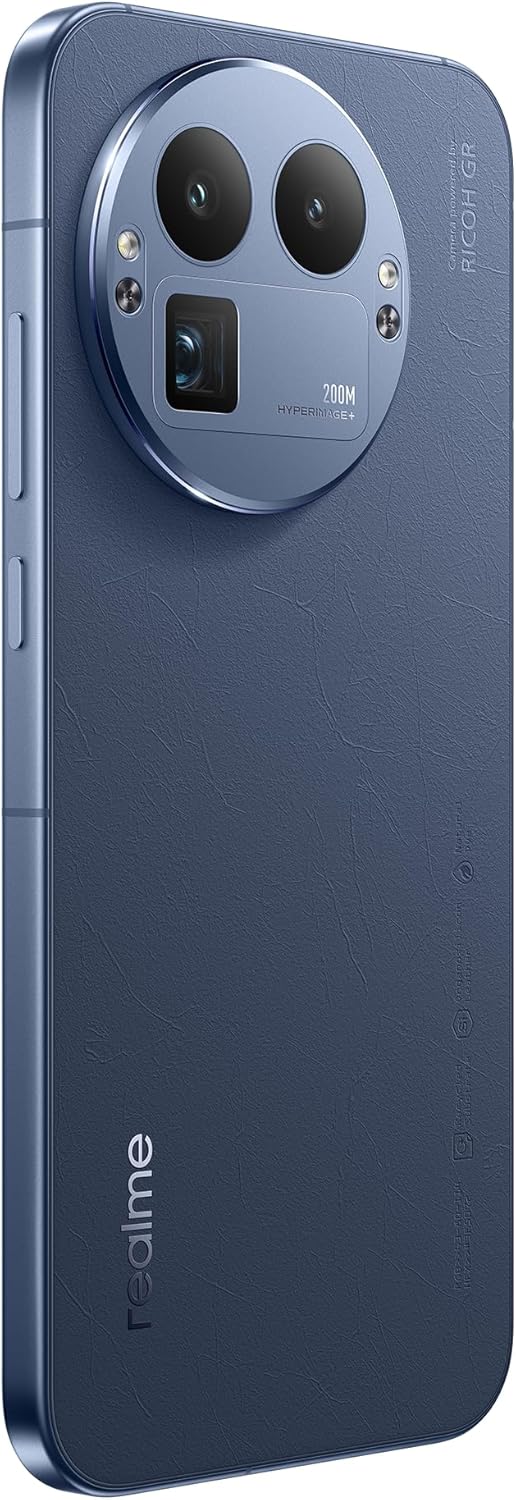
תמונה: אחורי view of the Realme 12 Plus 5G RMX3867, showcasing the prominent circular camera module with multiple lenses and a "200M HYPERIMAGE+" label.
4.3. קישוריות
- רשת 5G: Your device supports 5G connectivity for faster mobile data speeds. Ensure your SIM card and plan support 5G.
- Wi-Fi: התחבר לרשתות אלחוטיות לגישה לאינטרנט. עבור אל הגדרות > Wi-Fi כדי לנהל חיבורים.
- בלוטות': Pair with Bluetooth devices like headphones, speakers, or car systems. Go to Settings > Bluetooth.
- USB-C: השתמש ביציאת USB-C לטעינה והעברת נתונים.
4.4. תכונות אבטחה
- חיישן טביעות אצבע: Unlock your device quickly and securely using the in-display fingerprint sensor. Register your fingerprints in Settings > Security & Privacy > Fingerprint.
- ביטול נעילת פנים: Use facial recognition to unlock your phone. Set up Face Unlock in Settings > Security & Privacy > Face.
- נעילת מסך: Choose from PIN, pattern, or password for basic screen security.
5. תחזוקה
5.1. ניקוי המכשיר
- השתמש במטלית רכה ונטולת סיבים כדי לנגב את המסך וגוף הטלפון.
- הימנעו משימוש בכימיקלים חזקים, חומרים שוחקים או תרסיסים.
- עבור כתמים עקשניים, מעט דמוי עורampנקו את המטלית במים או בחומר ניקוי מסכים המיועד במיוחד לאלקטרוניקה.
5.2. עדכוני תוכנה
Regularly check for and install software updates to ensure your device has the latest features, security patches, and performance improvements. Go to Settings > About device > Up to date to check for updates.
5.3. טיפול בסוללה
- הימנעו מטמפרטורות קיצוניות, שכן הן עלולות לפגוע בחיי הסוללה.
- השתמשו רק במטען ובכבל המקוריים או באביזרים תואמים מאושרים.
- Do not let the battery drain completely frequently. It is generally recommended to keep the battery level between 20% and 80%.
6. פתרון תקלות
6.1. בעיות נפוצות ופתרונות
| לְהַנפִּיק | פִּתָרוֹן |
|---|---|
| המכשיר לא נדלק | ודא שהסוללה טעונה. לחץ והחזק את לחצן ההפעלה למשך 10-15 שניות לפחות. |
| אפליקציות קורסות או קופאות | Close the app and reopen it. Clear the app's cache (Settings > Apps > [App Name] > Storage > Clear cache). Restart the device. |
| חיי סוללה גרועים | Check background app usage. Reduce screen brightness. Disable unnecessary features like GPS or Bluetooth when not in use. |
| לא ניתן להתחבר ל-Wi-Fi | הפעל מחדש את הנתב והטלפון. שכח מהרשת והתחבר מחדש. ודא ש-Wi-Fi מופעל במכשיר שלך. |
6.2. איפוס להגדרות היצרן
אם אתם נתקלים בבעיות מתמשכות, איפוס להגדרות היצרן עשוי לפתור אותן. אַזהָרָה: איפוס להגדרות היצרן ימחק את כל הנתונים בטלפון שלך. גבה נתונים חשובים לפני שתמשיך.
- עבור אל הגדרות > מערכת > אפשרויות איפוס.
- הקש על "מחק את כל הנתונים (איפוס להגדרות יצרן)".
- אשר את החלטתך והזן את קוד ה-PIN/סיסמה שלך אם תתבקש.
- המכשיר יופעל מחדש ויתחיל בתהליך האיפוס.
7. מפרטים
Below are the key technical specifications for the Realme 12 Plus 5G RMX3867:
| תכונה | פְּרָט |
|---|---|
| מותג | תחום |
| שם הדגם | Realme 12 Plus 5G (RMX3867) |
| מַעֲרֶכֶת הַפעָלָה | דְמוּי אָדָם |
| קיבולת אחסון זיכרון | 256 ג'יגה-בייט |
| גודל זיכרון RAM מותקן | 12 ג'יגה-בייט |
| דגם מעבד | לוֹעַ הָאֲרִי |
| מהירות מעבד | 1200 מגה-הרץ |
| גודל מסך | 6.4 אינץ' |
| סוג תצוגה | AMOLED |
| הַחְלָטָה | 1440 x 2560 |
| רזולוציית וידאו יעילה | 200 מגה פיקסל |
| טכנולוגיה סלולרית | 5G |
| קיבולת סוללה | 7000 מיליamp שעות |
| חיי סוללה ממוצעים | 21 שעות |
| קלט ממשק אנושי | מסך מגע |
| מספר דגם של פריט | GT 8 Pro (Note: Product title is Realme 12 Plus 5G RMX3867) |
Note: Some specifications may vary slightly based on region or specific product variant. The model number in the product title is RMX3867, while some specifications list 'GT 8 Pro'. Please refer to your device's packaging for the most accurate model information.
8. אחריות ותמיכה
Your Realme 12 Plus 5G RMX3867 device comes with a limited warranty. Please refer to the warranty card included in your product packaging for detailed terms and conditions, including warranty period and coverage.
לתמיכה טכנית, שירות או שאלות נוספות, אנא בקרו באתר התמיכה הרשמי של Realme website or contact their customer service. Contact information can typically be found on the realme official website or in the "Safety Guide" included with your device.
שמור את הוכחת הרכישה שלך לתביעות אחריות.


