מָבוֹא
This manual provides detailed instructions for setting up, operating, and maintaining your Samsung HW-Q6CC 3.1Ch 340W Soundbar System. This system is designed to enhance your audio experience with 340W of power, a dedicated wireless subwoofer, and support for Dolby Atmos and DTS. It also features built-in Bluetooth for streaming audio from your mobile devices.
מה יש בקופסה
ודא שכל הרכיבים נמצאים בחבילה:
- Samsung 3.1Ch Soundbar with AC power cord
- Subwoofer with AC power cord
- כבל HDMI
- מתאם מתח AC
- Wallmount kit
- Remote control with 2x AAA batteries

Figure 1: Contents of the Samsung HW-Q6CC Soundbar System box, showing the soundbar, wireless subwoofer, remote control, HDMI cable, power adapter, and wall mount kit.
הגדרה
1. מיקום פיזי
Place the soundbar directly in front of your television, centered for optimal audio projection. Ensure there are no obstructions in front of the soundbar. The wireless subwoofer can be placed anywhere in the room, ideally near a power outlet and within range of the soundbar for a stable wireless connection. Consider placing it in a corner for enhanced bass response.

Figure 2: The Samsung HW-Q6CC Soundbar and its wireless subwoofer in a typical home setup.
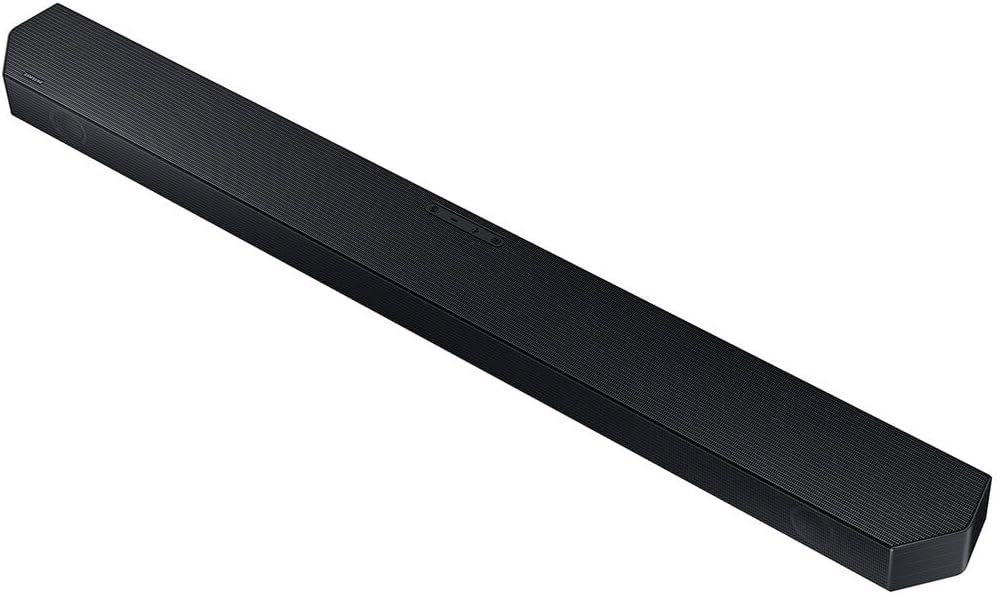
איור 3: מפורט view of the Samsung HW-Q6CC Soundbar unit.

איור 4: מפורט view of the Samsung HW-Q6CC Wireless Subwoofer unit.
2. חיבורים
- חיבור חשמל: Connect the AC power cords to the soundbar and the wireless subwoofer, then plug them into a wall outlet.
- חיבור HDMI eARC: For the best audio quality and control, connect the soundbar to your TV's HDMI eARC port using the provided HDMI cable. This allows for high-quality audio transmission and control of the soundbar volume using your TV remote.
- חיבור אופטי (אלטרנטיבי): If your TV does not have an HDMI eARC port, you can use an optical cable (not included) to connect the soundbar to your TV's optical digital audio output.
3. צימוד סאב וופר אלחוטי
The wireless subwoofer should automatically pair with the soundbar upon powering on. If the connection is not established, check the indicator light on the subwoofer. If it's blinking, press the 'ID SET' button on the back of the subwoofer, then press the 'PAIR' button on the soundbar remote control. The indicator light should turn solid blue once paired.
הוראות הפעלה
1. בקרות בסיסיות
The soundbar can be controlled using the buttons on the top panel or the included remote control.
- כפתורי הפאנל העליונים: Includes Power, Volume Up/Down, and Source Selection.
- שְׁלַט רָחוֹק: Provides comprehensive control over power, volume, sound modes, subwoofer level, and Bluetooth pairing.
2. מצבי סאונד
מיטוב חוויית השמע שלך עם מצבי שמע שונים:
- סאונד לייט אדפטיבי: Automatically analyzes content and optimizes sound settings for clear dialogue.
- Dolby Atmos & DTS Surround: Provides an immersive, virtualized surround sound experience for compatible content.
- מצב משחק: Synchronizes gaming audio for a more dynamic and responsive experience.
3. הזרמת בלוטות'
Connect your mobile devices to the soundbar via Bluetooth to stream music, podcasts, and other audio content wirelessly. Use the 'Bluetooth Multi Connection' feature to switch between two connected devices effortlessly. For quick pairing, utilize the 'Tap Sound' feature by gently tapping your compatible Samsung mobile device to the soundbar.
תַחזוּקָה
כדי להבטיח את אורך החיים והביצועים האופטימליים של מערכת הסאונד בר שלכם:
- שמרו על ניקיון הסאונד בר והסאב וופר על ידי ניגובם במטלית רכה ויבשה.
- הימנע משימוש בחומרי ניקוי נוזליים או בחומרים שוחקים.
- יש לוודא אוורור נאות סביב שתי היחידות כדי למנוע התחממות יתר.
- Do not expose the units to extreme temperatures, humidity, or direct sunlight.
פתרון בעיות
If you encounter issues with your soundbar system, try the following:
- אין כוח: Check if the power cords are securely connected to both the soundbar, subwoofer, and the wall outlets.
- אין צליל: Verify the input source on the soundbar matches your TV's output. Check all cable connections. Ensure the TV's internal speakers are turned off or set to external audio.
- סאב וופר לא מתחבר: Follow the wireless subwoofer pairing instructions in the Setup section. Ensure the subwoofer is within range and not obstructed.
- בעיות חיבור Bluetooth: Ensure Bluetooth is enabled on your mobile device and the soundbar is in Bluetooth pairing mode. Try unpairing and re-pairing the device.
- השלט הרחוק לא עובד: Check the batteries in the remote control. Ensure there are no obstructions between the remote and the soundbar.
מפרטים
| תכונה | מִפרָט |
|---|---|
| שם הדגם | HW-Q6CC |
| מותג | סמסונג |
| סוג רמקול | סרגל סאונד |
| תצורת ערוץ סאונד סראונד | 3.1 |
| רמקול כוח פלט מרבי | 340 וואט |
| טכנולוגיית קישוריות | בלוטות', HDMI, אופטי |
| מצב פלט שמע | Dolby Atmos, DTS Surround |
| טכנולוגיית תקשורת אלחוטית | בלוטות ', Wi-Fi |
| טכנולוגיית קישוריות סאבוופר | אַלחוּט |
| מידות המוצר | 2.2" D x 40.6" W x 4.1" H |
| משקל פריט | 25.1 פאונד |
| צֶבַע | שָׁחוֹר |
| חוֹמֶר | מתכת, פלסטיק |
| סוג הרכבה | מתקן קיר |
| שיטת בקרה | מְרוּחָק |
אחריות ותמיכה
This Samsung Soundbar System comes with a אחריות מוגבלתלתנאים וההגבלות הספציפיים, אנא עיינו בכרטיס האחריות המצורף לאריזת המוצר או בקרו באתר התמיכה הרשמי של סמסונג. webאֲתַר.
לסיוע נוסף, תמיכה טכנית או פניות שירות, אנא צרו קשר עם שירות הלקוחות של סמסונג דרך הכתובת הרשמית שלהם. webאתר או פרטי הקשר המופיעים בתיעוד המוצר שלך.