1. הקדמה
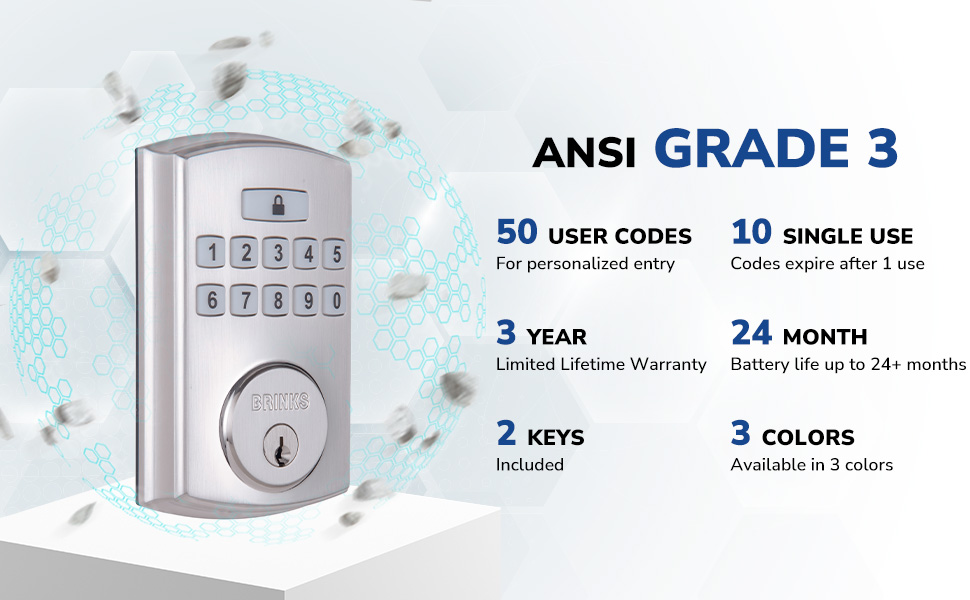
The BRINKS Keyless Entry Electronic Deadbolt Lock provides enhanced security and convenient keyless access for your home or office. This deadbolt features a programmable keypad, allowing for multiple user codes, and includes traditional key access as a backup. Designed for durability and ease of use, it integrates advanced security features to protect against common entry methods.

תכונות מפתח כוללות:
- Up to 50 customizable user codes.
- Optional auto-locking functionality.
- One-touch locking for quick security.
- PRO-GUARD security features: anti-tamper alarm, anti-pry shield, pick/bump/drill resistant keyway.
- Hardened steel anti-saw pin in the deadbolt latch.

2. מידע בטיחות
אנא קראו והבינו את כל ההוראות לפני ההתקנה והשימוש במוצר זה. אי ביצוע הוראות אלה עלול לגרום לתקלה במוצר, נזק לרכוש או פציעה.
- Do not attempt to disassemble or modify the lock beyond the instructions provided.
- Use only the specified battery type (4 AA alkaline batteries). Do not mix old and new batteries or different battery types.
- שמור את המפתחות במקום בטוח הרחק מהמנעול.
- ודא שכל הרכיבים מחוברים היטב במהלך ההתקנה.
- Avoid exposing the lock to excessive moisture or extreme temperatures.
3. תכולת החבילה
Verify that all parts are present before beginning installation. If any parts are missing or damaged, contact BRINKS customer support.
- מכלול לוח מקשים חיצוני
- הרכבה פנימית
- בריח דדבולט
- לוחית הרכבה
- סטרייק פלייט
- צלחת חיזוק
- ברגי הרכבה
- 2 Traditional Keys
- חומרת התקנה

4. התקנה
Installation of the BRINKS Electronic Deadbolt Lock is designed to be straightforward, requiring only a Phillips head screwdriver. No additional wiring is necessary.
4.1 בדיקות טרום התקנה
- עובי דלת: ודאו שעובי הדלת שלכם הוא בין 35 מ"מ (1.375 אינץ') ל-44 מ"מ (1.75 אינץ').
- רמקול: The deadbolt is compatible with both 2-3/8 inches (60mm) and 2-3/4 inches (70mm) backsets. Adjust the latch as needed.
- מסירת דלתות: The lock is universally compatible with both right-handed and left-handed doors.

4.2 שלבי התקנה
- התקן תפס Deadbolt: Insert the deadbolt latch into the door edge. Ensure the 'UP' arrow on the latch is pointing upwards. Secure with screws.
- התקנת לוח מקשים חיצוני: Feed the cable from the exterior keypad through the hole in the door. Position the keypad flush against the door.
- התקן לוחית הרכבה: Route the cable through the mounting plate. Secure the mounting plate to the door using the provided screws, ensuring it is aligned correctly.
- חבר כבלים: חבר את הכבל מלוח המקשים החיצוני למכלול הפנימי.
- התקן מכלול פנימי: Mount the interior assembly onto the mounting plate, ensuring the thumb turn operates smoothly. Secure with screws.
- התקנת לוחית תקיפה: Install the strike plate and reinforcement plate on the door frame, aligning them with the deadbolt latch.
- הכנס סוללות: Open the battery cover on the interior assembly and insert 4 AA alkaline batteries. Close the cover.

5. הגדרה ותכנות
After installation, you will need to program your lock with a Master Code and user codes.
5.1 הגדרת הקוד הראשי
The Master Code is used to program the lock and should be kept confidential. It cannot be used to unlock the door.
- Press the 'Program' button on the interior assembly.
- Enter a new 4-8 digit Master Code.
- Press the 'Lock' button.
- Re-enter the new Master Code.
- Press the 'Lock' button to confirm.
5.2 הוספת קודי משתמש
You can program up to 50 unique user codes for regular entry.
- לחץ על כפתור 'תוכנית'.
- הזן את קוד המאסטר שלך.
- Press the 'Lock' button.
- הזן קוד משתמש חדש בן 4-8 ספרות.
- Press the 'Lock' button to confirm.
5.3 Adding Single-Use Codes
Up to 10 single-use codes can be created, which expire after one use.
- לחץ על כפתור 'תוכנית'.
- הזן את קוד המאסטר שלך.
- Press the 'Lock' button twice.
- Enter a new 4-8 digit Single-Use Code.
- Press the 'Lock' button to confirm.
5.4 Setting Auto-Locking Feature
The auto-locking feature automatically locks the deadbolt after a set period (1-99 seconds) once unlocked.
- לחץ על כפתור 'תוכנית'.
- הזן את קוד המאסטר שלך.
- Press the 'Lock' button three times.
- Enter the desired auto-lock delay in seconds (e.g., '10' for 10 seconds).
- Press the 'Lock' button to confirm.

6. הוראות הפעלה
6.1 נעילת הדלת
- שימוש בקוד משתמש: Enter your 4-8 digit user code on the keypad. The deadbolt will retract, and the door can be opened.
- שימוש במפתח: Insert the traditional key into the keyway and turn to unlock.
6.2 נעילת הדלת
- נעילה בנגיעה אחת: Press the 'Lock' button on the keypad. The deadbolt will extend.
- נעילה אוטומטית: If enabled, the deadbolt will automatically extend after the set delay once the door is closed and unlocked.
- שימוש במפתח: Insert the traditional key into the keyway and turn to lock.
The keypad is illuminated for visibility in low-light conditions.
7. תחזוקה
7.1 החלפת סוללה
The lock is powered by 4 AA alkaline batteries. A low battery indicator will alert you when batteries need replacement. Battery life is approximately 24 months or longer.
- הסר את מכסה הסוללה מהמכלול הפנימי.
- הסר את הסוללות הישנות.
- הכניסו 4 סוללות אלקליין AA חדשות, תוך הקפדה על קוטביות נכונה.
- החזר את מכסה הסוללה למקומו.
7.2 ניקוי
נקו את החלק החיצוני של המנעול בעזרת מטלית רכהamp cloth. Avoid abrasive cleaners or solvents, as these can damage the finish or electronic components.
8. פתרון תקלות
- מנעול לא מגיב: Check battery levels. Replace batteries if necessary. Ensure the cable connection between the exterior and interior assemblies is secure.
- קודים שלא עובדים: Verify that the correct Master Code is being used for programming. Re-enter user codes carefully. Ensure the lock is not in programming mode when attempting to unlock.
- בריח לא נפתח/נסוג במלואו: Check for obstructions in the door frame or latch area. Ensure the deadbolt latch is installed correctly and aligned with the strike plate.
- Keypad not illuminating: בדוק את רמות הסוללה.
9. מפרטים
| תכונה | מִפרָט |
|---|---|
| שם הדגם | 4390-122 |
| סוג מנעול | דדבולט |
| חוֹמֶר | נִיקֵל |
| צֶבַע | Satin Nickel (other finishes available) |
| מידות (L x W x H) | 7.87 x 3.54 x 5.51 אינץ' |
| משקל פריט | 2.94 פאונד |
| קודי משתמש | עד 50 |
| Single-Use Codes | עד 10 |
| Auto-Locking Delay | 1-99 seconds (customizable) |
| מקור כוח | 4 סוללות אלקליין AA (לא כלולות) |
| חיי סוללה | 24+ חודשים |
| דירוג אבטחה | ANSI כיתה 3 |
| תכונות מיוחדות | Anti-Bump, Anti-Tamper Alarm, Anti-Pry Shield, Illuminated Keypad |
10. אחריות ותמיכה
10.1 מידע אחריות
This BRINKS Electronic Deadbolt Lock comes with a אחריות לכל החיים מוגבלת ל -3 שנים. Please refer to the warranty card included with your product for full terms and conditions. The warranty covers defects in material and workmanship under normal use.
10.2 תמיכת לקוחות
For technical assistance, troubleshooting, or warranty claims, please contact BRINKS customer support. Contact information can typically be found on the BRINKS official webבאתר או על אריזת המוצר.


