מָבוֹא
The Worlde Orca Pad-16 is a versatile performance controller designed for music production and live performance. It features high-quality, velocity and pressure-sensitive pads with RGB backlighting, assignable rotary knobs, and function buttons, providing comprehensive control over your digital audio workstation (DAW) and other music software.
This manual provides detailed instructions on setting up, operating, maintaining, and troubleshooting your Orca Pad-16 to ensure optimal performance and longevity.
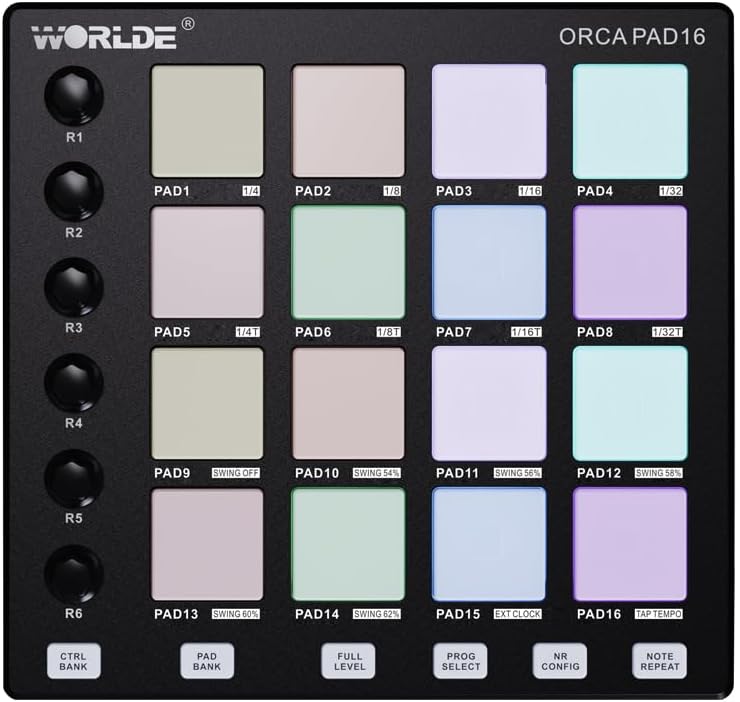
איור 1: מלמעלה למטה view of the Orca Pad-16, highlighting the 16 performance pads and rotary controls.
מדריך התקנה
תוכן החבילה
- Worlde Orca Pad-16 Performance Controller
- כבל USB
- Software Editor (available for download from Worlde webאֲתַר)
דרישות מערכת
- Operating System: Windows XP/7/8/10/11/Vista or Mac OSX (or higher)
- יציאת USB 2.0 זמינה
- Compatible Digital Audio Workstation (DAW) software (e.g., Ableton Live, Apple Logic Pro X, Propellerhead's Reason)
- For iOS compatibility: Apple iPad Camera Connection Kit (sold separately)
חיבור ההתקן
- Ensure your computer or iOS device meets the minimum system requirements.
- Connect one end of the provided USB cable to the USB port on the Orca Pad-16.
- Connect the other end of the USB cable to an available USB 2.0 port on your computer. For iOS devices, use the Apple iPad Camera Connection Kit.
- The Orca Pad-16 is USB powered and driver-free. Your operating system should automatically recognize the device.
- Launch your preferred DAW or music software. The Orca Pad-16 should appear as a MIDI input device in your software's preferences or settings.

איור 2: צד view of the Orca Pad-16, illustrating the USB connection port.
הוראות הפעלה
רפידות ביצועים
The Orca Pad-16 features 16 high-quality, velocity and pressure-sensitive pads with RGB backlighting. These pads can be used for triggering samples, playing drums, or launching clips in your DAW.
- רגישות מהירות: The harder you strike a pad, the louder the sound or the higher the velocity value transmitted.
- Pressure Sensitivity (Aftertouch): After striking a pad, applying continuous pressure can control parameters like vibrato, filter cutoff, or volume, depending on your software's mapping.
- תאורת RGB אחורית: The pads illuminate with various colors, often indicating their status (e.g., armed, playing, stopped) or assigned MIDI notes/channels.
Assignable Rotary Knobs
There are 18 assignable rotary knobs (three rows of six) that can be used to control various parameters in your software, such as volume, pan, filter cutoff, or effect sends. Each knob can be user-modified via the software editor.
- Rotate the knobs clockwise to increase a parameter's value and counter-clockwise to decrease it.
- עיין בהוראות מיפוי ה-MIDI של ה-DAW שלך כדי להקצות כפתורים אלה לפונקציות ספציפיות.
כפתורי פונקציה
The 6 function buttons allow for quick access to common features:
- בחירת תוכנית: Used to cycle through different program presets.
- הערה חזור על: Automatically repeats a triggered note at a specified rate.
- רמה מלאה: Ensures all triggered notes play at maximum velocity, regardless of how hard the pad is struck.
- Note Repeat Configuration: Adjusts parameters for the Note Repeat function.
- CTRL BANK: Switches between control banks for the rotary knobs.
- בנק פד: Switches between pad banks, allowing access to more than 16 pad assignments (up to 48 total).
עורך תוכנה
A dedicated software editor for Mac and PC is available on the Worlde website. This editor allows for advanced customization of the Orca Pad-16, including:
- Assigning MIDI notes and CC messages to pads and knobs.
- Adjusting velocity curves and pressure sensitivity.
- Configuring RGB lighting behavior.
- Saving and loading custom presets (16 presets available).
It is recommended to download and install the software editor for full control over your device's capabilities.
תַחזוּקָה
Proper care and maintenance will extend the life of your Worlde Orca Pad-16.
- ניקוי: Use a soft, dry, lint-free cloth to clean the surface of the device. For stubborn dirt, slightly dampשטפו את המטלית במים. הימנעו משימוש בחומרי ניקוי שוחקים, ממסים או אלכוהול, מכיוון שאלה עלולים לפגוע בגימור וברכיבים.
- אִחסוּן: כאשר אינו בשימוש, יש לאחסן את המכשיר במקום קריר ויבש, הרחק מאור שמש ישיר, טמפרטורות קיצוניות ולחות גבוהה.
- טיפול: הימנעו מהפלת המכשיר או מחשיפתו לפגיעות חזקות. אין להניח עליו חפצים כבדים.
- קישוריות: Always grasp the USB connector, not the cable, when plugging or unplugging the device.
פתרון בעיות
| בְּעָיָה | סיבה אפשרית | פִּתָרוֹן |
|---|---|---|
| המכשיר לא מזוהה על ידי המחשב/תוכנת DAW. |
|
|
| Pads/knobs not responding. |
|
|
| RGB backlighting not working. |
|
|
מפרטים
| שם הדגם | Orca Pad-16 |
| מספר דגם | ORCA-PAD16 |
| רפידות | 16 velocity and pressure-sensitive pads with RGB backlighting |
| ידיות סיבוביות | 18 assignable rotary knobs (3 rows of 6) |
| כפתורי פונקציה | 6 assignable function buttons (Program Select, Note Repeat, Full Level, Note Repeat Config, CTRL BANK, PAD BANK) |
| קישוריות | USB 2.0 |
| כּוֹחַ | מופעל באמצעות אוטובוס USB |
| תְאִימוּת | Windows XP/7/8/10/11/Vista, Mac OSX (or higher), iOS (with Apple iPad Camera Connection Kit) |
| מידות (L x W x H) | 23 x 20 x 5 ס"מ (כ-9.06 x 7.87 x 1.97 אינץ') |
| מִשׁקָל | 705 גרם (כ-1.55 פאונד) |
| חוֹמֶר | פּלָסטִי |
| רכיבים כלולים | Software Editor (downloadable) |
אחריות ותמיכה
מידע על אחריות
Please refer to the retailer's return policy and any warranty information provided at the time of purchase. Standard warranty terms typically cover manufacturing defects for a specified period from the date of purchase.
שמור את הוכחת הרכישה שלך לכל תביעת אחריות.
תמיכת לקוחות
For technical support, software editor downloads, or further inquiries, please visit the official Worlde webלאתר או לפנות למחלקת שירות הלקוחות שלהם.
הערה: לא סופק מידע בנוגע לזמינות חלקי חילוף.


