1. המוצר נגמרview
This manual provides essential information for the operation and maintenance of your GHUST MR23GA Replacement Magic Voice Remote Control. This remote is designed as a replacement for various LG Smart TV models, offering convenient control without complex setup.

Image 1.1: The GHUST MR23GA Replacement Magic Voice Remote Control.
תכונות עיקריות:
- החלפה ישירה: Functions as a direct replacement for original LG Magic Remote models.
- אין צורך בתכנות: Ready to use out of the box after battery insertion.
- בנייה עמידה: Made of high-quality ABS material for enhanced durability.
- עיצוב קומפקטי: Small and ergonomic for comfortable grip.
- Voice Search Capability: Supports voice commands for easier navigation (functionality may vary based on TV model and original remote features).
- כפתורי קיצורי דרך ייעודיים: גישה מהירה לשירותי סטרימינג פופולריים כמו נטפליקס ופריים וידאו.
2. התקנה והתקנה
The MR23GA remote control is designed for immediate use with compatible LG Smart TVs. No complex programming or pairing procedures are required.
2.1. התקנת סוללה
- אתר את מכסה תא הסוללות בגב השלט הרחוק.
- החלק את המכסה כלפי מטה או לחץ על התפס כדי לפתוח את התא.
- Insert two (2) AAA batteries (not included) into the compartment, ensuring the positive (+) and negative (-) terminals align correctly with the indicators inside.
- סגור את מכסה תא הסוללות על ידי החלקתו בחזרה למקומה עד שיישמע נקישה בטוחה.

Image 2.1: The remote control is designed for ease of use with no setup or programming required after battery installation.
Once batteries are installed, the remote is ready to operate your compatible LG Smart TV.
3. הוראות הפעלה
This section details the basic functions and operation of your MR23GA remote control.
3.1. פונקציות בסיסיות
- כפתור הפעלה (●): לחץ כדי להפעיל או לכבות את הטלוויזיה.
- לחצני מספרים (0-9): השתמשו בו כדי להזין מספרי ערוצים ישירות.
- עוצמת הקול מעלה/הנמכת (+/-): כוונן את עוצמת הקול של הטלוויזיה.
- Channel Up/Down (▲/▼): החלפת ערוצי טלוויזיה.
- כפתור השתקה (🔇): השתקה או ביטול השתקה של השמע של הטלוויזיה.
- לוח ניווט (למעלה, למטה, שמאלה, ימינה, אישור): נווט בין תפריטים ובחר אפשרויות.
- Back Button (↶): חזרה למסך או לתפריט הקודם.
- כפתור הבית (🏠): Access the TV's Smart Home dashboard.

Image 3.1: The compact size and ergonomic design make the remote easy to hold and operate.
3.2. שליטה קולית
לחץ והחזק את כפתור מיקרופון to activate voice control. Speak clearly into the remote to issue commands or search for content. Release the button when finished speaking. Note that voice control functionality may depend on your specific LG TV model and its original features.
3.3. Dedicated Shortcut Buttons
The remote features dedicated buttons for quick access to popular streaming applications:
- כפתור נטפליקס: הפעל ישירות את אפליקציית נטפליקס.
- לחצן וידאו ראשי: הפעל ישירות את אפליקציית Amazon Prime Video.
- כפתור דיסני+: Directly launch the Disney+ application.
- כפתור ערוצי LG: Directly launch the LG Channels application.
- Sling Button: Directly launch the Sling TV application.
- כפתור אלקסה: Activate Alexa voice assistant (functionality depends on TV model).

Image 3.2: Dedicated shortcut buttons provide quick access to your favorite applications.
3.4. תאימות
This replacement remote control is compatible with a wide range of LG Smart TV models, including but not limited to:
- LG OLED Series: OLED42C3AUA, OLED42C3PUA, OLED48C3PUA, OLED55C3PUA, OLED65C3AUA, OLED77C3PUA, OLED83C3PUA, OLED55G3PUA, OLED65G3PUA, OLED77G3PUA, OLED83G3PUA, OLED55B3PUA, OLED65B3PUA, OLED77B3PUA
- LG QNED Series: 43QNED75URA, 50QNED75URA, 55QNED75URA, 65QNED75URA, 75QNED75URA, 50QNED80URA, 55QNED80URA, 65QNED80URA, 75QNED80URA, 86QNED80URA
- LG UR9000 Series: 43UR9000PUA, 50UR9000PUA, 55UR9000PUA, 65UR9000PUA, 75UR9000PUA
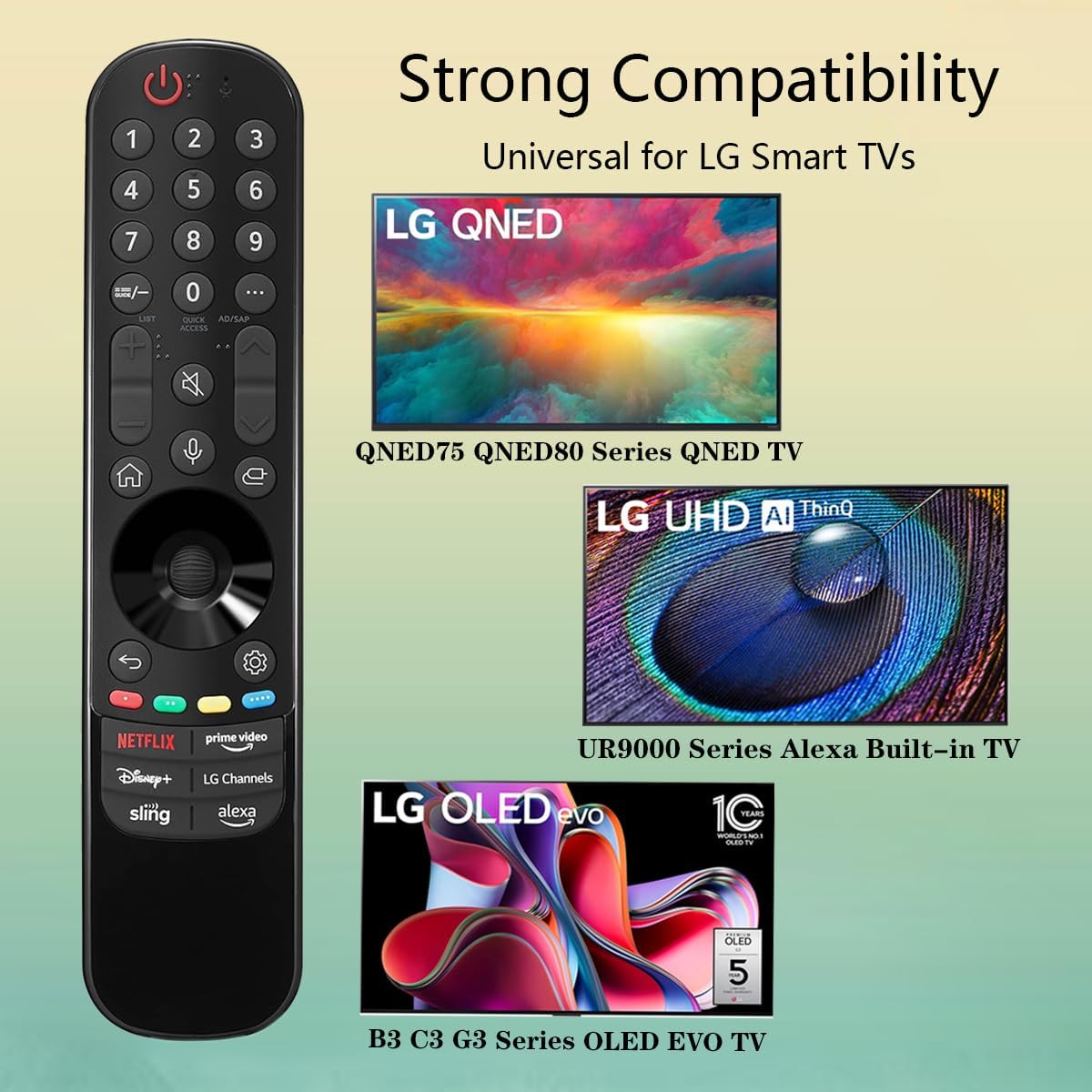
Image 3.3: The remote offers strong compatibility with various LG Smart TV series.
4. תחזוקה
טיפול ותחזוקה נאותים יאריכו את חיי השלט רחוק שלכם.
4.1. ניקיון
- השתמש במטלית רכה ויבשה כדי לנגב את פני השלט הרחוק.
- עבור לכלוך עיקש, מעט דחוףampנגב את המטלית במים או בחומר ניקוי עדין ולא שוחק. אין לרסס חומר ניקוי ישירות על השלט.
- הימנעו משימוש בכימיקלים חזקים, ממסים או חומרי ניקוי שוחקים, מכיוון שאלה עלולים לפגוע בגימור של השלט או ברכיבים הפנימיים.
4.2. טיפול בסוללה
- החלף סוללות כאשר תגובת השלט פוחתת או שהוא מפסיק לתפקד.
- יש להחליף תמיד את שתי הסוללות בו זמנית בחדשות מאותו סוג (AAA).
- אם לא נעשה שימוש בשלט רחוק למשך תקופה ממושכת (למשל, חודש או יותר), הוציאו את הסוללות כדי למנוע דליפה ונזק אפשרי לשלט רחוק.
- השלך סוללות משומשות בהתאם לתקנות המקומיות.
5. פתרון תקלות
אם נתקלת בבעיות בשלט רחוק שלך, עיין בבעיות הנפוצות ובפתרונות הבאים:
| בְּעָיָה | סיבה אפשרית | פִּתָרוֹן |
|---|---|---|
| השלט רחוק לא מגיב. | סוללות מתות או שהוכנסו בצורה שגויה. | החליפו את הסוללות בסוללות AAA חדשות, תוך הקפדה על קוטביות נכונה (+/-). |
| השלט עובד לסירוגין. | Low battery power; obstruction between remote and TV; infrared sensor blocked on TV. | החלף סוללות. ודא שקו ראייה פתוח לחיישן האינפרא אדום של הטלוויזיה. הסר כל מכשול. |
| Voice control or pointer not working. | This replacement remote may not support all advanced features of the original LG Magic Remote, or your TV model does not fully support these features with a replacement remote. | Verify your TV model's compatibility with replacement remotes for advanced features. Basic functions should still operate. |
| Dedicated app buttons (e.g., Alexa, LG Channels) not working. | Functionality depends on TV model and specific app integration. | Some app buttons may not be universally compatible or require specific TV software versions. Verify if other buttons work. |
אם הבעיה נמשכת לאחר ניסיון פתרונות אלה, אנא צור קשר עם תמיכת הלקוחות.
6. מפרטים
- מספר דגם: MR23GA
- מותג: רוח
- מידות המוצר: 7.3 x 1.6 x 1.2 אינץ'
- משקל פריט: 2.29 אונקיות
- מקור כוח: 2 x AAA סוללות (לא כלול)
- צֶבַע: שָׁחוֹר
- חוֹמֶר: ABS איכותי
- מכשירים תואמים: LG Smart Televisions (specific models listed in Section 3.4)
- תכונה מיוחדת: Voice Search (functionality may vary)
7. אחריות ותמיכה
GHUST is committed to providing high-quality products and excellent customer service.
7.1. שירות לאחר המכירה
If you have any questions regarding the quality or functionality of your GHUST MR23GA remote control, please do not hesitate to contact our customer support team. We are dedicated to resolving any issues promptly and ensuring your satisfaction.
For support, please refer to the contact information provided with your purchase or on the official GHUST product page.


