1. הקדמה
This manual provides essential instructions for the safe and efficient operation of your Tera Level 2 J1772 48A Electric Vehicle (EV) Charger. Please read this manual thoroughly before installation and use, and retain it for future reference.
The Tera EV Charger is designed to provide reliable and fast charging for both J1772 compatible electric vehicles and Tesla vehicles (with the included adapter). It features adjustable current settings, scheduling options, and robust safety protections.
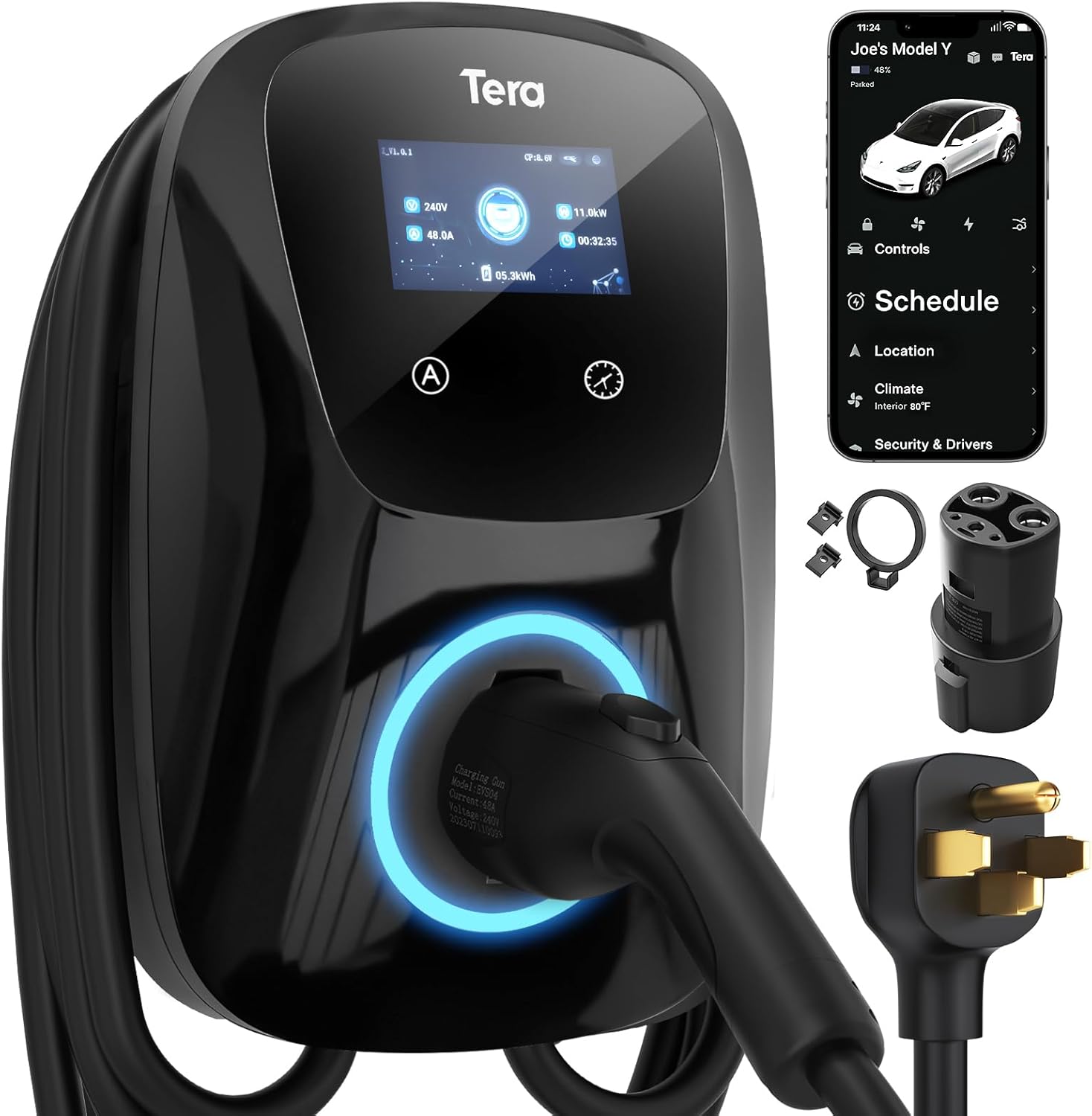
Image 1.1: Tera Level 2 EV Charger with included accessories.
2. מידע בטיחות
יש להקפיד תמיד על הנחיות הבטיחות הבאות כדי למנוע פציעה או נזק:
- התקנה מקצועית: ההתקנה צריכה להתבצע על ידי חשמלאי מוסמך בהתאם לכל תקנות החשמל המקומיות והארציות.
- הַאֲרָקָה: Ensure the charger is properly grounded to prevent electrical shock.
- מים ולחות: Do not operate the charger if it is visibly damaged or exposed to excessive moisture. While the unit is IP65 rated for outdoor use, avoid submerging it.
- שלמות כבל: Regularly inspect the charging cable for any signs of wear, cuts, or damage. Do not use a damaged cable.
- ילדים וחיות מחמד: הרחק ילדים וחיות מחמד מאזור הטעינה במהלך הפעולה.
- עצירת חירום: Familiarize yourself with the location of your electrical panel's circuit breaker for the charger in case an emergency shutdown is required.
- אוורור: ודא אוורור נאות סביב המטען במהלך הפעולה.
The Tera EV Charger is ETL Certified, indicating compliance with North American safety standards. This certification is equivalent to UL for home insurance requirements, signifying the manufacturer's commitment to high safety standards.

Image 2.1: ETL Certification and integrated safety protections.
3. תכולת החבילה
ודא שכל הפריטים נמצאים באריזה לפני שתמשיך בהתקנה:
- Tera Electric Vehicle Charger Unit
- מדריך למשתמש (מסמך זה)
- לוחית הרכבה
- סט ברגים
- כלים (להתקנה)
- J1772 to Tesla Adapter with Lock
- Cable Holder for Tesla

Image 3.1: Contents of the Tera EV Charger package.
4. התקנה והתקנה
The Tera EV Charger is designed for wall-mounted installation. Follow these general steps:
- בחר מיקום: Select a suitable location near your parking area, ensuring it is within reach of your vehicle's charging port and a dedicated 240V outlet (NEMA 14-50). The 25-foot cable provides flexibility.
- צלחת הרכבה: Unscrew the mounting plate from the charger unit. Position the mounting plate on the wall at the desired height and mark the drilling points.
- לוח הרכבה מאובטח: Drill pilot holes and securely fasten the mounting plate to the wall using the provided screws and anchors.
- Attach Charger Unit: Carefully align the charger unit with the mounted plate and slide it into place. Secure it with the anti-theft screw.
- חבר חשמל: Plug the charger's NEMA 14-50 plug into the dedicated 240V outlet.
- ניהול כבלים: Use the provided cable holder to neatly store the charging cable when not in use.
For detailed electrical wiring and circuit breaker requirements, consult a certified electrician. The unit is IP65 rated, making it suitable for both indoor and outdoor installation, capable of withstanding temperatures from -22°F to 122°F.

Image 4.1: Installation steps for the Tera EV Charger.

Image 4.2: The charger's IP65 rating ensures durable performance in various weather conditions.
5. הוראות הפעלה
The Tera EV Charger offers both manual and app-based control for charging sessions.
5.1. הגדרה ראשונית וטעינה
Before plugging the charger into your vehicle, it is recommended to configure the desired current and schedule settings on the unit or via the app. Plugging it in first will activate a plug-and-play mode, which may not utilize scheduled settings.

Image 5.1: Configure settings before connecting to the vehicle.
5.2. Manual Current Adjustment and Scheduling
The charger unit features a touch screen interface for direct control:
- התאמה נוכחית: Use the 'A' button on the unit to cycle through available current settings (e.g., 24A, 32A, 40A, 48A). Select the appropriate amperage for your vehicle and electrical circuit.
- הגדרת לוח זמנים: Use the clock icon button to set a charging schedule, allowing you to define charging start times for up to 12 hours in advance.

Image 5.2: Touch screen controls for current and schedule.
5.3. App-Based Control and Scheduling
For enhanced convenience, the Tera EV Charger can be controlled via a dedicated mobile application. This allows for remote management of charging sessions:
- התחל/הפסק טעינה: Initiate or terminate charging remotely.
- כוונון זרם: שנה את הטעינה amperage from your mobile device.
- טעינה מתוזמנת: Set detailed charging schedules to optimize for off-peak electricity rates or specific departure times.
- טעינת צג: View real-time charging status and energy consumption.

Image 5.3: App interface for remote charging control.

Image 5.4: Visual representation of scheduled charging for cost efficiency.
5.4. חיבור לרכב שלך
- Ensure the charger is powered on and any desired settings (current, schedule) are configured.
- For Tesla vehicles, attach the J1772 to Tesla adapter to the charger's J1772 connector.
- Insert the charging connector (or adapter) firmly into your vehicle's charging port.
- The charger will begin the charging process according to your settings or immediately if in plug-and-play mode.
פֶּתֶק: Hybrid vehicles may automatically reduce charging current based on their maximum allowable current, regardless of the charger's setting.
6. תכונות
- תאימות אוניברסלית: Fully upgraded for seamless compatibility with all Tesla models (using the included adapter) and J1772 standard electric vehicles.
- טעינה מהירה: Delivers up to 48A output, providing rapid Level 2 charging at approximately 46 miles of range per hour.
- זרם מתכוונן: Manually select charging current from 24A, 32A, 40A, or 48A to suit your vehicle's needs and home electrical capacity.
- אורך כבל מורחב: A 25-foot premium charging cable offers ample reach for convenient charging in various locations.
- עמיד ועמיד בפני מזג אוויר: IP65 rated for water and dust resistance, ensuring reliable operation in diverse environmental conditions, from extreme cold (-22°F) to high heat (122°F).
- בטיחות מקיפה: ETL certified with multiple protection features including overvoltagה, undervoltage, overload, overtemperature, ground fault, earth leakage, and short circuit protection.

Image 6.1: High-speed Level 2 charging capabilities.

Image 6.2: The 25-foot cable provides extensive reach for charging.
7. מפרטים
| מִפרָט | עֵרֶך |
|---|---|
| מותג | טרה |
| מספר דגם | ZB04-U011K series |
| Ampלמחוק | 48 Amps (Adjustable) |
| פלט כרךtage | 240 וולט (AC) |
| מהtage | 11.5 קילוואט |
| אורך כבל | 25 רגל |
| סוג מחבר | J1772 (with Tesla adapter included) |
| תקע חשמל | NEMA 14-50 |
| דירוג IP | IP65 |
| טמפרטורת הפעלה | -22°F עד 122°F (-30°C עד 50°C) |
| הסמכות | ETL, CE, TÜV, FCC |
| משקל פריט | 20 פאונד (כ-9.1 ק"ג) |
| מידות המוצר | 22 x 16 x 12 אינץ' (כ-56 x 41 x 30 ס"מ) |
8. פתרון תקלות
If you encounter issues with your Tera EV Charger, consider the following common troubleshooting steps:
- אין כוח: Check the circuit breaker for the outlet. Ensure the NEMA 14-50 plug is fully inserted.
- טעינה לא מתחילה: Verify that the charging connector is securely plugged into the vehicle's port. Check the charger's display for error messages. Ensure the vehicle is ready to accept a charge.
- טעינה איטית: Confirm the current setting on the charger or app. Ensure your vehicle is not limiting the charging rate.
- מחווני שגיאה: The charger features LED indicators to communicate status and errors. Refer to the table below for common indicator meanings.
| מצב מחוון | מַשְׁמָעוּת |
|---|---|
| Blue (Always on) | המתנה |
| Green (Always on) | Insert the Charger |
| Green (Flashes every 1S) | טְעִינָה |
| Red (Always on) | CP לא תקין |
| Red (Flashes every 1S) | Over/Under Voltage |
| Red (Flashes every 2S) | תקלה קרקעית |
| Red (Flashes 3S ON, 3S OFF) | הגנה מפני זרם יתר |
| Purple (Flashes every 1S) | הגנה מפני דליפות |
| Purple (Flashes every 2S) | הגנה מפני טמפרטורות גבוהות |
| Purple (Flashes every 4S) | הגנת הידבקות |

Image 8.1: LED indicator light meanings for troubleshooting.
אם הבעיות נמשכות, צור קשר עם תמיכת הלקוחות.
9. תחזוקה
Regular maintenance helps ensure the longevity and optimal performance of your EV charger:
- ניקוי: נגבו מעת לעת את יחידת המטען והכבל בעזרת מטלית רכהamp בַּד. הימנע משימוש בכימיקלים קשים או בחומרי ניקוי שוחקים.
- בדיקת כבלים: Routinely check the charging cable and connector for any signs of damage, fraying, or discoloration. Replace if damaged.
- אִחסוּן: When not in use, store the charging cable neatly using the provided cable holder to prevent kinks or damage.
- הגנת הסביבה: While the unit is weatherproof, ensure it is not continuously exposed to extreme conditions beyond its operating limits.
10. אחריות ותמיכה
The Tera EV Charger comes with a אחריות לשנה, reflecting the manufacturer's commitment to quality and reliability. For warranty claims or technical assistance, please contact Tera customer support.
מידע ליצירת קשר:
- אֶלֶקטרוֹנִי: cs@tera-innovation.com
- Webאֲתַר: https://www.tera-innovation.com
- טֵלֵפוֹן: +1 (626)438-1404

Image 10.1: Certifications and 2-year warranty information.


