1. הקדמה
תודה על הרכישהasing the Sharp Plasmacluster Humidifying Air Purifier, Model KC-35T7. This manual provides essential information for the safe and efficient operation, maintenance, and troubleshooting of your new appliance. Please read this manual thoroughly before use and keep it for future reference.
This advanced air purifier is designed to improve your indoor air quality by reducing harmful gases such as formaldehyde and other Volatile Organic Compounds (VOCs). It features a powerful purification function, integrated humidification, and a convenient display for humidity and temperature.
2. מידע בטיחות
כדי להבטיח הפעלה בטוחה ולמנוע נזק למוצר או פגיעה בעצמך ובאחרים, אנא הקפידו על אמצעי הזהירות הבאים:
- יש להשתמש תמיד במכשיר עם הנפח הנכוןtagכפי שצוין בתווית הדירוג.
- Do not block the air intake or outlet vents.
- Do not insert fingers or objects into any openings.
- Unplug the appliance before cleaning, performing maintenance, or when not in use for extended periods.
- Do not operate the appliance near flammable gases or combustible materials.
- Keep the appliance away from water and moisture. Do not immerse the unit in water.
- Ensure the water tank is properly installed before operating the humidification function. Use only clean tap water in the water tank.
- מכשיר זה אינו מיועד לשימוש על ידי אנשים (כולל ילדים) עם יכולות פיזיות, חושיות או נפשיות מופחתות, או חוסר ניסיון וידע, אלא אם כן הם קיבלו פיקוח או הדרכה לגבי השימוש במכשיר על ידי אדם האחראי לבטיחותם.
3. זיהוי חלקים
Familiarize yourself with the main components of your Sharp Plasmacluster Humidifying Air Purifier:

איור 3.1: חזית View of the Air Purifier. This image displays the main body of the Sharp KC-35T7 air purifier, highlighting the control panel at the top, the air intake grille, and the Plasmacluster logo. The unit is white with black accents on the sides.
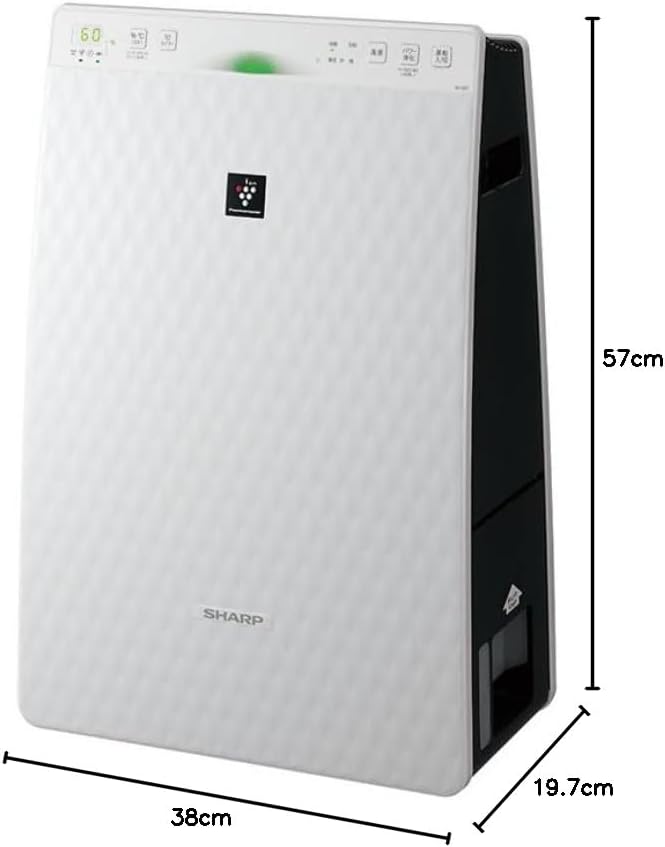
Figure 3.2: Air Purifier with Dimensions. תמונה זו מספקת פרספקטיבה view of the Sharp KC-35T7, illustrating its approximate dimensions: 38 cm (width), 19.7 cm (depth), and 57 cm (height). These measurements are crucial for proper placement and space planning.
מרכיבי מפתח:
- לוּחַ בַּקָרָה: Located on the top, with buttons for power, mode selection, fan speed, and display.
- כניסת אוויר: Located on the front and sides, where air is drawn into the unit.
- יציאת אוויר: Located at the top, where purified and humidified air is released.
- מיכל מים: Removable tank for humidification, typically located on the side or back.
- מסננים: Internal filters (e.g., HEPA, deodorizing) for air purification.
4. התקנה
Follow these steps for the initial setup of your air purifier:
- פריקת אריזה: Carefully remove the air purifier from its packaging. Retain the packaging materials for future transport or storage.
- התקנת מסנן: Open the rear panel of the unit. Remove all protective plastic bags from the filters (e.g., HEPA filter, deodorizing filter) and install them according to the markings inside the unit. Ensure they are securely in place. Close the rear panel.
- Fill Water Tank (for Humidification): Remove the water tank from the unit. Open the water tank cap and fill it with clean tap water up to the maximum fill line. Close the cap securely and reinsert the water tank into the unit until it clicks into place.
- מיקום: Place the air purifier on a flat, stable surface, ensuring there is adequate space (at least 20 cm) around the air intake and outlet for optimal airflow. Avoid placing it directly against a wall or near heat sources.
- חיבור חשמל: חבר את כבל החשמל לשקע חשמל מתאים.
5. הוראות הפעלה
Learn how to operate your Sharp Plasmacluster Humidifying Air Purifier:
הפעלה/כיבוי:
- הקש על כּוֹחַ בלוח הבקרה כדי להפעיל או לכבות את היחידה.
בחירת מצב:
The unit typically offers several operating modes:
- מצב אוטומטי: The unit automatically adjusts fan speed and humidification based on detected air quality and humidity levels.
- מצב טיהור אוויר: Operates solely as an air purifier.
- מצב לחות: Operates with humidification function active.
- Plasmacluster Spot Mode: Concentrates Plasmacluster ions for targeted deodorization or purification.
הקש על מצב button repeatedly to cycle through available modes.
התאמת מהירות מאוורר:
התאם את מהירות המאוורר לפי טעמך:
- הקש על מהירות מאוורר button to select between Low, Medium, High, or Silent settings.
Humidity/Temperature Display:
The display shows current room humidity and temperature. This information helps you monitor your indoor environment and adjust settings as needed.
6. תחזוקה
Regular maintenance ensures optimal performance and extends the lifespan of your air purifier. Always unplug the unit before cleaning.
ניקוי והחלפת פילטר:
- לפני סינון: Clean the pre-filter (mesh filter) regularly, approximately once a month, or more often if used in a dusty environment. Use a vacuum cleaner to remove dust or wash it with water and mild detergent. Ensure it is completely dry before reinstallation.
- מסנן HEPA: The HEPA filter cannot be washed. Replace it approximately every 2-5 years, depending on usage and air quality. Refer to the indicator light on the control panel for replacement timing.
- מסנן מפיג ריח: The deodorizing filter also cannot be washed. Replace it at the same interval as the HEPA filter.
Water Tank and Humidifying Filter Cleaning:
- מיכל מים: Clean the water tank weekly to prevent mold and bacteria growth. Rinse with clean water and use a soft brush or cloth to remove any residue.
- Humidifying Filter/Tray: Clean the humidifying filter and tray monthly. Remove any mineral deposits or slime using a soft brush and a mild descaling solution (e.g., citric acid solution) if necessary. Rinse thoroughly with clean water and ensure all parts are dry before reassembly.
ניקוי חיצוני:
- Wipe the exterior of the unit with a soft, dry cloth. For stubborn stains, use a damp cloth with a mild detergent, then wipe dry. Do not use abrasive cleaners or solvents.
7. פתרון תקלות
אם אתם נתקלים בבעיות עם מטהר האוויר שלכם, עיינו בבעיות הנפוצות ובפתרונות הבאות:
| בְּעָיָה | סיבה אפשרית | פִּתָרוֹן |
|---|---|---|
| היחידה לא נדלקת. | כבל החשמל אינו מחובר היטב. אין חשמל מהשקע. | בדוק את חיבור כבל החשמל. בדוק את השקע עם מכשיר אחר. |
| אין לחות. | Water tank empty. Water tank not properly installed. Humidifying filter dirty. | Refill water tank. Reinstall water tank correctly. Clean humidifying filter. |
| רעש יוצא דופן. | Filters not properly installed. Foreign object in unit. | בדוק את התקנת המסנן. נתק את החשמל ובדוק אם יש חפצים זרים. |
| טיהור אוויר לקוי. | Filters are dirty or clogged. Unit placed in an obstructed area. | Clean or replace filters. Ensure proper clearance around the unit. |
| ריח עולה מהיחידה. | Deodorizing filter saturated. Water tank/humidifying filter dirty. | Replace deodorizing filter. Clean water tank and humidifying filter. |
אם הבעיה נמשכת לאחר ניסיון פתרונות אלה, אנא צור קשר עם תמיכת הלקוחות.
8. מפרטים
Detailed technical specifications for the Sharp Plasmacluster Humidifying Air Purifier KC-35T7:
| תכונה | מִפרָט |
|---|---|
| מותג | חַד |
| מספר דגם | KC-35T7 |
| צֶבַע | לָבָן |
| מידות המוצר (D x W x H) | 19.7 ס"מ x 38 ס"מ x 57 ס"מ |
| מידות חבילה (L x W x H) | 63 ס"מ x 43 ס"מ x 26 ס"מ |
| משקל החבילה | 7.88 ק"ג |
| פונקציות אחרות | Humidification function, Plasmacluster technology, Humidity/Temperature display |
| סוללות נדרשות | לֹא |
9. אחריות ותמיכה
Your Sharp Plasmacluster Humidifying Air Purifier is covered by a manufacturer's warranty. Please refer to the warranty card included in your product packaging for specific terms and conditions, including the warranty period and coverage details.
For technical assistance, service, or to inquire about replacement parts and filters, please contact Sharp customer support. Contact information can typically be found on the manufacturer's official webבאתר או על גבי קבלת הרכישה שלך.
When contacting support, please have your product model number (KC-35T7) and serial number (if applicable) ready.


