1. הקדמה
This manual provides comprehensive instructions for the safe and efficient operation, setup, maintenance, and troubleshooting of your Surfans F35 HiFi MP3 Player. Please read this manual thoroughly before using the device to ensure optimal performance and longevity.
2. המוצר נגמרview
The Surfans F35 is a professional high-resolution audio player designed for exceptional sound quality and user experience. It features advanced audio components and versatile connectivity options.
2.1 תכונות עיקריות
- אודיו ברזולוציה גבוהה: Equipped with a dedicated FPGA, advanced ESS Sabre ESS9038Q2M DAC chip, and native DSD256 hardware decoding for pristine audio.
- יציאות מגוונות: Features independent amplifying channels with 3.5mm single-ended and 4.4mm balanced outputs, plus a 1Vpp coaxial Type-C output.
- ממשק אינטואיטיבי: 4.0-inch TFT (480x800) touchscreen display combined with physical buttons and a distinctive ALPS rotary encoder for smooth operation.
- עיצוב חזק: Constructed with a one-piece aluminum alloy body using 5-axis CNC technology for durability and a comfortable feel.
- Bi-directional Bluetooth: Functions as both a Bluetooth audio source and a professional Bluetooth decoding amplifier, supporting AAC, SBC, and other high-quality lossless transmissions.
- אחסון ניתן להרחבה: Comes with a 128GB TF card and supports memory expansion up to 512GB.
- חיי סוללה ארוכים: Provides up to 8.5 hours (balanced) or 10 hours (single-ended) of continuous playback, with an incredible 25-day standby time.
- Wide Format Support: Supports FLAC, WAV, WMA, M4A, MP3, MP2, AAC, APE, OGG, AIFF, DFF, DSF, AIF, Native DSD256, and more.
2.2 Product Components and Controls

איור 1: חזית view of the Surfans F35 HiFi MP3 Player, showing the screen and side controls.
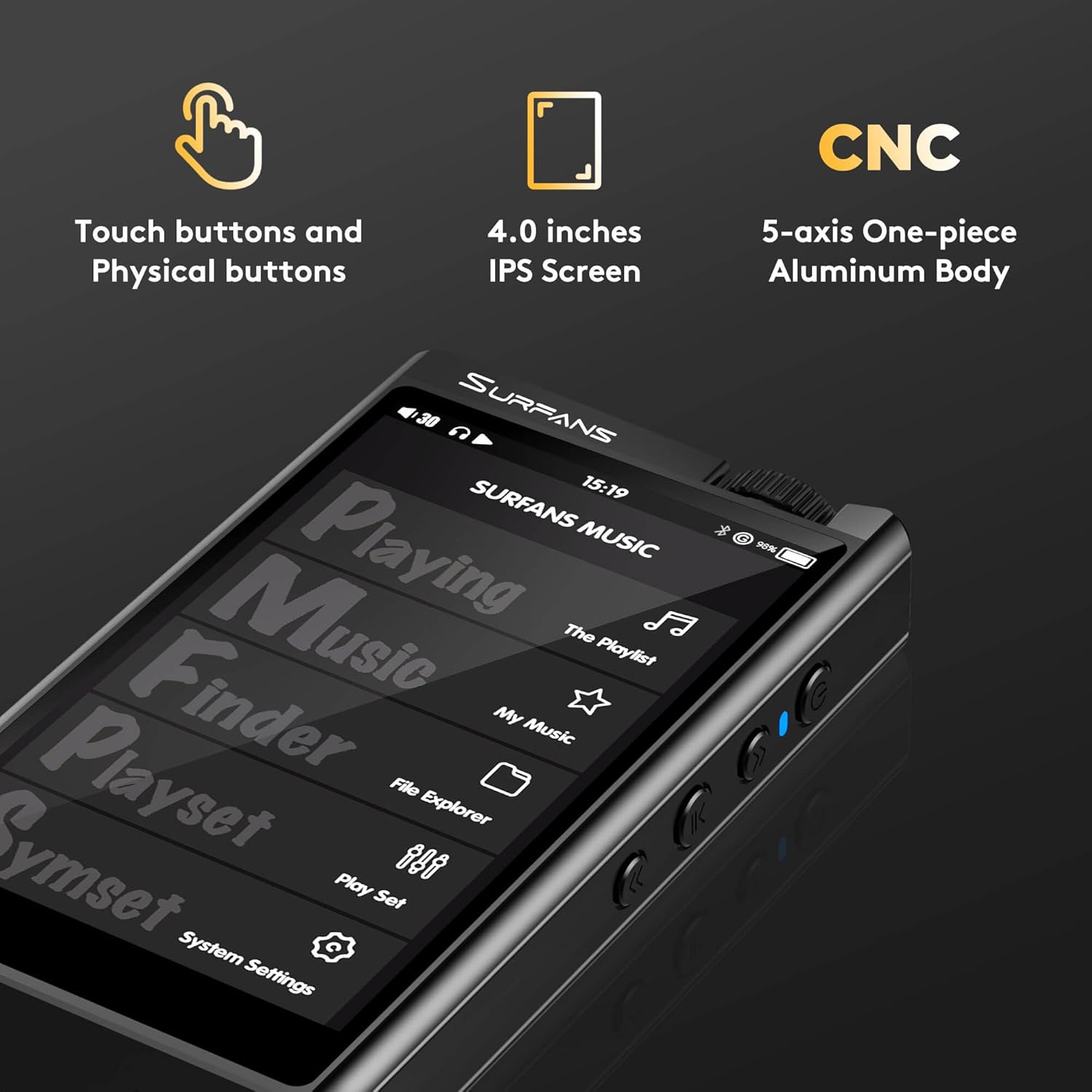
Figure 2: Illustration of the F35's 4.0-inch IPS screen, touch buttons, physical buttons, and one-piece CNC aluminum body.

איור 3: תקריב view of the top panel, highlighting the 4.4mm balanced and 3.5mm single-ended audio output jacks, and the Japanese Alps Rotary Encoder for volume control.

Figure 4: The MicroSD card slot on the F35, demonstrating storage expansion up to 512GB.
3. התקנה
3.1 טעינת המכשיר
Before first use, fully charge the Surfans F35. Connect the included USB Type-C cable to the device's charging port and the other end to a USB power adapter (not included) or a computer's USB port. The charging indicator will show the charging status.
3.2 הכנסת כרטיס ה-MicroSD
The device supports MicroSD cards up to 512GB. Locate the MicroSD card slot on the side of the player. Gently insert the MicroSD card with the gold contacts facing down until it clicks into place. To remove, push the card in slightly until it springs out.
3.3 הפעלה/כיבוי
To power on, press and hold the power button located on the side of the device until the screen illuminates. To power off, press and hold the power button until the power-off options appear on the screen, then select "Power Off". A short press will turn the screen on/off.
3.4 העברת מוזיקה Files
Connect the Surfans F35 to your computer using the USB Type-C cable. The device will appear as a removable storage drive. You can then drag and drop your music files (FLAC, WAV, MP3, DSD, etc.) directly into the player's internal storage or the inserted MicroSD card.
4. הוראות הפעלה
4.1 ניווט בסיסי
The Surfans F35 features a 4.0-inch touchscreen for primary navigation. Swipe to browse menus and tap to select options. Physical buttons on the side provide quick access to playback controls (play/pause, next/previous track) and volume adjustment via the rotary encoder.
4.2 נגינה
From the main menu, select "Music" or "File Explorer" to browse your audio library. Choose a track or album to begin playback. The player supports a wide range of lossless and lossy formats including FLAC, WAV, WMA, M4A, MP3, MP2, AAC, APE, OGG, AIFF, DFF, DSF, and AIF, including native DSD256.

Figure 5: Visual representation of various supported audio formats including DFF, FLAC, M4A, WMA, APE, DSF, ACC, MP3, WAV, OGG, AIFF, and DTS.
4.3 קישוריות בלוטות'
The F35 features bi-directional Bluetooth 4.2. This allows it to:
- Transmit Audio: Connect to Bluetooth headphones or speakers to stream music wirelessly. Go to Bluetooth settings, enable Bluetooth, and pair with your desired device.
- Receive Audio (USB DAC Mode): Connect the F35 to a smartphone or computer via Bluetooth to use it as a high-quality Bluetooth decoding amplifier. This allows your phone/computer to stream audio to the F35, which then outputs through its audio jacks.

Figure 6: The F35 demonstrating its bi-directional Bluetooth capability, connecting to a Bluetooth speaker, and its function as a USB DAC when connected to a computer.
4.4 Using as a USB DAC
Connect the Surfans F35 to your computer using the USB Type-C cable. On the device, select "USB DAC" mode when prompted. Your computer should recognize the F35 as an external audio device. Select it as your default playback device in your computer's sound settings to enjoy high-fidelity audio output through the F35.
4.5 Equalizer and Digital Filters
The F35 includes a built-in 9-band equalizer and 5 available digital filters to customize your listening experience. Access these settings through the "System Settings" or "EQ" menu on the device. Adjust the frequency bands or select a filter preset to tailor the sound to your preferences or specific audio content.

Figure 7: Screenshot of the F35's user interface showing the 9-band equalizer and digital filter options for sound customization.
5. תחזוקה
5.1 ניקוי ההתקן
Use a soft, dry, lint-free cloth to clean the device's screen and body. Avoid using abrasive cleaners, solvents, or aerosol sprays, which may damage the surface. Do not expose the device to excessive moisture.
5.2 טיפול בסוללה
To prolong battery life, avoid fully discharging the battery frequently. Charge the device regularly, even if not in use for extended periods. Store the device in a cool, dry place away from direct sunlight and extreme temperatures.
5.3 עדכוני תוכנה
Periodically check the official Surfans website for any available firmware updates. Updates can improve performance, add new features, or fix bugs. Follow the instructions provided with the update package carefully.
6. פתרון תקלות
| בְּעָיָה | סיבה אפשרית | פִּתָרוֹן |
|---|---|---|
| המכשיר לא נדלק. | סוללה חלשה; המכשיר קפוא. | Charge the device for at least 30 minutes. Press and hold the power button for 10-15 seconds to force a restart. |
| אין פלט קול. | Volume too low; incorrect output selected; faulty headphones/cable; corrupted audio file. | Increase volume. Ensure headphones are fully plugged into the correct port (3.5mm or 4.4mm). Test with different headphones/cable. Try another audio file. |
| בעיות בחיבור בלוטות'. | המכשיר אינו במצב צימוד; מחוץ לטווח; הפרעות. | Ensure Bluetooth is enabled on both devices and the F35 is in pairing mode. Move devices closer. Restart both devices. |
| Cannot recognize MicroSD card. | Card not inserted correctly; card corrupted; unsupported format. | Reinsert the card. Try a different MicroSD card. Ensure the card is formatted to a compatible file מערכת (למשל, FAT32, exFAT). |
| Files not appearing on player. | Files not transferred correctly; unsupported file פוּרמָט. | לְאַמֵת files are in the correct directory on the player/card. Check if the file format is supported by the F35. |
7. מפרטים
| תכונה | פְּרָט |
|---|---|
| מותג | סרפנים |
| שם הדגם | Surfans F35 Hifi Music Player |
| Storage Capacity (Internal) | 128 ג'יגה-בייט |
| אחסון ניתן להרחבה | Up to 512 GB (MicroSD card) |
| לְהַצִיג | 4.0-inch TFT Touchscreen (480 x 800) |
| שבב DAC | ESS Sabre ESS9038Q2M |
| יציאות שמע | 3.5mm Single-ended, 4.4mm Balanced, USB Type-C Coaxial (1Vpp) |
| סוג בלוטות' | Bi-directional Bluetooth (AAC, SBC supported) |
| פורמטי שמע נתמכים | APE (192KHz/24bit), FLAC (192KHz/24bit), WAV (384KHz/24bit), WMA (192KHz/24bit), Wma Lossless (96KHz/24bit), M4A, MP3, MP2, AAC, APE, OGG, AIFF, DFF, DSF, AIF, Native DSD256 (11.28 MHz) |
| חיי סוללה (ממוצע) | 10 Hours (single-ended), 8.5 Hours (balanced) |
| זמן המתנה | 25 ימים |
| מידות (L x W x H) | 12 x 6.6 x 2 ס"מ (4.6 x 2.6 x 0.7 אינץ ') |
| מִשׁקָל | 108.86 גרם |
| תכונות מיוחדות | Touch screen, Equalizer, USB DAC function, CNC aluminum body |
8. אחריות ותמיכה
Surfans offers a one-year return and exchange policy for the F35 HiFi MP3 Player. For any product inquiries, technical support, or warranty claims, please contact Surfans customer service through the retailer's platform or visit the official Surfans webאתר ליצירת קשר.
למידע נוסף, בקר בכתובת: Surfans Official Store on Amazon


