1. הקדמה
This manual provides essential information for setting up, operating, and maintaining your new SHARP Roku TV. Please read this manual thoroughly before using the television to ensure proper and safe operation. Keep this manual for future reference.
Your SHARP Roku TV combines stunning 4K Ultra HD resolution with the intuitive Roku operating system, offering access to a vast library of streaming content and smart features.
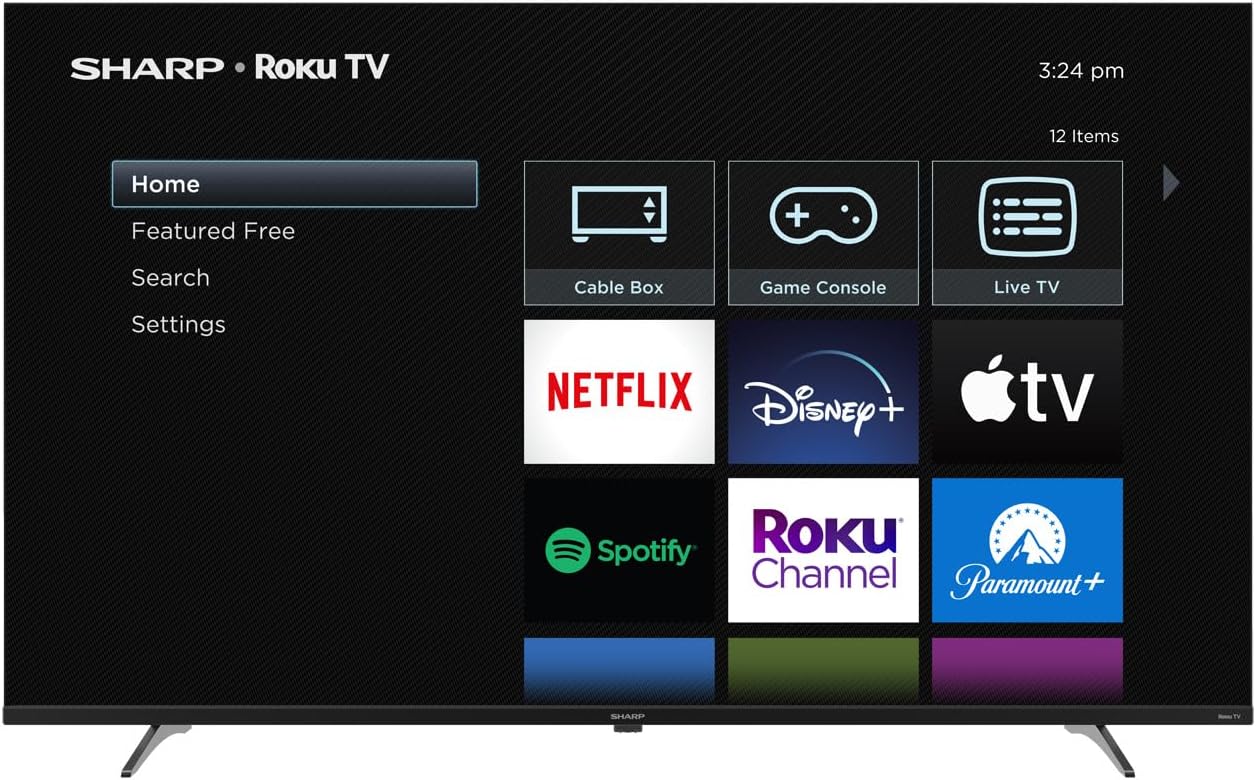
Image 1.1: SHARP Roku TV with Home Screen
תמונה זו מציגה את החלק הקדמי view of the SHARP Roku TV, powered on and displaying the main Roku home screen. The screen features a menu on the left with options like Home, Featured Free, Search, and Settings. On the right, large icons for various streaming services such as Netflix, Disney+, Apple TV, Spotify, Roku Channel, and Paramount+ are visible, along with input options for Cable Box, Game Console, and Live TV.
2. מידע בטיחות
יש להקפיד תמיד על אמצעי זהירות בסיסיים בעת השימוש במוצר זה כדי להפחית את הסיכון לשריפה, התחשמלות ופציעות אדם.
- מקור כוח: Connect the TV only to the type of power source indicated on the marking label.
- אוורור: יש לוודא אוורור נאות. אין לחסום פתחי אוורור.
- מים ולחות: אין לחשוף את הטלוויזיה לגשם או לחות. אין להניח חפצים מלאים בנוזלים, כגון אגרטלים, על הטלוויזיה.
- ניקוי: נתקו את הטלוויזיה משקע הקיר לפני ניקוי. השתמשו במטלית רכה ויבשה. אין להשתמש בחומרי ניקוי נוזליים או בחומרי ניקוי בתרסיס.
- מיקום: הנח את הטלוויזיה על משטח יציב ומאוזן. הימנע מהצבתה באור שמש ישיר או בקרבת מקורות חום.
- יְלָדִים: יש לפקח על ילדים כדי לוודא שהם לא מטפסים על הטלוויזיה או משחקים איתה.
3. מה בקופסה
פרקו בזהירות את הקופסה וודאו שכל הפריטים נמצאים ובמצב תקין.
- SHARP Roku TV (Model: 4T-C50EL8UR)
- Simple Roku Remote Control
- מעמד טלוויזיה (2 יחידות)
- כבל חשמל
- מדריך התחלה מהירה (לא כלול במדריך זה)
- ברגים להתקנת מעמד
- סוללות AAA (2) לשלט רחוק
4. התקנה
4.1 פירוק
Remove the TV and all accessories from the packaging. It is recommended to keep the original packaging materials in case you need to transport the TV in the future.
4.2 חיבור המעמד
If you are not wall-mounting your TV, you will need to attach the included stand. Place the TV face down on a soft, clean surface to prevent screen damage. Align the stand pieces with the screw holes on the bottom of the TV and secure them with the provided screws.
4.3 התקנה על הקיר (אופציונלי)
Your SHARP Roku TV is VESA compatible (200x300). If you choose to wall-mount the TV, ensure you use a VESA-compliant wall mount kit and follow the instructions provided with the wall mount. Professional installation is recommended for wall mounting.
4.4 חיבור ציוד היקפי
Connect your external devices to the TV using the available ports.
- HDMI: The TV features 4 HDMI ports, including one with eARC support for enhanced audio return channel functionality. Connect Blu-ray players, game consoles, cable boxes, etc.
- USB: שני יציאות USB זמינות לחיבור התקני אחסון USB אל view כְּלֵי תִקְשׁוֹרֶת files.
- אתרנט: לקבלת חיבור אינטרנט קווי יציב, חבר כבל Ethernet ליציאת LAN.
- כּוֹחַ: חבר את כבל החשמל לכניסת החשמל של הטלוויזיה ולאחר מכן לשקע בקיר.
4.5 הפעלה ראשונית והגדרת Roku
- Plug in the TV.
- הכנס את סוללות ה-AAA המצורפות לשלט רחוק.
- לחץ על לחצן ההפעלה בשלט.
- Follow the on-screen instructions for the guided Roku setup. This includes selecting your language, connecting to a Wi-Fi network (or using Ethernet), and activating your Roku account.
- The TV will guide you through channel scanning for over-the-air broadcasts if an antenna is connected.
5. הפעלה
5.1 שלט רחוק מעלview
The simple Roku remote control provides easy navigation. Key buttons include:
- כּוֹחַ: מפעיל/מכבה את הטלוויזיה.
- בַּיִת: חוזר למסך הבית של Roku.
- כרית כיוון: ניווט בתפריטים ובחירת פריטים.
- בסדר: מאשר בחירות.
- בְּחֲזָרָה: חוזר למסך הקודם.
- עוצמת הקול מעלה/הנמכת: מכוונן את עוצמת השמע.
- לְהַשְׁתִיק: משתיק את האודיו.
- תגובה מיידית: קופץ כמה שניות אחורה בהפעלת וידאו.
- כוכב (*): Accesses options menu for selected content.
- Dedicated Channel Buttons: גישה מהירה לשירותי סטרימינג פופולריים.
5.2 Navigating the Roku Interface
The Roku Home screen is your central hub. Use the directional pad on your remote to:
- Browse installed streaming channels.
- Access input sources (HDMI, USB, Live TV).
- חפש movies, TV shows, and channels.
- התאם את הגדרות הטלוויזיה.
5.3 Using Streaming Channels
Select a channel icon from the Home screen to launch it. Follow the on-screen prompts to sign in to your accounts for subscription services. The Roku Channel offers a wide selection of free live TV and on-demand content.
5.4 בחירת קלט
To switch between connected devices (e.g., Blu-ray player, game console), navigate to the input tile on the Roku Home screen and select the desired HDMI or other input.
5.5 הגדרות תמונה וקול
Access picture and sound settings through the Roku interface (usually under 'Settings' or by pressing the '*' button during playback). Your TV supports 4K Ultra HD with HDR10 for enhanced contrast and color. It also features Dolby Digital Audio for an immersive sound experience.

Image 5.1: Dolby Audio Feature
This image highlights the Dolby Audio feature of the SHARP Roku TV. The television is shown displaying a vibrant scene of a whale breaching the ocean surface against a dramatic sky. In the foreground, the prominent 'Dolby Audio' logo is displayed, emphasizing the TV's advanced sound capabilities.
5.6 Voice Assistant Ready
Your SHARP Roku TV is compatible with popular voice assistants. To use this feature, you may need a compatible voice-enabled remote or a smart speaker linked to your Roku account. Refer to Roku's official support for detailed instructions on integrating voice control.
6. תחזוקה
6.1 ניקוי
- מָסָך: נגבו בעדינות את המסך בעזרת מטלית רכה ונטולת סיבים. במקרה של סימנים עקשניים, נגבו קלותampשוטפים את המטלית במים או בחומר ניקוי ספציפי למסכים (לעולם אל תרסס ישירות על המסך).
- קבינט: נגבו את ארון הטלוויזיה בעזרת מטלית רכה ויבשה.
- אין להשתמש ב: Abrasive cleaners, waxes, or solvents.
6.2 עדכוני תוכנה
Your Roku TV automatically checks for and installs software updates when connected to the internet. This ensures you have the latest features and security enhancements. You can manually check for updates in the Settings menu.
7. פתרון תקלות
אם נתקלת בבעיות עם הטלוויזיה שלך, עיין בפתרונות הנפוצים הבאים:
| בְּעָיָה | פתרון אפשרי |
|---|---|
| אין כוח | ודא שכבל החשמל מחובר היטב הן לטלוויזיה והן לשקע חשמל תקין. נסה שקע אחר. |
| אין תמונה, אבל יש קול | בדוק את מקור הקלט. ודא שהמכשיר המחובר דולק ופועל כראוי. |
| אין קול, אבל יש תמונה | Check the volume level and ensure the TV is not muted. Verify audio settings for the selected input. |
| השלט רחוק לא עובד | החלף את הסוללות. ודא שאין חסימות בין השלט לחיישן ה-IR של הטלוויזיה. |
| לא ניתן להתחבר ל-Wi-Fi | ודא שנתב ה-Wi-Fi שלך דולק ונמצא בטווח קליטה. הזן שוב את סיסמת ה-Wi-Fi בזהירות. נסה להפעיל מחדש את הנתב ואת הטלוויזיה. |
| בעיות באיכות התמונה (למשל, מטושטשת, מעוותת) | Check the source resolution. For streaming, ensure a stable internet connection. Adjust picture settings in the TV menu. |
8. מפרטים
Detailed technical specifications for the SHARP Roku TV 4T-C50EL8UR.

Image 8.1: SHARP Roku TV Dimensions
This image provides a detailed diagram of the SHARP Roku TV's physical dimensions. It clearly labels the overall width as 43.72 inches (W), the height without the stand as 25.30 inches (H), and the height with the stand as 26.52 inches (H). The stand width is also indicated as 33.99 inches.
| תכונה | מִפרָט |
|---|---|
| מספר דגם | 4T-C50EL8UR |
| גודל מסך (אלכסון) | 50 Inches (49.51" Diag.) |
| טכנולוגיית תצוגה | LED (DLED Backlight) |
| הַחְלָטָה | 4K Ultra HD (3840 x 2160) |
| תמיכה ב-HDR | HDR10/HLG |
| קצב רענון | 60 הרץ |
| מַעֲרֶכֶת הַפעָלָה | Roku TV |
| טכנולוגיית אודיו | Dolby Digital Audio, Built-In Speaker System |
| יציאות HDMI | 4 (כולל eARC אחד) |
| יציאות USB | 2 |
| קישוריות | Wi-Fi Compatible, Ethernet |
| תאימות VESA | 200x300 |
| מידות המוצר (רוחב x דק) | 43.7 ס"מ x 9.56 ס"מ x 26.53 ס"מ (עם מעמד) |
| משקל פריט | 20.9 פאונד |
| צריכת חשמל (במצב פעיל) | 0.5 וואט |
| כרך ידtage | 120 וולט (AC) |
| רכיבים כלולים | TV, Remote Control, Stand, Power Cable |
9. אחריות ותמיכה
For warranty information and technical support, please refer to the warranty card included with your product or visit the official SHARP support website. You can also find extensive support resources and FAQs on the Roku support webאֲתַר.


