1. הקדמה
Thank you for choosing the De'Longhi Rivelia EXAM440.35.BG Automatic Coffee Machine. This appliance is designed to provide a premium coffee experience with ease of use and customizable options. Please read this manual carefully before using the appliance to ensure proper operation, maintenance, and safety.
2. הוראות בטיחות חשובות
יש להקפיד תמיד על אמצעי זהירות בסיסיים בעת שימוש במכשירים חשמליים כדי להפחית את הסיכון לשריפה, התחשמלות ופציעות אדם.
- קרא את כל ההוראות לפני השימוש.
- אל תיגע במשטחים חמים. השתמש בידיות או ידיות.
- כדי להגן מפני שריפה, התחשמלות ופציעה אישית, אין לטבול כבל, תקעים או מכשיר במים או בנוזל אחר.
- יש צורך בהשגחה צמודה כאשר כל מכשיר נמצא בשימוש על ידי ילדים או בקרבתו.
- נתק מהשקע כאשר אינו בשימוש ולפני הניקוי. הניחו להתקרר לפני הדבקה או הסרה של חלקים ולפני ניקוי המכשיר.
- אין להפעיל כל מכשיר עם כבל או תקע פגומים או לאחר שהמכשיר פגום, או ניזוק בכל דרך שהיא. החזר את המכשיר למתקן השירות המורשה הקרוב לבדיקה, תיקון או התאמה.
- השימוש באביזרים נלווים שאינם מומלצים על ידי יצרן המכשיר עלול לגרום לשריפה, להתחשמלות או לפציעה אישית.
- אין להשתמש בחוץ.
- אל תתנו לכבל להיות תלוי על קצה השולחן או השיש, או לגעת במשטחים חמים.
- אין להניח על או ליד מבער גז או חשמלי חם, או בתנור מחומם.
- תמיד חברו תחילה את התקע למכשיר, ולאחר מכן חברו את הכבל לשקע בקיר. כדי לנתק, כבו כל בקר למצב "כבוי", ולאחר מכן הוציאו את התקע משקע הקיר.
- אל תשתמש במכשיר לשימוש אחר מהשימוש המיועד.
- יש לנקוט משנה זהירות בעת סילוק אדים חמים.
3. המוצר נגמרview
The De'Longhi Rivelia EXAM440.35.BG is a compact automatic coffee machine featuring a 3.5-inch color touchscreen, a manual milk frother, and the innovative Bean Switch System for easily changing coffee bean varieties.

איור 3.1: חֲזִית view of the De'Longhi Rivelia EXAM440.35.BG coffee machine in Sand Beige.
מרכיבי מפתח:
- 3.5" Full-Touch Color Display: For intuitive control and personalized coffee routines.
- Bean Switch System: Two interchangeable 250g bean containers for different coffee varieties.
- מקציף חלב ידני: For preparing creamy milk foam for lattes and cappuccinos.
- מיכל מים: נשלף, קיבולת של 1.4 ליטר.
- מגש טפטוף ומיכל טחינה: For collecting excess water and used coffee grounds.
- פיית קפה: גובה מתכוונן למגוון גדלי כוסות.

איור 3.2: The De'Longhi Rivelia series, showcasing various color options including Sand Beige.
4. הגדרה ראשונית
4.1 פריקה ומיקום
- הוציאו בזהירות את המכונה מאריזתה.
- הנח את המכונה על משטח יציב ומאוזן, הרחק מהתזות מים וממקורות חום.
- ודאו שיש מספיק מקום סביב המכונה לאוורור ולגישה לרכיבים.
4.2 מילוי מיכל המים
- הסר את מיכל המים מצד המכונה.
- מלאו את המיכל במים קרים וטריים מהברז עד למחוון המפלס MAX.
- החזירו את מיכל המים למקומו היטב.
4.3 Filling the Bean Container (Bean Switch System)
The Rivelia features two interchangeable bean containers. You can switch between them to enjoy different coffee varieties.
- Lift the lid of a bean container.
- שפכו פולי קפה טריים לתוך המיכל. אין למלא יתר על המידה.
- Place the filled bean container onto the machine's bean hopper. Ensure it is seated correctly.
- To switch beans, simply lift the current container, replace it with another filled container, and the machine will detect the change.

איור 4.1: The Bean Switch System with two interchangeable bean containers.

איור 4.2: Illustration of filling the bean container with fresh coffee beans.
4.4 שימוש ראשון ומחזור שטיפה
Before making your first coffee, perform a rinsing cycle to clean the internal circuits.
- חבר את המכונה לשקע חשמל.
- הפעל את המכונה באמצעות לחצן ההפעלה.
- Follow the on-screen instructions for the initial setup, including language selection and water hardness.
- The machine will automatically perform a rinsing cycle. Place a container under the coffee spouts and hot water spout to collect the water.
- לאחר השלמת מחזור השטיפה, המכונה מוכנה לשימוש.
5. תפעול
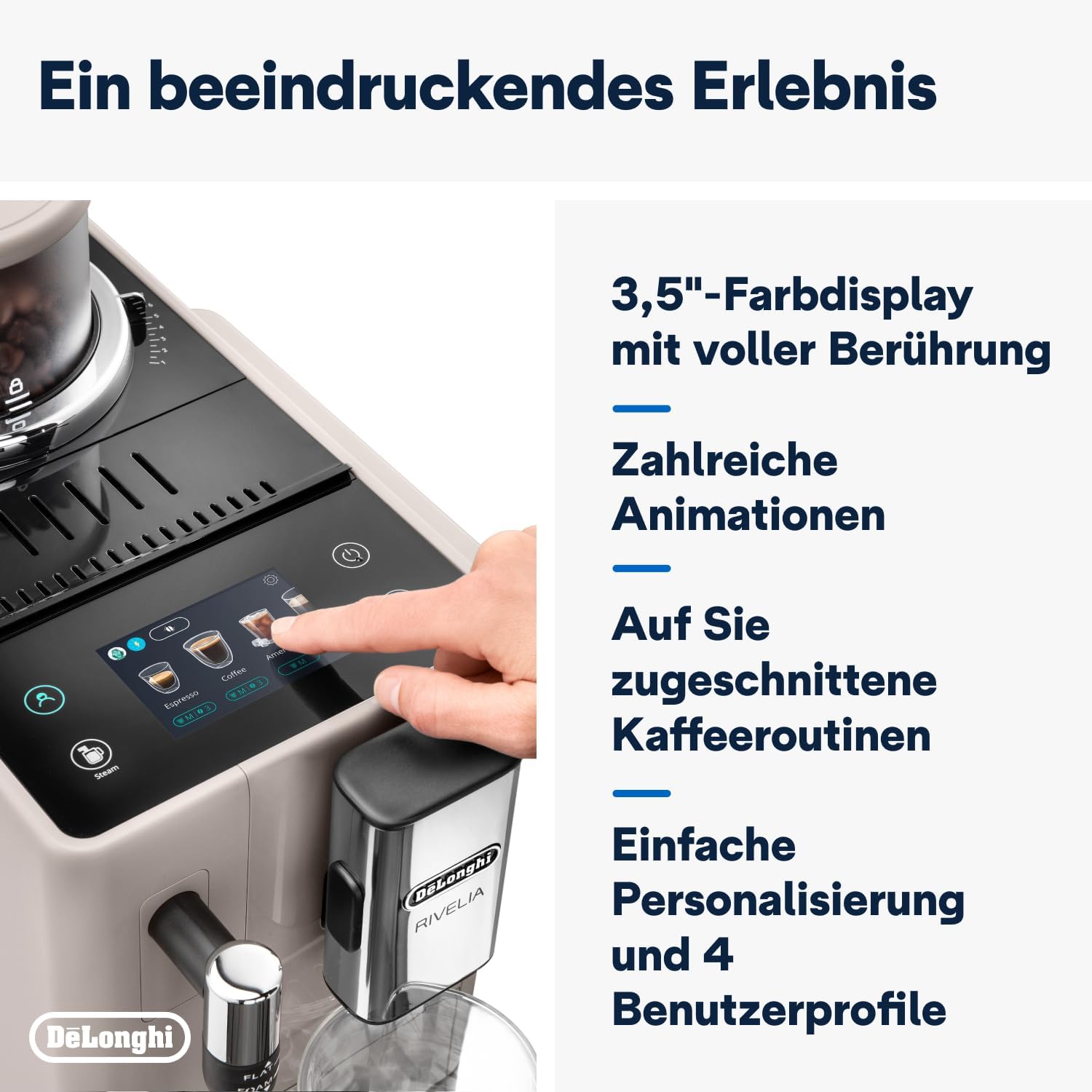
5.1 Using the 3.5" Full-Touch Color Display
The intuitive touchscreen allows you to select beverages, customize settings, and manage user profiles.

איור 5.1: The 3.5-inch full-touch color display in use, showing beverage selection.
- Beverage Selection: Swipe through the menu to choose from 8 pre-programmed coffee recipes.
- התאמה אישית: Adjust coffee strength, temperature, and volume for each drink.
- משתמש פרוfiles: Create up to 4 personalized user profiles to save your favorite settings. The machine adapts its menu based on your routine.
- טכנולוגיית Bean Adapt: This technology automatically adjusts grinding parameters, dosage, and brewing temperature to optimize extraction for the selected coffee bean variety.
5.2 הכנת משקאות קפה
- Ensure the water tank is filled and a bean container is in place.
- מניחים כוס מתחת לפיות הקפה.
- Select your desired beverage from the touchscreen menu.
- Adjust settings (strength, volume) if desired.
- Press the "Start" icon to begin brewing.

איור 5.2: A selection of coffee drinks, including espresso, americano, and milk-based beverages.
5.3 שימוש במקציף החלב הידני
The integrated steam wand allows you to manually froth milk for creamy cappuccinos and lattes.
- ממלאים קנקן חלב בחלב קר (מוצרי חלב או חלבי).
- מקמו את מוט הקיטור בתוך החלב, ממש מתחת לפני השטח.
- Activate the steam function via the touchscreen.
- Move the jug up and down to create desired foam texture.
- לאחר היווצרות קצף, כבו את פונקציית הקיטור ונקו את המוט מיד.

איור 5.3: Demonstrating the manual milk frother for creating creamy milk foam.
5.4 הוצאת מים חמים
The machine can also dispense hot water for teas or other hot beverages.
- הניחו כוס מתחת לפיית המים החמים (בדרך כלל מוט הקיטור).
- Select the hot water function from the touchscreen.
- Press "Start" to dispense hot water.
6. ניקיון ותחזוקה
ניקוי קבוע מבטיח ביצועים אופטימליים ומאריך את חיי מכונת הקפה שלכם.
6.1 ניקיון יומי
- מגש טפטוף ומיכל טחינה: רוקנו ושטפו מדי יום. המכונה תודיע לכם מתי יש לרוקן את מיכל שאריות הקפה.
- מיכל מים: יש לשטוף מדי יום ולמלא מחדש במים טריים.
- פיות קפה: נגב עם מודעהamp בַּד.
- מקציף חלב: לאחר כל שימוש, נגבו את מוט הקיטור עם מודעהamp cloth and purge steam briefly to clear any milk residue.
6.2 ניקיון שבועי
- יחידת חליטה: Remove the brew unit (refer to the machine's internal instructions for removal) and rinse it thoroughly under running water. Allow it to air dry before reinserting.
- מיכלי שעועית: Empty and clean the bean containers, especially when switching bean types, to prevent oil buildup.
6.3 ניקוי אבנית
The machine will indicate when descaling is required. Use only De'Longhi descaling solution and follow the on-screen instructions precisely. Descaling regularly prevents limescale buildup and maintains coffee quality.
7. פתרון תקלות
This section addresses common issues you might encounter with your De'Longhi Rivelia EXAM440.35.BG.
| בְּעָיָה | סיבה אפשרית | פִּתָרוֹן |
|---|---|---|
| המכונה לא נדלקת. | לא מחובר לחשמל; שקע החשמל פגום. | בדוק את חיבור כבל החשמל; נסה שקע אחר. |
| "Fill Water Tank" message appears, but tank is full. | Water tank not inserted correctly; sensor issue. | Remove and reinsert the water tank firmly. Ensure the float in the tank moves freely. |
| הקפה חלש מדי או מימי. | טחינה גסה מדי; מינון קפה לא מספיק; פולי קפה ישנים. | Adjust grind setting finer; increase coffee strength via menu; use fresh beans. |
| מקציף החלב לא מייצר קצף. | מוט הקיטור חסום; החלב לא קר מספיק; סוג חלב שגוי. | נקו היטב את מוט הקיטור; השתמשו בחלב קר; ודאו שהחלב מתאים להקצפה. |
| Touchscreen unresponsive or scratched. | תקלת תוכנה זמנית; נזק פיזי. | Restart the machine. If scratched, contact customer support for service options. Avoid abrasive cleaners. |
8. מפרט טכני
| תכונה | פְּרָט |
|---|---|
| מותג | ד'לונגי |
| מספר דגם | EXAM440.35.BG |
| צֶבַע | בז' חול |
| מידות (L x W x H) | 43 x 24.5 x 38.5 ס"מ |
| מִשׁקָל | 9.8 קילוגרם |
| קיבולת מיכל מים | 1.4 ליטר |
| כּוֹחַ | 1450 וואט |
| כרך ידtage | 240 וולט |
| חוֹמֶר | מַתֶכֶת |
| תכונות מיוחדות | מקצוען 4 משתמשיםfiles, 8 coffee beverages, Bean Switch System, Integrated steam wand, Coffee routines, Bean Adapt Technology |
| כיבוי אוטומטי | כֵּן |
איור 8.1: מידות המוצר: 245 מ"מ (רוחב) x 430 מ"מ (עומק) x 385 מ"מ (גובה).
9. אחריות ותמיכה
9.1 מידע אחריות
Your De'Longhi Rivelia EXAM440.35.BG coffee machine comes with a standard manufacturer's warranty. Please refer to the warranty card included in your product packaging for specific terms and conditions, including the warranty period and coverage details. Keep your proof of purchase for warranty claims.
9.2 תמיכת לקוחות
For technical assistance, spare parts, or service, please contact De'Longhi customer support. You can find contact information on the official De'Longhi webבאתר או בתיעוד המצורף למכשיר שלך.
- תמיכה מקוונת: בקרו באתר הרשמי של דה לונגי webאתר לשאלות נפוצות, מדריכים לפתרון בעיות ורישום מוצרים.
- תמיכה טלפונית: Contact numbers are typically listed in your warranty booklet or on the brand's webאֲתַר.


