1. הקדמה
This manual provides instructions for the installation, operation, and maintenance of your STRONG SW8000M 8-Port Gigabit Desktop Switch. This device is designed to expand your network connectivity with high-speed Gigabit Ethernet ports, suitable for home and office environments.
2. תכונות מוצר
- מהירות ג'יגה-ביט: Provides 10/100/1000 Mbps for fast network connections.
- 8-Port Connectivity: Expands network with 8 Gigabit Ethernet ports.
- הכנס והפעל: No software or configuration required for basic operation.
- עיצוב מתכת חזק: Durable metal housing for longevity.
- הרכבה גמישה: Supports desktop placement or wall mounting.
- פעולה ללא מאוורר: Ensures quiet performance, ideal for noise-sensitive areas.
- Optimized Data Traffic: Supports QoS, IGMP, and VLAN functions.
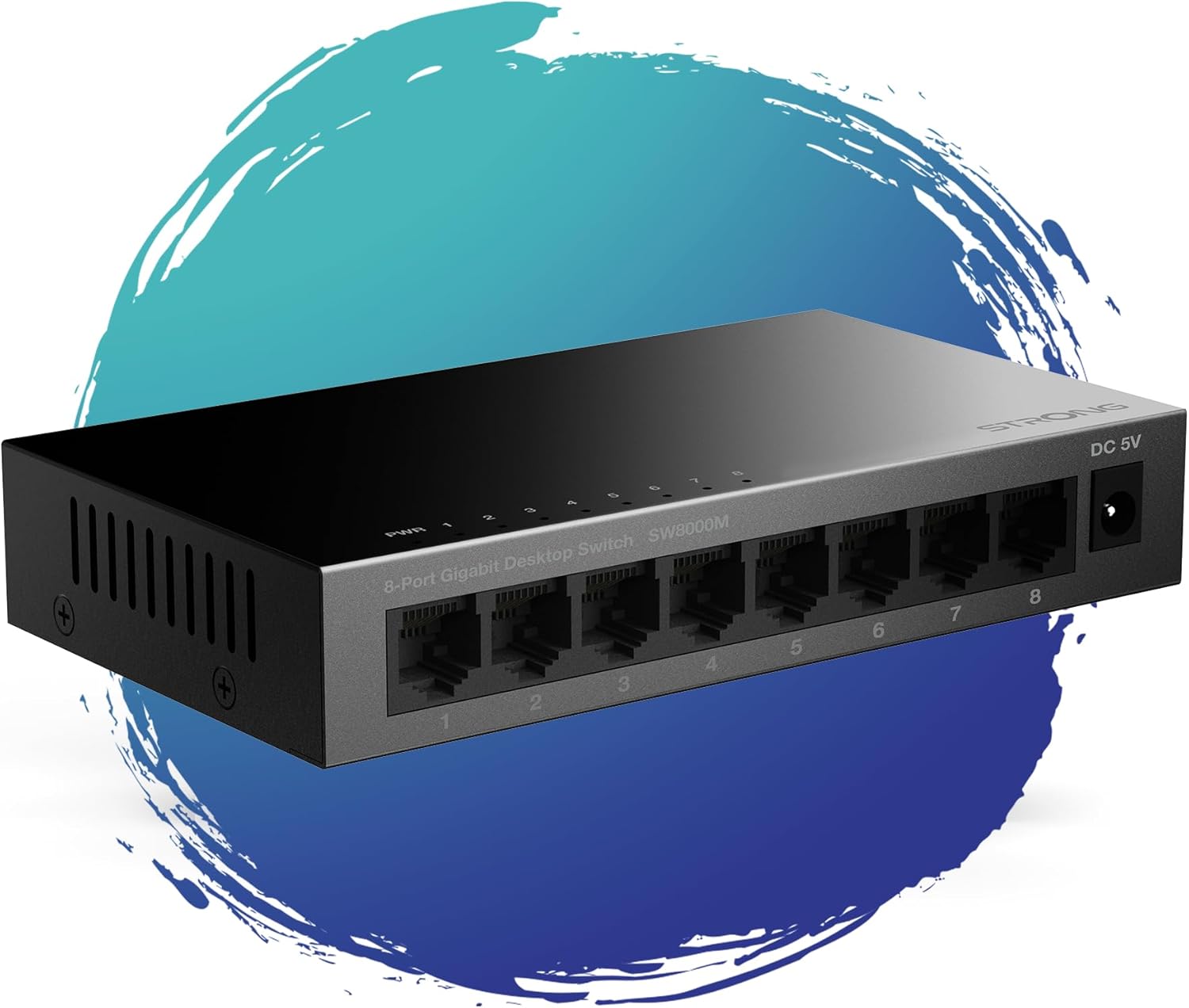
איור 1: חזית view of the STRONG SW8000M 8-Port Gigabit Desktop Switch, highlighting its compact design and 8 RJ45 ports.
3. תכולת החבילה
ודא שכל הפריטים נמצאים בחבילה:
- STRONG SW8000M 8-Port Gigabit Desktop Switch
- Power Adapter (Mains plug)
- הוראות התקנה (מדריך זה)
- תעודת אחריות
4. התקנה והתקנה
4.1 מיקום פיזי
The SW8000M switch can be placed on a desktop or mounted on a wall. Ensure the location is well-ventilated and away from direct heat sources or moisture.
- מיקום בשולחן העבודה: הנח את המתג על משטח שטוח ויציב.
- הרכבה על הקיר: Use the provided mounting options (if applicable) to secure the switch to a wall.

Figure 2: Illustrates the switch's advanced features like QoS, traffic optimization, and IEEE 802.3x flow control.
4.2 חיבור המתג
- Connect the power adapter to the DC 5V port on the switch and then plug it into a power outlet. The Power LED (PWR) on the switch will illuminate.
- Connect your network devices (e.g., computers, printers, network-attached storage, routers) to any of the 8 Gigabit RJ45 ports using standard Ethernet cables.
- The corresponding LED indicator for each connected port will light up, indicating an active connection. A blinking LED indicates data activity.

איור 3: אחורי view of the switch, detailing the 8 Gigabit RJ45 ports and the DC 5V power input.
5. הפעלת המתג
The STRONG SW8000M is a plug-and-play device. Once connected, it automatically detects the speed and duplex mode of connected devices, providing optimal performance without manual configuration.
- מחווני LED: Each port has an LED indicator. A solid light indicates a link, and a blinking light indicates data transmission. The PWR LED indicates the device is powered on.
- זרימת נתונים: The switch intelligently manages data traffic to ensure smooth and efficient communication between all connected devices.
6. תחזוקה
- ניקוי: השתמשו במטלית רכה ויבשה לניקוי החלק החיצוני של המתג. אין להשתמש בחומרי ניקוי נוזליים או בתרסיס.
- אוורור: Ensure that the ventilation openings on the sides of the switch are not blocked to prevent overheating.
- עיצוב ללא מאוורר: The fanless design reduces dust accumulation and eliminates operational noise, requiring minimal internal maintenance.
7. פתרון תקלות
- אין כוח: Ensure the power adapter is securely connected to the switch and a working power outlet. Check if the PWR LED is illuminated.
- אין אור קישור: Verify that the Ethernet cables are properly connected to both the switch and the network device. Try a different port or cable. Ensure the connected device is powered on.
- חיבור איטי: Ensure all connected devices and cables support Gigabit Ethernet for optimal speed. Check for excessive network traffic or faulty cables.
- חיבור לסירוגין: Check cable connections. Ensure the switch is placed in a stable environment, free from strong electromagnetic interference.
8. מפרטים
| תכונה | תֵאוּר |
|---|---|
| דֶגֶם | SW8000M |
| מספר יציאות | 8 x RJ45 Gigabit Ethernet |
| קצב העברת נתונים | 10/100/1000 Mbps |
| סוג ממשק | RJ45 |
| קלט כוח | 5 וולט, 1 Amp |
| חומר מארז | מַתֶכֶת |
| מידות המוצר (L x W x H) | 3.07 אינץ' x 0.98 אינץ' x 5.43 אינץ' |
| משקל פריט | 240 גרם (8.5 אונקיות) |
| טמפרטורת הפעלה | עד 50 מעלות צלזיוס |
| רכיבים כלולים | Switch, Power Adapter, Manual, Warranty Card |
9. אחריות ותמיכה
The STRONG SW8000M switch comes with a manufacturer's warranty. Please refer to the included Warranty Card for specific terms and conditions. For technical support or further assistance, please visit the official Strong webלאתר או לפנות לשירות הלקוחות שלהם.
משך זמינות חלקי חילוף באיחוד האירופי: 2 שנים


