1. הוראות בטיחות חשובות
אנא קראו בעיון את כל ההוראות לפני השימוש במכשיר זה. שמרו מדריך זה לעיון עתידי.
- מכשיר זה מיועד לשימוש ביתי בלבד.
- אין לטבול את המכשיר במים או בנוזלים אחרים.
- Keep the appliance away from water sources, especially when charging.
- Do not use the appliance if the cord or plug is damaged. Contact customer support for repair.
- Always ensure the appliance is switched off before cleaning or performing maintenance.
- יש להרחיק מהישג ידם של ילדים. מכשיר זה אינו צעצוע.
- הימנע ממגע עם חלקים נעים.
- Do not use the trimmer on irritated skin or open wounds.
- השתמשו רק במתאם הטעינה המצורף למכשיר.
2. המוצר נגמרview
The HTC AT-206A is a rechargeable hair trimmer designed for precise grooming tasks such as edging, outlining, dry shaving, and light shaping around areas like the neck, ears, and sideburns.

Image 2.1: HTC AT-206A Trimmer and its retail packaging, showing the device and included accessories.
רכיבים:
- Trimmer Unit (HTC AT-206A)
- כבל טעינה
- מברשת ניקוי
- בקבוק שמן סיכה
- מצורף מסרק
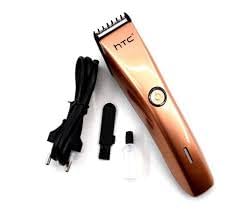
Image 2.2: The HTC AT-206A trimmer displayed with its charging cable, cleaning brush, oil bottle, and comb attachment.
3. הגדרה וטעינה
3.1 טעינה ראשונית
- Before first use, fully charge the trimmer for approximately 8-10 hours.
- ודא שהגוזם מכובה.
- חבר את כבל הטעינה לשקע הטעינה של הגוזם.
- חברו את המתאם לשקע חשמלי מתאים.
- נורית חיווי הטעינה (אם קיימת) תידלק כדי להראות שהטעינה מתבצעת.
- Once fully charged, disconnect the charger from the outlet and the trimmer.
3.2 חיבור אביזר המסרק
- ודא שהגוזם מכובה.
- Align the comb attachment with the trimmer blade.
- Gently push the comb attachment onto the blade until it clicks into place.
- To remove, gently pull the comb attachment away from the blade.
4. הוראות הפעלה
4.1 פעולה בסיסית
- ודא שהגוזם טעון.
- לחץ על כפתור ההפעלה כדי להפעיל את הגיזום.
- לחץ שוב על כפתור ההפעלה כדי לכבות את הגיזום.
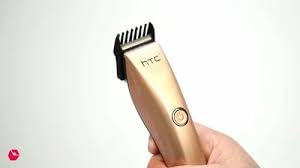
Image 4.1: The HTC AT-206A trimmer held in hand, demonstrating its ergonomic design for ease of use.
4.2 טכניקות גיזום
- לקבלת התוצאות הטובות ביותר, השתמשו בקוצץ על שיער נקי ויבש.
- החזיקו את הגוזם בזווית קלה כנגד העור.
- הזיזו את התספורת באיטיות וביציבות נגד כיוון צמיחת השיער.
- Use the comb attachment for longer hair lengths (0.5mm-13mm).
- For edging and outlining, use the trimmer without the comb attachment for a closer trim.
- Stretch the skin taut with your free hand to ensure a smooth surface for trimming.
5. תחזוקה וניקיון
ניקוי ותחזוקה קבועים יבטיחו ביצועים אופטימליים ויאריכו את חייו של המכונה שלכם.
5.1 ניקוי הלהבים
- Ensure the trimmer is switched off and disconnected from the charger.
- Use the provided cleaning brush to remove any loose hairs from the blades.
- For a more thorough clean, you may carefully detach the blade head (refer to specific instructions if provided with your model for blade removal).
- Do not rinse the entire trimmer under water unless explicitly stated as waterproof.
5.2 שימון הלהבים
- After cleaning, apply 1-2 drops of the provided lubricating oil onto the blades.
- הפעילו את הגרידר למשך מספר שניות כדי לאפשר לשמן להתפזר באופן שווה.
- נגב את כל עודפי השמן עם מטלית רכה.
- Oiling the blades regularly (e.g., after every few uses) helps maintain cutting efficiency and prevents rust.
5.3 אחסון
Store the trimmer in a cool, dry place, away from direct sunlight and moisture. Ensure it is fully charged before storing for extended periods.
6. פתרון תקלות
If you encounter any issues with your trimmer, refer to the following common problems and solutions:
- הגרימר לא נדלק:
Ensure the trimmer is fully charged. Check if the charging cable is properly connected and the power outlet is functional. - Poor trimming performance / pulling hair:
The blades may be dull or clogged with hair. Clean and oil the blades as described in the Maintenance section. Ensure the trimmer is adequately charged. - סוללה לא מחזיקה טעינה:
Ensure the trimmer is charged for the recommended duration. If the issue persists, the battery may need replacement. Contact customer support. - רעש או רעידות מוגזמות:
The blades might be misaligned or require oiling. Clean and oil the blades. If the problem continues, discontinue use and contact customer support.
7. מפרטים
| תכונה | מִפרָט |
|---|---|
| מספר דגם | AT-206A (SA-144) |
| מקור כוח | סוללה נטענת |
| חומר להב | Stainless Steel (Metal) |
| Cutting Length Range | 0.5mm - 13mm (with comb attachment) |
| מידות (L x W x H) | 18.7 x 4.9 x 11.2 ס"מ |
| שימושים מומלצים | Dry Shaving, Edging, Light Shaping, Outlining (Neck, Ears, Sideburns, Face) |
| צֶבַע | שָׁחוֹר |
| יַצרָן | סִין |
8. אחריות ותמיכה
This product is covered by a standard manufacturer's warranty. Please refer to the product packaging or contact your retailer for specific warranty terms and conditions.
לתמיכה טכנית, סיוע בפתרון בעיות או תביעות אחריות, אנא צרו קשר ישירות עם הקמעונאי או היצרן. שמרו את הוכחת הרכישה שלכם לכל שאלה הקשורה לאחריות.


