1. הקדמה
Welcome to the user manual for your Hoppstar Expert Digital Camera. This manual provides essential information on how to set up, operate, and maintain your camera, ensuring a fun and creative experience for young photographers. Please read this manual carefully before using the camera and keep it for future reference.
The Hoppstar Expert is designed specifically for children, offering a user-friendly interface, durable construction with interchangeable silicone covers, and a range of exciting features including a selfie camera, video recording, picture frames, photo filters, and face detection.
2. מידע בטיחות
- This product is intended for children aged 3 years and older. Adult supervision is recommended during use.
- אין לחשוף את המצלמה למים או ללחות מוגזמת.
- Avoid dropping the camera or subjecting it to strong impacts, even with the protective silicone cover.
- Keep small parts, such as memory cards, out of reach of very young children to prevent choking hazards.
- Use only the charging cable provided or a compatible USB charger.
- אל תנסה לפרק או לתקן את המצלמה בעצמך. צור קשר עם תמיכת הלקוחות אם מתעוררות בעיות.
3. תכולת החבילה
אנא סמן את התיבה עבור הפריטים הבאים:
- Hoppstar Expert Digital Camera
- מדריך הוראות
- כבל טעינה USB
- שרוך/רצועה
- מתאם USB-C ל-USB-A
- USB-C to Micro-USB Adapter
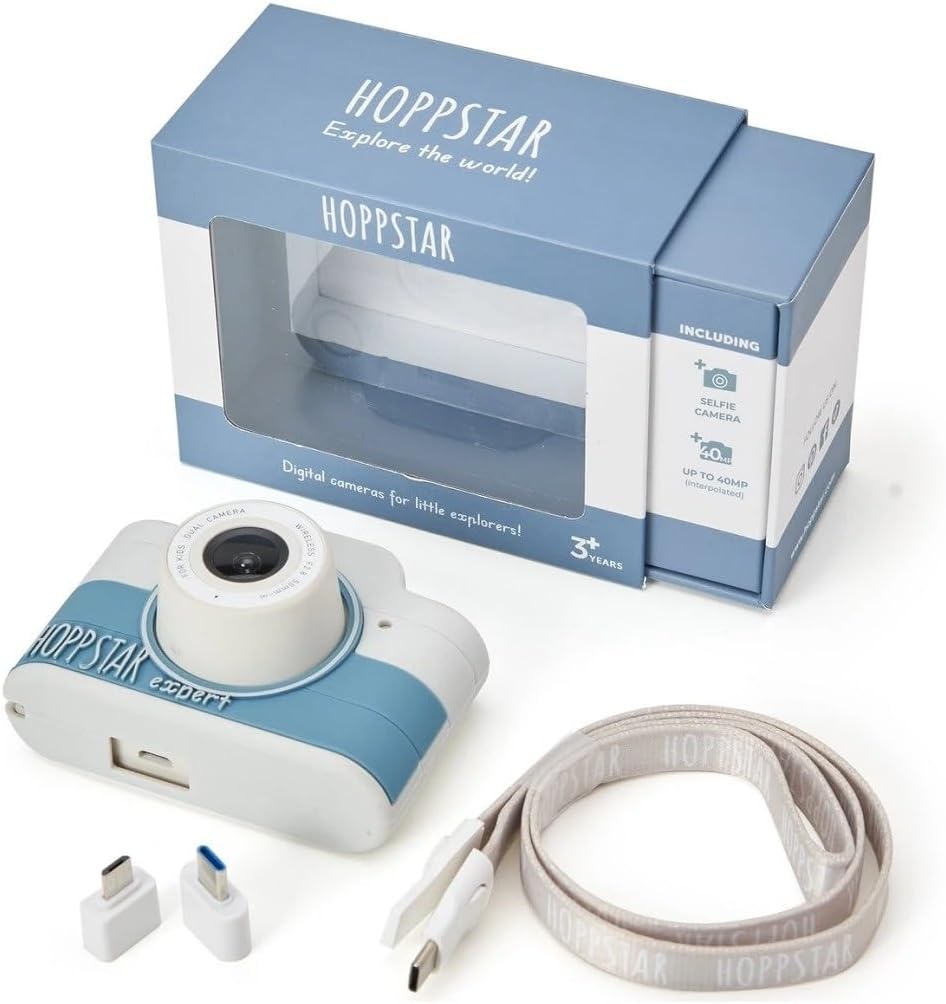
Image: Hoppstar Expert camera shown with its retail packaging, USB charging cable, lanyard, and two USB adapters.
4. המוצר נגמרview
חֲזִית View

Image: The front of the Hoppstar Expert camera, featuring the main lens, flash, and the 'Hoppstar Expert' branding on the blue and white body.
- עדשה ראשית: For taking standard photos and videos.
- Flash/Light: מספק תאורה בתנאי תאורה חלשים.
- מִיקרוֹפוֹן: לוכד אודיו במהלך הקלטת וידאו.
אֲחוֹרִי View

Image: The back of the Hoppstar Expert camera, displaying the LCD screen and the control buttons on either side.
- מסך LCD: Displays menus, live view, והשמעה.
- מצלמת סלפי: ממוקם מעל המסך לצילומי עצמי.
- לחצני שליטה: Navigation, OK, Menu, and other function buttons.
5. התקנה
5.1 טעינת המצלמה
Before first use, fully charge the camera's internal battery. Connect the provided USB charging cable to the camera's USB port and to a USB power source (e.g., computer, wall adapter). The charging indicator light will show the charging status and turn off when fully charged.
5.2 הכנסת כרטיס זיכרון
The Hoppstar Expert comes with 16 GB of internal storage. If you wish to expand storage, locate the memory card slot (usually on the side or bottom) and insert a compatible microSD card (not included) until it clicks into place. Ensure the camera is powered off before inserting or removing the card.
5.3 הפעלה/כיבוי
לחץ והחזק את לחצן ההפעלה (בדרך כלל ממוקם בחלק העליון או בצד) למשך מספר שניות כדי להפעיל או לכבות את המצלמה.
6. הוראות הפעלה
6.1 בקרות בסיסיות
- לחצן אישור: Confirms selections in menus, takes photos, or starts/stops video recording.
- לחצני ניווט: Used to move through menu options (Up, Down, Left, Right).
- לחצן תפריט: Accesses the camera's settings and feature options.
- לחצן מצב: מעבר בין מצבי תמונה, וידאו והפעלה.
6.2 צילום תמונות
In photo mode, frame your shot using the LCD screen. Press the OK button to capture a photo. The camera supports both front and selfie cameras. To switch between cameras, navigate to the camera settings in the menu or use a dedicated button if available.
6.3 הקלטת סרטונים
Switch to video mode. Press the OK button once to start recording and press it again to stop. Videos are saved to the internal memory or inserted memory card.
6.4 Using Creative Features
The Hoppstar Expert includes several creative features:
- Picture Frames: Apply fun borders to your photos. Access this feature through the camera's menu.
- Photo Filters: Change the look and feel of your photos with various color and effect filters.
- זיהוי פנים: The camera can automatically detect faces in the frame, assisting with focus.
Explore these options within the camera's menu settings to enhance your photos and videos.
7. תחזוקה
- ניקוי: Use a soft, dry cloth to clean the camera body and screen. For the lens, use a specialized lens cleaning cloth. Do not use liquid cleaners.
- כיסוי סיליקון: The interchangeable silicone cover can be removed and cleaned with mild soap and water if necessary. Ensure it is completely dry before reattaching.
- טיפול בסוללה: כדי להאריך את חיי הסוללה, הימנעו מפריקה מלאה של הסוללה לעתים קרובות. טען את המצלמה באופן קבוע, גם אם אינה בשימוש למשך פרקי זמן ממושכים.
- אִחסוּן: אחסן את המצלמה במקום קריר ויבש, הרחק מאור שמש ישיר וטמפרטורות קיצוניות.
8. פתרון תקלות
המצלמה לא נדלקת
- ודא שהסוללה טעונה. חבר את המצלמה למקור חשמל ונסה שוב.
- לחץ והחזק את לחצן ההפעלה למשך זמן ארוך יותר (5-10 שניות).
איכות תמונה/וידאו ירודה
- ודא שהעדשה נקייה וללא כתמים או אבק.
- Check lighting conditions. Optimal results are achieved in well-lit environments.
- Ensure the camera is held steady during capture.
Camera Freezes/Unresponsive
- Try resetting the camera by pressing the reset button (if available, often a small pinhole) or by holding the Power button until it turns off and then restarting.
לא ניתן לשמור תמונות/סרטונים
- Check if the internal memory or inserted memory card is full. Delete unnecessary fileאו הכנס כרטיס חדש.
- Ensure the memory card is properly inserted and not corrupted.
If you encounter issues not listed here or if troubleshooting steps do not resolve the problem, please contact Hoppstar customer support.
9. מפרטים
| תכונה | מִפרָט |
|---|---|
| שם מותג | Hoppstar |
| שם הדגם | Hoppstar Expert Yale |
| מספר דגם | 76893 |
| צֶבַע | ייל |
| מידות חבילה | 14.3 x 8.7 x 5.1 ס"מ |
| מהירות צילום רציפה | 30 פריימים לשנייה |
| רכיבים מובנים | Camera + Instruction Manual |
| שנת דגם | 2023 |
| צבע סרט | צֶבַע |
| סוג בקרת חשיפה | אוֹטוֹמָטִי |
| סוג תריס | אֶלֶקטרוֹנִי |
10. אחריות ותמיכה
The Hoppstar Expert Digital Camera comes with a standard manufacturer's warranty. Please refer to the warranty information provided with your purchase or visit the official Hoppstar webבאתר לקבלת פרטים בנוגע לתנאי האחריות.
For technical support, product inquiries, or warranty claims, please contact Hoppstar customer service through their official webאתר או פרטי הקשר המופיעים במסמכי הרכישה שלך.


